Hands-on Cisco Networking: Multi-VLAN Lab with DHCP, OSPF, and NAT for Internet Access
Introduction
Hands-on Cisco Networking: Multi-VLAN Lab with DHCP, OSPF, and NAT for Internet Access
Introduction
In this document, I walk you through a hands-on Cisco lab simulation designed using Cisco Packet Tracer. The goal was to create a secure and scalable small office network that includes:
— Multiple VLANs for departmental segmentation — Trunking and VLAN access port configuration — Inter-VLAN routing using a Layer 3 switch — OSPF for internal routing — DHCP relay for centralized IP management — NAT to provide internet access to internal users
This project simulates a real-world small office environment with departments like Sales, Finance, IT, and Interns, each on its own subnet, communicating through a central core switch and accessing the internet via a border router.
Network Topology Overview
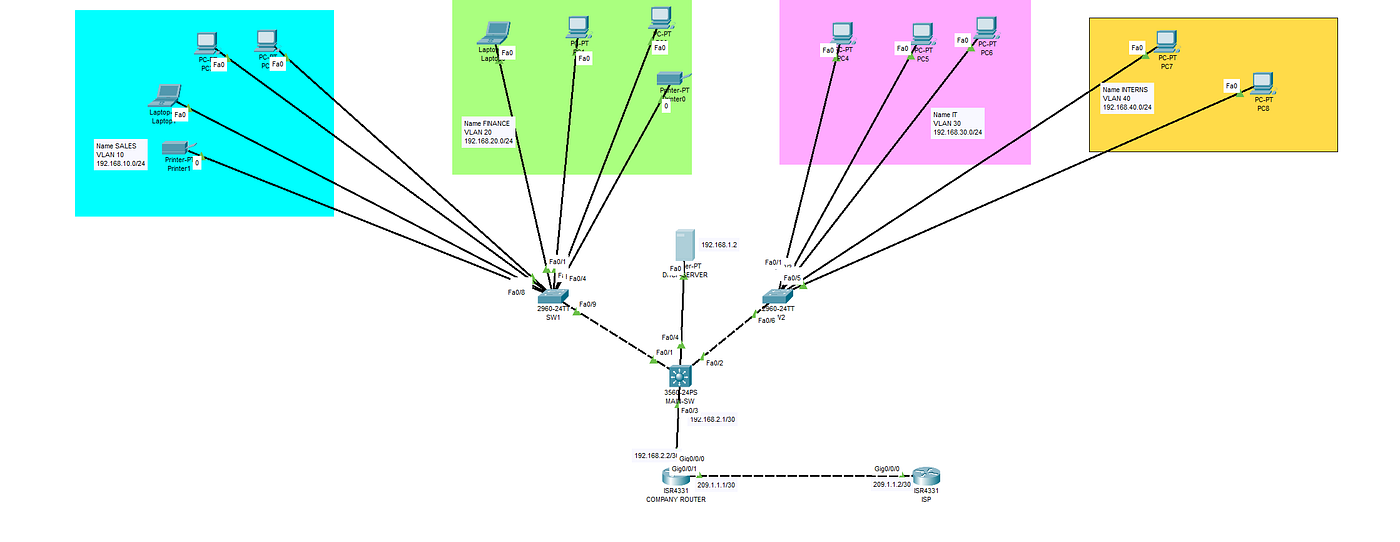
The full topology created in Cisco Packet Tracer is shown below:
Subnet & VLAN Summary
- VLAN10 (Sales): 192.168.10.0/24
- VLAN20 (Finance): 192.168.20.0/24
- VLAN30 (IT): 192.168.30.0/24
- VLAN40 (Interns): 192.168.40.0/24
- VLAN90 (Unused): For unassigned ports to prevent unauthorized access.
- VLAN 1 (Native): 192.168.1.0/24
- Core-Router Link: 192.168.2.0/30
- ISP-Router Link: 200.1.1.0/24
Access Switch Configuration
Access-SW1 (Sales & Finance)
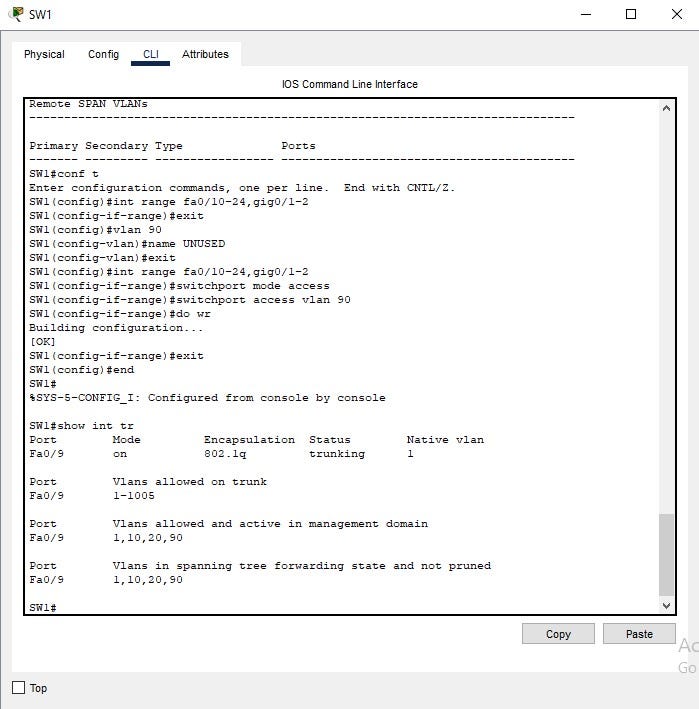
— VLANs 10, 20, and unused VLAN 90 configured — Ports Fa0/1–4 assigned to VLAN 10 (Sales) — Ports Fa0/5–8 assigned to VLAN 20 (Finance) — Fa0/9 configured as a trunk to core switch
Access-SW2 (IT & Interns)
- VLANs 30, 40, and unused VLAN 90 — Ports Fa0/1–3 assigned to VLAN 30 (IT) — Ports Fa0/4–5 assigned to VLAN 40 (Interns) — Fa0/6 as trunk to core switch

Core Switch (CORE-SW) — Inter-VLAN Routing
— SVIs (Switched Virtual Interfaces) configured for each VLAN — IP routing` enabled — DHCP relay using ‘ip helper-address 192.168.1.2’ — Trunk links to both access switches — OSPF configured for dynamic routing

Routing with OSPF
OSPF was configured on both the core switch and the Company Router. All internal VLANs are part of Area 0.


Internet Access with NAT on Company Router
The Company Router connects to an ISP and uses NAT overload to translate internal IPs. An ACL permits traffic from internal VLANs only.


Testing & Validation
Inter-VLAN Ping - Success DHCP Assignment - Success Internet Access - Success NAT Translations -Verified
What I Learned
- VLAN segmentation for security and scalability — Trunking and SVI routing on a Layer 3 switch — OSPF dynamic routing — DHCP relay using helper addresses — NAT with ACLs and PAT
Conclusion
This lab demonstrates my ability to design and implement scalable, secure networks that meet business needs. I’m passionate about leveraging these skills to contribute to an organization’s success as a Network Engineer.
메타데이터
- post_id
- b2d6c2c2f53c
- slug
- hands-on-cisco-networking-multi-vlan-lab-with-dhcp-ospf-and-nat-for-internet-access-b2d6c2c2f53c
- url
- https://medium.com/@officialgeorgebosso/hands-on-cisco-networking-multi-vlan-lab-with-dhcp-ospf-and-nat-for-internet-access-b2d6c2c2f53c
- canonical_url
- https://medium.com/@officialgeorgebosso/hands-on-cisco-networking-multi-vlan-lab-with-dhcp-ospf-and-nat-for-internet-access-b2d6c2c2f53c
- author_url
- https://medium.com/@officialgeorgebosso
- status
- ok
- fetched_at
- 2026-07-10 06:45:42