AWS App Modernization Decisions
Documentation mentions key migration decisions when it comes to migrating & modernizing Legacy .NET & Java Workloads to AWS EC2 & EKS…
AWS App Modernization Decisions
Documentation mentions key migration decisions when it comes to migrating & modernizing Legacy .NET & Java Workloads to AWS EC2 & EKS. Points mentioned below are based on my prior experience which might be helpful to all the technologists out there.
Database
- Migrate on-premise Oracle database to Aurora Postgres on AWS. Amazon RDS can provision storage up to 6TB, on-demand without downtime. Amazon Aurora automatically increases storage from a minimum of 10 GB to a maximum of 64 TB, in increments of 10 GB, based on current usage — you do not need to pre-configure storage. Storage scaling does not affect database performance.
- Shared Databases (multiple apps using the same schemas/ tables within the DB instance).
- Check Schema Ownership, Shared tables (any app accessing/ writing to same table). Any schema that is owned (for reads & writes) by the application should be migrated to Postgres as they would pose less issues & challenges for migration. Any Schema not owned by the app (under migration) should not be migrated to Postgres due to other app/ service dependencies and underlying complexity.
- In case schema is shared by many apps, verify possibility to migrate just the tables from those schema on Postgres. Discuss how many tables are in scope and how many can be migrated. If the tables are shared as well, verify options to migrate the other app so they can talk to the table on cloud instead of reaching on-premise.
- AWS Data Source to On-premise table joins:- (Inner join between a table in AWS Aurora Postgres with a table in on-premise Oracle DB). Better to refactor the code if such a situation arises as it won’t work and is not feasible. Leverage Power BI or Pulse DB Scan Reports for Detailed DB Analysis.
- Verify Tables, Procedures, Views, Batch Jobs, Shared Databases.
- Verify dependency on ETL jobs, Power BI/ Tableau reports.
- Beware of “sendStringParametersAsUnicode” parameter when migrating any Java app if it talks to a MSSQL Database as the default value is “true” and it drastically impacts query performance. Always disable the sendStringParametersAsUnicode default JDBC Driver setting when using SQL Server. Additional documentation available here.
- leveraging DMS for moving Data in KB/ GB to AWS and vice versa. Less than 300 GB of data takes approx 15 minutes. Leverage AWS Snowball to transfer terabyte/ petabyte size data.
- Verify with Client app owners and stakeholders if they want a single instance of Postgres DB with single or multiple databases. Verify how many schemas to be moved within the database. Check if any apps going to share the schemas.
- If the app is going to talk to a DB on-premise post cloud migration, get on-premise DB performance metrics from Splunk or related tool. Perform Load testing on lower environments in the cloud and compare with on-premise benchmarks. If performance drops in cloud, fix it first before going to higher environments.
AWS Tools AWS CLI AWS CDK
.NET
App Refactor App on AWS EC2 Instances
- Retarget Legacy .NET Framework v2/3.5/4/4.5 to v4.8 framework version (latest). Henceforth upgrade all OSS packages which are compatible with v4.8.
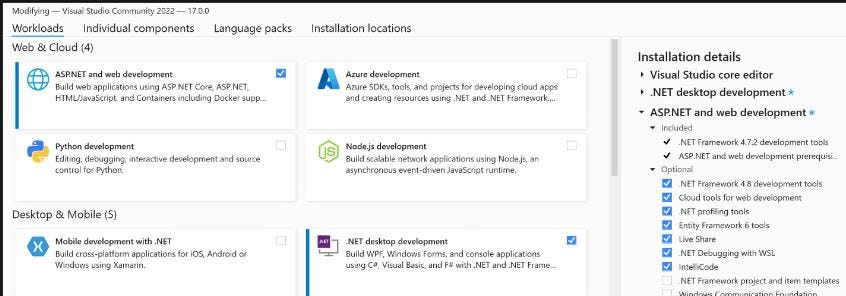
- Convert Website to Web Application through steps mentioned here. Select additional project templates as seen below. Note: In a website, you can quickly modify .cs file on server without the need to build and publish from local but better to convert to web application type in case you are planning for future platform migrations or going for MVC pattern.
- Convert VB.NET to C# using VSIX Extension. Convert Webforms to ASP.NET MVC & then to .NET 5/6.
- Leverage Serverless computing services for specific use cases viz; Azure Functions, Logic Apps, Service Bus Queue/ Topic, Azure Storage, Cosmos DB.
- Leverage Dotvvm OSS package & Owin middleware to incrementally migrate existing Webforms solution to Dotvvm pages & ViewModels. Create new .NET Core Project and copy over Dotvvm pages, ViewModels on to it, build and run. (Optional: Leverage AWS Porting Assistant to Port converted Dotvvm Solution to .NET Core).
- Install Docker Engine on WSL2. Supports Linux containers only. (Docker Engine is free to use).
- Dockerize converted .NET 5/6 App using Linux Containers. Install Minicab locally and test on single node Kubernetes cluster if app is deployed on AWS EKS.
App Replatform on AWS EC2 Instances.
- Migrate/ Retarget Legacy .NET Framework v2/3.5/4/4.5 to v4.8 framework version (latest & last .Net framework version).
- Convert Website to Web Application through steps mentioned here. Install additional templates and steps mentioned in image shown under.
- Before code changes, ensure .gitignore file added from bash using touch command. use this template.
- Convert VB.NET to C# using VSIX Extension.
- Leverage .NET Portability Analyzer tool to verify higher version compatibility scores. Additional details mentioned here.
- Leverage “curl” client from bash to test/ verify request headers being sent from ALB after authentication.
- Cookie creation & configuration in codebase and within ALB if multiple instances used in higher environments.
- App bare minimum settings on server manager on Ec2 for IIS to function well as mentioned here.
- If you have a public site and you want to quickly host it on Azure with a Self signed SSL certificate, configure it as mentioned here & here. The links show to create self signed cert from IIS. You can however create one real quick through PowerShell as well. Once done, add certificate to the Trusted Root Certification Authorities store & Trusted Publishers within mmc console. Your browser will still throw a security warning if you are using self-signed certificate. The reason is browsers only trust SSL from a trusted Certificate authority. So you will need to install the certificate in your browser . You can however use Let’s Encrypt to get a real certificate for your local machine so that browsers will trust the certificate for the localhost and your domain names. Note: use “openssl” to create self signed certs as mentioned here & here. Install on Windows from here.
- Upgrade OSS packages, publish artifacts & deploy on AWS EC2 Instance.
- Verify if .NET 4.8 is preinstalled or not if you are replatforming app on .NET 4.8 as most Win 2019 servers comes preinstalled with it. Verify from registry DWORD value as mentioned here.
- Remove unused/ redundant code from codebase.
- Authenticate via ForgeRock Identity Gateway (FRIG) (which would internally use AWS/ Azure AD to authenticate end users) if app uses Windows Authentication. Switch to “anonymous authentication” on Server IIS if FRIG is used. Pass necessary information like user id/ customer id via the http header for further processing via the .NET code which would then read the value from http header keys as required.
- Maintain codebase in centralized git repository. Store secrets in plain text. Build code into artifacts and store in artifact management system.
- Automate deployments via Azure DevOps/ Jenkins Pipeline on EC2 Instance or manually deploy via RDP on EC2 instances.
- Leverage IaC CloudFormation/ Terraform templates for automation requirements as necessary. (Manual configuration of instances adds a risk as the instances are no longer immutable & cannot be configured using automation.)
- Always install .NET 4.7 & Extensibility features from Server Manager roles & features on EC2 instances to ensure all relevant script maps are installed on IIS.
- Setup a /Health.aspx page on the application root which would return a 200 Ok Response. This is important especially if multiple instances sits behind an ALB configured for round robin. ALB would ping the instance before making request to verify if its healthy or not.
- Verify if you have to configure Application Pool on Classic or Integrated pipeline as most legacy apps run on Classic pipeline.
- Create EC2 instance from standard Windows 2019 AMIs. The instances may be joined to the domain and the IT support team should be given administrative access. The IT support team can manually configure the instances to meet the applications needs such as installing IIS and .NET components.
- If the application can support high availability it should be hosted on multiple instances and fronted with a load balancer. Note: Ensure there are no issues with Sticky Sessions during testing.
- Create App specific cookie if required to maintain session affinity based on AWS documentation. Configure same on ALB as well. (Sometimes if multiple apps are open on multiple tabs on same browser, session is not maintained on few apps even if user logs into them via SSO.)
Any Complex Replatform or Refactor
- Leverage open-source Polly library for .NET Resiliency, Transient Fault handling capabilities, & for retries with exponential backoff. Apply Polly policies such as Retry, Circuit Breaker, Bulkhead Isolation, Timeout, and Fallback. Polly targets .NET Framework 4.x and .NET Standard 1.0, 1.1, and 2.0 (which supports .NET Core and later).
- Leverage serverless computing services (SNS, SQS, S3, Lambda, Dynamo DB) & refactor application on EKS containers.
Issues Encountered during .NET App Migration to AWS
- If App uses windows authentication, it might get tricky. Multiple prompts might show up on browser if Windows Authentication is enabled on AWS Ec2 IIS which might get hard to solve. Resolution Options: To resolve, better to authenticate using built-in IAM solutions viz; ForgeRock or Azure AD IAM & OIDC protocol. If using either, turn off windows authentication on Ec2 IIS & enable anonymous authentication as IAM solution would authenticate end users using cloud/ on-premises active directory for us.
- IIS has a limit for the size of the files users can upload to an application. If the file size exceeds the limit, the application will throw “Error in HTTP request, received HTTP status 413 (Request Entity Too Large)” error. Resolution Options: Apply fix as mentioned here.
- Export to Excel functionality fails when downloading file. File gets created on an instance but request to download goes into another instance and it shows 404 on browser as file is not available. This can be verified through Application & IIS logs. Root cause: 2 ALBs were in place. Each had different stickiness duration values. One had just 10 secs and other had 1 day. Resolution: Created App based cookie & application based cookie stickiness type within the ALB. Applied ALB stickiness duration & cookie expiry within codebase to 1 day. Ensured they are consistent. If its in few seconds then cookie might expire if we try to export large dataset. So have a duration set to few hours or a day. Modified value 10secs to 1 day and made them consistent which fixed the stickiness issue. After fix, stickiness was maintained. File got created on an instance and request to download also done on same instance.
- 504 Gateway Error: Export to excel fails when exporting large datasets. ALB responds with 504 Gateway error. Root cause: Default ALB idle timeout is 60 secs which times out during export to excel process since usually there is some time taken to generate large datasets (more than 100,000 records on excel). Resolution Options: Increased ALB idle timeout from 60 secs to 600 secs which fixed the 504 error. It however did not fix the issue completely as we started receiving 502 next.
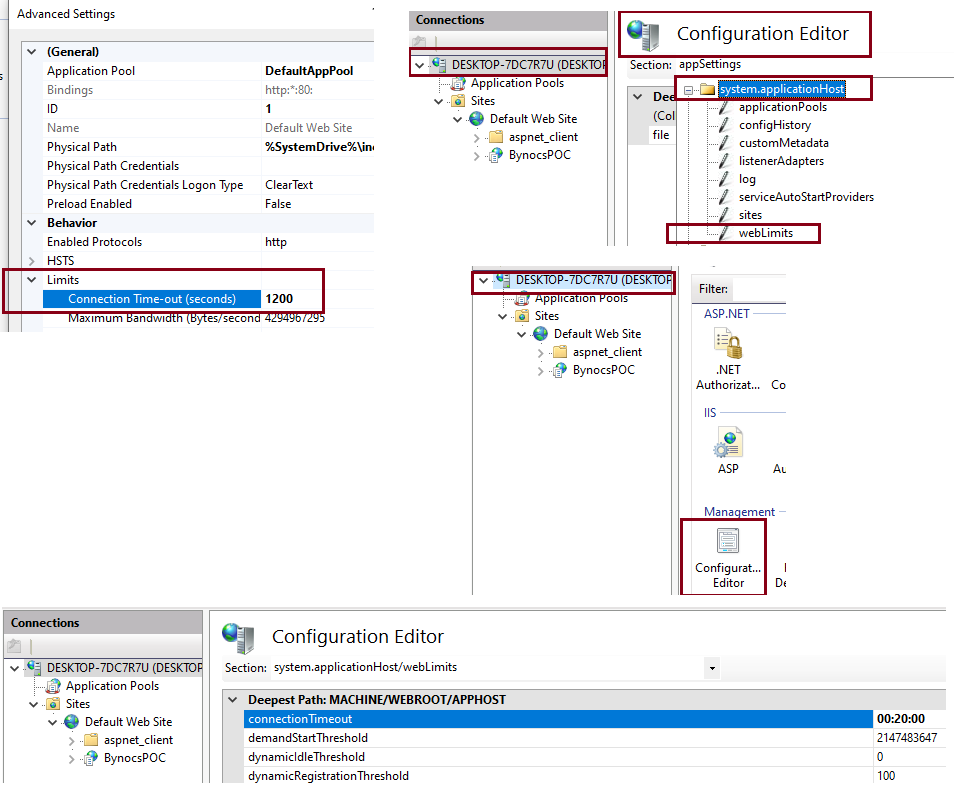
- 502 Gateway Error: Export to excel fails when exporting large datasets. ALB responds with 502 Gateway error. Root cause: ALB idle timeout of 600 secs is probably more than the Target EC2 instance connection timeout on website within IIS which is 120 secs (2 minutes) by default. Resolution Options:
- Increased Target EC2 instance connection timeout value to 1200 secs which was greater than ALB idle timeout value of 600 as mentioned here since “the length of the server’s HTTP keep-alive timeout needs to exceed the AWS ALB idle connection timeout to avoid unexpected 502 bad gateway occurrences.” AWS documentation available here. Enabled keep alive on IIS as mentioned here.
- We changed website connection timeout to 1200 secs (20 mns). Right click website -> advanced settings & make changes.
- We also modified Connection Timeout on ApplicationHost -> Weblimits to 20 mns. Navigated to IIS root -> Configuration Editor -> system.applicationHost -> webLimits on IIS to make the changes.
- Increased ProxyPass timeout to 600 secs (10 minutes) keeping TTL=60 secs default. ProxyPass “/<app short name>” “https://<domain>:8443/” disablereuse=On retry=0 ttl=60 timeout=600 ProxyPassReverse “/<app short name>” “https://<domain>:8443/” timeout=600
- To fix Viewstate MAC errors after EC2 deployment, add <machineKey tag on web.config file. You can create same from IIS which would then update web.config file. Ensure to have same key & value on both instance behind ALB.
- Session State lost on other apps configured within ForgeRock SSO Web Farm ALB. Once migrated app is used side by side on 2 different tabs on same chrome browser, the other app loses session state especially after performing refresh or CRUD operations on the migrated app. ALB Stickiness explained here , here & here. Occurs usually if multiple instances are used behind the ALB for HA scenarios. If stickiness is enabled with a duration of 5 minutes then request will go to same instance within those 5 minutes. After 5 minutes elapsed, request will go to another instance. If stickiness is disabled, round robin algorithm will take over. Other Info: ALB uses AWSALB cookie to support stickiness. When ALB receives request from the client without a cookie, it selects a target using the round robin algorithm, generates a new cookie which encodes information about selected target, encrypts cookie & includes cookie in the response. A compliant client then copies the received cookie in subsequent requests. For any future requests, ALB then decodes, decrypts cookie & forwards requests to the backend to maintain stickiness. If cookie is not available, a new target is chosen. *Resolutions: Created application-based cookie stickiness on ALB for the Stickiness Type with below mentioned settings & as per AWS documentation mentioned here. CloudFormation .yml available here.*
- Within ALB attributes, Setup Stickiness duration to 1 day. Give a name for the app cookie name (usually a app short name). Stickiness type = Application-based cookie. Load balancing Algo = round robin.
- Within the codebase (in C# or VB) & web.config file, setup application-based cookie with below attributes. Enable cookie persistence with expiry as shown under. instead of min value, use hours/ minutes or days.
- ScriptResourceHandler Script files (Webresource.axd & ScriptResource.axd) fails to load on browser if App is authenticated using ForgeRock SSO Web Farm ALB through a context root (/<app short name>) & proxy pass configuration. **Resolution: **Create a separate “application” alias under root website in IIS to resolve. The alias name should match the context root name applied on AWS ALB. The URL would have duplicate names then (http://<appname>.<domain>/<ALB context root>/<IIS alias name>/<filename>.aspx) which should be informed to the client stakeholders.
JAVA
Refactor App on EKS Container
- Leverage Serverless computing services (viz; S3, SQS, SNS, Lambda, Dynamo DB) for specific use cases & refactor. simple use case: Publish messages to SNS Topic and send to SQS Queue. Let queue push messages to Lambda internal queue in async manner and then let Lambda process the data and push to S3 or Dynamo.
Migration patterns to Replatform Java App on EKS.
- Spring 2/3/4/5 to SpringBoot 2.6 Conversion. Migrate Spring MVC apps to Spring MVC latest & upgrade to JDK 11 or migrate to SpringBoot & JDK 17.
- Migrate Sonic MQ (component of Sonic ESB) to AWS Aurea Messenger.
- TIBCO Queue to AWS SNS Topic migration.
- Migrate “Spring Cloud Config” to “AWS System Manager Parameter Store” for storing passwords & secrets.
- Perform performance testing only if there is a rationale (wicked chatty, large payloads). perform load test on aws dev. if its underperforming, bundle with other apps, split tables/ columns, do CDC.
- Implement sidecar proxy using NGINX for outbound egress communication from AWS to on-premises through the APIGW.
- Implement standalone Reverse Proxy leveraging apache httpd or Nginx for inbound/ ingress communication. On-premise web service will call through proxy which will then forward request to API GW.
- Leverage CAST AIP, HIP & Imaging Reports to understand code vulnerabilities, Components & their interactions, Cloud recommendations, Outbound Egress integrations for various protocols viz; (TCP/IP, Http, Https, SFTP, FTP, MQ, SMTP & JDBC), High level Tech Stack, Exposed endpoints, Hard coded URLs etc.
- Verify if we need to convert components for refactor disposition. For example, if we are targeting “SpringBoot 2.6” as the target software, then
- Analyze list of deprecated components in terms of migrating to SpringBoot latest version (if that is what we are targeting on AWS). Licensing constraints if any around the legacy components. Recommend Alternative Components. Based on recommendations, provide high level estimate to customer to convert from one type to another via story point/ t-shirt size estimation guidelines.
- Convert ANT to MAVEN.
- Any app behind APIGW won’t need LDAP. Any Upstream UI application can authenticate via ForgeRock IGW (Identity Gateway). After successful authentication, FR will pass user/ customer id via the http header for further processing. FR can also create JWT token via SSO Auth process.
- Remove Guava cache dependency from code if migrating to SpringBoot 2+ & EKS as its deprecated for higher versions of SpringBoot. The Spring Boot framework allows the integration of various cache providers, such as EhCache, Redis, Hazelcast, Infinispan, Caffeine, etc. Use any one of them as per your requirement. Note: Caffeine is a Java 8 rewrite of Guava’s cache and will supersede the Guava support in Spring Boot 2.0.
- Deploy Tomcat Spring MVC apps on Tomcat 9i/JDK11 on EKS. Deploy JBOSS Spring MVC apps on Tomcat9i/JDK11. Deploy JBOSS apps on Wildfly/JBOSS EAP. Deploy on Tomcat9i/JDK11. If EJB used, Deploy on Wildfly/JBOSS.
- Environmentalize infra diagrams (<env>)
- WebSphere to Tomcat Conversion. Verify Compatibility. Deploy SpringBoot app to EKS after upgrading to latest version on JDK 17. Verify checklist & matching tomcat version here.
- Convert/ Migrate Hystrix Circuit Breaker (Deprecated) to Resilience4J (Latest).
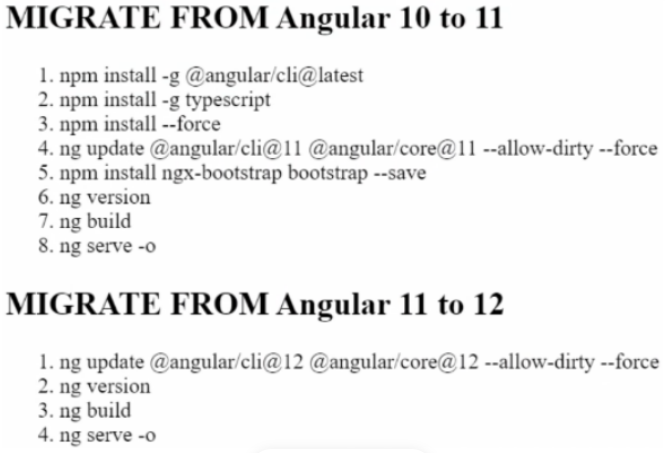
- Convert any Angular App to latest version v13/14. Migrate to nearest version instead of going to the latest if current version is quite old. Shown below is migration path from v10 to v12.0. Same steps can be followed to upgrade to v13.0 (latest when writing this article). Note: First 3 steps below is to install Angular CLI, TypeScript & installing NPM packages on local. Its one-time activity.
-
Any On-premise service would connect to Enterprise API Gateway via the Reverse proxy (httpd apache proxy or Nginx). (Reverse Proxy would allow all on-premise apps to call the same on-premise URL through proxy even after the app is migrated to AWS allowing seamless migration and zero impact to the upstream apps. Proxy would then forward the request to the APIGW.)
-
Verify if there is any ETL job dependency on the Oracle Database tables & schemas migrating to Aurora Postgres.
Other Networking/LZ
- Cross Account connectivity challenges (Ex: EKS in one account which needs access to EFS on another AWS Account)
- AWS to On-Premise Hybrid connectivity.
- Oracle / Postgres partitioning challenges.
- Network Latency during hybrid connections via AWS Direct Connect Service. Verify network bandwidth.
- S3 Bucket in client network accessed by the Vendor on a separate on-premises network. Better to own file creation and deploy on Vendors network from AWS.
메타데이터
- post_id
- b2d7b09da80e
- slug
- aws-app-migration-modernization-decisions-b2d7b09da80e
- url
- https://medium.com/@roshitrajan/aws-app-migration-modernization-decisions-b2d7b09da80e
- canonical_url
- https://medium.com/@roshitrajan/aws-app-migration-modernization-decisions-b2d7b09da80e
- author_url
- https://medium.com/@roshitrajan
- status
- ok
- fetched_at
- 2026-06-23 17:05:31


