How I Built a Centralized AuditLogging System for All My Services
In a distributed microservices architecture, tracking who did what, when, and where is critical — not just for debugging, but for…
How I Built a Centralized Audit Logging System for All My Services
In a distributed microservices architecture, tracking who did what, when, and where is critical — not just for debugging, but for compliance, security, and accountability. That’s why I built a centralized audit logging system that captures structured, consistent, and queryable logs across all services.
Here’s how I designed it, the tools I used, and the lessons I learned.
🚨 The Problem: Scattered and Inconsistent Logs
Before centralization, each service logged actions differently:
- Different formats (JSON, plain text, etc.)
- Logs stored locally or in service-specific buckets
- No correlation between user actions across services
This made it nearly impossible to trace a user’s journey or investigate incidents.
🧠 The Goal: Unified, Structured, and Searchable Logs
I wanted a system that could:
- Capture who did what, when, and where
- Be language-agnostic and easy to integrate
- Support real-time ingestion and querying
- Be secure, tamper-resistant, and auditable
🧱 The Architecture
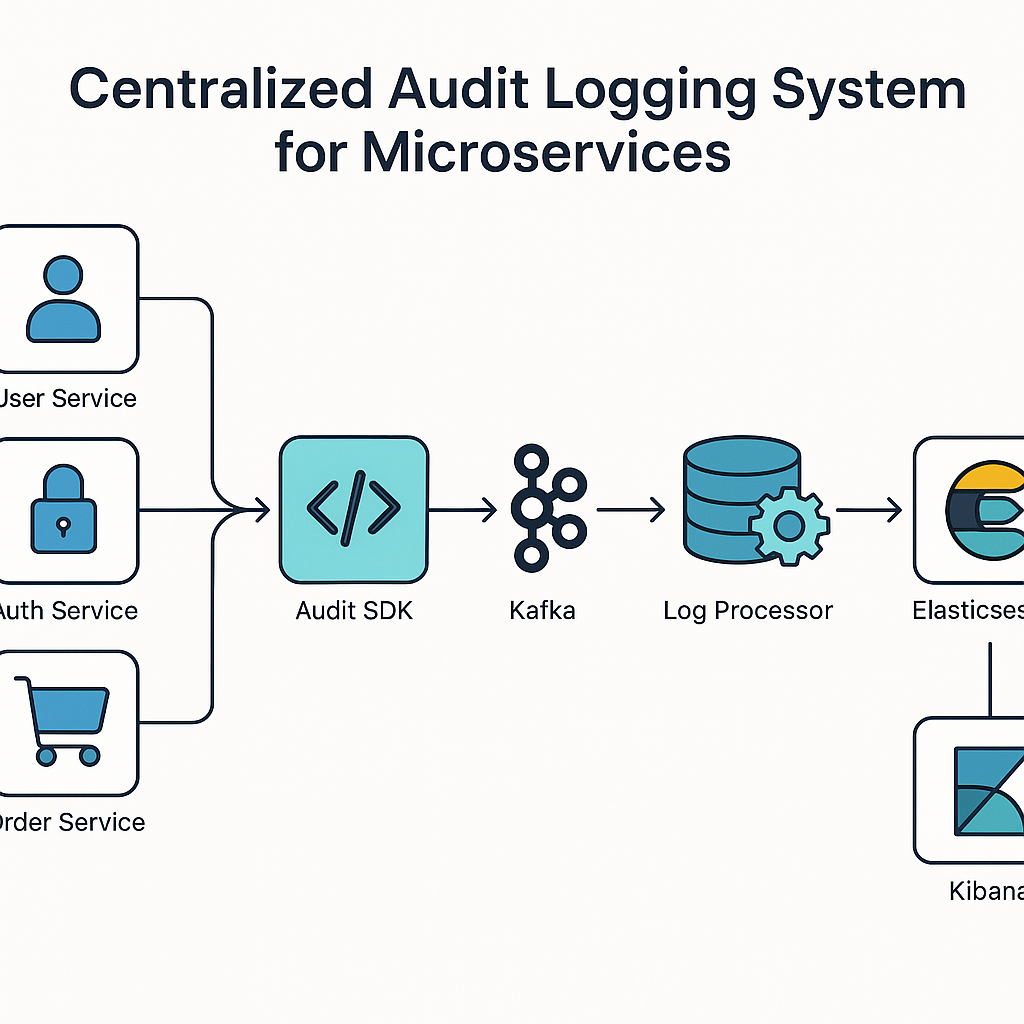
Here’s the high-level flow:
[Service A] ─┐
[Service B] ─┼──> [Audit SDK] ──> [Message Queue] ──> [Log Processor] ──> [Elasticsearch]
[Service C] ─┘- Audit SDK: Standardized logging format
- Message Queue: Kafka for decoupling and buffering
- Log Processor: Enriches, validates, and stores logs
- Elasticsearch: Fast querying and visualization via Kibana
🔧 Step 1: Define a Standard Audit Log Schema
{
  "timestamp": "2025-06-30T12:34:56Z",
  "user_id": "12345",
  "action": "DELETE_USER",
  "resource": "user:67890",
  "service": "user-service",
  "ip": "192.168.1.10",
  "metadata": {
    "reason": "user requested deletion"
  }
}
🧠 Tip: Use ISO 8601 timestamps and consistent field names.
🛠️ Step 2: Build a Lightweight Audit SDK
I created a Go package that every service could import:
func LogAuditEvent(userID, action, resource string, meta map[string]string) {
    event := AuditEvent{
        Timestamp: time.Now().UTC(),
        UserID:    userID,
        Action:    action,
        Resource:  resource,
        Metadata:  meta,
    }
    sendToKafka(event)
}
✅ Result: Consistent logs across all services.
📬 Step 3: Stream Logs via Kafka
Kafka acted as a buffer and decoupled services from the storage layer.
- Topic:
audit-logs - Partitioned by service name
- Retention: 7 days (raw), 90 days (processed)
🧹 Step 4: Process and Store Logs
A consumer service enriched logs with:
- GeoIP data
- User roles
- Request context
Then stored them in Elasticsearch for fast querying.
🔍 Step 5: Visualize with Kibana
I built dashboards to:
- Track user activity
- Monitor sensitive actions (e.g., DELETE, EXPORT)
- Alert on anomalies (e.g., failed logins, bulk deletions)
🔐 Security Considerations
- Logs are immutable once stored
- Access to logs is role-based
- Sensitive fields (e.g., tokens) are masked or excluded
📈 The Impact
- 🔍 Faster incident response with full traceability
- ✅ Compliance-ready audit trails
- 🧠 Better insights into user behavior
- 🔐 Improved security posture
🧠 Final Thoughts
Audit logging isn’t just a checkbox for compliance — it’s a powerful tool for visibility, security, and trust. By centralizing and standardizing logs, I turned a fragmented mess into a reliable source of truth.
If you can’t trace it, you can’t trust it.
메타데이터
- post_id
- b2eaf2ca1656
- slug
- how-i-built-a-centralized-auditlogging-system-for-all-my-services-b2eaf2ca1656
- url
- https://medium.com/@techcodyind/how-i-built-a-centralized-auditlogging-system-for-all-my-services-b2eaf2ca1656
- canonical_url
- https://medium.com/@techcodyind/how-i-built-a-centralized-auditlogging-system-for-all-my-services-b2eaf2ca1656
- author_url
- https://medium.com/@techcodyind
- status
- ok
- fetched_at
- 2026-07-31 16:39:44




