How I would learn to code in 2026, If I have to start over
The developers moving fastest with AI are not memorizing syntax. They understand how software is actually built.
How I would learn to code in 2026, If I have to start over
The developers moving fastest with AI are not memorizing syntax. They understand how software is actually built.
Image Thumbnail -How I would learn to code in 2026, If I have to start over
Most beginners still start with the same question:
“Should I learn Python, JavaScript, Java, or Go?”
I get why. I asked similar questions when I was starting out. Picking a language feels like picking a career direction. It feels permanent.
But in 2026, that question is not as powerful as it used to be.
AI tools can translate code from one language to another. They can explain syntax. They can generate boilerplate. They can even help you debug errors that would have taken hours earlier.
So the real bottleneck is no longer syntax.
The real bottleneck is understanding what you are building.
That is the difference between someone who uses AI to move faster and someone who uses AI to create a project they cannot maintain.
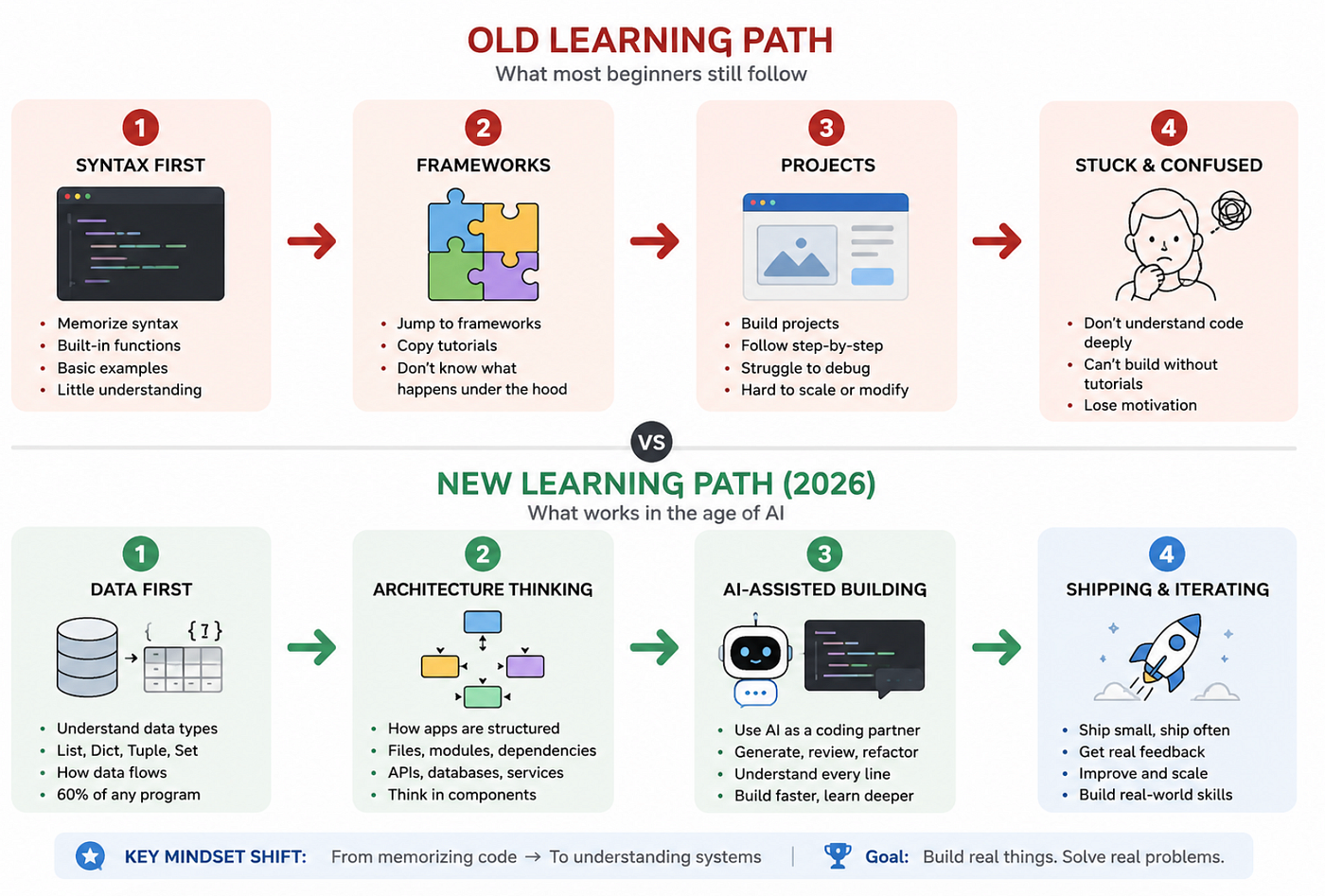
Image- Old learning path vs New Learning path
Why “Which Language Should I Learn?” Became the Wrong Starting Point
I am not saying languages do not matter.
They do.
If you want to build AI applications, Python is still a very practical starting point because most AI libraries, tutorials, and tools support it well.
But learning Python does not mean memorizing every built-in function.
That is where many beginners lose interest.
They open documentation, try to remember syntax, get bored, and assume coding is not for them.
The better question is:
“What should I understand so I can build real software?”
That changes everything.
Because once you understand how data moves, how files are organized, how APIs talk, and how projects are shipped, switching syntax becomes much easier.
Start With Data Structures, Not Syntax
Every application is mostly data moving from one place to another.
- A user submits a form.
- The backend validates it.
- The database stores it.
- The API returns a response.
- The frontend renders it.
That entire flow is data transformation.
In Python, you should understand four basic shapes first:
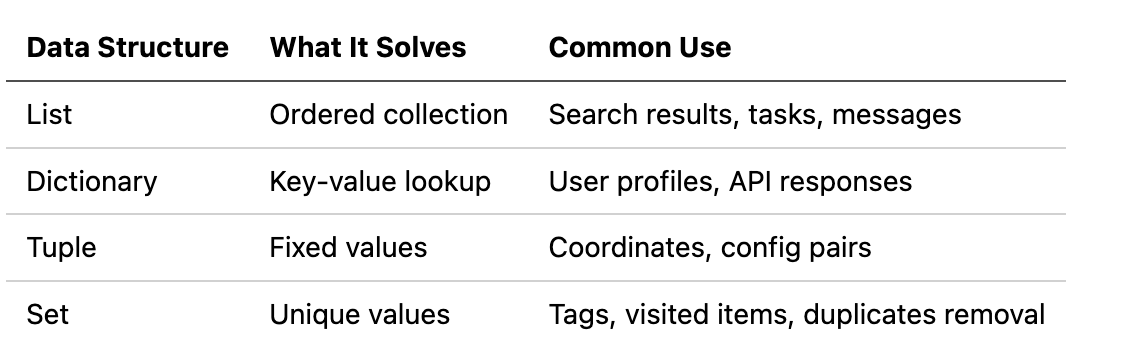
Image- Data Structure common uses
Here is a simple example:
user = {
    "id": 101,
    "name": "Neha",
    "skills": ["Python", "React", "AI"],
    "is_active": True
}
print(user["skills"][0])
This looks basic, but it matters.
A lot of real-world bugs happen because developers do not understand the shape of the data they are handling.
For example, this will break:
print(user["email"])Why?
Because email does not exist in the dictionary.
A better version is:
email = user.get("email", "No email found")
print(email)
This small change prevents your app from crashing when optional data is missing.
That is not just Python knowledge.
That is production thinking.
Understand How Python Code Actually Runs
At first, I assumed code “just runs.”
Later I realized that understanding execution order makes debugging much easier.
Python runs from top to bottom.
So this works:
def greet(name):
    return f"Hello, {name}"

message = greet("Neha")
print(message)
But this breaks:
message = greet("Neha")
print(message)

def greet(name):
    return f"Hello, {name}"
The function is called before Python has seen its definition.
This is why line numbers in error messages matter. They are not random. They tell you where the execution stopped.
When you learn this, debugging becomes less mysterious.
You stop thinking, “Why is Python angry?”
You start asking, “What did Python know at this line?”
That is a better developer question.
Learn Project Structure Early
Most tutorials teach isolated files.
Real projects do not look like that.
A real Python project usually has structure:
ai-summary-app/
│
├── app.py
├── requirements.txt
├── README.md
├── services/
│   └── ai_service.py
├── utils/
│   └── file_reader.py
└── tests/
    └── test_summary.py
This structure tells a story.
app.py starts the application.
requirements.txt lists dependencies.
services/ contains business logic.
utils/ contains reusable helper functions.
tests/ checks whether things still work.
Most beginners put everything in one file because it feels faster.
And for the first one hour, it is faster.
Then the project grows.
Then debugging becomes painful.
Then even your AI coding assistant struggles because the context is unclear.
This is one of the most underrated AI coding lessons:
AI works better when your codebase is organized well.

Architecture Diagram: User → Frontend → API Route → AI Service → File Reader → Model Response
Pin Your Dependencies Before They Betray You
One mistake I made early was installing libraries without caring about versions.
Something worked on Monday.
Then a few weeks later, I reinstalled the project and it failed.
The code had not changed.
The library had.
This is why requirements.txt matters.
Bad:
fastapi
requests
openai
Better:
fastapi==0.115.0
requests==2.32.3
openai==1.51.2
Pinning versions gives your future self the same environment you used while building.
This matters even more when you deploy projects or collaborate with other developers.
A working app is not enough.
A reproducible app is better.
AI Coding Is Not an Excuse to Skip Understanding
There is a strange misconception around AI coding.
Some people think it means:
“Just prompt and accept whatever comes.”
That is risky.
AI can generate code quickly, but it does not always understand your product constraints, edge cases, database design, or deployment environment.
A better workflow looks like this:
- Define the problem clearly.
- Ask AI for possible architectures.
- Pick the simplest version.
- Build one working vertical slice.
- Read every generated line.
- Test with real inputs.
- Ship.
- Improve based on what breaks.
This is where the real learning happens.
Not when AI writes code.
But when you question the code.
For example, instead of asking:
Build me a PDF summarizer app.Ask:
Design a minimal PDF summarizer app using FastAPI.
Include:
- upload endpoint
- text extraction service
- AI summary function
- error handling for empty PDFs
- simple project structure
Explain tradeoffs before writing code.
The second prompt gives AI a direction.
More importantly, it forces you to think like a builder.
Build a Cupcake Before the Wedding Cake
Most people build projects in horizontal layers.
- First frontend.
- Then backend.
- Then database.
- Then AI.
- Then deployment.
The problem is that nothing works end-to-end until very late.
A better approach is a vertical slice.
If you are building a document summarizer, do not start with login, dashboard, subscriptions, and analytics.
Start with this:
def summarize_text(text):
    if not text.strip():
        return "No text found to summarize."
return f"Summary placeholder for: {text[:100]}"
This is not impressive.
But it gives you a working path.
Input → processing → output.
Once that works, replace the placeholder with a real AI call.
Then add file upload.
Then add database storage.
Then add authentication.
Small complete versions beat large incomplete systems.

Chart: Horizontal Layers vs Vertical Slice Development — Time to First Working Demo
Common Mistakes Beginners Make With AI-Assisted Coding
Here are the mistakes I see often:
- Asking AI to build the full app in one prompt.
- Not reading generated code.
- Ignoring project structure.
- Skipping dependency versions.
- Testing only happy paths.
- Shipping without understanding the failure cases.
The dangerous part is that AI-generated code can look correct.
Clean formatting creates confidence.
But clean-looking code can still be wrong.
Always test edge cases.
def divide(a, b):
    return a / b
Looks fine.
Until this happens:
print(divide(10, 0))Better:
def divide(a, b):
    if b == 0:
        raise ValueError("Cannot divide by zero")
    return a / b
This is the difference between code that works once and code that survives real users.
The Tradeoff Nobody Talks About
AI makes building faster.
But it can also make your fundamentals weaker if you use it passively.
- The benefit is speed.
- The risk is dependency.
- The balance is simple:
Use AI for acceleration, not replacement.
- Let it write boilerplate.
- Let it suggest architecture.
- Let it explain unfamiliar code.
But you should still understand:
- What data is moving through the system.
- Why each file exists.
- Which dependency is being used.
- Where errors can happen.
- How to test the smallest working version.
That is the real skill.
Reflection: What Changed for Me
After building a few AI-assisted projects, I stopped treating coding as syntax practice.
I started seeing it as system design at a smaller scale.
Even a tiny app has architecture.
Even a small script has data flow.
Even a beginner project has tradeoffs.
The surprising realization was this:
AI did not remove the need to understand software. It made understanding software more valuable.
Because now, many people can generate code.
Fewer people can judge whether that code is good.
That gap is where serious developers will stand out.
Final Takeaways
If I were learning to code in 2026, I would not start by memorizing syntax.
I would focus on:
- Data structures.
- Execution flow.
- Project structure.
- Dependency management.
- Modular code.
- AI-assisted workflows.
- Testing and shipping small versions.
Pick Python if you want a strong starting point for AI applications.
But do not stop at Python syntax.
Build something small.
- Read the code.
- Break it.
- Fix it.
- Ship it.
- Then improve it.
That cycle will teach you more than any roadmap.
The question is no longer, “Which language should I learn?”
The better question is:
“Can I understand what I am building well enough to make it work, debug it, and improve it?”
From Tech By Neha Gupta
- 👏 Enjoyed the article? Don’t forget to leave a clap.
- 💬 Have thoughts or questions? Share them in the comments.
Before you go
- Please take a moment to like the post and follow the writer!
- Did you know that over 400,000 developers share what they’re building, learning, and discovering across our platforms every month? Learn how you can contribute here
메타데이터
- post_id
- b2eb3f16b825
- slug
- how-i-would-learn-to-code-in-2026-if-i-have-to-start-over-b2eb3f16b825
- url
- https://javascript.plainenglish.io/how-i-would-learn-to-code-in-2026-if-i-have-to-start-over-b2eb3f16b825
- canonical_url
- https://javascript.plainenglish.io/how-i-would-learn-to-code-in-2026-if-i-have-to-start-over-b2eb3f16b825
- author_url
- https://medium.com/@techbynehagupta
- status
- ok
- fetched_at
- 2026-07-10 06:45:42