GLM-4.7-Flash on 24GB GPU (llama.ccp, vLLM, SGLang, Transformers)
GLM-4.7-Flash is one of those rare open-weights releases that changes what “local-first” can realistically mean for coding + agentic…
GLM-4.7-Flash on 24GB GPU (llama.ccp, vLLM, SGLang, Transformers)
GLM-4.7-Flash is one of those rare open-weights releases that changes what “local-first” can realistically mean for coding + agentic workflows.
It’s a 30B-class MoE model that only activates ~3.6B parameters per token, with strong benchmark results yet still practical to run on consumer hardware with ~24GB VRAM using quantized weights.
Let’s have a look at the runtime options
- llama.cpp + GGUF
- vLLM
- SGLang
- Transformers
Thanks for reading this article. I’m writing a deep-dive ebook on Agentic SaaS, the emerging design patterns that are quietly powering the most innovative startups of 2026.
Bookmark the first 2 chapters: A*gentic SaaS Patterns Winning in 2026*, packed with real-world examples, architectures, and workflows you won’t find anywhere else.
Let’s dive right in.
Why this is a “local LLM” breakthrough
What you’re getting is MoE efficiency.
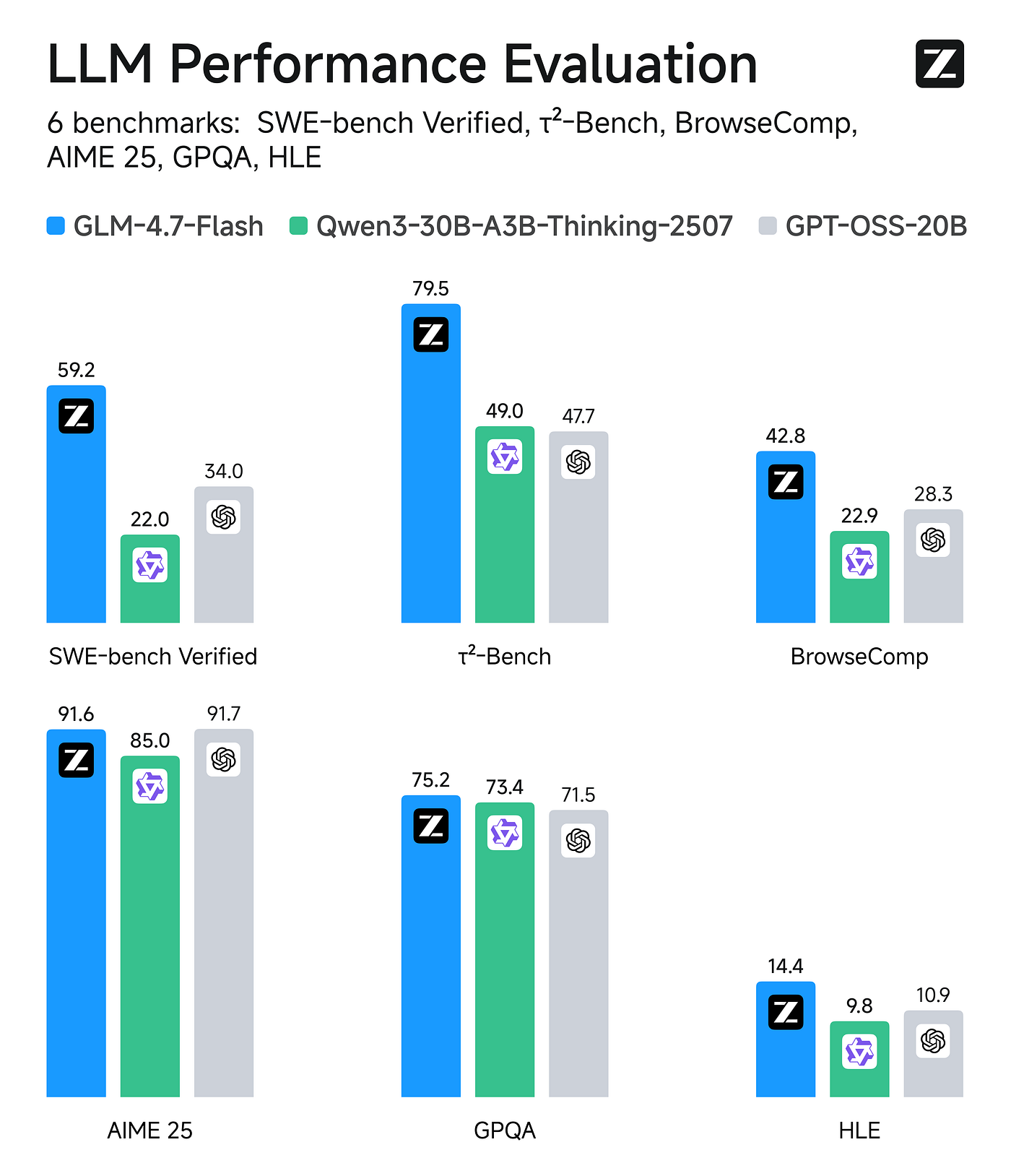
GLM-4.7-Flash is a 30B-A3B Mixture-of-Experts model (30B total, ~3B active). Benchmarks reported scores include SWE-bench Verified 59.2 and τ²-Bench 79.5, among others.
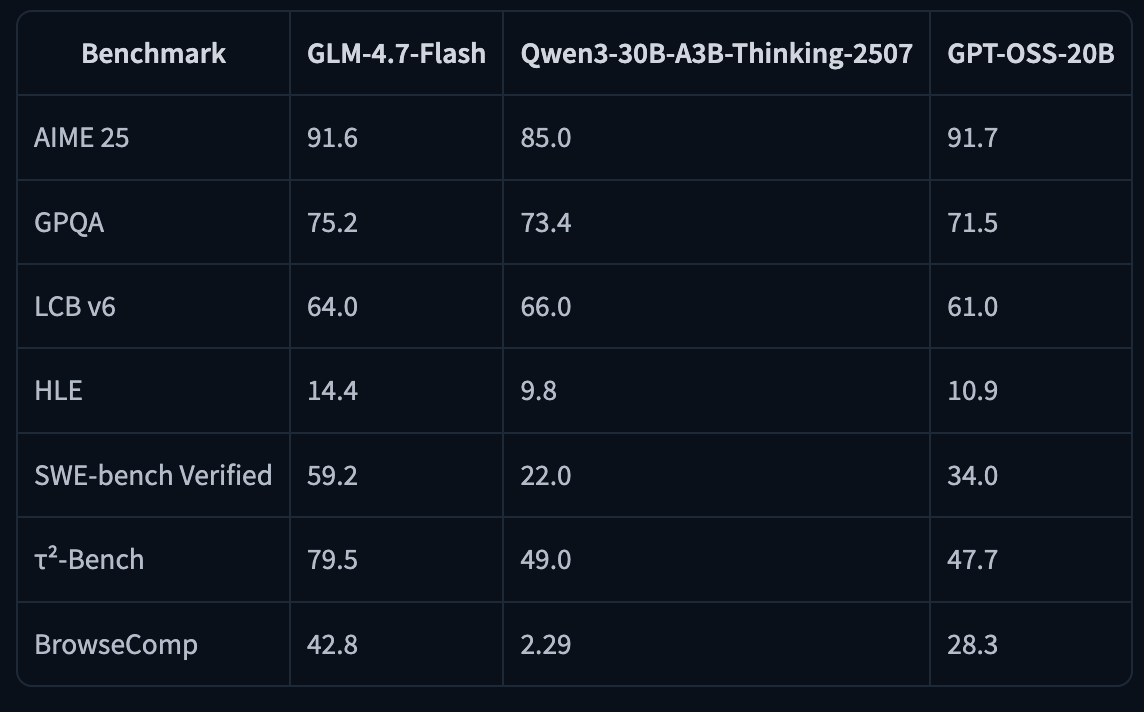
You can run it on 24GB RAM/VRAM/unified memory (and notes ~18GB needed for their 4-bit path).
If you are interested in running local LLMs, we also recently published a guide for solo developers and small teams
Quick specs for memory & context
Hardware target recommended is any modern GPU with ~24GB VRAM (e.g., RTX 3090 / 4090 class) and you can run Unsloth’s 4-bit GGUF example with ~18GB RAM/unified memory required, and “full precision” with ~32GB.
Maximum context window of 202,752 tokens (your usable context depends heavily on KV cache memory).
If you have the right runtime and enough memory, you can reach 200K context.
Let’s look at the runtime options.
A) llama.cpp + GGUF (fastest path to ‘running locally’)
Best when you want local CLI chat, desktop apps, and a simple OpenAI-compatible endpoint via llama-server.
1) Build llama.cpp (CUDA)
On Ubuntu/Debian:
apt-get update
apt-get install pciutils build-essential cmake curl libcurl4-openssl-dev -y
git clone https://github.com/ggml-org/llama.cpp
cmake llama.cpp -B llama.cpp/build \
    -DBUILD_SHARED_LIBS=OFF -DGGML_CUDA=ON
cmake --build llama.cpp/build --config Release -j --clean-first --target llama-cli llama-mtmd-cli llama-server llama-gguf-split
cp llama.cpp/build/bin/llama-* llama.cpp
If you don’t have a GPU (or want CPU-only), build with -DGGML_CUDA=OFF.
2) Run GLM-4.7-Flash (4-bit) in chat mode
Unsloth suggests Z.ai’s recommended sampling parameters:
- General:
--temp 1.0 --top-p 0.95 - Tool calling:
--temp 0.7 --top-p 1.0 - With llama.cpp, set
**--min-p 0.01** (because llama.cpp’s default is 0.1).
General (most tasks)
./llama.cpp/llama-cli \
  -hf unsloth/GLM-4.7-Flash-GGUF:UD-Q4_K_XL \
  --jinja --threads -1 --ctx-size 32768 \
  --temp 1.0 --top-p 0.95 --min-p 0.01 --fit on
Tool-calling-friendly sampling
./llama.cpp/llama-cli \
  -hf unsloth/GLM-4.7-Flash-GGUF:UD-Q4_K_XL \
  --jinja --threads -1 --ctx-size 32768 \
  --temp 0.7 --top-p 1.0 --min-p 0.01 --fit on
Notes:
--fit onhelps llama.cpp fit memory behavior based on model metadata.- You can push context higher as memory allows; Unsloth references up to ~202k max context.
Unsloth currently doesn’t recommend running this GGUF in Ollama due to potential chat template compatibility issues (llama.cpp + LM Studio/Jan backends are called out as working well).
3) Fix looping / repetition (important update)
Unsloth reports a Jan 21 update where a llama.cpp-side bug had set "scoring_func": "softmax" but it should be "sigmoid", which caused looping/poor outputs.
They updated the GGUFs and recommend re-downloading for better quality.
If your outputs feel “stuck”:
- Update llama.cpp to the latest commit and rebuild.
- Re-download the updated GGUF from Unsloth.
- Use the recommended sampling presets above.
4) Download the model
Via (after installing pip install huggingface_hub hf_transfer ). You can choose UD-Q4_K_XL or other quantized versions.
# !pip install huggingface_hub hf_transfer
import os
os.environ["HF_HUB_ENABLE_HF_TRANSFER"] = "1"
from huggingface_hub import snapshot_download
snapshot_download(
    repo_id = "unsloth/GLM-4.7-Flash-GGUF",
    local_dir = "unsloth/GLM-4.7-Flash-GGUF",
    allow_patterns = ["*UD-Q4_K_XL*"],
)
5) Serve it like an API: llama-server (OpenAI-compatible)
Start llama-server
./llama.cpp/llama-server \
  --model unsloth/GLM-4.7-Flash-GGUF/GLM-4.7-Flash-UD-Q4_K_XL.gguf \
  --alias "unsloth/GLM-4.7-Flash" \
  --threads -1 \
  --fit on \
  --seed 3407 \
  --temp 1.0 \
  --top-p 0.95 \
  --min-p 0.01 \
  --ctx-size 16384 \
  --port 8001 \
  --jinja
6) Call it with the OpenAI Python SDK
from openai import OpenAI

client = OpenAI(
    base_url="http://127.0.0.1:8001/v1",
    api_key="sk-no-key-required",
)

resp = client.chat.completions.create(
    model="unsloth/GLM-4.7-Flash",
    messages=[{"role": "user", "content": "What is 2+2?"}],
)

print(resp.choices[0].message.content)
At this point you can point any OpenAI-compatible client (your apps, agent frameworks, evaluation harnesses) at your local endpoint.
For the updates, you can refer to documentation.
Tool calling (agents): a practical pattern
GLM-4.7-Flash is positioned for agentic workflows, and both the HF model card and Unsloth docs emphasize tool calling support.
A minimal “tool loop” looks like this:
- Send
messages+toolsto the model - If the model returns tool calls, execute them locally
- Append tool results to the conversation
- Repeat until the model returns a final answer
Here’s a safe, minimal example (one tool):
import json
from openai import OpenAI

client = OpenAI(base_url="http://127.0.0.1:8001/v1", api_key="sk-no-key-required")

def add(a: float, b: float) -> float:
    return a + b

TOOLS = [{
    "type": "function",
    "function": {
        "name": "add",
        "description": "Add two numbers.",
        "parameters": {
            "type": "object",
            "properties": {
                "a": {"type": "number"},
                "b": {"type": "number"},
            },
            "required": ["a", "b"],
        },
    },
}]
messages = [{"role": "user", "content": "Add 12.5 and 3.4, then explain the result."}]

while True:
    resp = client.chat.completions.create(
        model="unsloth/GLM-4.7-Flash",
        messages=messages,
        tools=TOOLS,
        tool_choice="auto",
    )

    msg = resp.choices[0].message
    tool_calls = getattr(msg, "tool_calls", None)

    if not tool_calls:
        print(msg.content)
        break

    # Handle tool calls
    messages.append({"role": "assistant", "content": msg.content or "", "tool_calls": tool_calls})

    for tc in tool_calls:
        args = json.loads(tc.function.arguments)
        if tc.function.name == "add":
            result = add(args["a"], args["b"])
        else:
            result = f"Unknown tool: {tc.function.name}"
        messages.append({
            "role": "tool",
            "tool_call_id": tc.id,
            "content": str(result),
        })
Unsloth also provides a much larger reference example (multiple tools, guarded terminal execution, etc.).
B) vLLM (throughput + serving)
Best when you want higher-throughput serving and more “server-y” deployment, but you’ll need vLLM’s main/nightly support right now.
vLLM announced day-0 support for GLM-4.7-Flash, but the HF model card notes that vLLM support is on main branches / nightly builds right now.
1) Install the right builds
pip install -U vllm --pre --index-url https://pypi.org/simple --extra-index-url https://wheels.vllm.ai/nightly
pip install git+https://github.com/huggingface/transformers.git
2) Serve the model
The model card shows a multi-GPU example:
vllm serve zai-org/GLM-4.7-Flash \
  --tensor-parallel-size 4 \
  --speculative-config.method mtp \
  --speculative-config.num_speculative_tokens 1 \
  --tool-call-parser glm47 \
  --reasoning-parser glm45 \
  --enable-auto-tool-choice \
  --served-model-name glm-4.7-flash
On a single GPU, start by setting --tensor-parallel-size 1 and drop speculative flags until you’re stable.
C) SGLang (server + agent features)
Similar “main branch required” story, good for structured tool calling + reasoning parsers.
The HF model card includes both install pins and a launch command:
uv pip install sglang==0.3.2.dev9039+pr-17247.g90c446848 --extra-index-url https://sgl-project.github.io/whl/pr/
uv pip install git+https://github.com/huggingface/transformers.git@76732b4e7120808ff989edbd16401f61fa6a0afa

python3 -m sglang.launch_server \
  --model-path zai-org/GLM-4.7-Flash \
  --tp-size 4 \
  --tool-call-parser glm47 \
  --reasoning-parser glm45 \
  --speculative-algorithm EAGLE \
  --speculative-num-steps 3 \
  --speculative-eagle-topk 1 \
  --speculative-num-draft-tokens 4 \
  --mem-fraction-static 0.8 \
  --served-model-name glm-4.7-flash \
  --host 0.0.0.0 \
  --port 8000
There’s also a note about attention backends for Blackwell GPUs.
You can find more information on HuggingFace model card.
D) Transformers (reference implementation)
Best for correctness checks, experiments, and when you want to stay close to upstream HF APIs.
import torch
from transformers import AutoModelForCausalLM, AutoTokenizer

MODEL_PATH = "zai-org/GLM-4.7-Flash"

messages = [{"role": "user", "content": "hello"}]
tok = AutoTokenizer.from_pretrained(MODEL_PATH)

inputs = tok.apply_chat_template(
    messages,
    tokenize=True,
    add_generation_prompt=True,
    return_dict=True,
    return_tensors="pt",
)

model = AutoModelForCausalLM.from_pretrained(
    pretrained_model_name_or_path=MODEL_PATH,
    torch_dtype=torch.bfloat16,
    device_map="auto",
)

inputs = inputs.to(model.device)

generated = model.generate(**inputs, max_new_tokens=128, do_sample=False)
print(tok.decode(generated[0][inputs.input_ids.shape[1]:]))
If you have any questions, drop a comment!
Bonus Articles
See you next time around!
메타데이터
- post_id
- b3358d2f0e78
- slug
- glm-4-7-flash-on-24gb-gpu-llama-ccp-vllm-sglang-transformers-b3358d2f0e78
- url
- https://medium.com/@agentnativedev/glm-4-7-flash-on-24gb-gpu-llama-ccp-vllm-sglang-transformers-b3358d2f0e78
- canonical_url
- https://medium.com/@agentnativedev/glm-4-7-flash-on-24gb-gpu-llama-ccp-vllm-sglang-transformers-b3358d2f0e78
- author_url
- https://medium.com/@agentnativedev
- status
- ok
- fetched_at
- 2026-06-09 15:37:30