The AWS Networking Gotchas Nobody Warns You About (Coming From Kubernetes or Traditional…
If you’ve spent years in traditional IPv4 networking or living inside Kubernetes, AWS VPC design looks familiar right up until it isn’t…
The AWS Networking Gotchas Nobody Warns You About (Coming From Kubernetes or Traditional Networking)
If you’ve spent years in traditional IPv4 networking or living inside Kubernetes, AWS VPC design looks familiar right up until it isn’t. The vocabulary overlaps: subnets, gateways, DNS, CIDR blocks. But a few of the underlying rules are different enough to bite you if you’re not paying attention. Here are the ones that come up constantly.
HA in AWS isn’t a floating IP. It’s DNS indirection
If you’ve done HA the “traditional” way (keepalived, VRRP, a floating IP that migrates between two boxes), the AWS mental model is going to feel backwards at first.
In a VPC, subnets are AZ-scoped. Each AZ gets its own subnet with its own non-overlapping CIDR block, which means an instance in us-east-1a and an instance in us-east-1b will always have different private IPs. There's no floating IP that hops between AZs the way it might hop between two on-prem boxes.
Instead, AWS pushes everything toward a pattern that will feel very familiar if you’ve worked with Kubernetes Services:
- A Application/Network Load Balancer gives you a stable DNS name, while the actual backend IPs behind it change constantly as instances scale, fail, and get replaced.
- Auto Scaling Groups span multiple AZs and just launch replacements with new IPs when something dies. The load balancer’s target group absorbs the change.
- RDS Multi-AZ keeps the same endpoint hostname through a failover, but the IP behind that hostname absolutely changes.
The parallel to Kubernetes is almost exact: a Service’s ClusterIP is stable while kube-proxy rewrites the rules underneath it as pods die and get rescheduled with new IPs. In AWS, it’s the load balancer’s DNS name that stays constant while target groups get rewritten underneath it. Different mechanism, same philosophy: build for dynamic IPs behind a static name, not static IPs replicated across failure domains.
A /24 subnet does not give you 254 usable IPs
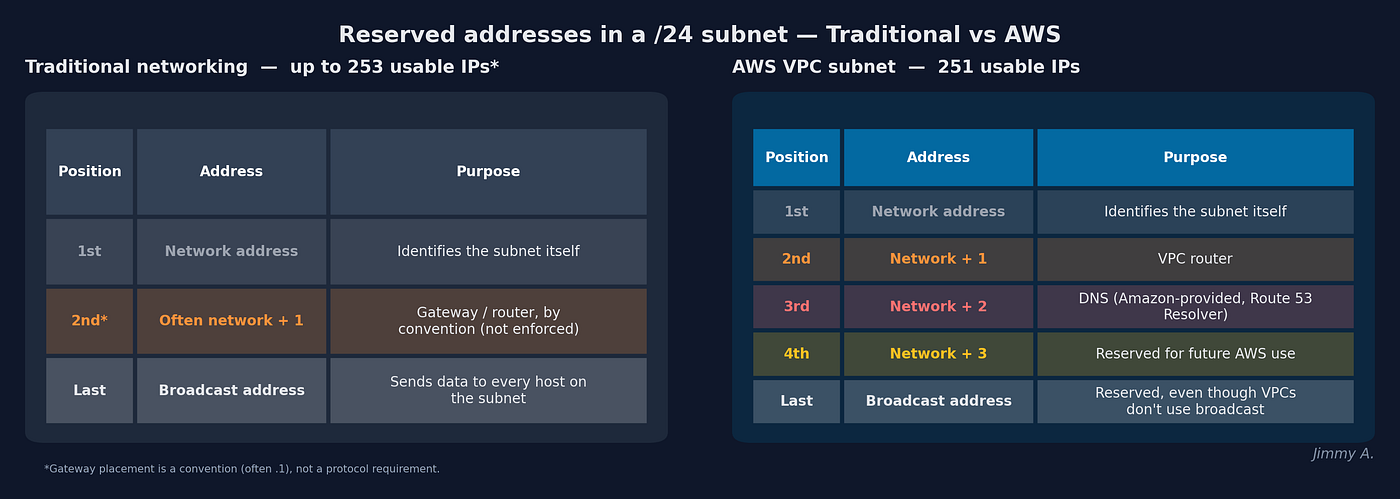
Everyone learns the classic IPv4 rule: subtract the network address and the broadcast address, and a /24 gives you 254 usable hosts. In a VPC, that math is wrong: AWS reserves five addresses, not two.
For any subnet, AWS always reserves:
- 1st address: Network address (identifies the subnet itself)
- 2nd address: VPC router
- 3rd address: DNS (Amazon-provided resolver)
- 4th address: Reserved for future use
- Last address: Broadcast (even though VPCs don’t support broadcast traffic)
So a /24 actually gives you 251 usable IPs, not 254. That gap matters more as subnets get smaller. A /28 only has 16 addresses total, and after AWS's five reserved, you're down to 11 usable. That's easy to overlook until you're carving out something like EKS control plane ENI subnets and suddenly run out of room.
The VPC router isn’t a device you can move
Coming from traditional networking, “gateway” usually means an actual box you configure, often at .1, but sometimes wherever your team's convention puts it. In a VPC, the router isn't a device at all. It's a distributed function baked into AWS's network fabric, and it's always the second address in the subnet's range. You don't get to pick it, and you don't get to move it.
What you do control is its behavior, via route tables. Attaching different route tables to different subnets is literally what makes a subnet “public” versus “private.” You’re configuring the rules, not the device.
CIDR blocks have to be aligned: you can’t just pick any IP
AWS lets you size VPCs and subnets anywhere from /16 to /28, which is more flexibility than the /16-and-/24-only examples in most tutorials suggest. But there's a rule that trips people up: the CIDR block has to start on the actual network address for that prefix length, not just any IP that happens to fall inside the range. If the address you give AWS isn't aligned to a valid boundary for that prefix length, AWS rejects it outright. It won't silently round it down for you the way some tools do.
A classic pattern that relies on getting this right is splitting a /24 into two aligned /25s, one per AZ, for a simple two-AZ HA layout using the same total address space as a single subnet.
The takeaway
None of these are exotic edge cases. They’re the kind of thing that shows up the first time you actually design a VPC instead of clicking through a tutorial’s defaults. If you’re coming from Kubernetes or classic on-prem networking, the concepts translate, but almost none of the specifics do 1:1. Assume nothing carries over exactly, check AWS’s actual reserved-IP and CIDR-alignment rules before you finalize a subnet plan, and design for DNS-based failover from the start rather than trying to recreate a floating IP.
Have you run into other AWS networking assumptions that didn’t hold up once you actually built something? I’d love to hear about them.
메타데이터
- post_id
- b4525554e889
- slug
- the-aws-networking-gotchas-nobody-warns-you-about-coming-from-kubernetes-or-traditional-b4525554e889
- url
- https://medium.com/@jimmyayoade89/the-aws-networking-gotchas-nobody-warns-you-about-coming-from-kubernetes-or-traditional-b4525554e889
- canonical_url
- https://medium.com/@jimmyayoade89/the-aws-networking-gotchas-nobody-warns-you-about-coming-from-kubernetes-or-traditional-b4525554e889
- author_url
- https://medium.com/@jimmyayoade89
- status
- ok
- fetched_at
- 2026-08-09 07:18:25



