GraphRAG: When Vector Search Isn’t Enough
Before we talk about GraphRAG, let’s make sure we’re on the same page about what RAG is.
GraphRAG: When Vector Search Isn’t Enough
Before we talk about GraphRAG, let’s make sure we’re on the same page about what RAG is.
RAG stands for Retrieval Augmented Generation. It’s the technique behind almost every “chat with your documents” tool you’ve seen. The idea is simple. You have a pile of documents. A user asks a question. Instead of asking the AI to answer from memory, you first find the most relevant pieces of those documents, then hand both the question and those pieces to the AI. The AI uses them to write the answer.
This works because language models are good at reading and summarizing, but they don’t know your private documents. RAG fills that gap.
How normal RAG works
The standard way to do RAG is with vector search. The flow looks like this:
- Chop your documents into smaller pieces called chunks, usually a few paragraphs each
- Run each chunk through an embedding model, which turns the text into a list of numbers called a vector
- Store all these vectors in a vector database
- When a user asks a question, turn the question into a vector too and find the chunks whose vectors are closest
- Hand those chunks to the AI, get an answer
Think of a vector as a coordinate that represents meaning. Two chunks about cats sit close together. A chunk about cats and a chunk about taxes sit far apart.
This is vector RAG. It is fast, cheap, and works well for many tasks.
Where vector RAG breaks down
Vector RAG is good at finding chunks that match a question. The problem is it has no idea how those chunks relate to each other.
Imagine you have a thousand customer support emails. Someone asks “what are the most common complaints this year”. Vector search will find a few emails containing the word “complaint”, but that is not the answer. The real answer needs you to read all the emails, group them, and notice patterns. Vector search cannot do that.
Or imagine fraud investigation. You want to know if Person A is connected to Company B through a chain of suppliers. Vector search finds chunks mentioning each name, but cannot follow the chain from A to B.
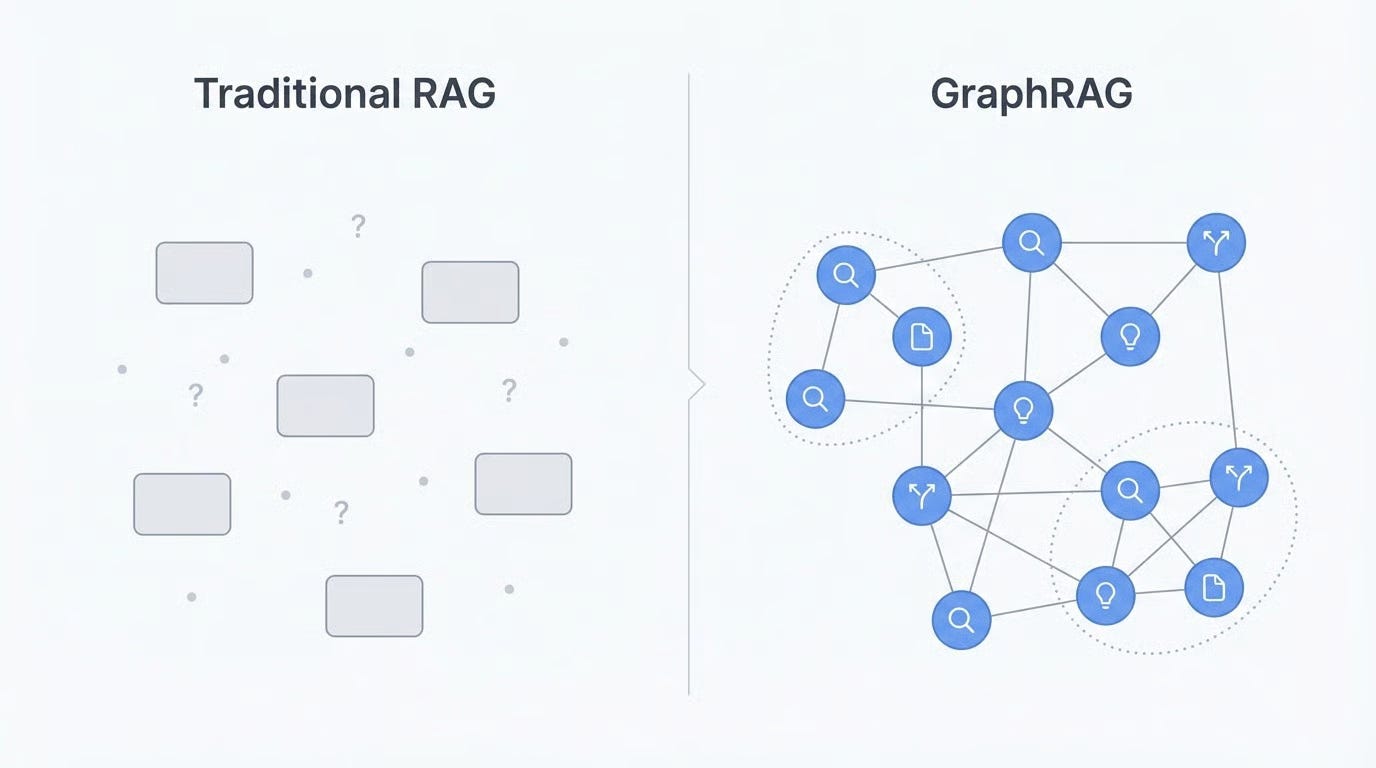
The problem is that vector RAG treats your documents like a bag of disconnected snippets. It has no map of how things relate.
What GraphRAG does differently
GraphRAG, which Microsoft Research introduced in 2024, fixes this by adding a second layer.
When you index your documents, GraphRAG does what vector RAG does, but it also asks an AI to read each chunk and pull out:
- Entities: people, companies, places, events
- Relationships: how those entities connect
For example, from “Ali works at TechCorp, which acquired DataSoft last year”, the AI extracts Ali, TechCorp, and DataSoft as entities, plus the relationships “Ali works at TechCorp” and “TechCorp acquired DataSoft”.
Do this for every chunk and you end up with a giant knowledge graph. A web of who is connected to what.
GraphRAG then takes one more step. It groups the graph into clusters called communities and writes a short summary for each one. Your index now has three layers:
- The original chunks
- The graph of entities and relationships
- Summaries at different zoom levels
When a query comes in, the system picks the right layer. Specific factual questions go to the chunks. Relationship questions traverse the graph. Big-picture questions use the community summaries.
Advantages
- Global questions become possible. “What are the main themes in this dataset” or “summarize recurring issues across incidents”. No single chunk answers these. The community summaries do.
- Multi-hop reasoning works. Ask “how does Person A connect to Company D” and the system walks the graph from A through B and C to D. Vector search loses the trail.
- Investigation gets much stronger. OSINT, due diligence, fraud detection, research synthesis. Anywhere the value is in connecting dots rather than looking up facts.
- Richer context. Even on regular questions, having entities and relationships available means the answer can include related links the user did not ask about directly.
Disadvantages
- Expensive to build. An AI reads every chunk to extract entities, then writes community summaries. A one-million-token corpus can cost hundreds of dollars on commercial APIs.
- Slow indexing. Vector RAG takes minutes. GraphRAG can take hours or days. If your documents change often, you will feel this.
- More complex. You now maintain a vector store, a graph store, and an extraction pipeline. More skills, more tools, more things that break.
- Quality depends on the extractor. If the model misses an entity or invents a relationship, that error becomes permanent in your graph.
- Worse at simple lookups. “What is our refund policy” does not need a graph. It needs a document. GraphRAG adds overhead with no benefit here.
When to use which
The practical advice for most teams:
- Start with vector RAG. Ship it. See how far it gets you.
- If users keep asking questions vector RAG cannot answer well, especially global or relationship questions, add GraphRAG.
- Many teams end up running both. Vector RAG for direct lookups, GraphRAG for harder questions. The application routes the query to the right one.
A note on cost
The reason GraphRAG is expensive is the AI calls during indexing. If you run those calls on a local model instead of a paid API, the cost picture changes completely. What costs hundreds of dollars on commercial APIs costs almost nothing in raw compute on GPUs you already own. For teams with local infrastructure, this makes GraphRAG practical for many more projects than it would otherwise be.
Tools worth looking at
- Microsoft GraphRAG: the original implementation, good reference point
- LightRAG: lighter and faster, trades some sophistication for speed
- Neo4j GraphRAG: built on their graph database
- LlamaIndex PropertyGraphIndex: fits if you are already using LlamaIndex
Query Types
GraphRAG offers distinct retrieval strategies, each suited to different question types. Picking the right one depends on whether you need broad synthesis, specific entity information, or something in between.
Global Search
Global search answers questions that require understanding an entire corpus. Questions like “What are the main themes in this document collection?” or “What patterns emerge across these reports?” need information aggregated from everywhere, not retrieved from a few matching chunks.
The mechanism is map-reduce over community summaries. In the map phase, each community summary gets processed independently: the system asks an LLM to extract relevant points and rate their importance. In the reduce phase, the highest-rated points from all communities get aggregated into a final prompt, and the LLM synthesizes them into a coherent response.
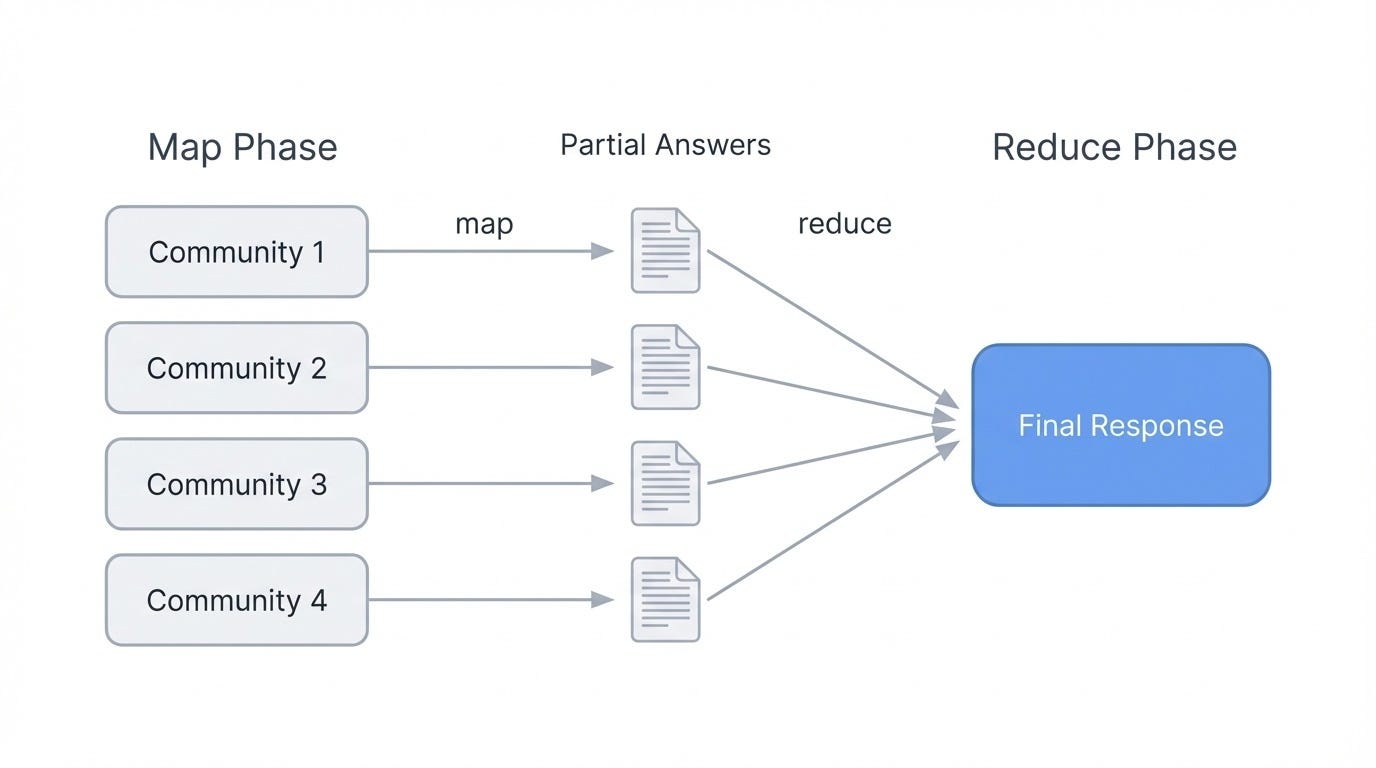
GraphRAG global search using map-reduce.
This works because community summaries already capture what each cluster of entities is about. The system doesn’t need to retrieve thousands of chunks. Instead, it reasons over pre-computed descriptions that represent the graph’s structure at whatever hierarchy level you choose. Lower levels (smaller, tighter communities) give more detailed answers but cost more LLM calls. Higher levels (broader groupings) run faster but may miss nuance.
Local Search
Local search handles entity-specific questions. “What are the healing properties of chamomile?” or “What did Acme Corp announce about their Q3 earnings?” target particular entities and the information connected to them.
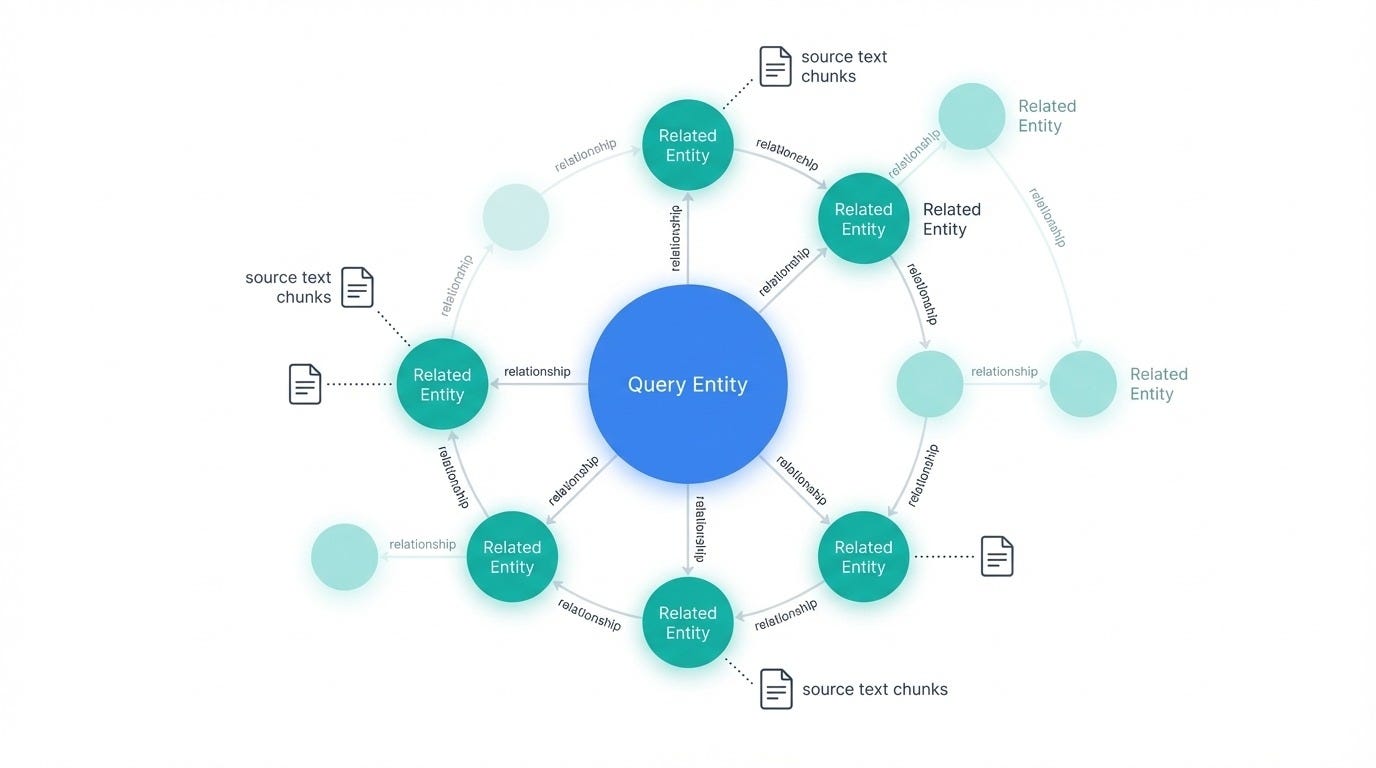
GraphRAG local search with related nodes.
Closing thought
GraphRAG is not a replacement for vector RAG. It is a different tool for a different job. Vector RAG finds chunks. GraphRAG understands structure.
Most projects do not need a knowledge graph. They need search that works. But for the projects that do need one, GraphRAG is the difference between an AI that retrieves and an AI that actually understands the shape of your data.
Reference
메타데이터
- post_id
- b470354f0dac
- slug
- graphrag-when-vector-search-isnt-enough-b470354f0dac
- url
- https://medium.com/@CyberRaya/graphrag-when-vector-search-isnt-enough-b470354f0dac
- canonical_url
- https://medium.com/@CyberRaya/graphrag-when-vector-search-isnt-enough-b470354f0dac
- author_url
- https://medium.com/@CyberRaya
- status
- ok
- fetched_at
- 2026-06-17 08:20:12