Natas : OverTheWire
Natas is part of the OverTheWire (OTW) wargames, focusing on web security. Natas introduces real-world web vulnerabilities such as…
Natas : OverTheWire
Level 0–10

Natas is part of the OverTheWire (OTW) wargames, focusing on web security. Natas introduces real-world web vulnerabilities such as information disclosure, weak authentication, insecure session management, and improper input validation.
Each level of natas consists of its own website located at http://natasX.natas.labs.overthewire.org, where X is the level number. There is no SSH login. To access a level, enter the username for that level (e.g. natas0 for level 0) and its password.
Each level has access to the password of the next level. Your job is to somehow obtain that next password and level up. All passwords are also stored in /etc/natas_webpass/. E.g. the password for natas5 is stored in the file /etc/natas_webpass/natas5 and only readable by natas4 and natas5.
Level 0
▪️URL : [http://natas0.natas.labs.overthewire.org](http://natas0.natas.labs.overthewire.org)
▪️Username : natas0
▪️Password : natas0
Log into level 0 by using the given URL, username and password.

natas0_0

natas0_1
After logging you can see the below instruction.

natas0_2
It says that the password is in that page. So, to view source code; right click on the page and click ‘view page source’ or ctrl + U.

natas0_3

natas0_4
In there the password for next level is given as a comment.

natas0_5
Level 0 -> Level 1
▪️URL : [http://natas1.natas.labs.overthewire.org](http://natas0.natas.labs.overthewire.org)
▪️Username : natas1
▪️Password : 0nzCigAq7t2iALyvU9xcHlYN4MlkIwlq
Enter the level 1 page by using the given URL.

natas1_1
The username is natas1 and password was found in level 0. By using that username and password log into level 1.
Then you can see the below instruction.

natas1_2
It says that password is on that page. To view the source code, if you right click it will display a message like below.

Since the right clicking has blocked, press ctrl + U to view source code.

In there the password for next level is given as a comment.

Level 1 -> Level 2
▪️URL : [http://natas2.natas.labs.overthewire.org](http://natas0.natas.labs.overthewire.org)
▪️Username : natas2
▪️Password : TguMNxKo1DSa1tujBLuZJnDUlCcUAPlI
Enter the level 2 page by using the given URL.

After logging you can see the below instruction.

It displays an instruction; “There is nothing on this page”.
To check is the password is hidden in source code, press ctrl+U.

There is an image called ‘pixel.png’ in a file called ‘files’.

To go inside that file, type ‘/files/’ in the URL or type http://natas2.natas.labs.overthewire.org/files/

Then it displays below page:

In that files, there is a file calles ‘users.txt’ . Click on that file.

Then we can see the password of natas3 is there.

Level 2 -> Level 3
▪️URL : [http://natas3.natas.labs.overthewire.org](http://natas0.natas.labs.overthewire.org)
▪️Username : natas3
▪️Password : 3gqisGdR0pjm6tpkDKdIWO2hSvchLeYH
Enter the level 3 page by using the given URL, username and password.

After logging you can see the below instruction.

It displays an instruction; “There is nothing on this page”.
To check is the password is hidden in source code, press ctrl+U.

There is comment :
<! — No more information leaks!! Not even Google will find it this time… →
To view the pages that are disallowed; type ‘/robots.txt’ in the URL or type *http://natas3.natas.labs.overthewire.org/robots.txt*

There is a disallowed directory called ‘s3cr3t’. To check that directory, type :
http://natas3.natas.labs.overthewire.org/s3cr3t/

Press Enter.

That directory is consist of a file called ‘users.txt’.Click on that file.

That file is consist of the password for the next level.
Level 3 -> Level 4
▪️URL : [http://natas4.natas.labs.overthewire.org](http://natas0.natas.labs.overthewire.org)
▪️Username : natas4
▪️Password : QryZXc2e0zahULdHrtHxzyYkj59kUxLQ
Enter the level 4 page by using the given URL, username and password.

After logging you can see the below instruction.

After click ‘ Refresh page’ it changes to below.

It says that“Access disallowed. You are visiting from “http://natas4.natas.labs.overthewire.org/” while authorized users should come only from “http://natas5.natas.labs.overthewire.org/”.
The access is restricted based on the HTTP Referer header.
It only allows access if the request comes from “http://natas5.natas.labs.overthewire.org/". Since the request is coming from “http://natas4.natas.labs.overthewire.org/", access is denied. To bypass this, we need to change the Referer header to the allowed source. It can be done by using ‘Burp Suite’.
▫️Burp Suite is a comprehensive suite of tools, developed by PortSwigger, used for web application security testing, penetration testing, and vulnerability scanning, offering both manual and automated testing capabilities.
- First, log into natas 4 using burp browser.
- On ‘intercept’ in burp suite.
- Click ‘refresh page’ in the browser.
- Then you can see the below one.

There, referer is …natas4…

- Then press right click and press ‘Send to Repeater’ or press ctrl + R .

- Then go to the repeater section.

- Change it to natas4 in referer to natas5

- Click send and check the response.

After that the access is granted and the password for level 5 is given in the response.

Level 4 -> Level 5
▪️URL : [http://natas5.natas.labs.overthewire.org](http://natas5.natas.labs.overthewire.org)
▪️Username : natas5
▪️Password : 0n35PkggAPm2zbEpOU802c0x0Msn1ToK
Enter the level 5 page by using the given URL, username and password.

After logging you can see the below instruction.

It says that “Access disallowed. You are not logged in”. It means that we are not logged in. To check that open natas 5 in burp suite.

In here, there is a cookie named loggedin with a value of ‘0’.

To logged in the value must be ‘1’. So change it and check the response.


Change 0 to 1.

Click ‘send’ and check response. In there, the access is granted and the password for natas 6 is given.

Level 5 -> Level 6
▪️URL : [http://natas6.natas.labs.overthewire.org](http://natas5.natas.labs.overthewire.org)
▪️Username : natas6
▪️Password : 0RoJwHdSKWFTYR5WuiAewauSuNaBXned
Enter the level 6 page by using the given URL, username and password.

After logging you can see the below instruction.

It says to input a secret and submit. And there is link to view source code.
Click ‘ view sourcecode’.

In the source code, there is a file path; “includes/secret.inc”

Copy and paste it in the URL.
*“http://natas6.natas.labs.overthewire.org/includes/secret.inc”*

In that file we can see the secret;
$secret = “FOEIUWGHFEEUHOFUOIU”;

Copy that secret and paste it in the input secret filed.

Then click submit and then it displays the password for natas 7.

Level 6 -> Level 7
▪️URL : [http://natas7.natas.labs.overthewire.org](http://natas5.natas.labs.overthewire.org)
▪️Username : natas7
▪️Password : bmg8SvU1LizuWjx3y7xkNERkHxGre0GS
Enter the level 7 page by using the given URL, username and password.

After logging you can see a page like below.

When click ‘Home’ it displays “this is the front page” and when click ‘About’ it displays “this is the about page”.

To view source code, click ctrl + U.

In there, a hint is given as a comment.

It says that the password is in a page named natas8.located in : ‘/etc/natas_webpass/natas8’.
Copy and paste it in the URL.

Press enter and the password is appeared.

Level 7 -> Level 8
▪️URL : [http://natas8.natas.labs.overthewire.org](http://natas5.natas.labs.overthewire.org)
▪️Username : natas8
▪️Password : xcoXLmzMkoIP9D7hlgPlh9XD7OgLAe5Q
Enter the level 8 page by using the given URL, username and password.

After logging you can see a page like below.

Click ‘ view sourcecode’.

There is a code with php.

The secret is encoded and we have to decode it.

To do that,


‘oubWYf2kBq’ is the decoded secret. Write it in the input secret box and submit.

Then the password for natas 9 is displayed.

Level 8 -> Level 9
▪️URL : [http://natas9.natas.labs.overthewire.org](http://natas5.natas.labs.overthewire.org)
▪️Username : natas9
▪️Password : ZE1ck82lmdGIoErlhQgWND6j2Wzz6b6t
Enter the level 9 page by using the given URL, username and password.

After logging you can see a page like below.

Click view sourcecode.

There is a php code which gives outputs based on what we type.

If the word we type is excist on the file ‘ dictionary.txt’ it will output data.As a example if we type ls;

According to the previous levels memory, to get the password we have to read the file called natas10 which is located in etc/natas_webpass. To read the file use the command ‘cat’.

It doesn't gives the output that we want. Because,

The commands we type are go under the $key and there are not only the command that we type. So we have to exit from previous command(grep) and remove other one by commenting it.
“grep -i ; cat /etc/natas_webpass/natas10 #dictionary.txt”


Click search and it displays the password for level 10.

Level 9 -> Level 10
▪️URL : [http://natas10.natas.labs.overthewire.org](http://natas5.natas.labs.overthewire.org)
▪️Username : natas10
▪️Password : t7I5VHvpa14sJTUGV0cbEsbYfFP2dmOu
Enter the level 10 page by using the given URL, username and password.

After logging you can see a page like below.

Click view sourcecode.

This level is more advanced than the previous one. This filters the output. It means, in here we can't type characters like ‘;’ , ‘|’ and ‘&’.

We can use ‘.’ for ‘;’.
“grep -i . /etc/natas_webpass/natas11 dictionary.txt”
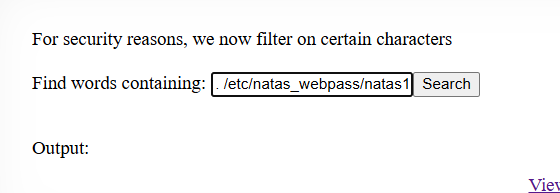
Click search and it gives the password for natas 11.


Password for natas 11 : UJdqkK1pTu6VLt9UHWAgRZz6sVUZ3lEk
메타데이터
- post_id
- b47b7b54bbda
- slug
- natas-overthewire-b47b7b54bbda
- url
- https://medium.com/@kavidipathawuda/natas-overthewire-b47b7b54bbda
- canonical_url
- https://medium.com/@kavidipathawuda/natas-overthewire-b47b7b54bbda
- author_url
- https://medium.com/@kavidipathawuda
- status
- ok
- fetched_at
- 2026-08-30 20:20:19




