Inside Daily Rolling Forecast Logic: How PCF Shifts Actuals and Forecasts Every Day
One of the most impressive capabilities of Oracle Predictive Cash Forecasting (PCF) is its ability to maintain a continuously moving…
Inside Daily Rolling Forecast Logic: How PCF Shifts Actuals and Forecasts Every Day
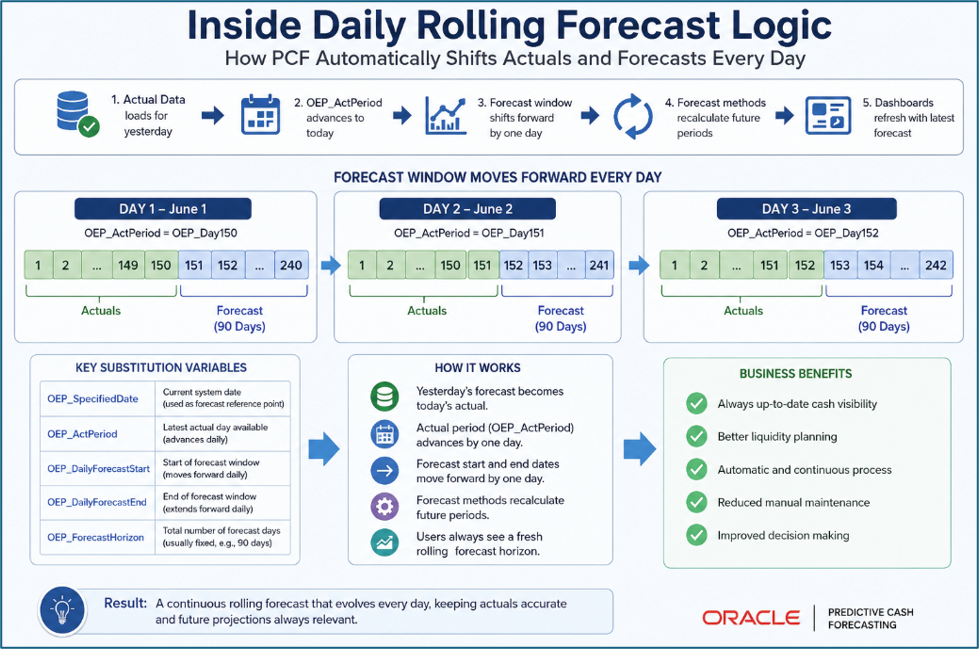
One of the most impressive capabilities of Oracle Predictive Cash Forecasting (PCF) is its ability to maintain a continuously moving forecast horizon. Unlike traditional forecasting models that require manual period updates, PCF automatically shifts actuals and forecast periods every day, ensuring treasury teams always have a current view of expected cash positions.
For many administrators, this daily movement appears almost magical. Actual periods increase, forecast windows move forward, dashboards remain current, and forecast calculations continue without manual intervention.
What “rolling” actually means ?
Most planning applications are static by default. You open a form, enter a number, save. The calendar doesn’t care what day it is. Oracle PCF is different it is designed around the assumption that today’s date changes every day, and that the boundary between “what happened” and “what we expect to happen” must shift accordingly.
A rolling forecast in PCF means three things happening in coordination: the actuals window expands by one day each morning, the open forecast window shrinks by one day from the leading edge, and the substitution variables that define those windows advance in lockstep. When this is working correctly, a forecast submitted Monday looks different from the same data viewed on Thursday not because anyone touched it, but because the engine rolled it forward.
Three substitution variables, one boundary
Everything in PCF’s rolling logic hinges on three application-level substitution variables. Understanding them is the first step to understanding or debugging any rolling forecast behavior.
CurDay / OEP_CurDay: The anchor. Stores today’s date as an EPM period member. Updated daily either by the seeded EPM Automate job, or by a Groovy business rule. Every time a form or calc rule asks “what day is today?”, it reads this variable.
OEP_ActualsEndDay: The boundary between known and estimated. Typically set to OEP_CurDay minus one the last day for which bank actuals or subledger data have been confirmed. Everything at or before this date is treated as actual; everything after it is forecast.
OEP_FcstEndDay : The horizon. Defines the last day of the active forecast window. As the actuals end date rolls forward, this rolls forward too maintaining a fixed forecast depth (e.g., always 13 weeks out from today).
The seeded PCF application ships with a rule set that updates these variables automatically via EPM Automate on a daily schedule. When the variables update, all forms and calculations that reference them immediately reflect the new boundary no manual intervention, no data refresh required.
What the timeline looks like, day by day
The table below shows how the actuals/forecast boundary shifts across a single work week. Each row is a snapshot of the same rolling window viewed on a different day.

Note: The seeded PCF rules use EPM Automate to trigger this Groovy rule at a scheduled time each morning typically before business hours in each regional time zone. If multiple cubes share the same variables (OEP_DCSH, OEP_PCSH, OEP_RCSH), confirm which cube owns each variable or you may see conflicting updates mid-day.
Common failure modes in daily rolling logic
Rolling forecast logic fails in three consistent patterns. Each one has a distinct symptom and a specific root cause.
*Variables roll but forms show stale data : The substitution variables updated, but a business rule that pushes actuals into the forecast range did not run. Check whether the “Copy Actuals to Forecast” rule is chained to the roll-forward rule, or runs independently on a separate schedule.*
*Variables do not roll on Mondays : Weekend handling. If EPM Automate is scheduled only on business days, the variables freeze over Saturday and Sunday. Monday’s roll-forward then attempts to advance by three days at once which the seeded logic handles, but custom rules may not. Use LocalDate.now() rather than incrementing from the previous stored value.*
*AMW overrides substitution variables mid-period : The seeded Activity Manager Workspace rules can reset substitution variables based on system date at form-open time. If you have a custom Reset Dates rule intended to lock the anchor to a specific date (e.g., FY25 end-of-quarter), it must run after AMW initializes or suppress AMW’s date-resolution step entirely via the rule priority settings.*
Why this matters beyond the mechanics ?
The daily roll-forward is infrastructure, not a feature. When it works, nobody notices. When it breaks even for a single day the actuals boundary freezes, forecast forms start populating historical periods, and users lose trust in the numbers fast.
The more important point: PCF’s rolling logic is what makes the six forecast methods discussed in the previous post meaningful in a treasury context. A trend-based or statistical forecast that doesn’t know what “today” is cannot distinguish between a period that should show actuals and one that should show a model-generated estimate. The substitution variable framework is the synchronization layer between the calendar and the forecast engine.
메타데이터
- post_id
- b4848746ea20
- slug
- inside-daily-rolling-forecast-logic-how-pcf-shifts-actuals-and-forecasts-every-day-b4848746ea20
- url
- https://medium.com/@venkatasiva600/inside-daily-rolling-forecast-logic-how-pcf-shifts-actuals-and-forecasts-every-day-b4848746ea20
- canonical_url
- https://medium.com/@venkatasiva600/inside-daily-rolling-forecast-logic-how-pcf-shifts-actuals-and-forecasts-every-day-b4848746ea20
- author_url
- https://medium.com/@venkatasiva600
- status
- ok
- fetched_at
- 2026-06-12 22:02:08