Warehouse Label Printing Solution for High-Volume Logistics Operations
Modern warehouses rely heavily on fast and accurate labeling systems to maintain efficient inventory flow, reduce shipping errors, and…
Warehouse Label Printing Solution for High-Volume Logistics Operations
Modern warehouses rely heavily on fast and accurate labeling systems to maintain efficient inventory flow, reduce shipping errors, and improve traceability. Whether managing e-commerce fulfillment, third-party logistics (3PL), or manufacturing distribution centers, a reliable warehouse label printing solution has become essential for daily operations.
In this article, we’ll explore the common challenges warehouses face with label printing, the key technologies behind efficient labeling systems, and how businesses can optimize warehouse workflows with the right hardware and software setup.
Why Warehouse Label Printing Matters
Warehouse labels are more than simple stickers. They are critical data carriers used for:
- Inventory tracking
- Barcode scanning
- Order fulfillment
- Shipping management
- Shelf identification
- Pallet labeling
- Product traceability
Poor-quality labels can lead to:
- Barcode scanning failures
- Delayed shipments
- Inventory mismatches
- Picking errors
- Increased labor costs
As warehouse operations scale, manual labeling methods quickly become inefficient and error-prone.
Common Warehouse Label Printing Challenges
1. Barcode Scanning Failures
Low-resolution printing or faded labels can cause barcode scanners to fail, slowing down picking and packing operations.
Common causes include:
- Poor print resolution
- Low-quality label materials
- Incorrect printer settings
- Smudged thermal labels
2. Label Damage During Transportation
Warehouse labels are often exposed to:
- Moisture
- Abrasion
- Dust
- Temperature changes
Standard paper labels may peel off or become unreadable during shipping.
3. Slow Batch Printing During Peak Seasons
During busy fulfillment periods, warehouses may need to print thousands of labels daily. Desktop printers often struggle with:
- Print speed limitations
- Media loading downtime
- Overheating issues
4. Inventory Errors Caused by Inconsistent Labeling
Different departments using inconsistent label formats can create:
- SKU confusion
- Picking mistakes
- Incorrect inventory records
A centralized labeling system helps standardize operations.
Key Components of an Efficient Warehouse Label Printing Solution
A professional warehouse labeling system typically includes four main components:
ComponentFunctionIndustrial Label PrinterHigh-volume label outputDurable LabelsLong-lasting barcode readabilityLabel Design SoftwareStandardized templatesWMS/ERP IntegrationAutomated data printing
Choosing the Right Warehouse Label Printer
When selecting a warehouse label printer, businesses should evaluate:
Print Volume
High-volume warehouses require industrial-grade printers capable of continuous operation.
Print Resolution
For small barcodes and QR codes, 300dpi or higher is recommended.
Connectivity
Modern warehouses often require:
- USB
- Ethernet
- Wi-Fi
- Bluetooth
Media Compatibility
The printer should support:
- Thermal labels
- Synthetic labels
- Shipping labels
- Pallet labels
Thermal Printing Technologies for Warehouses
Direct Thermal Printing
Best for:
- Shipping labels
- Short-term logistics
- Temporary inventory tags
Advantages:
- Lower operating costs
- No ribbon required
- Faster printing
Limitations:
- Less durable over time
- Sensitive to heat and sunlight
Thermal Transfer Printing
Best for:
- Long-term inventory tracking
- Industrial environments
- Outdoor logistics
Advantages:
- Excellent durability
- Resistant to moisture and chemicals
- Longer label lifespan
Limitations:
- Requires ribbon replacement
How Automation Improves Warehouse Labeling Efficiency
Modern warehouse labeling systems increasingly integrate with:
- WMS platforms
- ERP systems
- Barcode scanners
- Conveyor systems
This allows:
- Automatic label generation
- Real-time inventory updates
- Faster order processing
- Reduced human error
For example, when a warehouse worker scans an order, the system can automatically generate and print the correct shipping label instantly.
Mobile Label Printing for Warehouse Operations
Many warehouses now use mobile label printers for:
- Shelf labeling
- Cycle counting
- Pallet identification
- On-site relabeling
Bluetooth-enabled portable printers improve flexibility and reduce walking time for warehouse staff.
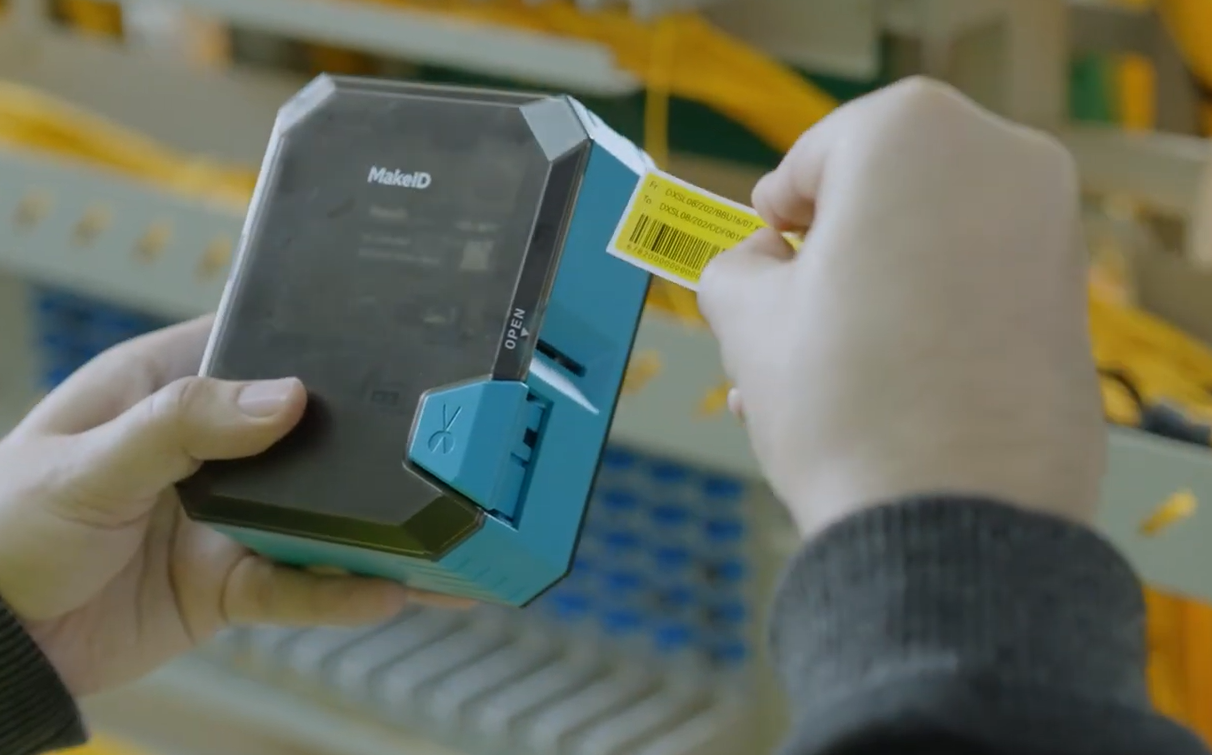
Recommended Solution: MakeID W110 Portable Label Printer
For warehouses seeking a compact and flexible mobile labeling solution, the MakeID W110 Portable Label Printer is a practical option for daily warehouse identification tasks.
Key Features of the MakeID W110
- Portable wireless design
- Bluetooth connectivity
- Fast mobile app printing
- Multiple label template support
- QR code and barcode printing
- Compact size for mobile warehouse use
The MakeID W110 is especially suitable for:
- Shelf labeling
- Storage bin identification
- Small warehouse inventory management
- Mobile logistics operations
- Temporary warehouse labeling tasks
Its wireless operation allows staff to print labels directly from smartphones without returning to a central workstation, improving workflow efficiency in dynamic warehouse environments.
Best Practices for Warehouse Label Printing
Standardize Label Templates
Use consistent:
- Barcode sizes
- Fonts
- SKU placement
- Label dimensions
This improves scanning accuracy and employee training efficiency.
Choose Durable Label Materials
For warehouse environments, consider:
- Synthetic labels
- Waterproof adhesives
- Smudge-resistant coatings
Regularly Maintain Print Heads
Dirty print heads can reduce barcode readability.
Routine cleaning helps:
- Extend printer lifespan
- Maintain print clarity
- Reduce downtime
Optimize Barcode Size and Contrast
Avoid:
- Overly small barcodes
- Low-contrast printing
- Crowded label layouts
Proper barcode design significantly improves scanning speed.
Future Trends in Warehouse Label Printing
Warehouse labeling technology continues to evolve with:
- RFID integration
- Cloud-based printing systems
- AI-powered inventory tracking
- Mobile-first warehouse operations
As logistics automation increases, fast and reliable label printing will remain a core part of warehouse efficiency and supply chain accuracy.
Conclusion
A well-designed warehouse label printing solution helps businesses improve inventory accuracy, reduce shipping errors, and streamline fulfillment workflows. By combining durable labels, reliable printers, and integrated warehouse systems, companies can significantly enhance operational efficiency.
For businesses looking for a compact and mobile-friendly warehouse labeling device, the MakeID W110 Portable Label Printer offers a convenient solution for flexible warehouse identification and inventory labeling tasks.
메타데이터
- post_id
- b4b9c01ef94c
- slug
- warehouse-label-printing-solution-for-high-volume-logistics-operations-b4b9c01ef94c
- url
- https://medium.com/@makeidgzh12/warehouse-label-printing-solution-for-high-volume-logistics-operations-b4b9c01ef94c
- canonical_url
- https://medium.com/@makeidgzh12/warehouse-label-printing-solution-for-high-volume-logistics-operations-b4b9c01ef94c
- author_url
- https://medium.com/@makeidgzh12
- status
- ok
- fetched_at
- 2026-06-09 15:37:30