SnowConvert AI: Automating Legacy Data Warehouse Migration to Snowflake
Introduction
SnowConvert AI: Automating Legacy Data Warehouse Migration to Snowflake

Introduction
Migrating off a legacy on-premise data warehouse is one of those projects that every data engineering team knows is necessary, but few look forward to. The reasons to move are well understood: elastic compute, separation of storage and compute, lower operational overhead, and access to modern AI and analytics capabilities. The obstacle is almost never the destination — it is the journey. Legacy codebases spanning decades of Teradata, Oracle, or SQL Server procedural logic do not translate themselves, and manual rewrites are error-prone, expensive, and slow.
Snowflake has been investing heavily in automation to compress these migration timelines. Their primary vehicle is SnowConvert AI, a free, AI-powered migration tool that converts SQL and procedural code from legacy platforms to Snowflake. The tool has evolved rapidly: what started as a deterministic syntax translator has grown into an agentic system that can extract code from source databases, convert it using Abstract Syntax Tree (AST) analysis, validate the converted output through AI-generated synthetic tests, deploy it to Snowflake, and even migrate the underlying data.
The February 2026 update introduced several capabilities that mark a turning point. AI-Powered Code Conversion reached general availability, two-sided verification with source-system execution launched for SQL Server, and direct conversion to Apache Iceberg tables became available for Teradata. Taken together, these features address the three hardest problems in any migration: conversion accuracy, functional validation, and output format flexibility.
In this article, I will explore the architecture behind SnowConvert AI, explain how its deterministic and agentic conversion pipeline works, walk through the difference between one-sided and two-sided validation, and examine what the Iceberg table target means for organizations that want open-format interoperability on cloud object storage.
What is SnowConvert AI?
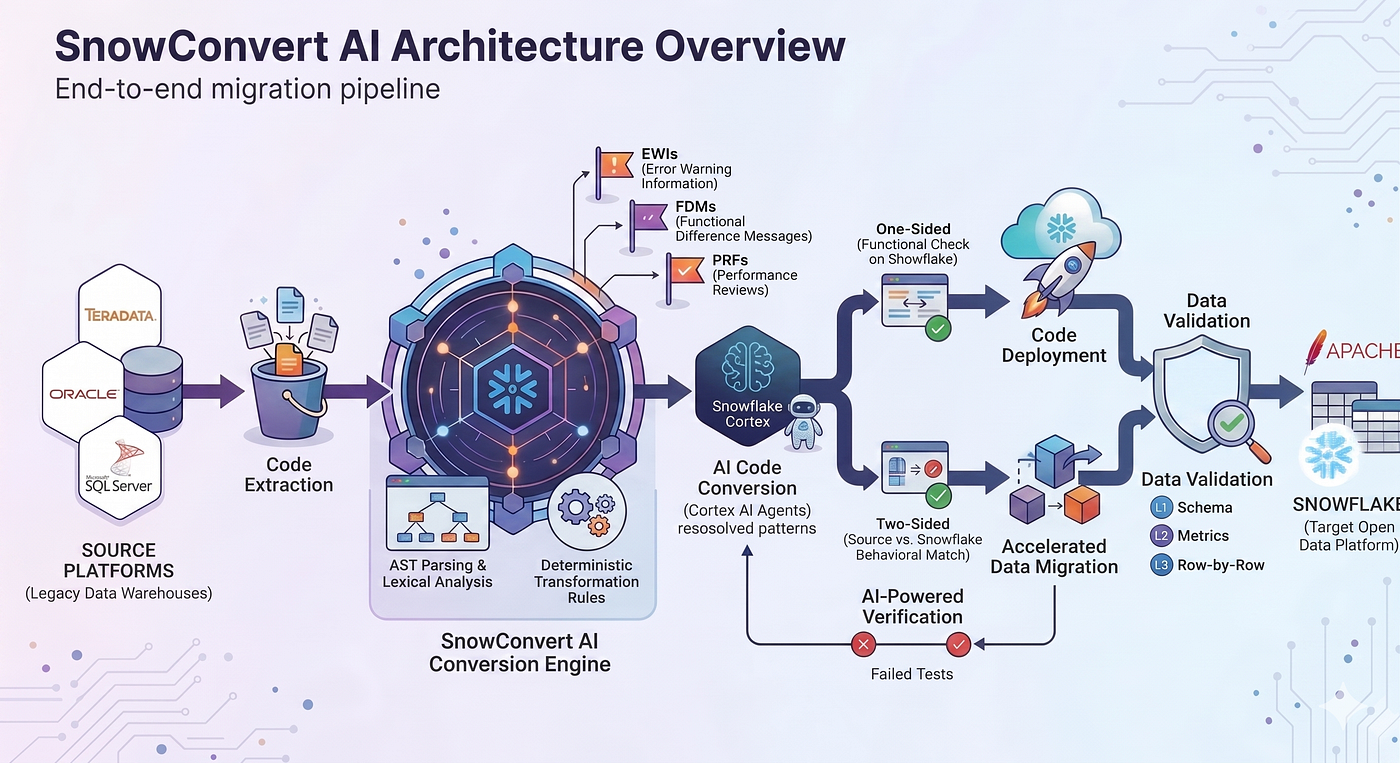
SnowConvert AI is a free migration solution that helps organizations move their complete data ecosystem to Snowflake, covering data warehouses, ETL pipelines, and business intelligence workloads. It is available both as a desktop application with a graphical interface and as a command-line interface (CLI) designed for integration into CI/CD pipelines and automated workflows.
The tool supports automated SQL and procedural code conversion across a broad set of source platforms: Oracle, Microsoft SQL Server, Teradata, Amazon Redshift, Google BigQuery, Greenplum, Sybase IQ, Azure Synapse, IBM Netezza, PostgreSQL, IBM DB2, Spark/Databricks SQL, Hive, and Vertica. Conversions cover everything from tables and views to complex stored procedures, user-defined functions (UDFs), and ETL pipelines.
At its core, SnowConvert AI combines two complementary approaches. The first is a deterministic conversion engine that uses Abstract Syntax Tree (AST) analysis to parse source code, build a semantic model of its structure, and apply rule-based transformations to produce equivalent Snowflake SQL. The second is an AI-powered layer that leverages Snowflake Cortex AI to handle cases the deterministic engine cannot resolve automatically: ambiguous patterns, behavioral differences between platforms, and complex procedural logic that requires contextual reasoning.
This dual approach is reflected in the tool’s messaging system. When the deterministic engine encounters a construct it cannot translate with full confidence, it annotates the output with one of three marker types: EWIs (Error Warning Information) flag syntax or semantic issues that need attention, FDMs (Functional Difference Messages) highlight behavioral differences between the source platform and Snowflake, and PRFs (Performance Reviews) identify patterns that may perform differently on Snowflake. These markers serve as structured inputs for the AI layer, which can then attempt to resolve them automatically.
The Conversion Pipeline: From Extraction to Deployment
The migration workflow in SnowConvert AI follows a well-defined pipeline that moves from code extraction through conversion, validation, deployment, and data migration.
Code Extraction
The process begins by connecting to the source database and extracting the SQL objects: tables, views, stored procedures, functions, triggers, and indexes. For platforms like SQL Server, Teradata, and Redshift, SnowConvert AI can connect directly to the source system to pull metadata and code definitions. The extraction process generates a structured inventory of all objects, their dependencies, and their source code, organized into a project structure that tracks each code unit through the migration lifecycle.
Deterministic Conversion

Once extracted, the source code passes through the deterministic conversion engine. This is where the AST analysis happens: the engine parses each source file into an abstract syntax tree, applies platform-specific transformation rules to rewrite constructs into Snowflake-compatible equivalents, and generates the output code. The transformations handle data type mappings (for example, Teradata BYTEINT to Snowflake NUMBER(38,0)), function translations (such as TD_MONTH_BEGIN to Snowflake date functions), procedural logic restructuring (like Teradata BTEQ scripts to Snowflake SnowScript), and structural changes (such as PARTITION BY RANGE_N to Iceberg partition transforms).
The engine is not a simple find-and-replace system. It works at the semantic level, understanding that a Teradata CASE_N partition over equality checks on a single column can be simplified to a direct PARTITION BY column_name in Snowflake Iceberg syntax, or that a SQL Server SCOPE_IDENTITY() call needs to be transformed into a Snowflake time-travel query. The transformation rules are extensive, the release notes from the past six months alone document hundreds of new rules, improvements, and edge case fixes across all supported platforms.
To illustrate, consider a SQL Server stored procedure that uses SCOPE_IDENTITY() to retrieve the last inserted identity value. SnowConvert AI recognizes this as a platform-specific construct and transforms it into a Snowflake time-travel query using LAST_QUERY_ID():
-- SQL Server source
CREATE PROCEDURE dbo.InsertProduct
  @ProductName NVARCHAR(100),
  @Price DECIMAL(10,2)
AS
BEGIN
  INSERT INTO Products (ProductName, Price)
  VALUES (@ProductName, @Price);

  SELECT SCOPE_IDENTITY() AS NewProductID;
END;

-- Snowflake output (SnowConvert AI)
CREATE OR REPLACE PROCEDURE InsertProduct(
  ProductName VARCHAR(100),
  Price NUMBER(10,2)
)
RETURNS TABLE()
LANGUAGE SQL
AS
BEGIN
  INSERT INTO Products (ProductName, Price)
  VALUES (:ProductName, :Price);

  -- SSC-FDM-TS0056 - SCOPE_IDENTITY IS NOT SUPPORTED IN SNOWFLAKE
  LET query_id := LAST_QUERY_ID();
  RETURN TABLE(SELECT MAX(ProductID) AS NewProductID
    FROM Products AT(STATEMENT => :query_id));
END;
Notice the FDM marker in the output — it flags a behavioral difference between SQL Server’s identity tracking and the Snowflake time-travel approach, alerting the developer that this transformation changes the underlying mechanism even though the result is functionally equivalent.
Where the deterministic engine reaches its limits, it leaves EWI or FDM markers in the output code and moves on. These unresolved markers become the targets for the AI layer.
AI Code Conversion
AI Code Conversion (formerly known as AI Verification) is the agentic component of the pipeline. It was announced in public preview in September 2025 and reached general availability in February 2026. The feature uses Snowflake Cortex AI, specifically the claude-4-sonnet model, to analyze converted code, generate synthetic test data, create and execute test cases, and propose fixes for unresolved EWIs and FDMs.
The process works as follows. For each object selected for AI conversion, the system generates synthetic test data that exercises the code’s logic paths, deploys the converted object to a Snowflake test environment, executes the test cases, and evaluates the results. If the tests pass, the object is marked as Verified by AI. If they fail, the AI agent analyzes the failure, proposes a code fix, applies it, and reruns the tests — repeating this loop until the tests pass or a maximum number of attempts is reached.
This is where the agentic nature of the tool becomes apparent: the AI does not simply suggest fixes for a human to apply. It autonomously iterates through a generate-test-fix-retest cycle, using the test results as feedback to converge on a working solution.
One-Sided vs. Two-Sided Verification

One of the most important distinctions in SnowConvert AI’s validation model is between one-sided and two-sided verification. Understanding this difference is critical for assessing the level of confidence you can have in converted code.
One-sided verification validates converted code by executing it exclusively on Snowflake. The AI generates synthetic test data, runs the converted code, and checks whether it executes without errors and produces logically consistent results. This approach is effective at catching syntax errors, runtime exceptions, and obvious logical problems. It is available across all supported source platforms and has been generally available since the February 2026 update.
Two-sided verification goes further by executing the same tests on both the source system and Snowflake, then comparing the results. This is a fundamentally stronger validation, because it does not just check whether the converted code runs — it checks whether the converted code produces the same output as the original. If discrepancies are detected, the AI agent automatically attempts to repair the converted logic and revalidates. This approach requires a source database instance running in Snowpark Container Services (SPCS), which SnowConvert provisions automatically. As of the February 2026 release, two-sided verification is available for SQL Server, with Teradata support added in version 2.19.0 (April 2026) through dedicated Teradata driver upload for verification. Support for additional platforms is planned.
The configuration for two-sided verification is managed through a YAML specification file that defines the source database connection parameters, the verification mode, the number of tests to generate per object, and optional project-level settings such as custom instructions and file dependency mappings:
mode: "TWO_SIDED"
n_tests: 3
repair: true
num_workers: 2
source_test_database:
  connection_params:
    hostname: <dns_name>
    port: 1433
    username: "user_name"
    password: "password"
  connection_metadata:
    type: "SPCS"
    spcs_service:
      name: "MSSQL_SERVER_DEMO_SERVICE"
      database: "SNOWCONVERT_AI"
      schema: "PUBLIC"
The distinction between these two modes maps directly to the level of risk an organization is willing to accept. One-sided verification is sufficient for objects with straightforward logic where the primary concern is syntactic correctness. Two-sided verification is essential for business-critical procedures where behavioral equivalence must be guaranteed: financial calculations, regulatory reporting logic, or any code path where a subtle difference in rounding, null handling, or type casting could have material consequences.
Direct Conversion to Apache Iceberg Tables

The most strategically significant feature in the February 2026 release is the ability to convert source platform tables directly into Snowflake-managed Apache Iceberg tables. This is enabled through a conversion setting called Table Translation, currently available for Teradata, with Redshift support added in version 2.18.0 (March 2026).
Apache Iceberg is an open table format designed for large-scale analytics on cloud object storage. When SnowConvert AI targets Iceberg, the output creates tables that store data in open Parquet format on the customer’s own cloud object storage, AWS S3, Azure Data Lake Storage, or Google Cloud Storage, while Snowflake manages the Iceberg catalog (transaction management, schema evolution, and query optimization). The converted tables include the CATALOG = ‘SNOWFLAKE’ declaration, confirming that Snowflake handles the metadata layer.
The transformation is not trivial. Iceberg tables have different constraints than standard Snowflake tables, and SnowConvert AI handles several adaptation layers during conversion. Data types that are not supported by Iceberg (like VARIANT or GEOGRAPHY) are flagged with an EWI. Character types like CHAR(n) are converted to VARCHAR since Iceberg does not support fixed-length strings. Numeric types without precision (like plain INT or BIGINT) are converted to NUMBER(38,0), and FLOAT types become DOUBLE. Timestamp types are normalized to precision 6 where they differ, since Iceberg requires consistent precision. Here is a concrete example showing how unsupported data types are handled:
--Teradata source
CREATE TABLE sensor_data (
  sensor_id INTEGER,
  reading_time TIMESTAMP,
  metadata VARCHAR(500),
  geo_location ST_GEOMETRY,
  payload JSON
);

--Snowflake Iceberg output
CREATE OR REPLACE ICEBERG TABLE sensor_data (
  sensor_id NUMBER(38,0),
  reading_time TIMESTAMP(6),
  metadata VARCHAR(500),
  --SSC-EWI-0073 - GEOGRAPHY/GEOMETRY DATA TYPE NOT SUPPORTED IN ICEBERG
  geo_location VARCHAR,
  payload VARCHAR
)
CATALOG = 'SNOWFLAKE';
The EWI marker on geo_location alerts the developer that the spatial data type was converted to a fallback VARCHAR, since Iceberg does not support Snowflake’s native GEOGRAPHY or GEOMETRY types.
Partition transformations are particularly interesting. Teradata’s PARTITION BY RANGE_N with numeric ranges is converted to Iceberg BUCKET partitions, calculating the bucket count from the range boundaries. Date-based RANGE_N partitions with INTERVAL ‘1’ MONTH become Iceberg’s native MONTH() partition transform. Teradata’s CASE_N partitions over equality checks on a single column are simplified to a direct PARTITION BY column_name. Here is a concrete example:
--Teradata source
CREATE TABLE sales (
  customerName VARCHAR(30),
  purchaseDate DATE
)
PARTITION BY RANGE_N(
  purchaseDate BETWEEN DATE '2000–01–01'
  AND '2100–12–31' EACH INTERVAL '1' MONTH
);

--Snowflake Iceberg output
CREATE OR REPLACE ICEBERG TABLE sales (
  customerName VARCHAR,
  purchaseDate DATE
)
PARTITION BY (MONTH(purchaseDate))
CATALOG = 'SNOWFLAKE';
There is also a case sensitivity complication. Teradata’s NOT CASESPECIFIC column attribute would normally be handled through Snowflake’s COLLATE option, but Iceberg tables do not support column-level collation. SnowConvert AI handles this by enforcing query-level case insensitivity using UPPER(RTRIM(…)) wrapping on comparisons, annotated with an FDM marker (SSC-FDM-TD0039) to alert the developer:
--Teradata source
SELECT * FROM users
WHERE username (NOT CASESPECIFIC) = 'Admin';

--Snowflake Iceberg output
--SSC-FDM-TD0039 - CASESPECIFIC HANDLED THROUGH UPPER(RTRIM()) WRAPPING
SELECT * FROM users
WHERE UPPER(RTRIM(username)) = UPPER(RTRIM('Admin'));
Temporary tables are an exception: volatile and temporary tables remain as standard Snowflake temporary tables, since Iceberg does not support the temporary table concept.
The Migration Assistant: AI-Powered Post-Conversion Support
For the cases where automated conversion and AI verification still leave unresolved issues, Snowflake provides the SnowConvert AI Migration Assistant, an AI-powered tool integrated into the Snowflake Visual Studio Code extension. The assistant is designed to help developers resolve EWIs, FDMs, and PRFs that remain after the automated pipeline has completed.
The workflow is straightforward. After running SnowConvert AI, you open the converted code in VS Code with the Snowflake extension enabled. A panel called SnowConvert AI Issues appears, listing all remaining migration issues grouped by file. Clicking on an issue navigates to the exact line of code. From there, you can request AI assistance by clicking the sparkle icon next to the issue or the CodeLens annotation above the affected code.
The assistant uses the Snowflake REST API to query Cortex AI, passing both the migration issue marker and the surrounding code context. The response includes an explanation of the root cause and a suggested fix. You can then interact with the assistant through a chat interface to refine the suggestion, ask follow-up questions about SQL semantics, or request specific code modifications.
The Migration Assistant is currently optimized for SQL Server as a source platform, with plans to expand optimization to other supported databases. It requires the Snowflake VS Code extension version GA 1.14.0 or later and access to at least one supported Cortex AI model.
The CLI: Automation and Scale
While the desktop application provides a guided, visual experience for migration workflows, the SnowConvert AI CLI is designed for teams that need to integrate migrations into automated pipelines. The CLI supports the full migration lifecycle from the command line: code extraction, conversion, AI-powered verification, deployment, data migration, and validation.
This CLI-first approach is particularly relevant for organizations running large-scale migrations with hundreds or thousands of objects, where manual interaction with a GUI would be impractical. It is also essential for professional services teams and partners who need to standardize migration workflows across multiple clients. The CLI supports headless execution, non-interactive runs, and configuration through TOML files and YAML specifications — making it suitable for integration with CI/CD tools, orchestration frameworks, and agentic tooling.
Connection credentials are stored in a connections.toml file, and the CLI reads project-level configuration from a structured TOML file as well. A typical project invocation follows a sequential pattern of commands:
# Extract code from source database
scai extract - project ./my-migration

# Run deterministic conversion
scai convert - project ./my-migration

# Run AI Code Conversion on unresolved objects
scai ai-convert - project ./my-migration - spec ./ai-spec.yaml

# Deploy converted objects to Snowflake
scai deploy - project ./my-migration

# Run data migration
scai data-migrate - project ./my-migration

# Validate migrated data
scai data-validate - project ./my-migration - config ./validation.yaml
Each command operates on the same project directory, and the CLI tracks the state of each code unit through the migration lifecycle.
Data Validation Framework

Beyond code conversion, SnowConvert AI includes a multi-level data validation framework that verifies the integrity of migrated data. The framework operates at three levels of fidelity, each providing progressively stronger guarantees. Schema validation (L1) checks structural consistency: column names, data type compatibility, column order, and nullability constraints. Metrics validation (L2) verifies data completeness at scale through row counts and column-level aggregates like min, max, sum, average, null counts, and distinct counts. Row-by-row validation (L3) provides the highest fidelity through MD5 hash comparison per row, detecting missing or mismatched rows through index-based matching.
The framework also includes helper commands for working with large datasets: an auto-generated YAML configuration that discovers tables directly from the source database, a row partitioning helper that splits large tables into manageable chunks for incremental validation, and a column partitioning helper that breaks wide tables into column-based partitions to reduce resource usage. These capabilities are currently available for SQL Server and Redshift migrations.
Billing and Cost Considerations
AI Code Conversion consumes Snowflake credits based on the compute resources it uses. The costs come from several sources: Cortex AI SQL for the AI agent’s inference calls, warehouse compute for executing test queries, Snowflake stages for storing input/output artifacts, and Snowpark Container Services (SPCS) for running source database instances during two-sided verification. Compute pools for AI code conversion are identified by names starting with AI_MIGRATOR.
SnowConvert AI provides an estimated cost summary in the Selection Summary panel before you initiate AI conversion, including the number of objects affected and the estimated credit consumption. The tool itself is free: the costs are limited to the Snowflake compute resources consumed during AI-powered verification and testing.
Limitations
As of the April 2026 release (version 2.20.0), there are some limitations to keep in mind:
-
AI Code Conversion is optimized for SQL Server migrations. While it works across supported platforms, the depth of coverage varies.
-
Two-sided verification requires a source database instance in SPCS. It is currently available for SQL Server and Teradata (driver support added in v2.19.0).
-
Iceberg table conversion is available for Teradata and Redshift. Unsupported data types (VARIANT, GEOGRAPHY) are flagged, and unsupported PARTITION BY patterns are commented out with a PRF marker.
-
Migration Assistant is optimized for SQL Server sources, with broader optimization planned for future releases.
-
All AI-generated fixes must be reviewed by the user before deployment. Objects carry a trust hierarchy: Verified by AI means the AI validated the code, while Verified by User means a human explicitly approved it.
Conclusion
SnowConvert AI represents a significant shift in how legacy data warehouse migrations are approached. Rather than treating migration as a manual rewriting exercise, it frames it as an automated, iterative pipeline where deterministic rules handle the bulk of transformations, AI agents resolve the edge cases, and synthetic test validation provides confidence before deployment.
The February 2026 update brought this vision into sharper focus. General availability of AI Code Conversion means the agentic loop (generate tests, execute, fix, retest) is now production-ready. Two-sided verification provides the strongest possible guarantee that converted code behaves identically to the original. And the Iceberg table target addresses a growing enterprise demand: the ability to migrate to a modern cloud platform without locking data into a proprietary format.
For organizations still running Teradata, Oracle, or SQL Server workloads on premise, the combination of automated AST-based conversion, AI-powered validation, and open-format output removes several of the traditional barriers to modernization. The migration is still a significant undertaking: no tool eliminates the need for architectural planning, stakeholder alignment, and careful testing. But the amount of manual code work that SnowConvert AI can absorb has expanded substantially, and the validation capabilities provide a level of confidence that was previously only achievable through months of manual regression testing.
As the tool continues to expand two-sided verification to more platforms and extends Iceberg support beyond Teradata and Redshift, the gap between legacy and modern data infrastructure will continue to narrow.
References
- Snowflake Blog, “What’s New in SnowConvert AI: February 2026”, Feb 9, 2026.
https://www.snowflake.com/en/blog/snowconvert-ai-new-features-feb-2026/
- Snowflake Documentation, “SnowConvert AI — Recent Release Notes”.
https://docs.snowflake.com/en/migrations/snowconvert-docs/general/release-notes/release-notes/README
- Snowflake Documentation, “Snowflake SnowConvert AI Documentation (Overview)”.
https://docs.snowflake.cn/en/migrations/snowconvert-docs/overview
- Snowflake Documentation, “AI Code Conversion”.
https://docs.snowflake.com/en/migrations/snowconvert-docs/snowconvert-ai-verification
- Snowflake Documentation, “AI Code Conversion with Source-System Verification”.
- Snowflake Documentation, “Teradata — Iceberg Tables Transformations”.
- Snowflake Documentation, “SnowConvert AI — Migration Assistant”.
https://docs.snowflake.cn/en/migrations/snowconvert-docs/migration-assistant/README
- Snowflake Documentation, “Migration Assistant — Getting Started”.
https://docs.snowflake.cn/en/migrations/snowconvert-docs/migration-assistant/getting-started
메타데이터
- post_id
- b53e27cb38a5
- slug
- snowconvert-ai-automating-legacy-data-warehouse-migration-to-snowflake-b53e27cb38a5
- url
- https://medium.com/data-reply-it-datatech/snowconvert-ai-automating-legacy-data-warehouse-migration-to-snowflake-b53e27cb38a5
- canonical_url
- https://medium.com/data-reply-it-datatech/snowconvert-ai-automating-legacy-data-warehouse-migration-to-snowflake-b53e27cb38a5
- author_url
- https://medium.com/@brcmat
- status
- ok
- fetched_at
- 2026-06-15 20:49:13