Automating Feature Engineering Workflows with Amazon Managed Workflows for Apache Airflow (MWAA)
Challenges with Feature Engineering
Automating Feature Engineering Workflows with Amazon Managed Workflows for Apache Airflow (MWAA)
Challenges with Feature Engineering
Feature engineering, the process of transforming raw data into meaningful, predictive features, is foundational for enhancing the accuracy and robustness of machine learning models. By crafting features that capture essential patterns, data scientists help algorithms better “understand” the structure and nuances within datasets. However, despite its importance, feature engineering comes with several inherent challenges that can slow down and complicate machine learning workflows.
Here are some of the primary challenges that underscore the need for automating feature engineering:
- Time-Consuming and Repetitive: Creating, validating, and refining features is often a manual process, and when data updates frequently, this cycle must be repeated constantly. This repetition can lead to significant time delays, especially when data teams have to reprocess features on a daily or hourly basis.
- Inconsistent Feature Creation: When feature engineering relies on manual processes, there’s a risk of inconsistency in feature creation and validation. Variability in transformations can lead to less reliable features and, consequently, models that are less robust and predictable.
- Limited Scalability: Scaling feature engineering becomes challenging as data volume grows or when real-time processing is required. Without automation, it’s nearly impossible to scale workflows efficiently to handle large or continuous data streams.
- Lack of Feature Sharing and Reusability: Feature engineering often involves creating valuable transformations that could benefit multiple models or teams. However, manually created features are often siloed, leading to duplication of effort and inconsistency across different models or projects. Automating feature engineering allows for a centralized repository of features, promoting feature sharing and reuse across teams and projects, which is especially valuable in large organizations.
- Real-Time Data Demands: In modern machine learning applications — such as fraud detection, recommendation systems, or personalized experiences — real-time or near-real-time data is essential. Manually engineering features in such dynamic environments is impractical, as it introduces delays that can make models less responsive to current data trends.
- Resource Allocation: With manual workflows, data scientists and engineers are frequently tied up in repetitive feature creation and validation tasks, leaving less time for higher-impact activities, like model fine-tuning, experimentation, or innovation.
Automating feature engineering directly addresses these issues, transforming the process into a streamlined, scalable, and consistent workflow. This enables organizations to not only save time and reduce manual effort but also to build more reliable, reusable, and shareable features that enhance collaboration and accelerate machine learning development.
Overview of Amazon Managed Workflows for Apache Airflow (MWAA)
Amazon Managed Workflows for Apache Airflow (MWAA) is a managed orchestration service for Apache Airflow, a popular open-source tool for creating, scheduling, and monitoring workflows. MWAA allows users to deploy and scale Airflow environments without the need to manage infrastructure, making it easier to build and automate complex workflows on AWS.
In an MWAA environment, users can define workflows as Directed Acyclic Graphs (DAGs) to automate various tasks, such as data extraction, transformation, and model training. With pre-built integrations for services like S3, Glue, and SageMaker, MWAA is particularly useful for automating data and machine learning workflows.
For users looking to reduce infrastructure management and focus on their core workflows, MWAA offers a robust and scalable solution that integrates well within the AWS ecosystem. You can learn more about Amazon MWAA here.
Solution Architecture and Workflow Design
Core Components
Define the Workflow as a DAG:
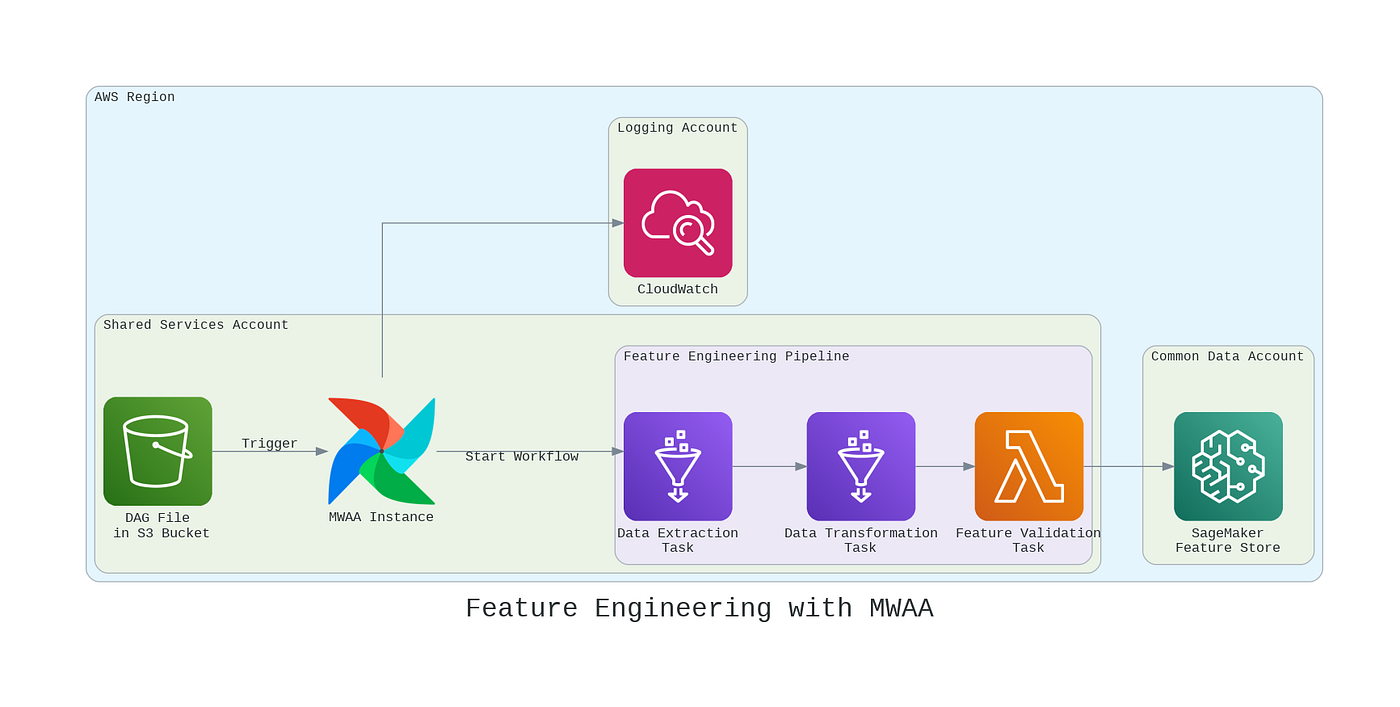
- Use MWAA to design the feature engineering pipeline as a Directed Acyclic Graph (DAG), where each step in the pipeline (data extraction, transformation, validation, and storage) is defined as a task.
Automated Workflow Triggering:
- Place the feature engineering DAG file in an S3 bucket. This triggers MWAA to execute the workflow each time the DAG file is updated. Uploading a modified DAG file to the S3 bucket will automatically retrigger the workflow.
Observability:
- Integrate MWAA with Amazon CloudWatch for comprehensive logging and monitoring. Configure alerts to track workflow performance and receive notifications of any task failures, enabling fast troubleshooting and optimization.
DAG Structure and Tasks
The DAG file will include distinct tasks corresponding to the feature engineering steps:
- Data Extraction Task: Define a task to extract data from sources like Amazon S3, RDS, or DynamoDB, utilizing Airflow’s operators, such as
S3FileTransformOperator. - Data Transformation and Feature Engineering Task: Configure tasks for data cleaning, preprocessing, and feature engineering. AWS Glue jobs or custom Python scripts can handle complex transformations, triggered through Airflow’s
GlueJobOperatororPythonOperator. - Feature Validation and Quality Checks Task: Add validation steps to maintain data quality. Use Lambda functions or custom Python scripts to check feature distributions, validate data types, handle missing values, and ensure overall data quality.
- Feature Storage Task: Store the finalized features in Amazon SageMaker Feature Store, making them accessible for model training and reusable across different pipelines.
Workflow Design Approaches:
- One DAG, Multiple Tasks: This approach combines all tasks within a single DAG file, managing the entire workflow from data extraction to storage in a single pipeline.
- Multiple DAGs, Separate Tasks: In this approach, each task has its own dedicated DAG (e.g., one DAG for data extraction, another for transformation). This can simplify workflows when tasks are complex or require independent scheduling.
The choice between these approaches depends on task complexity and desired flexibility in managing the pipeline.
Code Walkthrough: Generating an Airflow DAG for Feature Engineering
from airflow import DAG
from airflow.operators.dummy_operator import DummyOperator
from airflow.providers.amazon.aws.operators.glue import AwsGlueJobOperator
from airflow.providers.amazon.aws.operators.lambda_function import AwsLambdaInvokeFunctionOperator
from airflow.providers.amazon.aws.hooks.sagemaker import SageMakerHook
from datetime import datetime

# Define the DAG
default_args = {
    'owner': 'data_engineer',
    'depends_on_past': False,
    'email_on_failure': False,
    'email_on_retry': False,
    'retries': 1,
}

dag = DAG(
    'feature_engineering_pipeline',
    default_args=default_args,
    description='A feature engineering pipeline using Amazon MWAA triggered on S3 change',
    start_date=datetime(2023, 10, 1),
    schedule_interval=None,  # Triggered on change, no daily schedule
    catchup=False,
)

# Define the tasks

# 1. Dummy Start Task
start = DummyOperator(
    task_id='start',
    dag=dag,
)

# 2. Data Extraction using AWS Glue (Extracts data from S3 to Glue Data Catalog)
data_extraction = AwsGlueJobOperator(
    task_id='data_extraction',
    job_name='glue_data_extraction_job',  # Name of the Glue job in AWS
    iam_role_name='GlueExecutionRole',    # IAM role with permissions for Glue
    script_location='s3://path/to/glue/extraction_script.py',  # S3 path to the Glue script
    dag=dag,
)

# 3. Data Transformation using AWS Glue (Transforms raw data for feature engineering)
data_transformation = AwsGlueJobOperator(
    task_id='data_transformation',
    job_name='glue_data_transformation_job',  # Name of the Glue job for transformation
    iam_role_name='GlueExecutionRole',
    script_location='s3://path/to/glue/transformation_script.py',  # S3 path to transformation script
    dag=dag,
)

# 4. Feature Validation using AWS Lambda
feature_validation = AwsLambdaInvokeFunctionOperator(
    task_id='feature_validation',
    function_name='feature_validation_lambda',  # Lambda function name in AWS
    payload={'key': 'value'},  # Payload if needed for validation
    aws_conn_id='aws_default',
    log_type='Tail',
    dag=dag,
)

# 5. Store Engineered Features in SageMaker Feature Store
def store_features():
    # Initialize SageMaker hook to interact with Feature Store
    sagemaker_hook = SageMakerHook(aws_conn_id='aws_default')

    # Sample payload to push data to Feature Store
    record = {
        "FeatureGroupName": "my_feature_group",
        "Record": [
            {"FeatureName": "feature1", "ValueAsString": "value1"},
            {"FeatureName": "feature2", "ValueAsString": "value2"},
            # Add more features as needed
        ]
    }

    # Use SageMaker Feature Store's PutRecord to add features
    sagemaker_hook.get_conn().put_record(**record)

store_features_task = PythonOperator(
    task_id='store_features',
    python_callable=store_features,
    dag=dag,
)

# 6. Dummy End Task
end = DummyOperator(
    task_id='end',
    dag=dag,
)

# Set up dependencies
start >> data_extraction >> data_transformation >> feature_validation >> store_features_task >> end
Explanation of the Code
DAG Definition:
- The
schedule_intervalis set toNonebecause this DAG will be triggered based on changes to the DAG file in S3, rather than a daily schedule. catchup=Falseensures that backlogs of unexecuted DAG runs aren’t executed in the case of missed schedules.
Start and End Dummy Tasks:
startandendareDummyOperatortasks that structure the workflow’s starting and ending points, improving readability.
Data Extraction Using AWS Glue:
data_extractionuses theAwsGlueJobOperatorto trigger a Glue job (glue_data_extraction_job) that extracts data from an S3 bucket and registers it in the Glue Data Catalog.- The Glue job script path (
s3://path/to/glue/extraction_script.py) contains the data extraction logic and is located in S3.
Data Transformation Using AWS Glue:
data_transformationis also managed byAwsGlueJobOperator, triggering another Glue job (glue_data_transformation_job) responsible for transforming the raw data and creating new features.- This job reads data from the Glue Data Catalog and outputs the transformed data, ready for validation.
Feature Validation Using AWS Lambda:
feature_validationusesAwsLambdaInvokeFunctionOperatorto trigger an AWS Lambda function (feature_validation_lambda), which validates the processed features by checking aspects like data types, null values, and distribution.
Storing Features in SageMaker Feature Store:
- The
store_features()function uses theSageMakerHookto store validated features in SageMaker Feature Store, ensuring accessibility for downstream ML tasks. - The
put_recordmethod of SageMaker’s Feature Store is used to write the features, withFeatureGroupNamespecified to identify where the features are stored.
Task Dependencies:
- Tasks are structured in a linear dependency sequence, ensuring data flows from extraction to transformation, validation, and finally, feature storage. Each step completes sequentially, maintaining data integrity.
This DAG offers an automated, structured workflow for feature engineering on AWS, leveraging Glue for ETL, Lambda for validation, and SageMaker Feature Store for feature storage.
Choosing Between MWAA and SageMaker Data Wrangler for Feature Engineering Automation
Both MWAA and SageMaker Data Wrangler offer powerful tools for automating feature engineering workflows on AWS, but they serve different purposes and excel in distinct scenarios. Here’s a comparison to help determine when to use each:
Workflow Complexity & Integration Needs
- MWAA: Suited for complex workflows integrating multiple AWS services (e.g., S3, Glue, Athena) and requiring modular control.
- Data Wrangler: Ideal for simpler, end-to-end data preparation workflows within SageMaker, best for medium-sized datasets.
User Accessibility
- MWAA: Requires Apache Airflow and Python knowledge, suited for technical users needing custom DAG-based workflows.
- Data Wrangler: Drag-and-drop interface, enabling non-technical users to conduct data transformations with minimal coding.
Processing Type
- MWAA: Designed for real-time and near-real-time processing, suitable for streaming or frequently updated data.
- Data Wrangler: Geared toward batch processing, ideal for periodic updates or static datasets.
Feature Reusability & Storage
- MWAA: Supports centralized feature storage for reuse across models and teams, integrates with SageMaker Feature Store.
- Data Wrangler: Limited to feature storage within SageMaker, suitable for smaller-scale feature sharing.
Summary:
- Use MWAA for complex, real-time workflows needing feature sharing across teams and high scalability.
- Use Data Wrangler for streamlined, batch-based feature engineering in a visual environment for SageMaker-only applications.
Enhancements and Optimization Tips
- Use Open Source DAG Factory for Dynamic DAG Generation: Instead of manually creating each DAG, consider using an open-source DAG Factory (such as dag-factory) to dynamically generate DAGs based on YAML configuration files. This simplifies DAG management and allows you to easily adjust parameters or create multiple DAGs for different feature engineering workflows without duplicating code.
- Implement Data Quality Checks with Data Quality Definition Language (DQDL): Integrate DQDL into the workflow to enforce data quality standards at every step. DQDL provides a standardized way to define quality checks, making it easier to catch issues such as missing values, outliers, or incorrect data types before they propagate through the pipeline.
- Optimize Glue Jobs with Partitioned Data: To reduce processing time in AWS Glue jobs, partition your data in S3 by relevant fields (e.g., date or region) before extraction. Partitioned data helps Glue jobs read only the necessary data partitions, improving both speed and cost-efficiency during data processing and transformation.
- Leverage Spot Instances for Cost Savings in Glue Jobs: Configure Glue jobs to use Spot Instances for tasks that are not time-sensitive. Spot Instances provide substantial cost savings, allowing you to optimize expenses for large-scale feature engineering pipelines while maintaining flexibility.
- Automate Feature Monitoring with CloudWatch Alarms: Set up CloudWatch Alarms to track feature metrics like feature drift or data quality degradation. Automating these alerts enables proactive monitoring of your feature engineering pipeline, ensuring feature consistency and high-quality data for downstream models.
Conclusion
Automating feature engineering workflows with Amazon Managed Workflows for Apache Airflow (MWAA) simplifies complex data tasks, making pipelines more efficient and consistent. By leveraging AWS tools like Glue, Lambda, and SageMaker Feature Store, teams can speed up feature processing and ensure high-quality data for models.
This same approach can be extended beyond feature engineering to automate other workflows, like model engineering, bringing even more flexibility and scalability to your data operations.
Useful Links
메타데이터
- post_id
- b557aa46b1f5
- slug
- automating-feature-engineering-workflows-with-amazon-managed-workflows-for-apache-airflow-mwaa-b557aa46b1f5
- url
- https://medium.com/@transformationalleader-surjeet/automating-feature-engineering-workflows-with-amazon-managed-workflows-for-apache-airflow-mwaa-b557aa46b1f5
- canonical_url
- https://medium.com/@transformationalleader-surjeet/automating-feature-engineering-workflows-with-amazon-managed-workflows-for-apache-airflow-mwaa-b557aa46b1f5
- author_url
- https://medium.com/@transformationalleader-surjeet
- status
- ok
- fetched_at
- 2026-07-07 08:01:35



