Production-Ready CI/CD: Deploying React application to Google Kubernetes Engine (GKE)
A complete guide to automating your frontend delivery using GitHub Actions, Artifact Registry, and GitOps with ArgoCD.
Production-Ready CI/CD: Deploying React application to Google Kubernetes Engine (GKE)
A complete guide to automating your frontend delivery using GitHub Actions, Artifact Registry, and GitOps with ArgoCD.
💻 Important Note for Readers: The terminal commands, setup steps, and package managers (such as Homebrew) used throughout this tutorial are explicitly tailored for macOS. If you are running Windows or Linux, you will need to adjust your local environment setup and CLI installations accordingly.
What you will do
- Prerequisites
- Create a GKE cluster and connect
kubectl. - Install AgroCD
- Create a React application
- Add CI and CD manifests
- Add GitHub Secrets
- Configure Argo CD.
- Create GitHub Actions secrets for deployment.
- Deploy the app with GitHub Actions.
- Validate the deployment and test the app URL.
- Clean up resources when finished.
- GitHub repo for code
1. Prerequisites
You need the following installed on your computer:
gcloudkubectldockernodeandnpm- access to your Google Cloud project
- a GitHub repository for this project
If you do not already have the required tools installed, follow these steps.
Verify installed tools
Check that the required commands are already available before installing:
node --version
npm --version
docker version
kubectl version --client
gcloud version
If any command fails, install the missing tool using the instructions below.
Install Node.js and npm
Install Node.js and npm using the recommended installer for your platform from: https://nodejs.org/
For macOS with Homebrew:
brew install nodeVerify installation:
node --version
npm --version
Install Docker
Download Docker Desktop for your platform from: https://www.docker.com/get-started
After installation, verify Docker is running:
docker versionInstall kubectl
Follow the instructions at: https://kubernetes.io/docs/tasks/tools/
For macOS with Homebrew:
brew install kubectlVerify installation:
kubectl version --clientInstall Google Cloud SDK and Confirm the SDK is working
- Download and install the SDK for your platform from: https://cloud.google.com/sdk/docs/install
- Initialize the SDK:
gcloud init- Log in to your Google account:
gcloud auth login- Confirm SDK is working
gcloud auth listgcloud config listCreate a Google Cloud project
If you do not already have a project, create one now:
gcloud projects create gke-githubactions-argocd-12345 --name="GKE GitHubActions ArgoCD"Enable billing and link it to your project using the Cloud Console if needed.
Set the active project:
gcloud config set project gke-githubactions-argocd-12345Create a GCP service account and key
Create a service account for GitHub Actions deployment:
gcloud iam service-accounts create github-actions-deployer \
  --description="GitHub Actions deployer account" \
  --display-name="GitHub Actions Deployer"
Grant the service account the required permissions:
gcloud projects add-iam-policy-binding gke-githubactions-argocd-12345 \
  --member="serviceAccount:github-actions-deployer@gke-githubactions-argocd-12345.iam.gserviceaccount.com" \
  --role="roles/container.admin"
gcloud projects add-iam-policy-binding gke-githubactions-argocd-12345 \
--member="serviceAccount:github-actions-deployer@gke-githubactions-argocd-12345.iam.gserviceaccount.com" \
--role="roles/artifactregistry.writer"gcloud projects add-iam-policy-binding gke-githubactions-argocd-12345 \
--member="serviceAccount:github-actions-deployer@gke-githubactions-argocd-12345.iam.gserviceaccount.com" \
--role="roles/iam.serviceAccountUser"If you need to use Artifact Registry with storage operations, also grant:
gcloud projects add-iam-policy-binding gke-githubactions-argocd-12345 \
  --member="serviceAccount:github-actions-deployer@gke-githubactions-argocd-12345.iam.gserviceaccount.com" \
  --role="roles/storage.admin"
Create a new JSON key for the service account and save it locally:
gcloud iam service-accounts keys create ./gcp-sa-key.json \
  --iam-account=github-actions-deployer@gke-githubactions-argocd-12345.iam.gserviceaccount.com
Add the contents of gcp-sa-key.json to the GitHub secret GCP_SA_KEY.
Enable the required APIs:
gcloud services enable container.googleapis.com artifactregistry.googleapis.comgcloud services enable: This is the core Google Cloud CLI command used to activate APIs within your currently selected project.
container.googleapis.com: This is the internal name for the Google Kubernetes Engine (GKE) API. Enabling this allows you to create, manage, and scale Kubernetes clusters.
artifactregistry.googleapis.com: This is the internal name for Artifact Registry. Enabling this allows you to create secure, private repositories to store and manage your Docker container images, Maven/npm packages, or Helm charts.
gcloud artifacts repositories create githubactions-argocd-poc-repo \ — repository-format=docker \ — location=us-central1 \ — description=”Docker repository for CI/CD with GitHub Actions and ArgoCD”
2. Create the GKE cluster
Run these commands in your terminal:
gcloud container clusters create gcp-gke-githubactions-argocd-cluster \
  --zone us-central1-a \
  --num-nodes=1 \
  --machine-type=e2-medium \
  --disk-size=30 \
  --disk-type=pd-ssd
Then connect kubectl to the cluster, this adds kubeconfig entry on your local
gcloud container clusters get-credentials gcp-gke-githubactions-argocd-cluster \
  --zone us-central1-a \
  --project gke-githubactions-argocd-12345
kubectl config current-contextScreenshot: GKE cluster creation and kubectl context setup.
3. Install Argo CD
Install Argo CD into the argocd namespace:
kubectl create namespace argocd
kubectl apply -n argocd -f https://raw.githubusercontent.com/argoproj/argo-cd/stable/manifests/install.yaml
Wait for Argo CD pods to start:
kubectl get pods -n argocdExpose the Argo CD server with a LoadBalancer so it is reachable from GitHub Actions:
kubectl patch svc argocd-server -n argocd -p '{"spec": {"type": "LoadBalancer"}}'Get the external IP for Argo CD:
kubectl get svc -n argocd argocd-serverGet the default admin password:
kubectl -n argocd get secret argocd-initial-admin-secret -o jsonpath="{.data.password}" | base64 -dScreenshot: Argo CD LoadBalancer external IP and initial admin login.
Open the Argo CD UI using the external IP and log in with:
- Username:
admin - Password: the value from the previous command
4. Create React application
If you do not already have a React app in this repository, create one with Vite:
npm create vite@latest . -- --template react
npm install
If the repository is not yet a Git repo, initialize it:
git init
git add .
git commit -m "Initial React app"
Add your GitHub repository as the remote and push:
git remote add origin https://github.com/<your-username>/<your-repo>.git
git branch -M main
git push -u origin main
If your repository already exists locally, simply commit and push your changes:
git add .
git commit -m "Add React app"
git push origin main
5. Add CI and CD manifests
Add k8s/deployment.yaml file as below, it is for creating k8s deployment and service resources
apiVersion: apps/v1
kind: Deployment
metadata:
  name: reactapp-gcp-gke-githubactions-cicd-deployment
  labels:
    app: reactapp-gcp-gke-githubactions-cicd
spec:
  replicas: 2
  strategy:
    type: RollingUpdate
    rollingUpdate:
      maxSurge: 1
      maxUnavailable: 0
  minReadySeconds: 5
  selector:
    matchLabels:
      app: reactapp-gcp-gke-githubactions-cicd
  template:
    metadata:
      labels:
        app: reactapp-gcp-gke-githubactions-cicd
    spec:
      containers:
      - name: react-app
        image: us-central1-docker.pkg.dev/gke-githubactions-argocd-12345/githubactions-argocd-poc-repo/gcp-gke-githubactions-agrocd-reactapp:3211f151febb44683c513fc0f5c3dc411ae55b6c
        ports:
        - containerPort: 80
        readinessProbe:
          httpGet:
            path: /
            port: 80
          initialDelaySeconds: 5
          periodSeconds: 10
          failureThreshold: 3
        livenessProbe:
          httpGet:
            path: /
            port: 80
          initialDelaySeconds: 15
          periodSeconds: 20
          failureThreshold: 3
---
apiVersion: v1
kind: Service
metadata:
  name: reactapp-gcp-gke-githubactions-cicd-service
spec:
  type: LoadBalancer
  selector:
    app: reactapp-gcp-gke-githubactions-cicd
  ports:
    - protocol: TCP
      port: 80
      targetPort: 80
Add .github/workflows/ci.yaml for continuous integration with GitHub Actions
name: CI/CD Pipeline
on:
  push:
    branches: [main]
  pull_request:
    branches: [main]
permissions:
  contents: write
env:
  GCP_PROJECT: gke-githubactions-argocd-12345
  GCP_REGION: us-central1
  GCP_ZONE: us-central1-a
  CLUSTER_NAME: gcp-gke-githubactions-argocd-cluster
  IMAGE_REPOSITORY: githubactions-argocd-poc-repo
  IMAGE_NAME: gcp-gke-githubactions-agrocd-reactapp
  DEPLOYMENT_MANIFEST: k8s/deployment.yaml
  ARGOCD_APP_NAME: reactapp-gcp-gke-githubactions-cicd
jobs:
  build-and-deploy:
    runs-on: ubuntu-latest
    steps:
      - name: Checkout repository
        uses: actions/checkout@v4
        with:
          fetch-depth: 0
      - name: Set up Node.js
        uses: actions/setup-node@v4
        with:
          node-version: '20'
      - name: Install dependencies
        run: npm ci
      - name: Build React app
        run: npm run build
      - name: Authenticate to Google Cloud
        uses: google-github-actions/auth@v1
        with:
          credentials_json: '${{ secrets.GCP_SA_KEY }}'
      - name: Configure Docker for Artifact Registry
        run: |
          gcloud auth configure-docker us-central1-docker.pkg.dev --quiet
      - name: Build and push Docker image
        id: build-image
        run: |
          IMAGE=us-central1-docker.pkg.dev/${GCP_PROJECT}/${IMAGE_REPOSITORY}/${IMAGE_NAME}:${GITHUB_SHA}
          echo "IMAGE=${IMAGE}" >> $GITHUB_ENV
          docker build -t "$IMAGE" .
          docker push "$IMAGE"
      - name: Update deployment manifest image
        run: |
          IMAGE=${{ env.IMAGE }}
          python - <<'PY'
          from pathlib import Path
          import re
          path = Path('${{ env.DEPLOYMENT_MANIFEST }}')
          text = path.read_text()
          pattern = r'^(\s*image:\s*).*$'
          new_text = re.sub(pattern, r'\1' + '${{ env.IMAGE }}', text, flags=re.MULTILINE)
          path.write_text(new_text)
          PY
        env:
          IMAGE: ${{ env.IMAGE }}
      - name: Commit deployment manifest update
        run: |
          git config user.name 'github-actions[bot]'
          git config user.email 'github-actions[bot]@users.noreply.github.com'
          git add ${{ env.DEPLOYMENT_MANIFEST }}
          git diff --cached --quiet || (
            git commit -m "ci: update deployment image to ${{ env.IMAGE }}" && git push origin HEAD:main
          )
      - name: Install Argo CD CLI
        run: |
          curl -sSL -o argocd https://github.com/argoproj/argo-cd/releases/latest/download/argocd-linux-amd64
          chmod +x argocd
          sudo mv argocd /usr/local/bin/argocd
      - name: Get GKE credentials
        uses: google-github-actions/get-gke-credentials@v1
        with:
          cluster_name: ${{ env.CLUSTER_NAME }}
          location: ${{ env.GCP_ZONE }}
          credentials_json: '${{ secrets.GCP_SA_KEY }}'
      - name: Apply Argo CD application manifest
        run: |
          kubectl apply -f agrocd-app.yaml
      # - name: Login and sync Argo CD app
      #   env:
      #     ARGOCD_SERVER: ${{ secrets.ARGOCD_SERVER }}
      #     ARGOCD_PASSWORD: ${{ secrets.ARGOCD_PASSWORD }}
      #   run: |
      #     argocd login "$ARGOCD_SERVER" --username admin --password "$ARGOCD_PASSWORD" --insecure
      #     argocd app sync ${{ env.ARGOCD_APP_NAME }}
      #     argocd app wait ${{ env.ARGOCD_APP_NAME }} --health --timeout 300
6. Add GitHub Secrets
Store sensitive values in GitHub instead of hardcoding them in the workflow.
In GitHub, go to your repository Settings > Secrets and variables > Actions.
Create these repository secrets:
GCP_SA_KEY— paste the JSON content of your GCP service account key.ARGOCD_SERVER— paste the Argo CD External Server IP.ARGOCD_PASSWORD— paste the Argo CD admin password.
Screenshot: GitHub Actions secrets dashboard with GCP_SA_KEY and ARGOCD_PASSWORD set.
7. Configure Argo CD
Open agrocd-app.yaml and make sure the path matches where your Kubernetes manifest lives.
If deployment.yaml is in the repository root, use:
spec:
  source:
    path: .
If you move deployment.yaml into a folder named k8s, use:
spec:
  source:
    path: k8s
Apply or update the Argo CD Application:
kubectl apply -f agrocd-app.yaml8. How GitHub Actions works
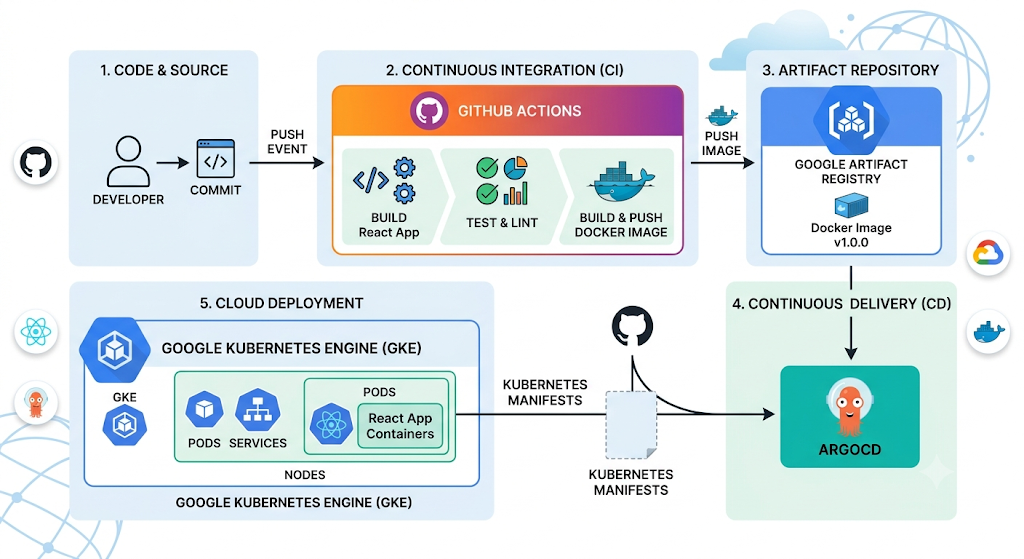
The workflow in .github/workflows/ci.yaml will:
- check out your repository
- authenticate to Google Cloud using
GCP_SA_KEY - build and push a Docker image to Artifact Registry
- update the deployment manifest with the new image tag
- commit the updated manifest back to GitHub
- log in to Argo CD
- sync the application
- wait for the application to become healthy
9. Zero downtime updates
This deployment is configured to update pods without taking the app offline by using a rolling update strategy:
replicas: 2keeps at least one pod available while a new pod starts.strategy.rollingUpdate.maxSurge: 1allows one extra pod to be created temporarily.strategy.rollingUpdate.maxUnavailable: 0ensures no pod is removed before a replacement is ready.- A readiness probe verifies each new pod is ready before traffic routes to it.
When a new image version is deployed, Kubernetes will:
- start a new pod with the updated image
- wait until the readiness probe passes
- terminate one old pod only after the new pod is ready
- repeat until all pods are updated
You can watch the rollout progress with:
kubectl rollout status deployment/reactapp-gcp-gke-githubactions-cicd-deploymentIf you need to roll back after a failed deployment:
kubectl rollout undo deployment/reactapp-gcp-gke-githubactions-cicd-deployment9. Run the deployment
Push your changes to the main branch:
git add .
git commit -m "Prepare deployment"
git push origin main
Then go to GitHub Actions and watch the workflow run.
Screenshot: GitHub Actions workflow run showing the build and deploy steps.
10. Validate the deployment
After the workflow completes, confirm the application is deployed and healthy.
10.1 Check Argo CD application status
Open the Argo CD UI and verify the app status is Healthy and Synced.
Or run:
argocd app get reactapp-gcp-gke-githubactions-cicdLook for:
Sync Status: SyncedHealth Status: Healthy
10.2 Check the Kubernetes deployment
Verify that the deployment is running in the target namespace:
kubectl get pods -n default
kubectl get svc -n default
10.3 Test the app URL in your browser
If your app is exposed via a Kubernetes service with an external IP or ingress, open that URL in your browser.
For example, if your service is exposed on port 80 and the external IP is 34.30.15.58, open:
http://34.30.15.58If the app is not exposed externally, use port-forwarding to test it locally:
kubectl port-forward svc/<service-name> 8080:80 -n defaultThen open:
http://localhost:808011. Troubleshooting
App path is wrong
If Argo CD shows an error like app path does not exist, set path in agrocd-app.yaml to the correct location.
Object 'Kind' is missing
This means Argo CD tried to parse a file such as package.json as a Kubernetes manifest. Only include manifest files in the Argo CD app path.
Permission denied on login
Verify that ARGOCD_SERVER in GitHub Secrets matches the current Argo CD External IP.
Verify that ARGOCD_PASSWORD in GitHub Secrets matches the current Argo CD admin password.
12. Clean up resources
When you are done, delete the GKE cluster:
gcloud container clusters delete gcp-gke-githubactions-argocd-cluster --zone us-central1-aRemove any unnecessary service accounts or secrets from GitHub.
13. GitHub Repo
All code files and configuration can be found in the following GitHub repository: https://github.com/suneelkandali/gcp-gke-githubactions-argocd-reactapp
메타데이터
- post_id
- b5f29eb821cf
- slug
- react-app-deployment-to-google-cloud-kubernetes-environment-with-ci-using-github-actions-and-cd-b5f29eb821cf
- url
- https://medium.com/@suneelr.kandali/react-app-deployment-to-google-cloud-kubernetes-environment-with-ci-using-github-actions-and-cd-b5f29eb821cf
- canonical_url
- https://medium.com/@suneelr.kandali/react-app-deployment-to-google-cloud-kubernetes-environment-with-ci-using-github-actions-and-cd-b5f29eb821cf
- author_url
- https://medium.com/@suneelr.kandali
- status
- ok
- fetched_at
- 2026-06-09 15:37:30