Demystifying Cloud Networking: CIDR Math, Stateful Firewalls, and the Security Group vs.
The ultimate multi-cloud guide to subnets, firewall statefulness, and how to prevent silent network blocks in AWS and Azure.
Demystifying Cloud Networking: CIDR Math, Stateful Firewalls, and the Security Group vs. NACL Showdown
The ultimate multi-cloud guide to subnets, firewall statefulness, and how to prevent silent network blocks in AWS and Azure.

Photo by: **Pinterest**
When teams begin migrating infrastructure to public clouds like Amazon Web Services (AWS) or Microsoft Azure, they often treat cloud networking like their old on-premises server closets.
They write a few firewall rules, spin up a virtual machine, and expect traffic to flow smoothly.
Then, the troubleshooting tickets start piling up:
- “Our application server can’t download package updates.”
- “We added an inbound HTTP rule, but our health checks are still failing.”
- “We ran out of IP addresses in our subnet within three weeks.”
In the cloud, networking is entirely software-defined, and security is integrated directly into the fabric of the hypervisor. To build resilient, secure infrastructure, you need to master three fundamental concepts: CIDR IP arithmetic, Firewall Statefulness, and the Stateful vs. Stateless boundary.
In this guide, we’ll demystify these core concepts, compare AWS and Azure security structures, and map out the mathematics of modern cloud subnetting.
1. Cloud Subnetting Math and the “Minus 5” Tax
In traditional networking, IP allocation is calculated using standard Classless Inter-Domain Routing (CIDR) notation. An IPv4 address consists of $32$ bits. When you declare a CIDR block with a prefix length of $n$ (for example, /24), you are reserving the first $n$ bits for the network identifier, leaving $32 - n$ bits for host allocation.
Mathematically, the total number of IP addresses available in a given subnet is:
Total IPs} = 2^{32 — n}
For a standard /24 subnet:
Total IPs = 2^{32–24} = 2⁸ = 256 addresses
For a smaller /28 subnet:
Total IPs = 2^{32–28} = 2⁴ = 16 addresses
The Cloud Tax: 5 Reserved IPs
In on-premises networks, you only lose $2$ IP addresses per subnet: the network address (all host bits set to $0$) and the broadcast address (all host bits set to $1$).
However, both AWS VPC Subnets and Azure Virtual Network Subnets reserve five IP addresses per subnet.
For any cloud subnet of size $n$, the actual number of usable host addresses is:
Usable Cloud IPs = 2^{32 — n} — 5
If you provision a /28 subnet expecting $14$ usable addresses for a cluster of microservices, you will find yourself with only $11$ usable IPs:
Usable IPs = 2^{32–28} — 5 = 16–5 = 11
The cloud providers claim these five addresses for critical infrastructure operations:
- Host
.0: Network Address. - Host
.1: Default Gateway (VPC/VNet router). - Host
.2: DNS Server (e.g., AWS Route 53 resolver or Azure DNS). - Host
.3: Future capability / internal system mapping. - Host
.255: Network Broadcast Address (even though the cloud does not support traditional IP broadcasting).
Architectural Takeaway: Never size your subnets too tightly. If you run out of IP addresses in a subnet, you cannot resize it. You must destroy the subnet and recreate it from scratch, which often causes major deployment disruptions.
2. Stateful Firewalls: Under the Hood of Security Groups
The primary line of defense for a cloud virtual machine is the Security Group (known as an EC2 Security Group in AWS, and a Network Security Group or NSG in Azure). Security Groups are stateful, host-level distributed firewalls evaluated at the hypervisor level (specifically, at the virtual network interface or NIC).
The term stateful is the key to their efficiency.
[Inbound Traffic] ──> Passes Firewall Rule Check ──> Establishes Active Connection State
                                                               │
                                                               ▼
[Outbound Response] <───────────────────────────── Dynamically Allowed Back Out (No Rule Needed)
When a packet arrives at your virtual machine, the security group evaluates its inbound rules. If a rule matches (e.g., allowing inbound HTTP traffic on TCP Port 80), the firewall permits the packet to pass and immediately creates an entry in an internal connection tracking table.
When the operating system sends a response back to the client, the firewall checks the connection tracking table. Seeing an active, established connection, it dynamically allows the outbound response packet to leave, completely bypassing all outbound rules.
AWS Security Groups vs. Azure Network Security Groups (NSGs)
While they serve the same purpose, AWS and Azure design Security Groups with fundamentally different logic:
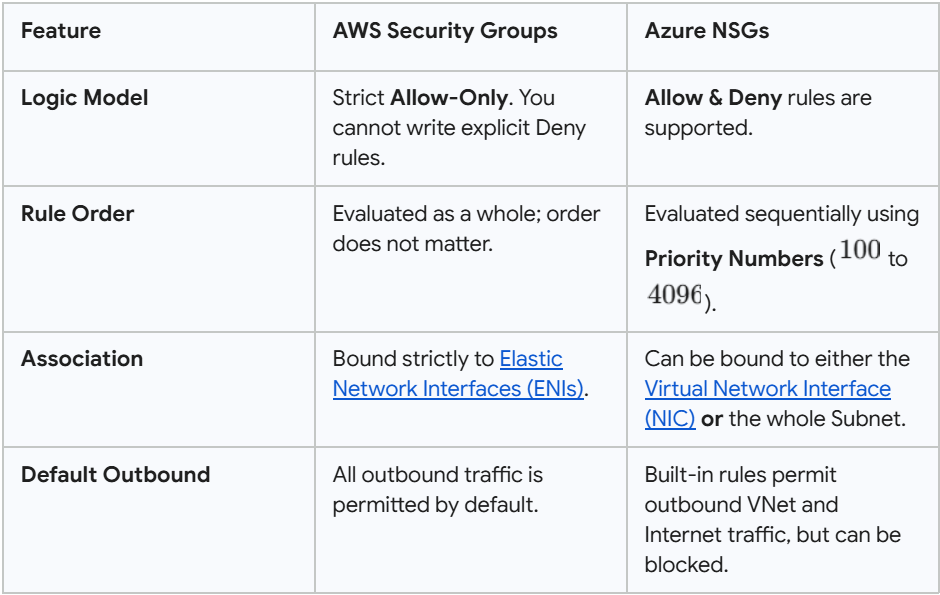
TABLE REF: Elastic Network Interfaces (ENIs), Virtual Network Interface (NIC)
For detailed implementation steps on creating these rules, you can consult the AWS Security Groups User Guide or the Azure NSGs Overview.
3. Stateful (Security Groups) vs. Stateless (NACLs)
Many security architectures enforce defense-in-depth by placing another firewall layer at the subnet boundary. In AWS, this is known as a Network Access Control List (NACL).
Unlike Security Groups, NACLs are stateless.
Stateful (Security Groups)             Stateless (NACLs)
 ┌───────────────────────────┐      ┌───────────────────────────┐
 │ Evaluates INBOUND only.   │      │ Must evaluate both        │
 │ Response is automatically │      │ INBOUND and OUTBOUND      │
 │ permitted back out.       │      │ rules separately.         │
 └───────────────────────────┘      └───────────────────────────┘
Because a stateless firewall does not maintain a connection tracking table, it views every incoming and outgoing packet as an entirely independent event.
The Ephemeral Port Trap
This stateless nature is where many DevOps teams run into trouble. Imagine you want to allow your internal virtual machines to fetch software updates from the public internet.
In your Security Group, you simply add an outbound rule allowing TCP Port 443 (HTTPS) to 0.0.0.0/0. The stateful group automatically permits the incoming response.
If you try to restrict this at the NACL level, you must configure two distinct rules:
- An Outbound Rule allowing TCP Port 443 to the internet.
- An Inbound Rule allowing traffic back in from the internet.
But what port does the incoming response use? It does not connect back to your server on port 443. Instead, your server initiated the connection using a randomized client port, known as an ephemeral port.
According to the Internet Assigned Numbers Authority (IANA), the default ephemeral port range is $49152$ to $65535$. However, different operating systems and NAT gateways utilize ranges from $1024$ to $65535$.
If your stateless NACL does not explicitly have an inbound rule allowing return traffic on these high-numbered ephemeral ports, your outbound connection will fail silently.
For step-by-step guidance on setting up stateless parameters, read the AWS NACLs User Guide and check the AWS Ephemeral Ports Guide.
Summary: Best Practices for Cloud Networking Security
To protect your cloud architecture while maintaining seamless connectivity, keep these four guidelines in mind:
- Calculate Subnet Growth (2^{32-n} — 5): Account for the 5 reserved cloud IPs and build your CIDR ranges to accommodate horizontal scaling and green-blue deployment configurations.
- Leverage Security Group Referencing: Instead of hardcoding public or private IP addresses inside your security groups, reference the ID of other security groups. For example, configure your database’s security group to only accept inbound traffic on port 3306 if the source is your
application-sgID. - Avoid SSH/RDP Exposure: Never expose administrative ports like SSH (port 22) or RDP (port 3389) directly to
0.0.0.0/0. Use modern, session-managed services like AWS Systems Manager Session Manager or Azure Bastion. - Use NACLs Sparingly: Keep your NACL rules simple. Use them for broad “blocking” actions (like denying known malicious IP ranges at the subnet boundary) and rely on stateful Security Groups for granular micro-segmentation.
DOWNLOAD THE RESOURCES: https://docs.google.com/document/d/1bLc2_gGPQRJdBFTGynRBDPsIT8oPhJVQiP837XQUCTA/edit?usp=sharing
How does your team manage network boundaries? Do you use a combination of Security Groups and NACLs, or do you rely on centralized firewalls? Let’s discuss in the comments below!
메타데이터
- post_id
- b5fdf72ca7a3
- slug
- demystifying-cloud-networking-cidr-math-stateful-firewalls-and-the-security-group-vs-b5fdf72ca7a3
- url
- https://medium.com/@thisarad404/demystifying-cloud-networking-cidr-math-stateful-firewalls-and-the-security-group-vs-b5fdf72ca7a3
- canonical_url
- https://medium.com/@thisarad404/demystifying-cloud-networking-cidr-math-stateful-firewalls-and-the-security-group-vs-b5fdf72ca7a3
- author_url
- https://medium.com/@thisarad404
- status
- ok
- fetched_at
- 2026-07-27 17:09:37