How to Set Up a Survey Lab with 10 RoboDot Units — EDU Pack Spotlight
Setting up a professional-grade surveying lab used to mean stretching limited budgets across expensive equipment. Today, the RoboDot Touch…
How to Set Up a Survey Lab with 10 RoboDot Units — EDU Pack Spotlight
Setting up a professional-grade surveying lab used to mean stretching limited budgets across expensive equipment. Today, the RoboDot Touch RTK GPS EDU Pack changes the game — bringing industry-level precision into classrooms, training labs, and field programs without breaking the bank.
With 10 full RoboDot Touch units, each capable of acting as a base or rover, the EDU Pack is the most versatile, cost-effective way to scale your institution’s GNSS capabilities.
What’s in the EDU Pack?
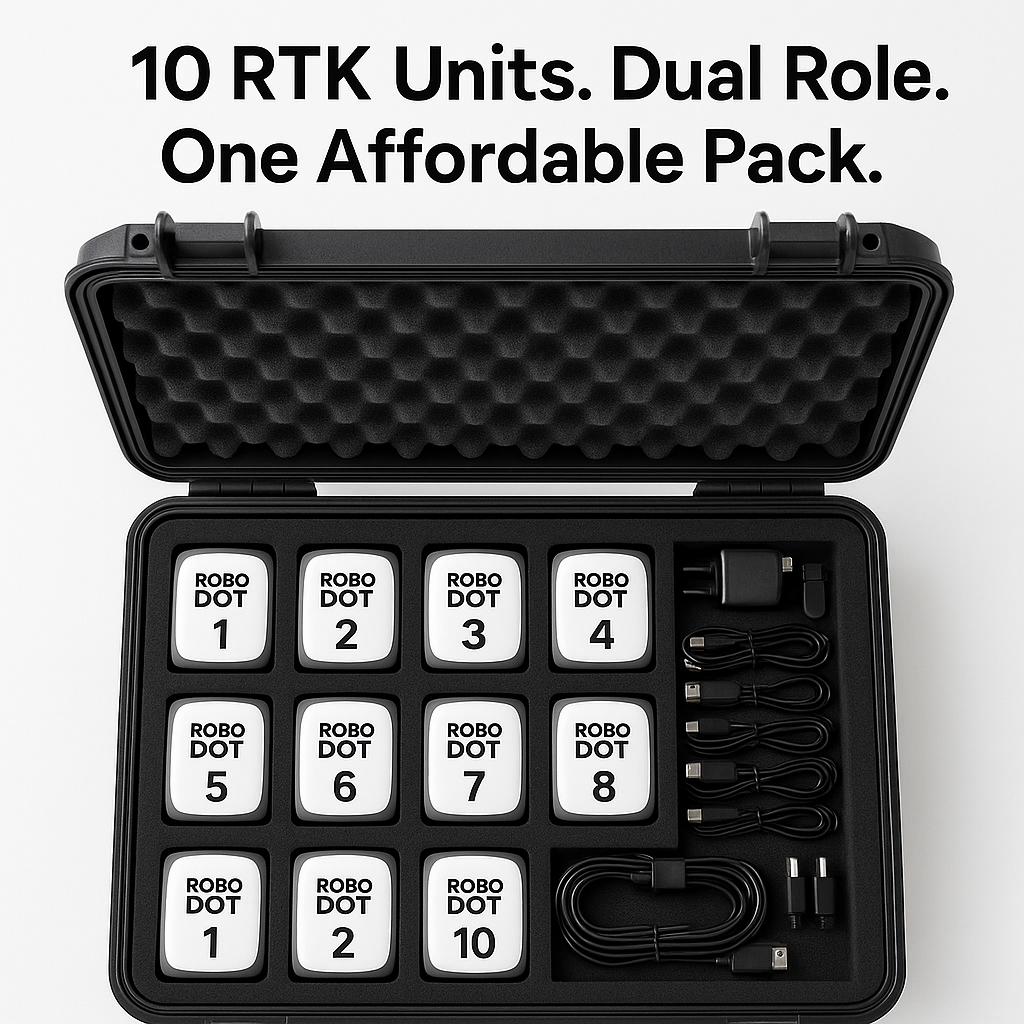
The EDU Pack is a bundle of 10 RoboDot Touch RTK GPS Receivers, all ready to go as either base stations or rovers. That means:
- No guesswork or role-locking — every unit is dual-capable
- Total deployment flexibility for large classrooms, field labs, or cohort-based training
- A deeply discounted price of $9,999 for 10 units — bringing each unit down to just $999.90
- No other RTK solution gives you this level of scale and modularity at this price point.
Step-by-Step: Setting Up Your Survey Lab
Whether you’re training students in geospatial science, drone mapping, or construction surveying, here’s how to get your lab running with RoboDot Touch:
1. Unpack & Assign
Each unit arrives ready for use. Begin by:
- Labeling devices 1–10 for easy student assignment
- Charging all units simultaneously using their included accessories
- Designating two units to test base/rover switching in demo scenarios
2. Install in Lab or Case
While most labs start indoors, RoboDot’s compact design fits easily into:
- Mobile teaching carts
- Lockable cases for outdoor demos
- Shelf or pegboard mounts for classroom visibility
Each device is lightweight, portable, and powered by USB-C — making cable management easy in group settings.
3. Create Survey Team Rotations
Use the 10 units to run multiple configurations:
- 5 base/rover pairs for team fieldwork
- Single base/multi-rover setups for master-class demos
- Unit-per-student exercises for hands-on learning without sharing
The flexibility to reconfigure on the fly helps instructors adapt to classroom size and curriculum needs.
4. Introduce Real-Time Corrections
Simulate field-level accuracy by introducing RTK corrections during lab exercises. Since every unit can serve as a base, you’ll never run into role shortages or bottlenecks — even in advanced coursework.
5. Expand Beyond the Lab
RoboDot is field-ready. Once students master usage in the classroom, you can extend training to:
- Drone-assisted topographic surveys
- Site layout simulations
- Geo-tagging workshops
This isn’t a toy-grade classroom tool — it’s the same GNSS performance you’d deploy on a jobsite.
Why Educators Choose RoboDot
- All-in-One Functionality: Each device can switch roles — no need to purchase or manage separate base/rover gear
- Unbeatable Value: At just $999.90 per unit, you save $295 per device off individual pricing
- Field Realism: Train with the same tech used by real drone mappers, surveyors, and precision agriculture teams
- Easy to Teach: Simple setup, USB-C charging, and compact design mean less time troubleshooting, more time teaching
Ready to Equip Your Survey Lab?
The 10X EDU Pack offers a full-fleet RTK solution built for institutions that care about real-world readiness and budget efficiency.
Learn more or place your order here: https://www.robota.us/product-page/robodot-touch-rtk-gps-base-rover-10-pack
메타데이터
- post_id
- b63e9ceca3e8
- slug
- how-to-set-up-a-survey-lab-with-10-robodot-units-edu-pack-spotlight-b63e9ceca3e8
- url
- https://medium.com/@marybock-seo123/how-to-set-up-a-survey-lab-with-10-robodot-units-edu-pack-spotlight-b63e9ceca3e8
- canonical_url
- https://medium.com/@marybock-seo123/how-to-set-up-a-survey-lab-with-10-robodot-units-edu-pack-spotlight-b63e9ceca3e8
- author_url
- https://medium.com/@marybock-seo123
- status
- ok
- fetched_at
- 2026-06-24 11:06:28