Windows authentication for Amazon EKS Windows based workload
Elastic Load Balancer (ELB) is typically used for non-Windows workloads in Amazon Elastic Kubernetes Service (EKS). It distributes incoming…
Windows authentication for Amazon EKS Windows based workload
Elastic Load Balancer (ELB) is typically used for non-Windows workloads in Amazon Elastic Kubernetes Service (EKS). It distributes incoming traffic across multiple targets in one or more Availability Zones (AZs). However, when running a .NET or ASP.NET-based Windows application on an Amazon EKS cluster that requires domain-join for Windows authentication, a challenge arises. This is because Windows authentication demands that the source port be preserved in the connection from the client to the server, and the Application Load Balancer (ALB) used by non-Windows EKS workloads does not meet this requirement.
To address this issue, it is recommended to use a Network Load Balancer (NLB) with a TCP listener, as it preserves the source port for a load balancer. Now coming back to domain-join for Windows authentication, as containers can’t be domain-joined, running Windows based application in container required configuring group Managed Service Accounts (gMSA), domain-joined Kubernetes Windows nodes, webhooks and cluster roles to enable Windows Authentication on Windows-based containers.
In this post I will cover the architectural overview of how to enable user sign-in using Active Directory domain credentials and applications in ECS pods can utilize Active Directory service accounts to connect to network resources, such as SQL Server databases.
Although the specific architectural pattern may differ based on the location of the Active Directory, the fundamental steps for accessing a SQL Server hosted in EC2 or RDS from a .NET or ASP.NET based application on an EKS cluster using Windows authentication remain the same. The following is a high-level, step-by-step process for achieving this:
- The Windows-based application running in an EKS pod retrieves the necessary credentials from AWS Secret Manager.
- The retrieved credentials are passed to AWS Managed Microsoft AD for authentication.
- AWS Managed Microsoft AD validates the credentials and returns a Kerberos Ticket-Granting Ticket (TGT).
- The TGT can be cached in a temporary network storage or locally in the pod.
- To access the SQL Server, the Windows application passes the TGT to gain access to the database.
Option 1 — Hosting the Active Directory Domain Service on AWS
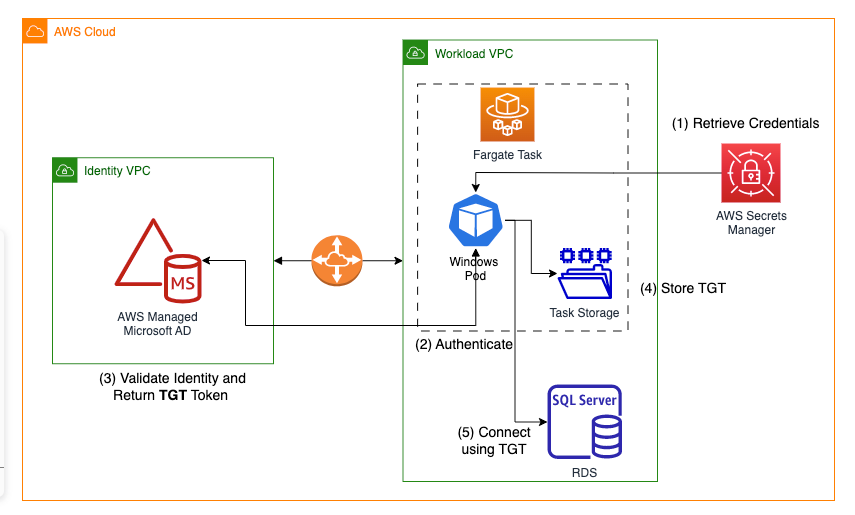
Option 2 — Hosting the Active Directory Domain Service On-premises and on AWS Cloud

Option 3 — Identity solely Managed at On-premises Active Directory

Conclusion
In this blog post, we explored how to configure Windows authentication for an Amazon EKS cluster that runs Windows containers. By utilizing AWS Secrets Manager and AD Directory options, we can easily set up domain-less Windows authentication for Amazon EKS Windows workloads. This architectural pattern allows us to take full advantage of the benefits of Kubernetes on AWS without compromising on security or compliance. With this approach, we can ensure that our Windows-based applications on Amazon EKS are authenticated and authorized correctly, while also maintaining the necessary levels of security and compliance required by our organization.
메타데이터
- post_id
- b671e1362abb
- slug
- windows-authentication-for-amazon-eks-windows-based-workload-b671e1362abb
- url
- https://medium.com/@awspallab/windows-authentication-for-amazon-eks-windows-based-workload-b671e1362abb
- canonical_url
- https://medium.com/@awspallab/windows-authentication-for-amazon-eks-windows-based-workload-b671e1362abb
- author_url
- https://medium.com/@awspallab
- status
- ok
- fetched_at
- 2026-06-24 11:06:28


