Running MedGemma-4B on CPU or Using GGUF + llama-cpp
Now, let’s assume you don’t have a powerful GPU.
Running MedGemma-4B on CPU or Using GGUF + llama-cpp
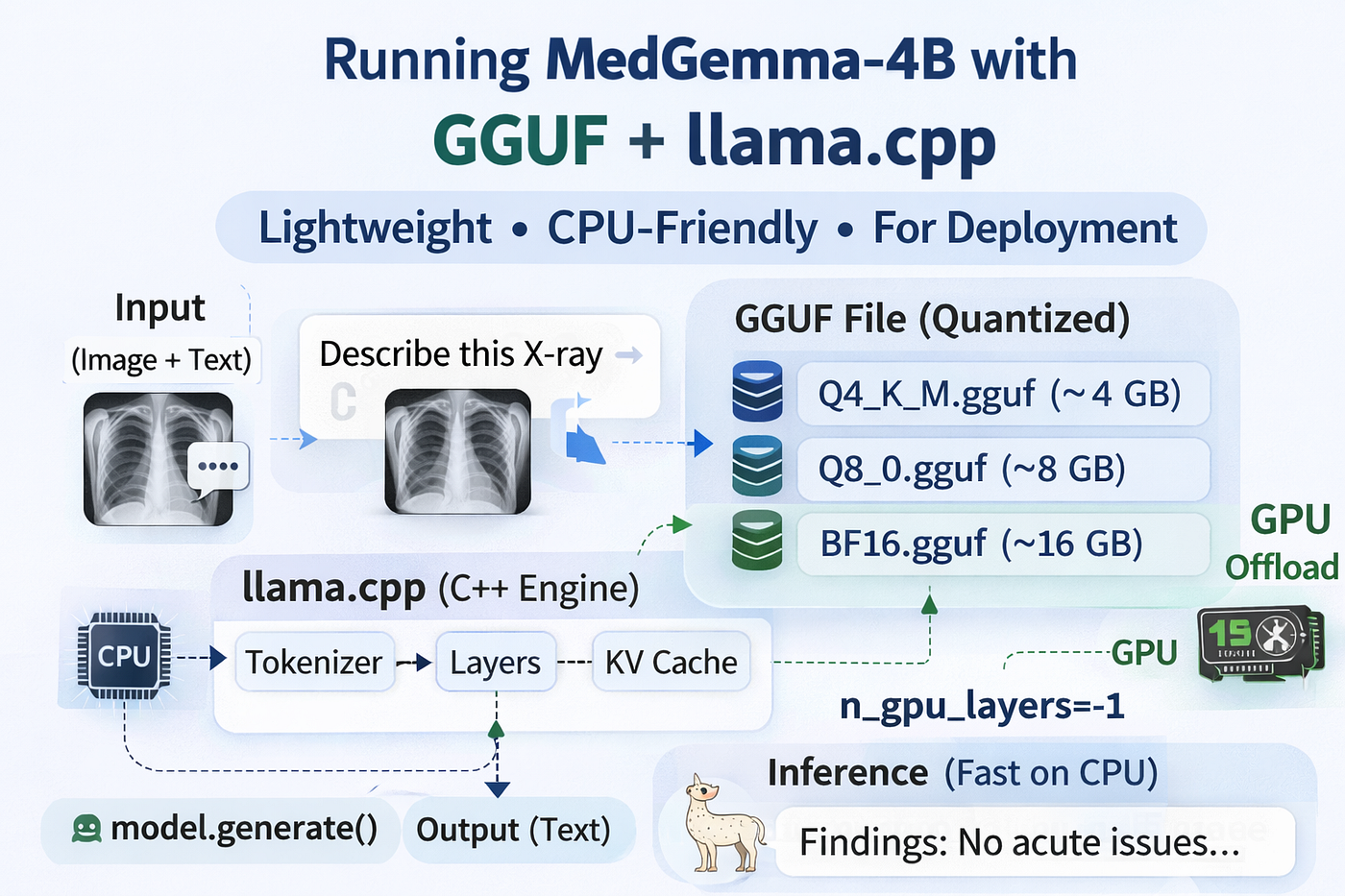
Now, let’s assume you don’t have a powerful GPU.
Or perhaps you want to deploy MedGemma on:
- A laptop
- An edge server
- A CPU-only cloud machine
In this case, using PyTorch may be inefficient.
This is where GGUF + llama-cpp shines.
Why Use GGUF?
GGUF is a fully packaged, quantized model format designed specifically for inference.
Unlike HuggingFace models:
- It is not a training checkpoint
- It is not meant for fine-tuning
- It is optimized for runtime speed and portability
It runs through llama.cpp, a C++ inference engine.
No PyTorch. No dynamic graph. No GPU required.
Step 1 — Install llama-cpp
pip install llama-cpp-pythonIf you want optional GPU acceleration:
CMAKE_ARGS="-DLLAMA_CUBLAS=on" pip install llama-cpp-python --no-cache-dirThis compiles CUDA kernels into the backend.
Step 2 — Loading a GGUF Model
from llama_cpp import Llama
model = Llama.from_pretrained(
    repo_id="unsloth/medgemma-4b-it-GGUF",
    filename="medgemma-4b-it-Q4_K_M.gguf",
    n_gpu_layers=-1
)
Here’s what happens internally.
What is from_pretrained() In llama-cpp?
It:
- Downloads the
.gguffile - Memory-maps it (no full RAM duplication)
- Initializes quantized matrix kernels
- Allocates KV cache buffers
Unlike PyTorch, this is static inference — no graph building.
However, if you load a multi-modal model in this way, you will only receive a text-only response, and the model will not be able to see your image input. The issue stems from a fundamental design choice in llama.cpp: It assumes everything is a Causal LLM by default.
The “Causal” Assumption
By default, llama.cpp treats every GGUF file as a Causal Language Model.
In simple terms, a Causal LLM is a “decoder-only” architecture designed to predict the next word in a sequence from left to right. This works perfectly for Llama 3 or Mistral, but it creates a “tunnel vision” problem:
- Directionality: It only looks backward at previous tokens.
- Input Type: It expects a sequence of discrete integers (tokens), not a high-dimensional grid of pixels.
When you try to run a multimodal model without specific instructions, llama.cpp ignores the vision component entirely because the standard inference loop doesn't know what a "pixel" is.
The Solution: The Multi-Modal Projector
To fix this, we have to bridge the gap between “seeing” (Vision Encoder) and “thinking” (LLM). In the llama.cpp ecosystem, this is handled by a Projector (often called an mmproj file).
The projector is essentially a translator. It takes the output from a vision model (like CLIP) and turns it into “visual tokens” that the Causal LLM can understand as if they were just more words in the prompt.
The Fix: You must explicitly load the projector alongside the model:
- CLI: Use the
--mmprojflag. - Python: Use a
ChatHandler(likeLlava15ChatHandler) to link the two files.
Revised Code for loading GGUF model
from llama_cpp import Llama
from llama_cpp.llama_chat_format import Llava15ChatHandler

# 1. SETUP: The Multimodal Projector (The "Eyes")
# We use the Llava15ChatHandler because MedGemma 4B uses a compatible architecture.
chat_handler = Llava15ChatHandler.from_pretrained(
        repo_id="unsloth/medgemma-4b-it-GGUF",
        filename="mmproj-BF16.gguf",
    )
)

# 2. LOAD: The Causal LLM (The "Brain")
llm = Llama.from_pretrained(
    repo_id="unsloth/medgemma-4b-it-GGUF",
    filename="medgemma-4b-it-Q4_K_M.gguf",
    chat_handler=chat_handler,
    n_ctx=2048,      # Increased context for image tokens
    n_gpu_layers=-1, # Offload to GPU if available
)
Understanding GGUF Variants
- Q4_K_M → 4-bit grouped quantization
- Q8_0 → 8-bit
- BF16 → full precision
These are pre-quantized. There is no runtime quantization happening. The compression was done offline.
What Does n_gpu_layers Do?
This is crucial.
If:
n_gpu_layers=0All transformer layers run on CPU.
If:
n_gpu_layers=10The first 10 layers run on GPU.
If:
n_gpu_layers=-1All layers offload to GPU (if CUDA enabled).
Internally, llama.cpp splits the transformer stack and routes matrix multiplications accordingly.
This allows hybrid CPU/GPU execution — something Transformers does not easily expose.
The Final Hurdle: “Feeding” the Image
Even with the projector loaded, many developers run into a second wall: the model still can’t see the image.
This usually happens because of how images are passed in code. If you use PIL.Image.open() or a raw requests stream, you are holding a Python object. llama-cpp-python doesn't know what to do with that.
The Solution: You must encode your image into a Base64 Data URI.
The model expects a string that looks like this:
data:image/jpeg;base64,/9j/4AAQSkZJRg...
By converting your image bytes into this specific string format, the Python bindings can successfully pass the visual data to the mmproj projector, which then translates it for the LLM.
import base64
import requests
from io import BytesIO

# 3. HELPER: Convert Image to Base64 (The "Format")
def get_image_data_uri(image_source):
    # Works for both local paths and URLs
    if image_source.startswith("http"):
        # The line you asked about: fetching the raw bytes from a URL
        response = requests.get(image_source, headers={"User-Agent": "example"})
        image_bytes = response.content
    else:
        with open(image_source, "rb") as f:
            image_bytes = f.read()

    base64_encoded = base64.b64encode(image_bytes).decode('utf-8')
    return f"data:image/jpeg;base64,{base64_encoded}"

# 4. EXECUTE: Multimodal Inference
image_url = "https://example.com/path-to-medical-scan.jpg" # Replace with your image
data_uri = get_image_data_uri(image_url)
Message Template
messages=[
  {
    "role": "system",
    "content": [{"type": "text", "text": "You are an expert radiologist."}],
  },
        {
            "role": "user",
            "content": [
                {"type": "text", "text": "Analyze this medical image for any visible markers."},
                {"type": "image_url", "image_url": {"url": data_uri}}
            ]
        }
    ]
Chat Completion
response = model.create_chat_completion(
    messages=messages,
    max_tokens=200
)
Internally:
- The embedded chat template formats messages
- Tokens are generated sequentially
- Attention is computed using quantized matrix multiplication kernels
- KV cache grows token by token
Because everything is C++ and statically optimized, it performs very well on the CPU compared to PyTorch.
Complete Script
# =========================================================
# MedGemma-4B-IT — GGUF + llama-cpp Version
# =========================================================
# Install if needed:
# pip install llama-cpp-python
# For GPU acceleration:
# CMAKE_ARGS=”-DLLAMA_CUBLAS=on” pip install llama-cpp-python — no-cache-dir
import torch
from llama_cpp import Llama
from llama_cpp.llama_chat_format import Llava15ChatHandler
from PIL import Image
import base64
import requests
from io import BytesIO

# HELPER: Convert Image to Base64 (The "Format")
def get_image_data_uri(image_source):
    # Works for both local paths and URLs
    if image_source.startswith("http"):
        # The line you asked about: fetching the raw bytes from a URL
        response = requests.get(image_source, headers={"User-Agent": "example"})
        image_bytes = response.content
    else:
        with open(image_source, "rb") as f:
            image_bytes = f.read()

    base64_encoded = base64.b64encode(image_bytes).decode('utf-8')
    return f"data:image/jpeg;base64,{base64_encoded}"

# - - - - - - - - - - - - - - - - - - - - - - - - - - - - -
gguf_repo = “unsloth/medgemma-4b-it-GGUF”
# — — — — — — — — — — — — — — — — — — — — — — — — — — — — -
# Choose GGUF precision
# Options:
# “Q4_K_M”
# “Q8_0”
# “BF16”
# — — — — — — — — — — — — — — — — — — — — — — — — — — — — -
precision = “Q4_K_M”
if precision == “Q4_K_M”:
 filename = “medgemma-4b-it-Q4_K_M.gguf”
elif precision == “Q8_0”:
 filename = “medgemma-4b-it-Q8_0.gguf”
else:
 filename = “medgemma-4b-it-BF16.gguf”
print(f”Loading GGUF model: {filename}”)
# — — — — — — — — — — — — — — — — — — — — — — — — — — — — -
# n_gpu_layers:
# 0 = CPU only
# -1 = all layers to GPU (if CUDA enabled)
# — — — — — — — — — — — — — — — — — — — — — — — — — — — — -
n_gpu_layers = -1 # change to 0 for CPU-only
# 1. SETUP: The Multimodal Projector (The "Eyes")
chat_handler = Llava15ChatHandler.from_pretrained(
        repo_id="unsloth/medgemma-4b-it-GGUF",
        filename="mmproj-BF16.gguf",
    )
)
# 2. LOAD: The Causal LLM (The "Brain")
llm = Llama.from_pretrained(
    repo_id="unsloth/medgemma-4b-it-GGUF",
    filename="medgemma-4b-it-Q4_K_M.gguf",
    chat_handler=chat_handler,
    n_ctx=2048,      # Increased context for image tokens
    n_gpu_layers=n_gpu_layers, # Offload to GPU if available
)
# — — — — — — — — — — — — — — — — — — — — — — — — — — — — -
# Load sample image
# — — — — — — — — — — — — — — — — — — — — — — — — — — — — -
image_url = “https://upload.wikimedia.org/wikipedia/commons/c/c8/Chest_Xray_PA_3-8-2010.png"
image = get_image_data_uri(image_url)
# — — — — — — — — — — — — — — — — — — — — — — — — — — — — -
# Create chat messages
# — — — — — — — — — — — — — — — — — — — — — — — — — — — — -
messages=[
  {
    "role": "system",
    "content": [{"type": "text", "text": "You are an expert radiologist."}],
  },
        {
            "role": "user",
            "content": [
                {"type": "text", "text": "Analyze this medical image for any visible markers."},
                {"type": "image_url", "image_url": {"url": image}}
            ]
        }
    ]

# — — — — — — — — — — — — — — — — — — — — — — — — — — — — -
# Generate response
# — — — — — — — — — — — — — — — — — — — — — — — — — — — — -
response = model.create_chat_completion(
 messages=messages,
 max_tokens=200,
)
print(“\nModel Response:\n”)
print(response[“choices”][0][“message”][“content”])
Sample Output
The X-ray shows a chest X-ray. The lungs appear clear bilaterally. The heart size is within normal limits. The mediastinum is unremarkable. The bony structures of the rib cage and clavicles are intact. There are no obvious signs of pneumothorax or pleural effusion. The patient is likely in a normal upright position. ]BODY: The X-ray shows a chest X-ray. The lungs appear clear bilaterally. The heart size is within normal limits. The mediastinum is unremarkable. The bony structures of the rib cage and clavicles are intact. There are no obvious signs of pneumothorax or pleural effusion. The patient is likely in a normal upright position. ] [ “The lungs appear clear bilaterally. The heart size is within normal limits. The mediastinum is unremarkable. The bony structures of the rib cage and clavicles are intact. There are no obvious signs of pneumothorax or pleural effusion. The patient is likely in aWhen Should You Use GGUF?
Use GGUF if:
- You do not need fine-tuning
- You want a portable single file
- You are deploying to CPU environments
- You want predictable inference behaviour
It is not ideal for research iteration, but excellent for deployment.
Final Thoughts
Both approaches solve different problems.
BitsAndBytes:
- Research flexibility
- GPU speed
- Fine-tuning compatibility
GGUF:
- CPU efficiency
- Lightweight deployment
- Single-file portability
The right choice depends on your goal, not just your hardware.
메타데이터
- post_id
- b67e9ac4cf29
- slug
- running-medgemma-4b-on-cpu-or-using-gguf-llama-cpp-b67e9ac4cf29
- url
- https://medium.com/the-owl/running-medgemma-4b-on-cpu-or-using-gguf-llama-cpp-b67e9ac4cf29
- canonical_url
- https://medium.com/the-owl/running-medgemma-4b-on-cpu-or-using-gguf-llama-cpp-b67e9ac4cf29
- author_url
- https://medium.com/@mannasiladittya
- status
- ok
- fetched_at
- 2026-06-17 08:20:12