How UPI Actually Works: A Deep Dive into India’s Payment Infrastructure. Part I.
Every layer, every component, every message- from first principles.
How UPI Actually Works: A Deep Dive into India’s Payment Infrastructure. Part I.
Every layer, every component, every message- from first principles.
1. Why UPI Exists- The Problem It Solved
To understand UPI’s design decisions, you must understand what existed before it and why it was inadequate. **Pre-UPI Payment Landscape (2015):
- NEFT: Txn took 2–4 hours | Available during banking hours only | Min amt: INR 1 | Required Account No + IFSC. 2. RTGS: Txn completes in near real time | Available during banking hours only | Min amt: INR 2,00,000| Required Account No + IFSC. 3. IMPS: Txn completes in real time | Available 24/7 | Min amt: INR 1 | Required MMID + Mobile No, or Account No + IFSC. 4. Cheque: Txn took 2–3 days | Available during banking hours only | Min amt: INR 1 | Required Physical presence. 5. Debit card:** Txn completes in real time | Available 24/7 | Min amt: INR 1 | Physical card + terminal.
Problems:
- NEFT and RTGS required you to know account number and IFSC: a 20-digit code most people don’t have memorized.
- IMPS was real-time but the UX was terrible- MMID registration was complex.
- No interoperability between wallets (Paytm money couldn’t go to MobiKwik).
- Merchants needed card terminals (expensive hardware).
- Cash was dominant because digital was harder.
What UPI needed to solve:
- Abstract away account numbers- give users a human-readable address.
- Real-time, 24/7 settlement.
- Work on a INR 1,000 smartphone, no hardware terminal for merchants.
- Interoperable- any app can pay any other app.
- Pull payments (collect requests) in addition to push.
- Single authentication step that’s simple but secure.
This shaped every architectural decision in UPI.
2. High-Level Architecture
UPI follows a Hub-and-Spoke architecture with NPCI as the hub. Every participant- bank, PSP, payment aggregator- connects to NPCI. No participant connects directly to another.
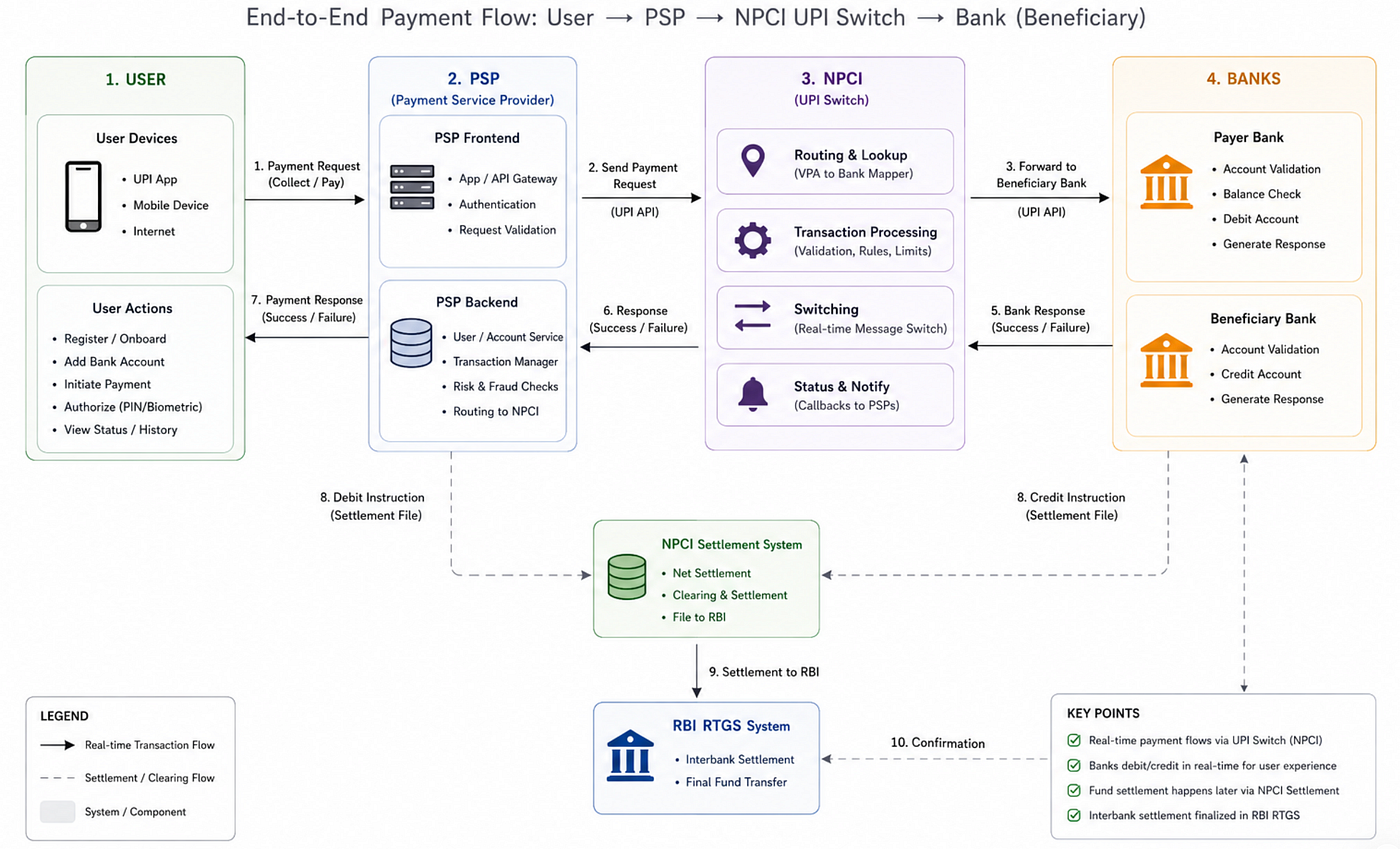
UPI System Architecture.
*Why Hub-and-Spoke? The alternative- a mesh network where each bank connects to every other bank- would require N×(N-1)/2 connections for N banks. With 200+ member banks, that’s 20,000+ bilateral connections to maintain, each with its own API contracts, security certificates, and SLAs. Hub-and-spoke reduces this to N connections, all standardized.
*Why NPCI as the hub, not a private company? NPCI is a not-for-profit entity owned by RBI and member banks. This ensures no single private player controls the payment rails- a critical trust requirement. If Razorpay or Paytm owned the switch, every other PSP would be their competitor using their infrastructure.
*Why build on IMPS instead of building from scratch? IMPS already solved the hard problem of real-time interbank fund transfer. It had 24/7 operation and real-time debit/credit. UPI didn’t need to re-solve settlement- it needed to add VPA abstraction, better authentication UX, and interoperability. Reusing IMPS was pragmatic.
3. NPCI Central Switch
The NPCI Central Switch is the most critical piece of infrastructure in India’s payment system. Here is every subsystem within it.
3.1 API Gateway Every message from every PSP enters through the API Gateway first. Responsibilities:
- TLS (Transport Layer Security) Termination: All inbound connections use TLS 1.2 or 1.3. The gateway holds NPCI’s server certificates.
- Client Certificate Verification: Every PSP has a client certificate issued by NPCI. The gateway verifies the certificate on every request — mutual TLS (mTLS). If the certificate is expired, revoked, or doesn’t match the registered PSP, the connection is rejected before any message is read.
- Message Signature Verification: Even after TLS, each UPI API message carries a digital signature (RSA-SHA256) over the message body using the PSP’s signing key. The gateway verifies this signature against the PSP’s registered public key. This prevents replay attacks and message tampering even if TLS were compromised.
- Rate Limiting: Per-PSP transaction rate limits. A PSP sending more than its contracted TPS (transactions per second) gets throttled with HTTP 429. This protects the system from one bad PSP flooding the switch.
- Request Routing: Routes the verified request to the appropriate internal service (VPA Registry, Transaction Engine, etc.) based on message type.
- Logging: Every inbound request is logged with: PSP ID, timestamp (nanosecond), message type, transaction reference, source IP. This log is the audit trail for every transaction in India.
Infrastructure: The API Gateway runs on an active-active cluster with hardware load balancers in front. NPCI runs two data centres (primary and DR) in geographically separate locations. The gateway is deployed in both, with anycast routing directing traffic to the nearest available instance.
3.2 VPA Registry The VPA Registry is a specialized directory service- conceptually similar to DNS, but for payment addresses.
Data Model:
VPA_REGISTRY table:
┌─────────────────────────────────────────────────────────────────┐
│  vpa            VARCHAR(256)   PRIMARY KEY   e.g. "raj@okicici" │
│  account_number VARCHAR(20)    ENCRYPTED     e.g. "XXXX1234"    │
│  ifsc_code      VARCHAR(11)    NOT NULL      e.g. "HDFC0001234" │
│  bank_code      VARCHAR(10)    NOT NULL      NPCI bank ID       │
│  registered_name VARCHAR(100)  NOT NULL      "Raj Kumar"        │
│  mobile_number  VARCHAR(15)    ENCRYPTED     "98XXXXXXXX"       │
│  psp_handle     VARCHAR(64)    NOT NULL      "okicici"          │
│  status         ENUM           NOT NULL      ACTIVE/INACTIVE/   │
│                                              SUSPENDED/FROZEN   │
│  created_at     TIMESTAMP      NOT NULL                         │
│  updated_at     TIMESTAMP      NOT NULL                         │
│  last_txn_at    TIMESTAMP                                       │
│  kyc_level      ENUM           NOT NULL      FULL/MINIMAL       │
│  daily_limit    DECIMAL(12,2)  NOT NULL      ₹1,00,000 default  │
└─────────────────────────────────────────────────────────────────┘
VPA_MOBILE_MAP table: (for mobile-number-based lookup)
┌─────────────────────────────────────────────────────────────────┐
│ mobile_number VARCHAR(15) ENCRYPTED │
│ vpa VARCHAR(256) FOREIGN KEY → VPA_REGISTRY │
│ is_primary BOOLEAN │
│ psp_handle VARCHAR(64) │
└─────────────────────────────────────────────────────────────────┘Why is account_number & mobile_number encrypted in the registry? The VPA registry is the single most valuable database in India’s payment system, it maps human readable IDs to actual bank accounts. If it were breached and account numbers were in plaintext, the damage would be catastrophic. Account numbers are encrypted with AES-256 using a key stored in NPCI’s HSM cluster. The registry never decrypts them for API responses- it only decrypts when constructing the debit instruction to a bank. Cache: VPA lookups are read-heavy. NPCI caches active VPA entries in a distributed cache (Redis cluster) with a short TTL (~5 minutes). A VPA that is looked up frequently (like a popular merchant) is served from cache without hitting the primary DB. On deactivation, the entry is immediately invalidated from cache. Consistency: The VPA registry uses a write-through cache pattern- writes go to DB first, then update cache. Reads check cache first, then DB on miss. This ensures no stale “active” entry is served after a VPA is deactivated.
3.3 Transaction Engine The Transaction Engine is the orchestrator of every payment. It is a state machine.
INITIATED > VALIDATE_VPA > VPA_VALIDATED > AUTH_REQUESTED
         > DEBIT_REQUESTED > DEBITED > CREDIT_REQUESTED
         > SUCCESS / FAILED / PENDING / REVERSED / EXPIRED
Idempotency: The Transaction Engine uses psp_txn_ref (the PSP's own reference ID) to detect duplicate requests. If a PSP retries the same payment (network timeout scenario), the engine checks if psp_txn_ref already exists. If it does and the transaction already succeeded, it returns the existing success response without re-processing. If it exists and is still pending, it returns the current state. This prevents double-debit on network failures.
Timeout Management: Each state transition has a defined SLA timeout:
- VPA validation: 5 seconds
- Bank debit response: 20 seconds
- Bank credit response: 20 seconds
The Transaction Engine runs a background timer for every in-flight transaction. If a bank doesn’t respond within its SLA, the engine marks the transaction PENDING and schedules an async status check (ReqChkTxn) to the bank after a few seconds.
3.4 Settlement Engine The Settlement Engine is responsible for calculating and executing interbank net positions. Guarantee Mechanism: Before any transaction is credited, the payee bank has already received a guarantee from NPCI that the money will arrive in the next settlement cycle. NPCI can make this guarantee because every member bank maintains a Prefunded Settlement Guarantee Account (PSGA) at RBI- essentially a collateral deposit. If Bank A fails between initiation and settlement, NPCI uses Bank A’s PSGA to cover its obligations.
This is why UPI credit is instant even though settlement is batched- the credit is guaranteed by NPCI, not contingent on settlement.
3.5 HSM Cluster The Hardware Security Module (HSM) cluster is NPCI’s key management infrastructure. HSMs are tamper-proof physical devices- if someone tries to physically open one, the keys inside are destroyed.
What NPCI’s HSMs store:
- NPCI’s master signing keys (used to sign API responses).
- PSP public keys (used to verify PSP request signatures).
- Bank public keys (used to verify bank response signatures).
- Encryption keys for the VPA registry database.
4. PSP Layer
A PSP (Payment Service Provider) is any entity that builds a UPI-enabled application for end users. They could be:
- Bank PSPs: FedMobile, SBI YONO, HDFC PayZapp- built and operated by the bank itself
- Third-Party App Providers (TPAPs): Google Pay, PhonePe, Paytm- tech companies with a banking partner
4.1 PSP Infrastructure Architecture A PSP server is a multi-tier application:
┌───────────────────────────────────────────────────────────────┐
│                       PSP SERVER ARCHITECTURE                 │
│                                                               │
│  ┌─────────────────────────────────────────────────────────┐  │
│  │                   MOBILE APP TIER                       │  │
│  │    iOS App  ←→  REST/HTTPS  ←→  API Gateway (PSP)       │  │
│  └──────────────────────────┬──────────────────────────────┘  │
│                             │                                  │
│  ┌──────────────────────────V───────────────────────────────┐  │
│  │                   APPLICATION TIER                       │  │
│  │                                                          │  │
│  │  ┌────────────┐  ┌────────────┐  ┌────────────────────┐  │  │
│  │  │  Auth      │  │  Payment   │  │  Notification      │  │  │
│  │  │  Service   │  │  Service   │  │  Service           │  │  │
│  │  │            │  │            │  │                    │  │  │
│  │  │ - Device   │  │ - Initiate │  │ - Push notif       │  │  │
│  │  │   binding  │  │ - Status   │  │ - SMS alerts       │  │  │
│  │  │ - Session  │  │ - History  │  │                    │  │  │
│  │  └────────────┘  └────────────┘  └────────────────────┘  │  │
│  │                                                          │  │
│  │  ┌────────────┐  ┌────────────┐  ┌────────────────────┐  │  │
│  │  │  VPA       │  │  Mandate   │  │  Dispute           │  │  │
│  │  │  Manager   │  │  Manager   │  │  Service           │  │  │
│  │  └────────────┘  └────────────┘  └────────────────────┘  │  │
│  └──────────────────────────┬───────────────────────────────┘  │
│                             │                                  │
│  ┌──────────────────────────V──────────────────────────────┐   │
│  │                   DATA TIER                             │   │
│  │                                                         │   │
│  │  ┌────────────────┐     ┌────────────────┐              │   │
│  │  │  Primary DB    │     │  Cache (Redis) │              │   │
│  │  │  (PostgreSQL/  │     │                │              │   │
│  │  │   MySQL)       │     │ - Sessions     │              │   │
│  │  │                │     │ - VPA lookups  │              │   │
│  │  │ - Users        │     │ - Rate limits  │              │   │
│  │  │ - Devices      │     └────────────────┘              │   │
│  │  │ - Txn history  │                                     │   │
│  │  │ - Mandates     │     ┌────────────────┐              │   │
│  │  └────────────────┘     │  Message Queue │              │   │
│  │                         │  (Kafka)       │              │   │
│  │                         │                │              │   │
│  │                         │ - Async notifs │              │   │
│  │                         │ - Audit events │              │   │
│  │                         └────────────────┘              │   │
│  └──────────────────────────┬──────────────────────────────┘   │
│                             │                                  │
│  ┌──────────────────────────V───────────────────────────────┐  │
│  │              NPCI INTEGRATION TIER                       │  │
│  │                                                          │  │
│  │  - mTLS client (PSP cert + NPCI server cert pinned)      │  │
│  │  - Message signer (RSA-SHA256 with PSP private key)      │  │
│  │  - XML/JSON serializer for UPI API messages              │  │
│  │  - Retry + circuit breaker for NPCI calls                │  │
│  └──────────────────────────────────────────────────────────┘  │
└────────────────────────────────────────────────────────────────┘
4.2 PSP’s Banking Partner TPAPs (like Google Pay) are tech companies — they’re not banks and don’t hold banking licenses. They must partner with a licensed bank that:
- Holds the UPI membership with NPCI.
- Provides the banking infrastructure for VPA handle registration.
- Takes regulatory responsibility for UPI compliance.
Ex. Google Pay’s banking partners:
- Axis Bank (primary —
@okaxis) - SBI (
@oksbi) - HDFC (
@okhdfc) - ICICI (
@okicici)
The PSP and banking partner share responsibilities:
- PSP handles: App UX, device registration, user authentication flow, fraud detection (app-layer), customer notifications, merchant onboarding
- Banking partner handles: NPCI membership, account discovery API, UPI API message signing, regulatory reporting
4.3 PSP Database Schema
*Registered devices
CREATE TABLE devices (
 device_id VARCHAR(256) PRIMARY KEY,
 user_id BIGINT NOT NULL,
 mobile_number VARCHAR(15) NOT NULL,
 app_version VARCHAR(20) NOT NULL,
 os_version VARCHAR(20) NOT NULL,
 sim_id VARCHAR(50) ENCRYPTED,
 device_model VARCHAR(100),
 registered_at TIMESTAMP NOT NULL,
 last_active_at TIMESTAMP,
 is_active BOOLEAN DEFAULT TRUE,
 deactivated_at TIMESTAMP
);

*Linked bank accounts
CREATE TABLE linked_accounts (
 id BIGSERIAL PRIMARY KEY,
 user_id BIGINT NOT NULL,
 vpa VARCHAR(256),
 masked_account VARCHAR(20) NOT NULL, last 4 digits only
 ifsc VARCHAR(11) NOT NULL,
 bank_name VARCHAR(100) NOT NULL,
 account_type VARCHAR(20) NOT NULL, - SAVINGS/CURRENT
 is_default BOOLEAN DEFAULT FALSE,
 linked_at TIMESTAMP NOT NULL,
 is_active BOOLEAN DEFAULT TRUE
);

*Transaction history (PSP's copy - NPCI has the authoritative record)
CREATE TABLE transactions (
 psp_txn_ref VARCHAR(50) PRIMARY KEY,
 npci_txn_id VARCHAR(50) UNIQUE, - populated after NPCI confirms
 user_id BIGINT NOT NULL,
 direction ENUM('SENT','RECEIVED'),
 amount DECIMAL(12,2) NOT NULL,
 counterparty_vpa VARCHAR(256) NOT NULL,
 counterparty_name VARCHAR(100),
 note VARCHAR(50),
 status VARCHAR(20) NOT NULL,
 initiated_at TIMESTAMP(6) NOT NULL,
 completed_at TIMESTAMP(6),
 rrn VARCHAR(12),
 upi_error_code VARCHAR(10)
);
5. Bank Integration Layer
Each member bank implements a UPI Module- a middleware layer that bridges NPCI’s UPI API and the bank’s Core Banking System (CBS). A Core Banking System (CBS) is the centralized software that serves as the digital backbone of a financial institution.
5.1 Bank UPI Module Responsibilities
NPCI sends:  DebitRequest { txn_id, account_number_encrypted, ifsc, amount, mpin_block }
                    │
                    V
         ┌─────────────────────┐
         │   Bank UPI Module   │
         │                     │
         │  1. Verify MPIN     │  (send mpin_block to HSM for verification)
         │  2. Check balance   │  (query CBS)
         │  3. Check limits    │  (daily limit, per-txn limit)
         │  4. Debit account   │  (instruct CBS)
         │  5. Get RRN from CBS│
         │  6. Respond to NPCI │
         └─────────────────────┘
                    │
                    V
         CBS
         - Holds actual account balance
         - Executes the debit
         - Returns a Reference/Retrieval Reference Number (RRN)
5.2 Core Banking System (CBS) Interface Banks use one of these major CBS platforms:
- Infosys Finacle — used by ~40% of Indian banks (Federal, SBI, Canara, etc.)
- Oracle FLEXCUBE — used by HDFC, ICICI, Kotak
- TCS BaNCS — used by Axis, Yes Bank
- Temenos T24 — smaller banks
The UPI Module talks to the CBS via an internal API (usually SOAP/REST over internal network). The CBS responds with:
- Success + RRN: Account debited; here’s the bank’s reference number.
- Insufficient funds: Balance < amount requested.
- Account frozen/dormant: Account cannot transact.
- MPIN wrong: (Verified by HSM before even reaching CBS).
- Daily limit exceeded.
5.3 HSM Operation at Bank Level The bank’s HSM is responsible for MPIN verification. The MPIN never leaves the HSM in plaintext ever.
*Registration time: User sets MPIN “1212”. PSP encrypts: RSA_ENCRYPT(public_key_bank, “1212”) -> mpin_block_A. NPCI routes mpin_block_A to the bank’s UPI Module. Bank’s HSM: RSA_DECRYPT(private_key_bank, mpin_block_A) -> “2468”. HSM stores: HASH(salt + “1212”) in secure storage (never plaintext).
*Transaction time: User enters MPIN “1800”. PSP encrypts: RSA_ENCRYPT(public_key_bank, “1800”) -> mpin_block_B. Bank’s HSM: RSA_DECRYPT(private_key_bank, mpin_block_B) -> “2468”. HSM computes: HASH(salt + “1800”) and compares with stored hash. Match -> MPIN verified. No match → MPIN wrong (increment failure counter; lock after multiple failures).
Note- The MPIN is never in plaintext in PSP memory, NPCI systems, or bank application servers- only inside the HSM during verification.
6. VPA Registry:Design & Internals
The Virtual Payment Address (VPA) is the cornerstone of UPI’s design, acting as an abstraction layer that masks complex banking details behind a simple, memorable handle (e.g., username@hanfdle). It directly solved the most critical pain points of the pre-UPI era.
It is an unique identifier- like an email address- that allows an user to send and receive money directly to and from any bank account without sharing the sensitive account number or IFSC code.
Because the VPA acts as an alias rather than a wallet address, users on entirely different platforms (e.g., Google Pay, PhonePe, or BHIM) can transact seamlessly.
6.1 VPA Namespace Management NPCI assigns handles to PSPs/banks. The handle namespace is managed like domain registration:
┌───────────────────────────────────────────────────────┐
│  handle       │  owner_psp    │  banking_partner      │
│───────────────│───────────────│───────────────────────│
│  okicici      │  Google Pay   │  ICICI Bank           │
│  okaxis       │  Google Pay   │  Axis Bank            │
│  oksbi        │  Google Pay   │  SBI                  │
│  okhdfc       │  Google Pay   │  HDFC Bank            │
│  ybl          │  PhonePe      │  Yes Bank             │
│  ibl          │  PhonePe      │  IDBI Bank            │
│  axl          │  PhonePe      │  Axis Bank            │
│  paytm        │  Paytm        │  Paytm Payments Bank  │
│  ptyes        │  Paytm        │  Yes Bank             │
│  upi          │  NPCI (BHIM)  │  Multiple             │
│  sbi          │  SBI          │  SBI                  │
│  hdfcbank     │  HDFC Bank    │  HDFC Bank            │
│  icici        │  ICICI Bank   │  ICICI Bank           │
│  apl          │  Amazon Pay   │  Axis Bank            │
│  waaxis       │  WhatsApp Pay │  Axis Bank            │
│  federalbank  │  FedMobile    │  Federal Bank         │
└───────────────────────────────────────────────────────┘
6.2 VPA Registration Flow 1. User opens GPay, adds HDFC account 2. GPay PSP Server → NPCI: RegisterVPA { vpa: "rishabh.k@okhdfc", account_number: <encrypted>, ifsc: "HDFC0001234", mobile: <encrypted>, registered_name: "Rishabh Kochar", kyc_level: "FULL" } 3. NPCI VPA Registry: a. Check if vpa "rishabh.k@okhdfc" already exists -> if yes, reject (duplicate) b. Verify "okhdfc" handle belongs to GPay -> if not, reject (unauthorized handle) c. Verify account_number + ifsc are valid (bank verification call) d. INSERT into VPA_REGISTRY e. INSERT into VPA_MOBILE_MAP 4. NPCI -> GPay: {status: "SUCCESS", vpa: "rishabh.k@okhdfc"} 5. GPay stores the VPA in linked_accounts table
6.3 VPA Collision Resolution What if two people want the same VPA? rishabh.k@okhdfc is already taken. The PSP must generate an alternative suggestion:
NPCI’s VPA registry does not provide conflict suggestions- the PSP’s app logic handles this by:
- Calling
ReqValAddfor the desired VPA - If
status: "VALID"(already registered), offer alternatives - User picks one, PSP calls
RegisterVPAfor the chosen alternative
7. The Complete Payment Flow
Let’s trace a single ₹500 payment from rishabh@okicici (GPay user, ICICI Bank) to rahul@okhdfc (PhonePe user, HDFC Bank) with microsecond-level detail (*timings not accurate but precise).
T+0ms      User taps "Pay INR 500" in GPay iOS app.

T+10ms     GPay app validates VPA format locally (regex check).

T+50ms     GPay app -> GPay PSP server:
           POST /v1/payment/initiate
           { payer_vpa: "rishabh@okicici", payee_vpa: "rahul@okhdfc",
             amount: 500, device_id: "...", session_token: "..." }

T+80ms     GPay PSP server -> NPCI: ReqValAdd (VPA validation)

T+120ms    NPCI API Gateway receives ReqValAdd
           - Verifies GPay's TLS certificate
           - Verifies GPay's message signature
           - Routes to VPA Registry service

T+130ms    VPA Registry: lookup "rahul@okhdfc"
           - Cache hit -> returns { name: "Rahul Kumar", status: ACTIVE }

T+140ms    NPCI -> GPay PSP: RespValAdd { regName: "Rahul Kumar", result: SUCCESS }

T+160ms    GPay PSP -> GPay iOS app: { payee_name: "Rahul Kumar", status: "verified" }

T+180ms    GPay iOS app shows: "Paying Rahul Kumar INR500"
           User sees HDFC bank confirmed name.

[User confirms payee and enters MPIN — typically 1–5 seconds]

T+5200ms   User enters MPIN "1212" on iOS numpad

T+5210ms   GPay iOS app:
           1. Retrieves ICICI Bank's RSA public key from keychain
              (downloaded during account setup, refreshed periodically)
           2. Generates random session key K (AES-256)
           3. Encrypts "1212" with session key K:
              ENC_MPIN = AES_256_CBC(K, "1212" + padding + timestamp)
           4. Encrypts K with ICICI's RSA public key:
              ENC_KEY = RSA_OAEP(ICICI_pubkey, K)
           5. Combines: mpin_block = BASE64(ENC_KEY || ENC_MPIN)
              (This is the "credential block" in the ReqPay message)

T+5220ms   GPay app -> GPay PSP server: POST /v1/payment/execute
           { psp_txn_ref: "PSP_ORD_123231431_41412",
             payer_vpa: "rishabh@okicici",
             payee_vpa: "rahul@okhdfc",
             amount: 500,
             mpin_block: "BASE64_ENCRYPTED_BLOCK",
             device_id: "...", geocode: "12.97,77.46" }

T+5240ms   GPay PSP server:
           1. Validates session token
           2. Checks device matches registered device
           3. Checks rate limits (not exceeding allowed TPS)
           4. Runs app-layer fraud check (velocity, geo, behavioral)
           5. Assigns psp_txn_ref, records to DB as INITIATED
           6. Constructs ReqPay XML (shown in section 7.2)
           7. Signs ReqPay with GPay's RSA private key

T+5280ms   GPay PSP -> NPCI: ReqPay (full XML)

T+5290ms   NPCI API Gateway:
           - mTLS verification (GPay's client cert)
           - Message signature verification (GPay's signing key)
           - Rate limit check
           - Routes to Transaction Engine

T+5300ms   NPCI Transaction Engine:
           1. Creates transaction record: TXN001, state=INITIATED
           2. Idempotency check: PSP_ORD_20240115_001 not seen before
           3. VPA lookup for payer: "rishabh@okicici" -> ICICI, Acc XXXX
           4. VPA lookup for payee: "rahul@okhdfc" -> HDFC, Acc YYYY
           5. Fraud Engine check (see section 15)
           6. Transaction state -> FRAUD_CLEARED
           7. Decrypts payer account number using HSM

T+5320ms   NPCI -> ICICI Bank UPI Module: DebitRequest
           { txn_id: "TXN001",
             account_number: <decrypted>,
             ifsc: "ICIC0001234",
             amount: 500.00,
             currency: "INR",
             mpin_block: "BASE64_ENCRYPTED_BLOCK",
             psp_ref: "PSP_ORD_352113343_12312" }

T+5340ms   ICICI Bank UPI Module:
           1. Routes mpin_block to ICICI's HSM
           2. HSM decrypts with ICICI's RSA private key -> session key K
           3. HSM decrypts mpin_block with K -> MPIN plaintext "1212"
           4. HSM hashes: SHA256(salt_for_rishabh + "1212") = H1
           5. HSM compares H1 with stored hash for rishabh's MPIN
           6. H1 matches stored hash -> MPIN CORRECT
           7. UPI Module queries CBS: balance check for account XXXX
           8. CBS returns: balance INT 12,500 (sufficient)
           9. UPI Module checks: daily limit not exceeded
           10. UPI Module instructs CBS: DEBIT ₹500 from account XXXX
           11. CBS debits: balance becomes ₹12,000
           12. CBS returns: RRN = "1234312121243"
           13. ICICI UPI Module records debit in its own log
           Transaction state at ICICI: DEBIT_COMPLETE

T+5480ms   ICICI Bank -> NPCI: DebitSuccess
           { txn_id: "TXN001", rrn: "1234312121243", result: "SUCCESS" }

T+5490ms   NPCI Transaction Engine:
           1. State -> DEBITED
           2. Records RRN on transaction
           3. Decrypts payee account number using HSM
           4. Constructs CreditRequest for HDFC

T+5500ms   NPCI -> HDFC Bank UPI Module: CreditRequest
           { txn_id: "TXN001",
             account_number: <decrypted>,
             ifsc: "HDFC0001234",
             amount: 500.00,
             rrn: "1234312121243" }

T+5520ms   HDFC Bank UPI Module:
           1. Validates txn_id (not duplicate)
           2. Instructs CBS: CREDIT ₹500 to account YYYY
           3. CBS credits account YYYY
           4. CBS returns acknowledgment

T+5580ms   HDFC Bank -> NPCI: CreditSuccess
           { txn_id: "TXN001", result: "SUCCESS" }

T+5590ms   NPCI Transaction Engine:
           1. State -> SUCCESS
           2. Records completion_time
           3. Adds to current settlement batch
           4. Constructs RespPay for GPay

T+5610ms   NPCI -> GPay PSP: RespPay (success, rrn: "1234312121243")

T+5620ms   GPay PSP:
           1. Updates transaction record: state=SUCCESS, rrn stored
           2. Publishes to Kafka: TxnSuccessEvent
           3. Notification service picks up event -> sends push to both users
           4. Responds to iOS app

T+5640ms   GPay iOS app receives success response
           Displays: "INR500 sent to Rahul Kumar"
           Shows transaction ID and RRN

T+5650ms   PhonePe receives push notification (NPCI also sends):
           "Rahul Kumar received ₹500 from Rishabh K"
           Rahul's HDFC account balance updated instantly in PhonePe

Total time: ~640ms (actual production average: 1–3 seconds due to bank CBS latency)
Source of info:
- UPI Product Overview & Procedural Guidelines — npci.org.in/what-we-do/upi/product-overview
- UPI Circular & API Specification — npci.org.in/what-we-do/upi/circular
- Multiple reputed blogs.
메타데이터
- post_id
- b6c0028ec4f5
- slug
- upi-system-design-the-complete-deep-dive-part-i-b6c0028ec4f5
- url
- https://medium.com/@rishabhkochar27/upi-system-design-the-complete-deep-dive-part-i-b6c0028ec4f5
- canonical_url
- https://medium.com/@rishabhkochar27/upi-system-design-the-complete-deep-dive-part-i-b6c0028ec4f5
- author_url
- https://medium.com/@rishabhkochar27
- status
- ok
- fetched_at
- 2026-06-20 20:29:01