Why Use char[] Instead of String for Passwords in Java
In modern software development, secure password handling extends far beyond hashing and salting in the database. A critical yet frequently…
Why Use char[] Instead of String for Passwords in Java
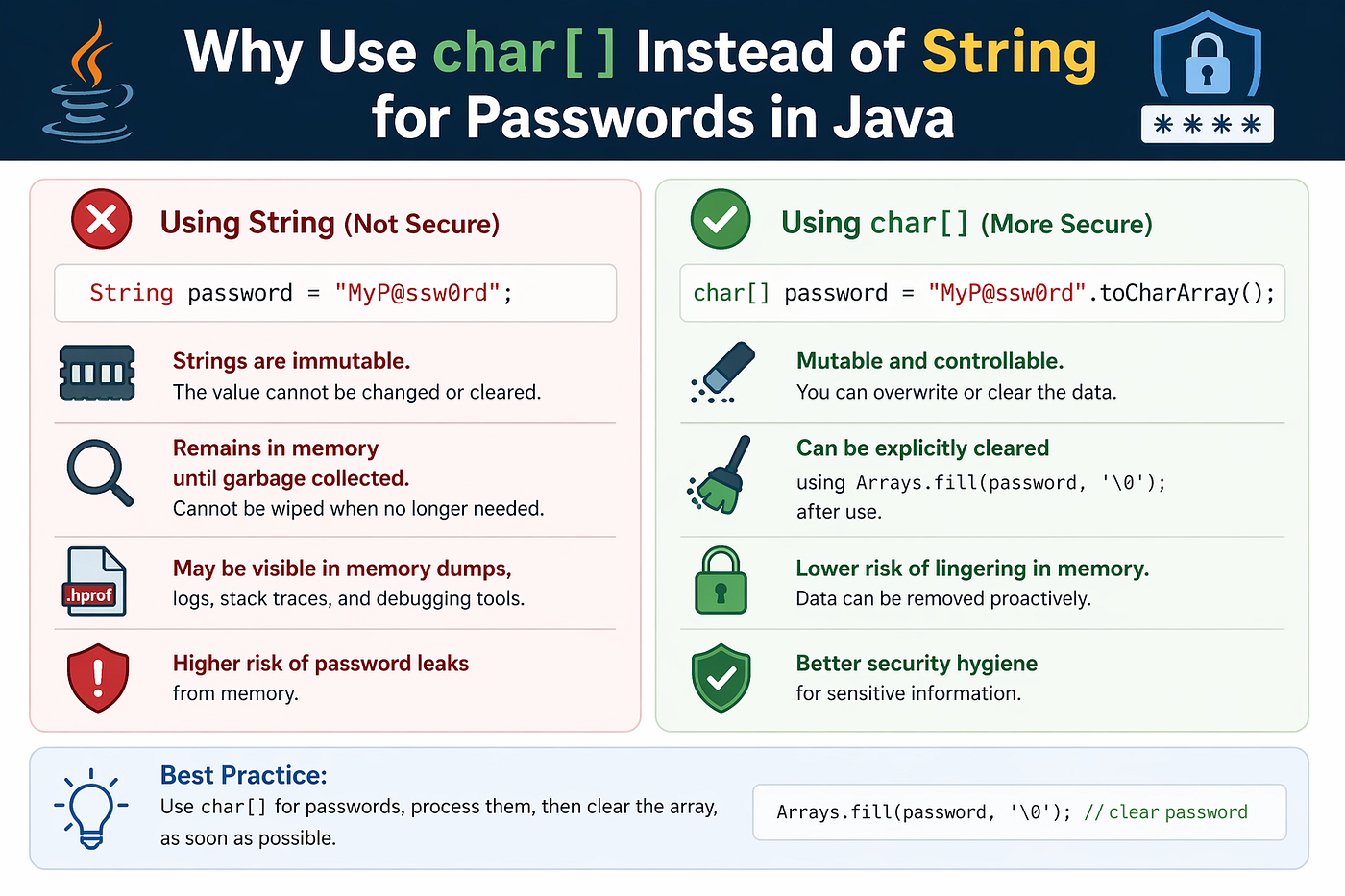
In modern software development, secure password handling extends far beyond hashing and salting in the database. A critical yet frequently overlooked aspect is how passwords are managed in application memory before they reach secure storage or processing. In Java, this leads to a well-established security best practice: always use a character array (char[]) instead of a String object when handling passwords.
This recommendation stems from fundamental characteristics of the Java language and runtime environment, specifically the immutability of String and the unpredictable behavior of the Garbage Collector.
For those currently preparing for interviews, consider exploring the comprehensive resource at **Codes Tutorial**. The platform offers interview templates, scenario-based design questions, real interview experiences, project practice materials, and more.
The Problem with String: Immutability and Lingering Data
Java String objects are immutable by design. Once a String is created, its internal character sequence cannot be modified. For example:
String password = "MySecretPassword123";The characters representing the password are stored in a fixed memory location. No amount of code can overwrite or erase this data while the String object exists. Even if the reference variable goes out of scope, the object itself remains in memory until the Garbage Collector (GC) reclaims it.
The Garbage Collector runs automatically based on JVM heuristics related to memory pressure and system resources. Developers have no direct control over its timing. As a result, sensitive data stored in a String may persist in plain text in RAM for an extended and unpredictable period — sometimes several minutes after the application has finished using it.
Research and memory analysis experiments have shown that password strings can remain detectable in heap memory for up to 358 seconds after the program no longer references them. This creates a significant window of vulnerability during which an attacker could potentially extract the plaintext password through a memory dump.
How Attackers Exploit Memory-Resident Data
Memory dumps are a realistic attack vector in several scenarios:
- Process dumps: Capturing the memory image of a running application.
- System crash dumps: Automatic memory snapshots created by the operating system during failures.
- Hibernation or swap files: When the OS moves RAM contents to disk for power management or virtual memory usage.
Sensitive data left in memory can be recovered using forensic tools, even if the application has completed its authentication logic.
Real-World Example: KeePass Vulnerability (CVE-2023–32784)
A notable case occurred with the popular password manager KeePass. Although the core logic avoided storing the full master password as a persistent String, the user interface generated intermediate placeholder strings (such as “●”, “●●”, “●●●”) as the user typed each character.
Because these were immutable String objects, fragments remained in memory. An attacker performing a memory dump could analyze the sequence of these placeholders and reconstruct the original password character by character. This vulnerability highlighted how even seemingly harmless UI operations can introduce serious security risks when String is used for sensitive input.
The Solution: Using char[] for Mutable and Erasable Password Handling
Unlike String, a char[] array is mutable. This allows developers to explicitly overwrite its contents immediately after use, significantly reducing the time sensitive data remains in memory.
Here is the recommended approach:
char[] password = getPasswordFromUser();  // e.g., from console or UI

try {
    // Perform authentication or hashing
    authenticate(password);
} finally {
    // Immediately clear the array
    Arrays.fill(password, '0');  // or '\0' for null character
}
By calling Arrays.fill() right after the password is no longer needed, the sensitive data is overwritten with zeros (or any other value) in milliseconds rather than waiting for the Garbage Collector. This practice follows the security principle of minimizing the lifetime of sensitive data in memory.
Additional Security Benefit: Safer Default Behavior in Logging
Using char[] also provides a natural safeguard against accidental leakage through logging or debugging statements.
Consider the following examples:
Object stringPassword = "Password";
System.out.println("String: " + stringPassword);
// Output: String: Password

Object charArrayPassword = "Password".toCharArray();
System.out.println("Array: " + charArrayPassword);
// Output: Array: [C@5823338e
When a String is printed, its actual content appears in logs. In contrast, printing a char[] displays only the class type and hash code (e.g., [C@5823338e), preventing accidental exposure of the password in log files, console output, or monitoring systems.
Key Reasons to Prefer char[] Over String for Passwords
- Eliminate Persistence Due to Immutability String objects cannot be cleared manually, leaving data vulnerable until GC runs.
- Enable Proactive Erasure char[] allows immediate overwriting with Arrays.fill(), shrinking the exposure window dramatically.
- Prevent Accidental Leaks in Logs and Debugging Default toString() behavior for arrays avoids printing sensitive content.
Best Practices Summary
- Always collect and process passwords using char[].
- Clear the array explicitly using Arrays.fill() in a finally block or equivalent cleanup mechanism as soon as authentication or hashing is complete.
- Avoid converting the char[] to String unless absolutely necessary, and limit the lifetime of any temporary String created.
- Apply the same principle to other sensitive data such as API keys or encryption secrets where feasible.
By adopting char[] for password handling, developers significantly strengthen in-memory security and align with the principle of least exposure for sensitive information. This practice, though simple, forms an important layer in defense-in-depth security strategies for Java applications.
Implementing this habit consistently helps ensure that passwords exist in plaintext in memory for the absolute minimum time required, thereby reducing the attack surface against memory-based exploits.
🔖 Thanks for reading.
- If you enjoyed this article, please consider giving it a clap.👏
- I would appreciate hearing your thoughts in the comments below! 💭
- Follow me for ongoing learning and connection!🔔
메타데이터
- post_id
- b6c9b1cfaed6
- slug
- why-use-char-instead-of-string-for-passwords-in-java-b6c9b1cfaed6
- url
- https://medium.com/codetutorials/why-use-char-instead-of-string-for-passwords-in-java-b6c9b1cfaed6
- canonical_url
- https://medium.com/codetutorials/why-use-char-instead-of-string-for-passwords-in-java-b6c9b1cfaed6
- author_url
- https://medium.com/@umeshcapg
- status
- ok
- fetched_at
- 2026-06-12 07:40:50