Search Auto-Complete using RxJava and Kotlin
Search is a very common feature in almost every android app out there. Our Shop101 android app also uses this feature to provide a way for…
Search Auto-Complete using RxJava and Kotlin
Search is a very common feature in almost every android app out there. Our Shop101 android app also uses this feature to provide a way for users to browse through different products.
Search-AutoComplete feature provides an interactive search experience in an application providing users with results while they are typing. While it can be implemented in various ways, at Shop101, we implemented this feature using RxJava for a smoother UI flow and simplifying an otherwise lengthy implementation. Let’s jump into this concept using some code.
First we will add the necessary dependencies in app’s build.gradle file -
dependencies {
    // RxJava
    compile "io.reactivex.rxjava2:rxjava:2.2.3"
    compile "io.reactivex.rxjava2:rxandroid:2.2.3"
    // RxBindig
    compile "com.jakewharton.rxbinding2:rxbinding:2.0.0"
    compile "com.jakewharton.rxbinding2:rxbinding-kotlin:2.0.0"
}
Text changes in the search field can be observed using following Rx method:
RxTextView.textChanges(searchText)And thanks to RxKotlin this can be more concisely written as :
searchText.textChanges()Let’s simplify the use cases for our example —
- Avoiding a search api call every time a user enters a new letter in the search field unless the word length is at-least 3.
- Toggling progress bar’s visibility based on the above api result.
The above mentioned use cases can be achieved using the following powerful RxJava operators -
- Debounce : This operator provides necessary time delay before making repetitive search queries. For ex: if user types “a”, “ab” and “abc” in an instant, multiple api requests may occur based on the text user is entering. Debounce operator allows us to provide necessary time delay before emitting the item from an Observable for further processing. So the only search query that took place is for “abc” reducing number of api calls to the network. Let’s provide a delay of 500ms between 2 successive api calls for performing auto suggestion query.
.debounce(500, TimeUnit.MILLISECONDS)- Filter : This operator provides a way to filter out the emitted observable items based on required conditions. Such as, to make a search query only if the entered text is ≥3 characters in length.
.filter {
    it.trim().toString().length >= 3
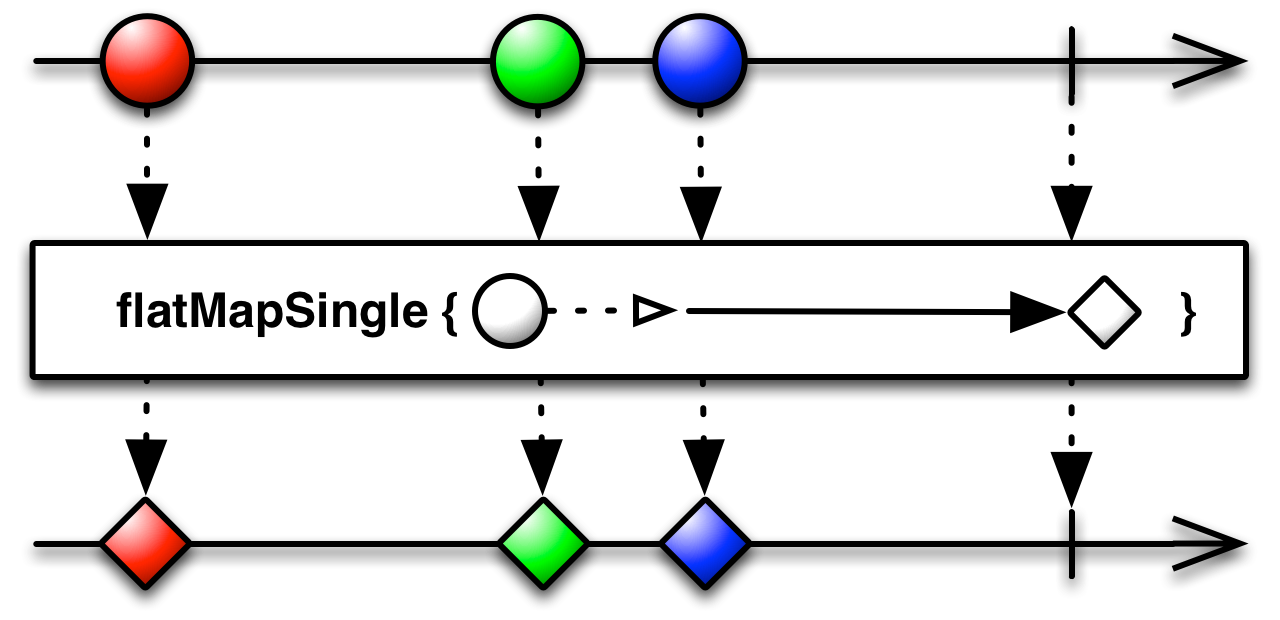
}- FlatMapSingle : This operator allows us to map each emitted item from Observable into SingleSources, subscribes to them and merges their onSuccess values into SingleSource. We will use this operator perform an API call.
We use FlatMapSingle rather than Map because FlatMapSingle returns an observables itself hence can be used to map over asynchronous operations. ConcatMap does not maintain the asynchronous behaviour as we have to wait for each observable to complete its work. Hence for our use case, FlatMapSingle stands out.

https://raw.githubusercontent.com/wiki/ReactiveX/RxJava/images/rx-operators/flatMapSingle.png
Here’s how we will use it for our example :
.flatMapSingle {
    fetchAutoSuggestionResults(it.trim().toString())
}- DoOnNext : This function can be triggered before FlatMapSingle to perform certain side actions before the stream is filtered based on the emitted observable items. Example: Logging certain values for debugging purposes. In our case we can toggle the visibility of the progress bar so that the user can be made aware of the triggered api call.
.doOnNext {
    if (it.trim().toString().length >= 3)
        progressLiveData.postValue(View.VISIBLE)
}- SkipInitialValue : As soon as a view is subscribed, the context is immediately emitted. To avoid this, skipInitialValue() is used.
So, combining the above operators, the overall piece of code would look something like this :
searchText.textChanges()
    .skipInitialValue()
    .debounce(500, TimeUnit.MILLISECONDS)
    .doOnNext {
        if (it.trim().toString().length >= 3)
           progressLiveData.postValue(View.VISIBLE)
    }
    .filter {
        it.trim().toString().length >= 3
    }
    .flatMapSingle {
        // Perform API operation
        fetchSearchResults(it.trim().toString())
    }
    .observeOn(AndroidSchedulers.mainThread())
    .subscribeOn(Schedulers.io())
    .subscribe({
         progressLiveData.postValue(View.GONE)
         // subscribe to the success here
     }, {
        progressLiveData.postValue(View.GONE)
        // subscribe to the failure here
     })
That’s it! This small piece of code will work wonders for the autocomplete search feature which is ready to work.
We hope this will be useful to someone out there. Let us know your suggestions.
Happy Coding!
Reference:
메타데이터
- post_id
- b6ef23cf95f0
- slug
- search-auto-complete-using-rxjava-and-kotlin-b6ef23cf95f0
- url
- https://medium.com/the101times/search-auto-complete-using-rxjava-and-kotlin-b6ef23cf95f0
- canonical_url
- https://medium.com/the101times/search-auto-complete-using-rxjava-and-kotlin-b6ef23cf95f0
- author_url
- https://medium.com/@pranav.shop101
- status
- ok
- fetched_at
- 2026-08-18 18:18:24