Stop Hammering Your Database — Caching Strategies Every Backend Engineer Should Know
From Cache Aside to Cache Stampedes — learn practical caching strategies for building scalable backend systems
BACKEND ENGINEERING
Stop Hammering Your Database — Caching Strategies Every Backend Engineer Should Know
From Cache Aside to Cache Stampedes — learn practical caching strategies for building sdcalable backend systems
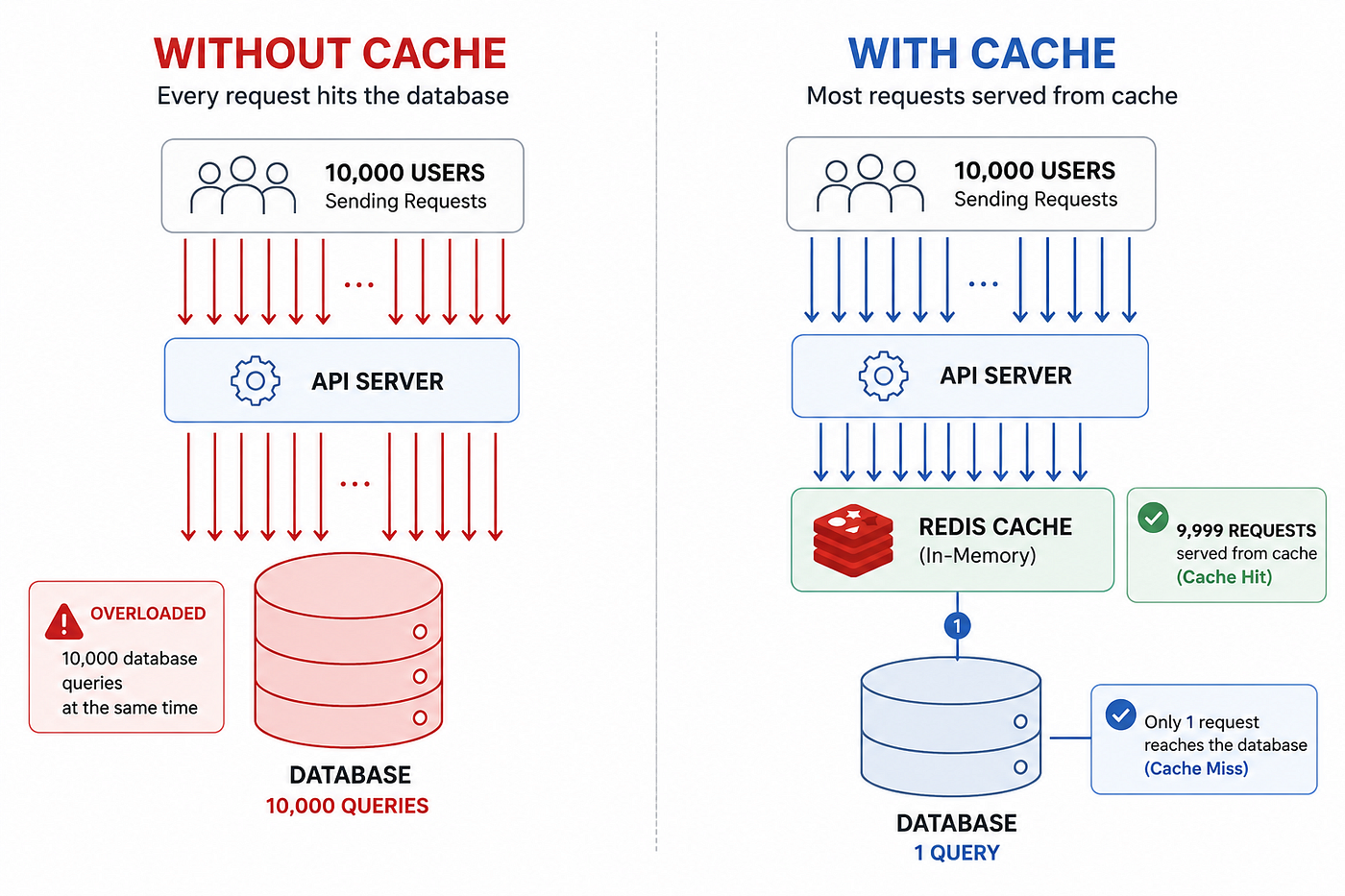
Illustration by the author using ChatGPT
Why you should care about caching?
Imagine 10,000 users searching for the same flight at the same time. How many database queries should your system execute?
The answer is one.
Every time a user searches for Chennai → Mumbai flights, your system may query multiple datasets including seat inventory, pricing rules, airline information, airport metadata, and more. Perfectly fine for a handful of users. But what happens when 10,000 users search for the exact same route at the same time?
Your database ends up executing the same queries repeatedly, consuming CPU, memory, and connections for work it has already done.
The scary part? Most of that load is completely avoidable.
Caching is how you break that cycle. Instead of repeatedly fetching the same data from the database, you store frequently accessed results in a fast in-memory layer and serve them directly to subsequent users.
But simply adding Redis to your architecture and calling it a day is not a caching strategy. The real challenge is understanding what to cache, which caching pattern to use, and how to handle the trade-offs associated with each approach.
In this article, we’ll explore the most common caching patterns using a flight booking application as an example, along with the real-world challenges that appear when these systems operate at scale.
Cache = store the result once, serve it thousands of times.
What You'll Learn
- Why caching matters
- Cache Aside
- Read Through
- Write Through
- Write Behind
- Refresh Ahead
- TTL
- Cache Invalidation
- Cache Stampede
- Cache Penetration
- Metrics & Monitoring
- Choosing the right strategy
- Real-world flight booking architecture
What Happens Without a Cache?
User → API → Database → ResponseWithout a cache, every request becomes a database request.
It doesn’t matter if the answer was fetched one second ago. The database still does the work again.
As traffic grows, the consequences become obvious.
- Higher response times as the database becomes busier
- Increased infrastructure costs from scaling database resources
- Connection pool exhaustion during traffic spikes
- Reduced system reliability when the database becomes a bottleneck
Your database becomes a machine for repeating the same work.
What Is a Cache?
A cache is a fast, in-memory layer sitting between your application and the database.
User → API → Cache ──<hit>──→ Response
                 └──<miss>──→ Database → Cache → Response
A cache hit occurs when the requested data is already available in the cache. The response is returned immediately.
A cache miss occurs when the data isn’t available in the cache. The application retrieves it from the database, stores it in the cache, and returns the result.
Think of it this way
Database = Library Cache = Your desk
You don’t walk to the library every time you need the same book.
Most teams use Redis as their cache because it’s fast, simple, and designed for in-memory data storage.
Cache Aside — The Most Common Pattern

Illustration by the author using ChatGPT
This is the caching strategy most teams implement with Redis.
How it works
- Check the cache
- If cache hits → return the data
- If cache misses → query the database, store the result in the cache, and return it
Flight Example
A user searches for Chennai → Mumbai flights.
- Cache miss → query the database → store the result in cache
- Next 1,000 users searching the same route → cache hit → database never gets involved
The database does the work once. The cache serves it thousands of times.
✅ Pros
- Simple to implement
- Application still works if cache is unavailable
- Only stores data that is actually requested
❌ Cons
- First request is slower due to a cold start
- Cached data can become stale
- Can cause cache stampedes under heavy load
Use when — Most read-heavy applications. If you’re starting with Redis, this should be your default choice.
Read Through Cache
Read Through works similarly to Cache Aside, but the cache layer handles cache misses instead of the application.
Your application simply requests a key. If the data isn’t in the cache, the cache layer fetches it from the database, stores it, and returns the result.
Reality check — Redis doesn’t support Read Through natively. Most teams build an abstraction layer that behaves like Read Through while using Cache Aside under the hood.
✅ Pros
- Cleaner application code
- Cache logic is centralized
❌ Cons
- More complex to implement
- Harder to debug and troubleshoot
Use when — You want caching concerns separated from business logic, especially in large applications with multiple teams.
Write Through Cache

Illustration by the author using ChatGPT
Every write updates both the cache and the database.
App → Update Cache + Database → DoneFlight Example — Seat Inventory
- Flight has 50 seats available
- A user books 1 seat
- The system updates both the database and cache to 49
- The next user immediately sees the updated seat count
Because the cache is updated as part of the write operation, stale reads are significantly reduced.
✅ Pros
- Cache stays synchronized with writes
- No stale reads immediately after a write
- Simple consistency model
❌ Cons
- Writes are slower
- May cache data that is never read
- More write operations
Use when — Seat inventory, account balances, booking status, or any data where stale information can cause business problems.
Write Behind — Write Back

Illustration by the author using ChatGPT
Write Behind prioritizes write performance by updating the cache immediately and persisting changes to the database asynchronously.
App → Cache <instant> → Database <later>Examples
- Like counts
- View counts
- Leaderboards
- Analytics events
The user gets an immediate response because the write is completed in the cache. A background process later batches and persists those changes to the database.
✅ Pros
- Extremely fast writes
- Reduces database write load
- Handles write spikes efficiently
❌ Cons
- Risk of data loss before persistence
- More complex architecture
- Eventual consistency
Use when — High-volume write workloads where occasional data loss is acceptable.
Avoid for — Bookings, payments, account balances, or any workflow where data integrity is critical.
Write Through optimizes for consistency. Write Behind optimizes for speed.
Refresh Ahead Cache

Illustration by the author using ChatGPT
Instead of waiting for a cache entry to expire, Refresh Ahead updates it before expiration.
Key expires in 60s
        ↓
Background job refreshes at 30s
        ↓
Users never see a cache miss
Flight Example
The Chennai → Mumbai route is searched thousands of times every day.
Rather than letting the cache expire and forcing the next user to wait for a database query, a background job refreshes the cache periodically.
As a result, users continue receiving fast responses while the database avoids sudden traffic spikes.
✅ Pros
- Eliminates cache misses for hot data
- Keeps response times consistent
- Reduces sudden database load
❌ Cons
- Requires identifying frequently accessed data
- Can waste resources on rarely used keys
- Additional background processing
Use when — Popular flight routes, airport metadata, pricing rules, or any data that is read frequently and changes infrequently.
Cache Aside reacts to demand. Refresh Ahead anticipates it.
TTL — Time To Live
Every cache entry should have an expiration time. That’s what TTL is for.
cache.set("flight:MAA:BOM", result, ttl=300) //expires in 5 minutesWhy TTL Matters
- Prevents stale data from living forever
- Frees up memory automatically
- Helps recover from bugs and synchronization issues
- Ensures cached data is periodically refreshed from the source of truth

Illustration by the author using ChatGPT
TTL vs Write Through
At first glance, Write Through may make TTL seem unnecessary.
After all, if every write updates both the database and cache, shouldn’t they always stay in sync?
Not necessarily.
Consider these scenarios
- A database administrator updates data directly
- A background job updates the database but not the cache
- Another service modifies the same data
- A bug updates the database and skips the cache update
In all these cases, the cache becomes stale.
Write Through handles — “My application updated the data.”
TTL handles — “Something outside my application changed the data.”
Write Through keeps data synchronized. TTL ensures stale data doesn’t live forever.
Cache Invalidation
Caching is easy. Keeping the cache correct is hard.
When data changes, how do you prevent users from seeing outdated information?
There are three common approaches
1. Update the Cache
Update the cache whenever the underlying data changes.
This is what Write Through does.
2. Delete the Cache Entry
Remove the cache key and let the next request fetch fresh data from the database.
This is often the simplest and safest approach.
3. Let TTL Handle It
Accept a small window of staleness and allow the cache entry to expire naturally.
The Hard Part — External Updates
Imagine a database administrator directly updates seat inventory in the database.
The cache has no idea the change happened.
It continues serving stale data until the cache is updated, invalidated, or expires.
The same problem can occur when
- Background jobs update the database
- Another service modifies the data
- A bug skips the cache update
How Teams Handle This
There is no single solution.
Most production systems combine
- Write Through or explicit cache updates
- Cache invalidation on data changes
- Sensible TTL values as a safety net
The hardest part of caching isn’t storing data. It’s knowing when that data is no longer correct.
Cache Stampede
This is one of the most common caching problems in production, yet many articles never mention it.

Illustration by the author using ChatGPT
What Happens?
- A popular cache key expires
- Thousands of users request it at the same time
- Everyone sees a cache miss
- Everyone queries the database
- The database gets overwhelmed
Flight Example
Imagine the cache for Chennai → Mumbai flights expires at 10:00 AM during peak traffic.
Suddenly, thousands of users trigger the same expensive database query at the same time.
Instead of reducing database load, the cache expiration creates a traffic spike.
Fix 1 — Mutex Lock
Allow only one request to rebuild the cache while everyone else waits.
const lockAcquired = await redis.set(
  `lock:${key}`,
  "1",
  "NX",
  "EX",
  10
);

if (lockAcquired) {
  const data = await db.getFlights();
  await redis.set(key, JSON.stringify(data), "EX", 300);
}
Only one request hits the database. Everyone else waits for the cache to be populated.
Fix 2 — TTL Jitter
Add randomness to expiration times so popular keys don’t expire simultaneously.
const ttl = 300 + Math.floor(Math.random() * 30);
await redis.set(key, value, "EX", ttl);
Instead of expiring exactly at 5 minutes, keys expire somewhere between 5 and 5.5 minutes.
Fix 3 — Soft TTL
Serve stale data temporarily while a background process refreshes the cache.
Users continue getting fast responses while fresh data is fetched asynchronously.
✅ Pros
- Protects the database during traffic spikes
- Improves system stability
- Reduces sudden load surges
❌ Cons
- Additional implementation complexity
- Temporary stale data may be served
- Requires careful cache management
Use when — You have frequently accessed data and cannot afford thousands of simultaneous cache misses.
A cache is supposed to reduce load. A cache stampede does the exact opposite.
Cache Penetration
Cache Stampede happens when a popular key expires.
Cache Penetration happens when requests target a key that never existed in the first place.

Illustration by the author using ChatGPT
What Happens?
- A request arrives for an invalid route, such as
flight:search:XYZ:ABC - Cache miss → database query runs
- Database returns nothing
- Nothing gets cached
- The next request repeats the same process
The result is simple — every request bypasses the cache and hits the database.
Real — World Scenario
A bot sends thousands of requests for random flight routes.
Since none of these routes exist, every request reaches the database.
Your cache provides no protection, and the database ends up doing unnecessary work.
Fix 1 — Cache Null Results
If the database returns nothing, cache that result for a short period.
const result = await db.getFlights(key);
if (!result) {
  await redis.set(key, "NULL", "EX", 60);
  return null;
}
await redis.set(key, JSON.stringify(result), "EX", 300);
return result;
The next request hits the cache instead of the database.
Fix 2 — Bloom Filters
A Bloom Filter answers one question very efficiently
Has this key ever existed?
Request
   ↓
Bloom Filter
   ↓
Definitely doesn't exist → Reject
   ↓
Might exist → Continue to Cache / DB
Bloom Filters are commonly used in large-scale systems to prevent expensive lookups for invalid keys.
✅ Pros
- Protects the database from invalid requests
- Bloom Filter checks are extremely fast
- Reduces the impact of bot traffic
❌ Cons
- Null caching consumes additional memory
- Bloom Filters require maintenance
- False positives are possible
Use when — Public-facing APIs where users can send arbitrary input.
Always pair this with rate limiting.
A cache protects your database from repeated requests. Cache Penetration exploits requests that should never have existed.
Metrics & Monitoring
You can’t improve what you don’t measure.
A cache may feel fast while frequently missing, serving stale data, or constantly evicting keys.
The Most Important Metric — Cache Hit Rate
Hit Rate = Cache Hits / (Cache Hits + Cache Misses) × 100What It Usually Means
>95% → Excellent
85–95% → Healthy
70–85% → Investigate TTLs and key design
<70% → Cache is providing limited valueWhat to Monitor
Cache Hit / Miss Rate
A high overall hit rate can be misleading.
For example
flight:search: → 95% flight:inventory: → 40%
Monitor key groups separately to identify weak spots.
Cache Latency
Cache lookups should be extremely fast.
If latency suddenly increases, investigate
- Network delays
- Redis memory pressure
- Large cache values
Eviction Rate
When Redis runs out of memory, it starts evicting keys.
A high eviction rate usually means
- Cache size is too small
- Too much data is being cached
- TTL values need adjustment
Penetration Rate
Track how many requests return no data.
A sudden increase may indicate
- Invalid client requests
- Bot traffic
- Cache Penetration issues
Useful Tools
- Redis →
INFO,MONITOR - Monitoring → Grafana + Prometheus
- APM → Datadog, New Relic
Which Strategy Should You Use?

Illustration by the author using ChatGPT
There is no universally best caching strategy.
The right choice depends on the data, traffic patterns, and consistency requirements.
Real-World Flight Booking Cache Design

Illustration by the author using ChatGPT
Notice how a single system uses multiple caching strategies.
Different types of data have different requirements.
What I Learned
The biggest mistake I made when learning caching was assuming Redis itself was the strategy.
Redis is just a tool.
The real challenge is deciding
- What to cache
- When to invalidate
- How much staleness is acceptable
- What happens when the cache fails
Key Takeaways
- Cache Aside + Redis is the best starting point for most applications
- Use Write Through when stale data can cause business problems
- TTL is a safety net and should be used with every caching strategy
- Cache Stampede occurs when many requests hit an expired key simultaneously
- Cache Penetration occurs when requests target keys that never existed
- Design caching strategies per data type, not per application
- Monitor hit rate, latency, and evictions to ensure the cache is actually helping
The goal of caching is not to store data. The goal is to avoid doing the same work twice.
메타데이터
- post_id
- b74a1bd0953c
- slug
- stop-hammering-your-database-caching-strategies-every-backend-engineer-should-know-b74a1bd0953c
- url
- https://medium.com/it-chronicles/stop-hammering-your-database-caching-strategies-every-backend-engineer-should-know-b74a1bd0953c
- canonical_url
- https://medium.com/it-chronicles/stop-hammering-your-database-caching-strategies-every-backend-engineer-should-know-b74a1bd0953c
- author_url
- https://medium.com/@suryad20698
- status
- ok
- fetched_at
- 2026-06-27 07:40:21