Proxy vs Reverse Proxy vs Load Balancer: What Engineers Get Wrong About the Difference
I’ve reviewed a lot of system design docs over the years. Junior engineers, senior engineers, even staff-level architects — and one pattern…
Proxy vs Reverse Proxy vs Load Balancer: What Engineers Get Wrong About the Difference
Proxy vs Reverse Proxy vs Load Balancer: What Engineers Get Wrong About the Difference
I’ve reviewed a lot of system design docs over the years. Junior engineers, senior engineers, even staff-level architects — and one pattern shows up constantly: people treating “proxy,” “reverse proxy,” and “load balancer” as interchangeable synonyms.
They’re not. Conflating them leads to real architectural mistakes. Security gaps. Over-engineered setups. Misplaced trust in cloud defaults.
Let me break down what these actually are, why the distinction matters, and where the real complexity hides.
The Forward Proxy: It’s About Hiding the Client
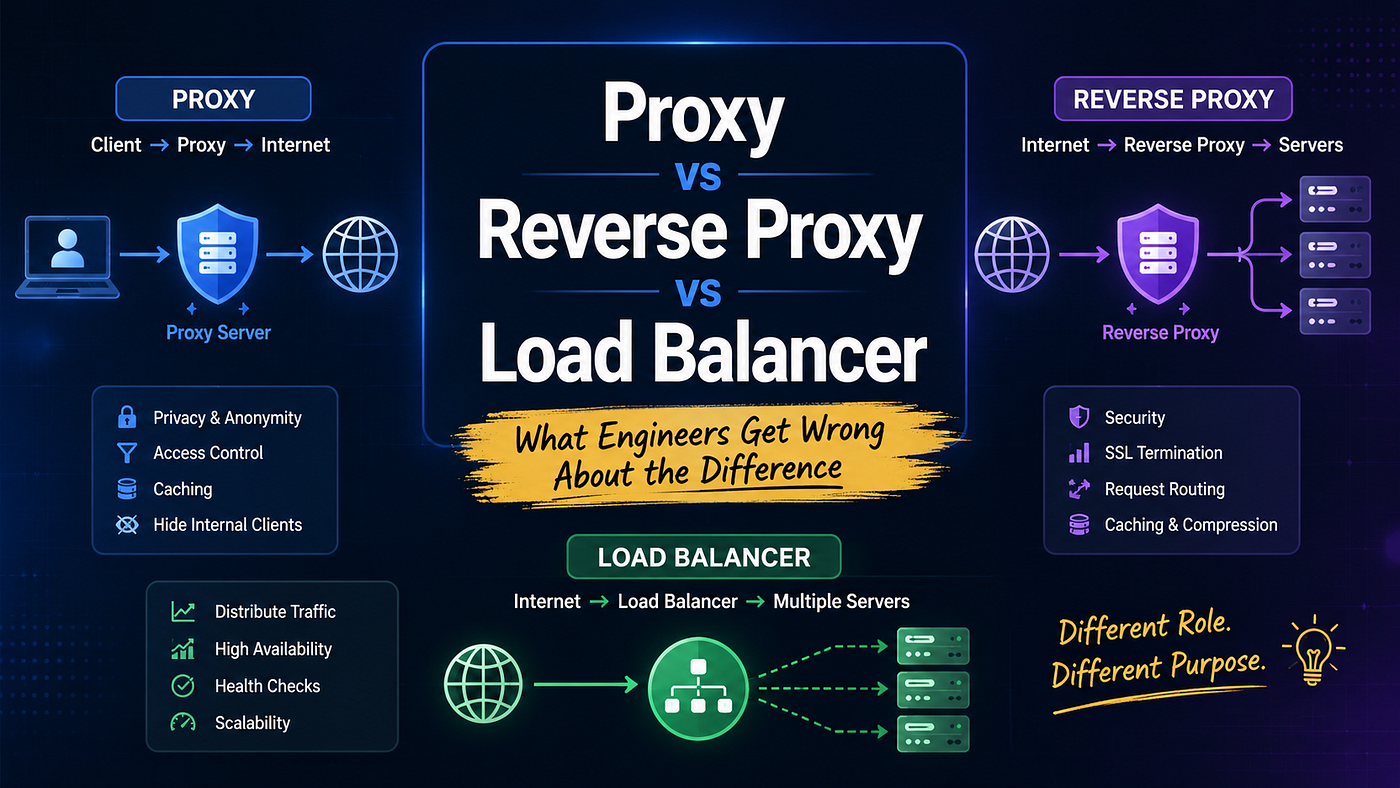
A forward proxy sits between your internal network and the public internet. The outside world never sees the actual client — it only sees the proxy.
Think of it as your company’s internet bouncer. Every outbound request from every employee machine routes through it. It can:
- Block domains (no, Karen, you can’t stream Netflix on company Wi-Fi)
- Cache responses to reduce bandwidth
- Strip identifying headers before requests leave your network
- Scan inbound responses for malicious payloads
# Simple squid forward proxy config snippet
http_port 3128
acl blocked_sites dstdomain .malicious-site.com
http_access deny blocked_sites
http_access allow localnet
Short and unglamorous. But in enterprise environments, this is serious infrastructure. One unfiltered response from a compromised CDN edge node can laterally move through your entire internal network. I’ve seen it happen. It’s not fun.
The caching piece also gets underestimated. If 40 engineers on your team all pull the same 200MB Docker base image or watch the same internal training video, your forward proxy serves the cached copy after the first hit. That’s real money on bandwidth at scale.
The Reverse Proxy: Hiding the Servers This Time
Flip the direction. Now you’re protecting servers, not clients. A reverse proxy accepts all incoming traffic from the public internet and routes it to one or more backend servers. Clients never talk directly to your application servers. They don’t even know those servers exist.
# NGINX reverse proxy routing to two backend apps
server {
    listen 80;
    server_name api.yourapp.com;

    location /users {
        proxy_pass http://users-service:3001;
    }

    location /payments {
        proxy_pass http://payments-service:3002;
    }
}
That config above? That’s doing path-based routing to separate microservices. NGINX is inspecting the URL, making a routing decision, and forwarding accordingly.
Your payment service never gets a /users request by accident. Your users service is never exposed to the internet directly.
This is where a lot of developers get the concept twisted. They know NGINX handles “load balancing,” so they equate the two. But load balancing is one feature inside what a reverse proxy does.
It also handles SSL termination, request inspection, caching, compression, and auth delegation. Load balancing is a subset.
SSL Termination Deserves Its Own Mention
I want to pause here because SSL termination is one of those things that sounds boring until you’re debugging encrypted traffic in a microservices cluster at 2am.
When NGINX or any reverse proxy terminates SSL, it decrypts incoming HTTPS traffic at the edge. Your backend services communicate over plain HTTP within the private network. This has two practical benefits:
- Your app servers aren’t burning CPU cycles on TLS handshakes
- The proxy can actually inspect request content for routing and security decisions
server {
    listen 443 ssl;
    ssl_certificate /etc/ssl/certs/yourapp.crt;
    ssl_certificate_key /etc/ssl/private/yourapp.key;

    location / {
        proxy_pass http://backend-cluster;
        proxy_set_header X-Forwarded-Proto https;
    }
}
Without termination at the edge, you either decrypt at every service (expensive and complex) or you route blind (dangerous). Neither is a good default.
Cloud Load Balancers vs. NGINX: Use Both, Not One
Here’s the question I hear constantly: “We’re on AWS with an ALB — why do we still need NGINX?”
Fair question. The AWS Application Load Balancer is genuinely good. It handles routing, health checks, and autoscaling integration. But it operates at a different layer than your internal reverse proxy, and they solve different problems.
![Internet → [AWS ALB] → Private Subnet → [NGINX Reverse Proxy] → [Backend Services]](https://miro.medium.com/v2/resize:fit:1400/1*qlSG4GrmQfReF11Fr5lEiQ.png)
Internet → [AWS ALB] → Private Subnet → [NGINX Reverse Proxy] → [Backend Services]
The ALB is your external gatekeeper. It handles the raw traffic distribution into your private subnet and provides DDoS protection at the edge. NGINX inside the subnet handles intelligent intra-cluster routing: session affinity, header-based decisions, path rewrites, service mesh logic.
AWS ALB routes based on simple rules — host headers, URL patterns, weighted target groups. NGINX can route based on cookies, session data, and request body content. They’re not the same tool. The layered approach isn’t redundant. It’s defense in depth combined with routing granularity.
In Kubernetes, this maps cleanly to the ingress controller pattern. Your cloud load balancer points traffic at the cluster. The ingress controller — often NGINX or Traefik — handles internal routing to services.
# Kubernetes Ingress rule snippet
apiVersion: networking.k8s.io/v1
kind: Ingress
metadata:
  name: app-ingress
spec:
  rules:
  - host: api.yourapp.com
    http:
      paths:
      - path: /orders
        pathType: Prefix
        backend:
          service:
            name: orders-service
            port:
              number: 80
One config file. Entire routing topology for your cluster. That’s why teams lean on ingress controllers rather than hardcoding routing logic in application code.
The Part Nobody Warns You About
Here’s the honest part of this conversation. Proxies introduce a new failure domain. Every layer you add is another thing that can silently misbehave under load, miscache a response, or drop headers in ways that break auth downstream.
I’ve debugged issues where a reverse proxy was stripping Authorization headers before they reached the backend. Took three hours to find. The app logs showed authenticated requests failing. The proxy logs showed... nothing useful.
Session stickiness also creates subtle bugs. You configure your reverse proxy to pin users to the same backend via cookie. Works great until that backend instance gets recycled during a deployment.
Half your users get silently logged out. Nobody filed a ticket correctly. The on-call engineer blamed a “flaky auth service.”
These aren’t edge cases. They’re the normal operational cost of layered proxy architecture. The sophistication that makes your infrastructure secure and scalable also makes failure modes less obvious and harder to trace.
Build the layers. But instrument everything. Trust nothing silently.
메타데이터
- post_id
- b78d5331ad6b
- slug
- proxy-vs-reverse-proxy-vs-load-balancer-what-engineers-get-wrong-about-the-difference-b78d5331ad6b
- url
- https://medium.com/@thinkchain/proxy-vs-reverse-proxy-vs-load-balancer-what-engineers-get-wrong-about-the-difference-b78d5331ad6b
- canonical_url
- https://medium.com/@thinkchain/proxy-vs-reverse-proxy-vs-load-balancer-what-engineers-get-wrong-about-the-difference-b78d5331ad6b
- author_url
- https://medium.com/@thinkchain
- status
- ok
- fetched_at
- 2026-08-05 14:08:51