What is Kafka Connect and why not just write a Consumer?
You Already Know How to Write a Kafka Consumer. Here’s Why You Shouldn’t.
What is Kafka Connect and why not just write a Consumer?
You Already Know How to Write a Kafka Consumer. Here’s Why You Shouldn’t.
The third time my team wrote a JDBC-to-Kafka producer, I started asking the wrong question.
We had a microservice that pulled rows from a PostgreSQL table every 30 seconds and published them to a Kafka topic. It worked. Six months later, a different team needed data from a different table into a different topic. They wrote their own version. Then a third team needed to push Kafka events into an Elasticsearch index. Another service, another deployment, another thing to monitor.
By the time I counted, we had five custom data-movement services running in our cluster. None of them shared code. Each had its own offset tracking logic, its own error handling quirks, its own way of handling schema changes. When one failed at 2 AM, whoever was on call had to remember which repository it lived in, how it managed state, and why the previous engineer had made the choices they did.
That is the problem Kafka Connect solves. Not elegantly, not without its own sharp edges, but it solves it.
Photo by RoseBox رز باکس on Unsplash
What Connect actually is…
Most introductions describe Kafka Connect as “a tool to stream data between Kafka and other systems.” That is accurate and almost useless as a mental model.
Here is a more grounded way to think about it: Connect is a distributed worker framework that hosts and manages data-movement jobs called connectors. You describe what you want moved and where, and Connect handles the rest. Polling, offset tracking, parallelism, restarts after failure, distributing work across multiple machines — you configure it, Connect operates it.
The thing you interact with most is a REST API. You POST a JSON configuration saying “read from this PostgreSQL table, write to this Kafka topic.” Connect validates it, starts the job, and manages it from there. No new service to deploy. No offset management code to write. No restart logic to maintain.
Underneath that REST API, three abstractions are doing the work.
Connector is not the thing that moves data. This trips people up constantly. A connector is the configuration and coordination layer. It knows what source or sink it’s talking to. It decides how many parallel workers to spawn. It reassigns work if a worker crashes. But it does not touch a single record itself.
Task is what actually moves data. Each connector spawns one or more tasks, and tasks run in parallel. A source task polls your database and publishes records to Kafka. A sink task consumes from Kafka and writes to your target system. The connector manages tasks; tasks do the work.
Worker is the JVM process that hosts tasks. You run one or more worker processes, and Connect distributes tasks across them. If a worker dies, its tasks get picked up by the surviving workers. This is the “distributed” part of Kafka Connect.
When you POST a connector config to the REST API, you are telling the framework: “I need this job to exist.” Connect figures out how many tasks to create, assigns them to available workers, and keeps track of which records have been processed.
What can actually Connect to what
The ecosystem question matters before anything else. If your source or sink is not supported, nothing else in this article is relevant.
The Confluent Hub (confluent.io/hub) is the de facto registry for Connect plugins. At the time of writing it lists over 200 connectors. Most production teams end up using a much smaller set, and the same names come up repeatedly.
Common sources (systems that feed data into Kafka):
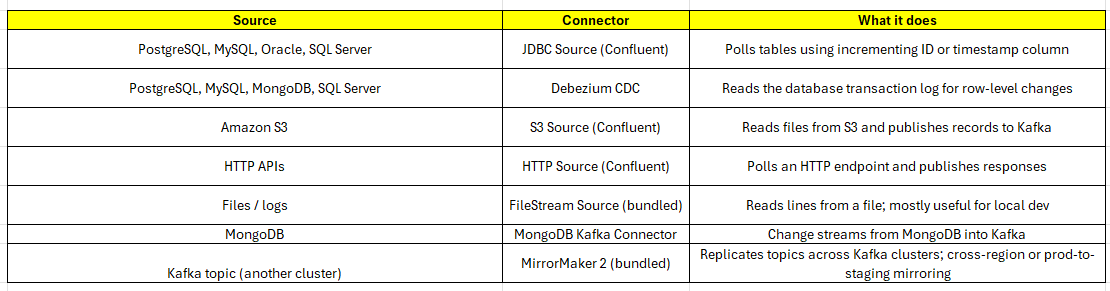
Commons Sources for Kafka Connect
Common sinks (systems that receive data from Kafka):
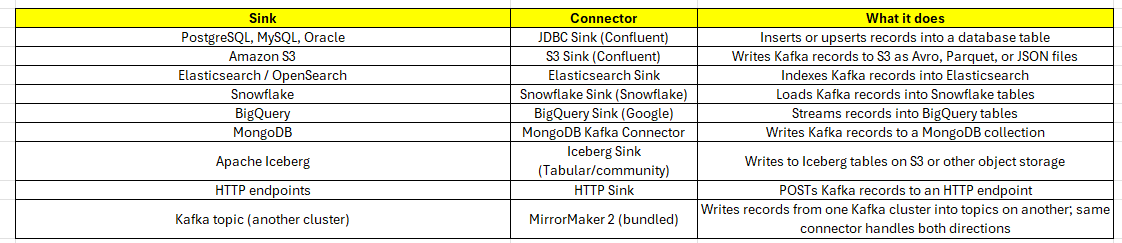
Common Sinks for Kafka Connect
A few things this list makes clear.
First, the same connector handles both directions in some cases. Debezium is source-only. JDBC comes in separate source and sink flavors. MongoDB ships one connector that covers both. MirrorMaker 2 is unique in that it is both source and sink simultaneously as it consumes from one Kafka cluster and produces into another, with offset translation built in. This matters when you are budgeting licenses or planning what plugins to install on your workers.
Second, the database connectors split into two very different categories: JDBC-based and CDC-based. JDBC polls on a schedule and can only detect new or updated rows if your table has a reliable incrementing column or timestamp. CDC reads the transaction log and captures every change including deletes, which JDBC cannot do at all. Article 4 covers JDBC and Article 5 covers Debezium CDC in detail, because they are different tools with different failure modes even though they solve adjacent problems.
Third, cloud-native sinks like S3, Snowflake, and BigQuery are where Connect earns its keep most obviously. Writing a reliable S3 sink that handles file rotation, partition strategies, and at-least-once delivery is several weeks of engineering work. The Confluent S3 Sink connector does all of it through configuration.
If your source or sink is not on this list, check Confluent Hub. If it is not there either, you are looking at writing a custom connector, which I will write about in my future articles. It is more tractable than it sounds, but it is not where you want to start.
The comparison you actually need
The question I kept hearing from engineers on my team was: “Why not just write a consumer?” It is a fair question. Kafka producers and consumers are well-understood. Everyone on the team already knows how to write one.
Here is how I started answering it.

Comparison b/w Custom consumer vs Kafka connect
The table makes Connect look obviously better. It is not that simple.
A custom consumer is still the right choice in a few situations. If your data-movement logic has conditional branching, transformations that depend on external state, or enrichment from other services, Connect will fight you. It is built for “move data from A to B,” not “move data from A, look up something in C, transform it, then write to B.” That is what Flink is for, or a proper stream processing job.
Connect also has real operational complexity. The configuration system has sharp edges. Error handling defaults are confusing. Running it on Kubernetes adds surface area that the documentation largely ignores. A custom consumer, for all its maintenance cost, is code your team already knows how to debug.
Where Connect wins is when your team keeps solving the same integration problems repeatedly. JDBC sources. S3 sinks. Elasticsearch sinks. Debezium CDC. These are solved problems with mature plugins. The time you save not building and maintaining custom integration services compounds over months.
A Concrete Example
Say you want to replicate a users table from PostgreSQL into a Kafka topic called db.users.
With a custom producer, you write something like this:
// Poll the database every 30 seconds for new rows.
// Track the last processed ID in... where exactly? Application state?
// A separate table? A file? Each choice creates a new failure mode.
ScheduledExecutorService scheduler = Executors.newSingleThreadScheduledExecutor();
scheduler.scheduleAtFixedRate(() -> {
    List<User> newRows = jdbcTemplate.query(
        "SELECT * FROM users WHERE id > ?", lastProcessedId
    );
    newRows.forEach(user -> producer.send(new ProducerRecord<>("db.users", user)));
    // If this crashes here, did we update lastProcessedId or not?
    lastProcessedId = newRows.get(newRows.size() - 1).getId();
}, 0, 30, TimeUnit.SECONDS);
The logic looks simple. The failure modes are not. What happens if the service restarts between publishing a record and updating lastProcessedId? You get duplicates. What if a new column is added to the users table? Your producer either breaks or silently drops the column depending on how you wrote the mapping.
With Kafka Connect, the same thing is a JSON configuration:
{
  "name": "postgres-users-source",
  "config": {
    "connector.class": "io.confluent.connect.jdbc.JdbcSourceConnector",
    "connection.url": "jdbc:postgresql://localhost:5432/mydb",
    "connection.user": "connect_user",
    "connection.password": "${file:/opt/kafka/secrets/db.properties:password}",
    "table.whitelist": "users",
    "mode": "incrementing",
    "incrementing.column.name": "id",
    "topic.prefix": "db.",
    "poll.interval.ms": "30000"
  }
}
You POST this to the Connect REST API. Connect handles the offset tracking, the parallelism, the restarts. When a worker crashes, Connect reassigns the task to another worker and resumes from the last committed offset. When the users table gains a new column, the JDBC connector picks it up on the next poll.
You did not write offset management code. You did not write restart logic. You did not write a new deployment manifest for a new service.
What Connect does not do
A few things worth being clear about before you go further.
Connect is not a stream processor. There are Single Message Transforms (SMTs) that let you do simple record-level operations, field renaming, timestamp conversion, header manipulation. But the moment your transformation needs to join two streams, aggregate records, or look up external data, you have left Connect’s domain. Use Flink or Kafka Streams for that.
Connect is not magic reliability. At-least-once delivery is the default. Under normal conditions that is fine. Under abnormal conditions, your sink needs to handle duplicates. If it cannot, you have a harder problem.
Connect is not invisible operationally. When something goes wrong, and it will, you need to understand how the REST API reports task failures, what the offset storage topics contain, and why a task in FAILED state is sometimes still processing records. The operational surface is real.
메타데이터
- post_id
- b7bb39d9f46f
- slug
- what-is-kafka-connect-and-why-not-just-write-a-consumer-b7bb39d9f46f
- url
- https://medium.com/towards-data-engineering/what-is-kafka-connect-and-why-not-just-write-a-consumer-b7bb39d9f46f
- canonical_url
- https://medium.com/towards-data-engineering/what-is-kafka-connect-and-why-not-just-write-a-consumer-b7bb39d9f46f
- author_url
- https://medium.com/@subodh.shetty87
- status
- ok
- fetched_at
- 2026-07-09 05:26:43