App Store Optimization That Actually Moves the Needle: From Keywords to Conversion Loops
Building an app has never been easier.
App Store Optimization That Actually Moves the Needle: From Keywords to Conversion Loops
Building an app has never been easier.
With today’s AI coding agents, what used to take months — or even a year — can now be done in days or weeks. You can prototype, build, and ship faster than ever before.
But there’s a catch.
Getting downloads has never been harder.
Because while building got easier, publishing didn’t get harder — it got crowded. The number of apps is growing faster than ever. Every day, thousands of new apps compete for the same limited attention.
So the real problem isn’t building anymore.
It’s getting discovered. And more importantly — getting chosen.
That’s where App Store Optimization (ASO) comes in.
And it’s not just about visibility. It’s about building a system:
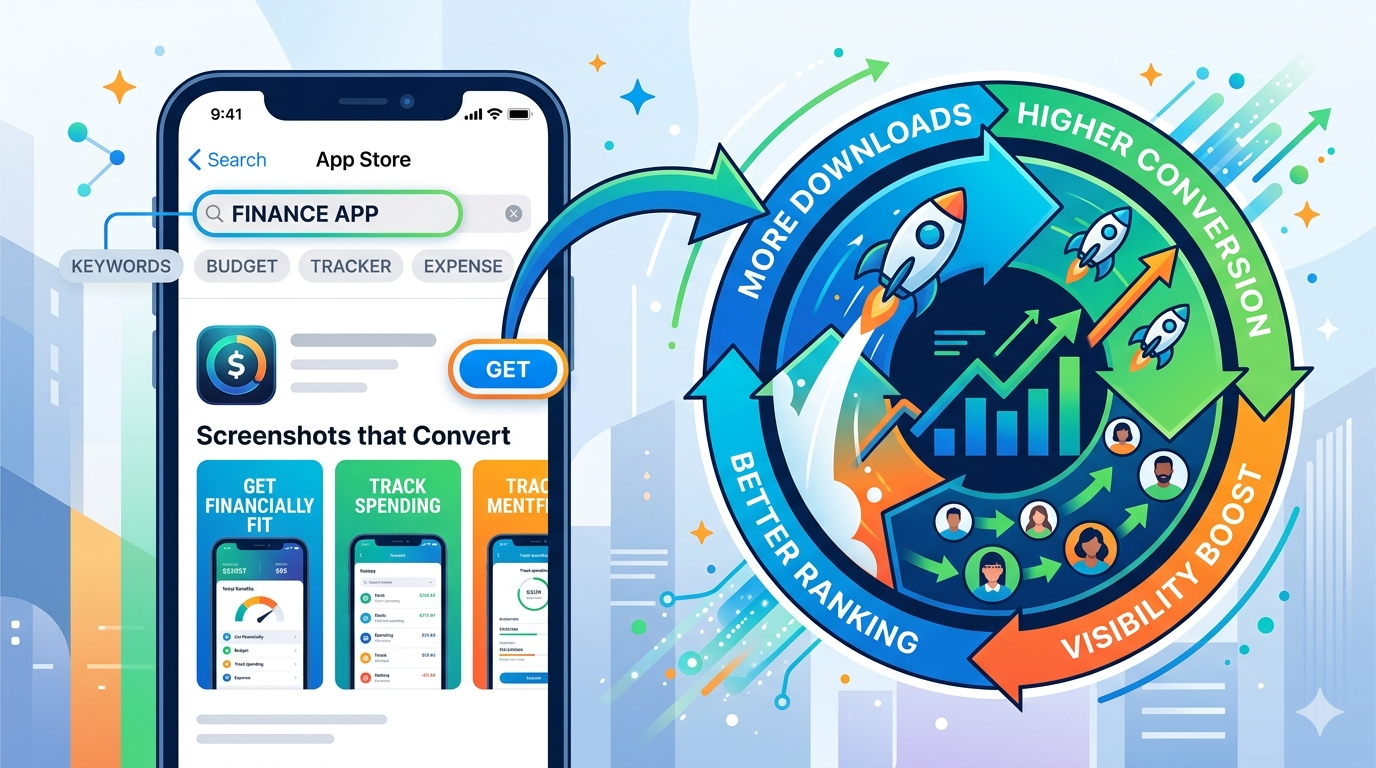
Impressions → Conversion → Downloads → Ranking → More Impressions
This guide covers both sides of that system — discovery and conversion — and how to improve them.
Part 1: Getting Found — Keywords, Title, and Metadata
Over 65% of downloads come from search. If you’re not ranking, you’re invisible.
App Title (30 Characters)
Your strongest ranking signal.
Formula: Brand + Primary Keyword
Examples:
- Notion — Notes & Docs
- Fantastical — Calendar & Tasks
If you’re unknown, prioritize clarity over branding:
- Budget Planner — Expense Tracker
Rules:
- Use all 30 characters
- Put the main keyword early
- Avoid filler words (“best”, “app”)
- Don’t spam — Apple will reject it
Subtitle (30 Characters)
Second strongest ranking factor + first value pitch.
Use it to:
- Add secondary keywords
- Communicate why it matters
Example:
- “Save Money & Track Spending”
Keyword Field (Apple Only, 100 Characters)
Hidden but powerful.
Best practices:
- Comma-separated, no spaces
- No duplicates from title/subtitle
- Use singular forms
- Include synonyms + misspellings
- Skip filler words
Description
- App Store: not used for ranking → focus on persuasion
- Google Play: used for ranking → include keywords naturally
Always optimize the first 3 lines — that’s what users see first.
Part 2: Getting Chosen — Conversion Is Everything
Ranking gets you seen. Conversion gets you downloads.
And here’s the key insight most developers miss:
Conversion rate influences ranking over time.
If users consistently download your app after seeing it, the App Store learns that your listing is relevant — and rewards it with better placement.
This is where growth compounds.
The App Icon
Small asset, massive impact.
What works:
- Simplicity (recognizable instantly)
- Strong contrast (works on light/dark backgrounds)
- Distinctiveness (stand out from competitors)
- No text
Your icon doesn’t compete globally — it competes against the apps next to you in search results.
Screenshots: Your #1 Conversion Lever
Most users decide without opening your product page.
That means:
Your first 2–3 screenshots are your pitch.
What High-Converting Screenshots Do
1. Show outcomes, not features
- ❌ “Settings screen”
- ✅ “Track Every Dollar Automatically”
2. Use bold, readable captions
- Must work at thumbnail size
- One clear message per screen
3. Tell a story
- Problem → Solution → Result
4. Look professional
- Consistent layout
- Clean typography
- Strong visual hierarchy
Design for Two Contexts
Your screenshots must work in:
- Search results (tiny thumbnails)
- Product page (large previews)
If your value isn’t clear in the small version, you’ve already lost.
The Missing Piece: Previewing in Context
Here’s where most ASO workflows break.
Designing screenshots in isolation is misleading.
Users don’t see your screenshots in Figma.
They see them:
- Inside search results
- Next to competitors
- In real App Store layouts
That context changes everything.
👉 That’s exactly what ASO Screenshot AI solves: https://apps.apple.com/us/app/aso-screenshot-ai/id6759809111
It lets you:
- Preview screenshots in real App Store layouts
- See search result cards, hero placements, and product pages
- Design with actual user perception, not guesswork
A/B Testing: The Highest-ROI ASO Lever
If you’re not testing, you’re guessing.
Even small changes can dramatically impact conversion:
- Headline wording
- Screenshot order
- Background color
- Value proposition framing
A/B testing lets you:
- Validate decisions with data
- Improve conversion incrementally
- Compound gains over time
ASO Screenshot AI includes built-in support for testing different screenshot variants — making iteration fast instead of painful.
Localization: The Growth Multiplier
Localized screenshots can increase downloads by 30%+ in many markets.
You don’t need to translate your whole app.
Just:
- Translate screenshot captions
- Keep visuals consistent
High-impact languages:
- Japanese
- Korean
- German
- French
- Spanish
- Portuguese
Most developers skip this — which gives you an unfair advantage.
Bringing It All Together
ASO isn’t a checklist. It’s a system.
Here’s how it works:
- Keywords bring impressions
- Screenshots drive conversion
- Conversion generates downloads
- Strong performance improves ranking
- Better ranking brings more impressions
And the loop continues.
Why Tools Matter
Manual ASO is slow and fragmented.
A modern workflow should let you:
- Design fast
- Preview accurately
- Test continuously
- Localize easily
That’s the idea behind ASO Screenshot AI: https://apps.apple.com/us/app/aso-screenshot-ai/id6759809111
It combines:
- Screenshot design
- Real App Store previews
- A/B testing workflows
- Localization support
So you can iterate like a product team — not a one-person marketing department.
Final Thoughts
Building apps is no longer the hard part.
Distribution is.
The App Store is driven by three forces:
- Relevance (keywords)
- Appeal (visuals)
- Performance (conversion)
Most developers focus on getting seen.
The ones who grow focus on what happens next.
Keywords get you impressions. Screenshots turn those impressions into downloads. And over time, performance determines whether you grow — or stay invisible.
메타데이터
- post_id
- b8101c190861
- slug
- app-store-optimization-that-actually-moves-the-needle-from-keywords-to-conversion-loops-b8101c190861
- url
- https://medium.com/@j.y.weng/app-store-optimization-that-actually-moves-the-needle-from-keywords-to-conversion-loops-b8101c190861
- canonical_url
- https://medium.com/@j.y.weng/app-store-optimization-that-actually-moves-the-needle-from-keywords-to-conversion-loops-b8101c190861
- author_url
- https://medium.com/@j.y.weng
- status
- ok
- fetched_at
- 2026-06-21 19:25:17