How to Fix Cloudflare Errors 1006, 1007, and 1008
Have you ever encountered a cold “Access Denied” page with Error 1006, 1007, or 1008 while browsing e-commerce websites, tech communities…
How to Fix Cloudflare Errors 1006, 1007, and 1008
Have you ever encountered a cold “Access Denied” page with Error 1006, 1007, or 1008 while browsing e-commerce websites, tech communities, or running automation scripts?
This is not a temporary website downtime. It means you have triggered Cloudflare’s Web Application Firewall (WAF) security defense mechanism. Whether you are managing multiple accounts or running automated workflows, this guide breaks down the root causes of these three errors and provides 5 proven solutions to restore seamless access.
1. What Are Cloudflare Errors 1006, 1007, and 1008?
Cloudflare acts as a security shield between users and target servers. When it flags a request as suspicious, it blocks the access and throws specific error codes:
- Error 1006: Access Denied: Your IP address has been blocked
- The Cause: This is a direct IP blacklist ban. Either the website administrator manually blocked your IP, or your current proxy has a poor reputation score (e.g., previously flagged for spam, abusive requests, or malicious scanning).
- Error 1007: Access Denied: Your IP address is not allowed
- The Cause: This relates to Access Control Lists (ACLs) and network types. Many websites block datacenter proxies or specific regions to prevent bot attacks. If your connection falls within these restricted IP ranges, 1007 is triggered.
- Error 1008: Access Denied: Your access is restricted
- The Cause: This is a high-level behavioral and compliance block. Even if your IP looks clean, you will trigger custom firewalls if your browser fingerprints or request headers look unnatural, or if you send high-frequency requests in a short time.
2. 3 Root Causes of Website Access Restrictions
From a network architecture perspective, these errors stem from three critical vulnerabilities:
- Low IP Purity (Public Contamination): Cheap or public proxies share resources among hundreds of users. If one user violates website policies, the entire proxy gets blacklisted, affecting all innocent users sharing it.
- Exposed Datacenter Labels: Datacenter IP ranges are publicly cataloged. Security systems easily identify that the request is coming from a server rather than a real human, leading to immediate blocks.
- Lack of Environment Isolation: When switching accounts without proper browser and network isolation, highly similar device fingerprints or abrupt IP jumps trigger automated bot detection.
3. How to Fix Cloudflare Errors 1006, 1007, and 1008
To bypass these blocks, you must mask your network identity and behavioral footprints to look like a legitimate local user.
① Use Premium Residential Proxies
Deploy a professional residential proxy service like IPFoxy. Premium residential proxies utilize IPs assigned to real home devices, matching the network signature of local broadband. With globally distributed, clean, and non-recycled nodes, your requests look exactly like those of a real user, effectively bypassing WAF detection.
② Rotate Your User-Agent (UA) Strings
Using fixed or non-browser User-Agents during automation easily flags your requests as bots. Regularly rotate authentic, up-to-date User-Agent strings from mainstream browsers (like Chrome or Safari) to make your traffic look organic.
③ Mimic Human Behavior
Introduce randomized delays between requests instead of fixed intervals. Vary your browsing paths, and simulate mouse movements, page scrolling, or basic interactions to significantly improve automation success rates against advanced bot detectors.
④ Change or Rotate Your Proxies
If your current proxy is blacklisted, continuing to retry will only escalate security flags. Switch to a different network or use a high-quality rotating proxy to break through current blacklist and geographical restrictions.
⑤ Integrate Captcha Solving Services
Security systems often present a Captcha challenge rather than a hard block. Integrating professional Captcha solving services into your automated workflows ensures uninterrupted data scraping and account operations.
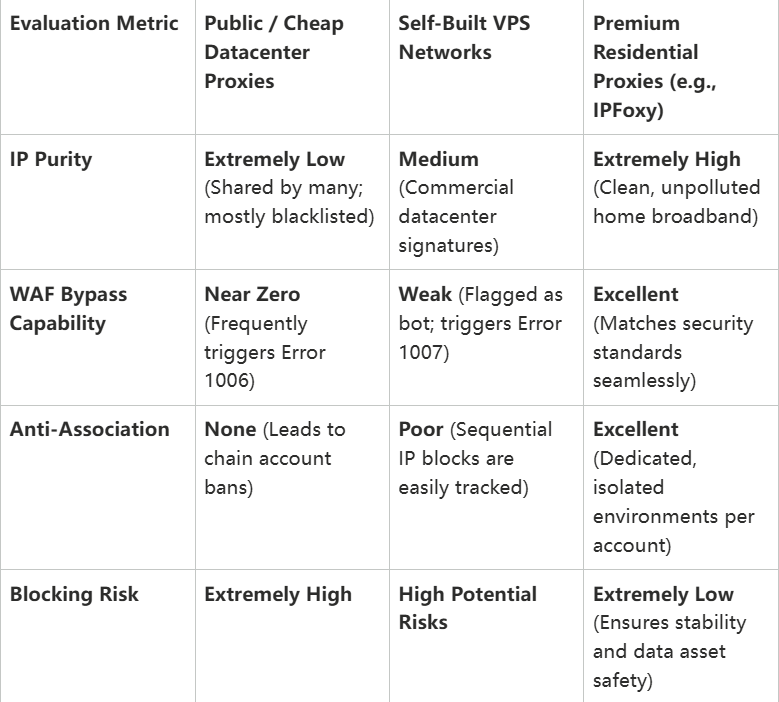
4. Network Performance & WAF Bypass Comparison
5. FAQ: Troubleshooting Cloudflare Blocks
Q1: Does clearing browser cache or restarting my router fix Error 1006?
- A: If you are on a dynamic home broadband network, restarting the router might fetch a new local IP and fix it. However, if you are using a fixed public or datacenter network, clearing cache is useless because the system blocks the underlying network IP. You must switch to a clean residential proxy.
Q2: Why do static residential proxies trigger fewer errors than rotating proxies in automation?
- A: While a rotating proxy offers a massive IP pool, abrupt geographical jumps in short intervals trigger secondary verifications or Errors 1007/1008. A static residential proxy maintains a stable connection tied to a specific city and broadband, which is indispensable for long-term session stability.
Q3: Can an anti-detect browser directly solve Error 1008?
- A: An anti-detect browser only isolates device fingerprints, cookies, and canvas parameters at the software layer. Error 1008 is heavily dependent on network environment and header anomalies. The ultimate bulletproof solution is: Anti-detect browser + clean residential proxy + human behavior simulation.
Conclusion
Ensuring seamless network access and automated workflows requires both optimized frontend behaviors and secure, isolated backend network infrastructures. By configuring premium residential proxies, rotating User-Agents, and mimicking human behavior, you can build a trustworthy network environment that keeps your e-commerce operations and data workflows stable and resilient.
메타데이터
- post_id
- b823911cfde3
- slug
- how-to-fix-cloudflare-errors-1006-1007-and-1008-b823911cfde3
- url
- https://medium.com/h7w/how-to-fix-cloudflare-errors-1006-1007-and-1008-b823911cfde3
- canonical_url
- https://medium.com/h7w/how-to-fix-cloudflare-errors-1006-1007-and-1008-b823911cfde3
- author_url
- https://medium.com/@fangkay0
- status
- ok
- fetched_at
- 2026-07-17 09:25:19