Databricks Expectations Explained: A Complete Associate and Professional Certification Guide
Warn, drop, or fail? Master the data-quality scenarios that repeatedly appear in Databricks exams
Databricks Expectations Explained: A Complete Associate and Professional Certification Guide
Warn, drop, or fail? Master the data-quality scenarios that repeatedly appear in Databricks exams
If a sales record has a null product ID, should your pipeline keep it, discard it, or stop processing completely?
That is the central idea behind expectations in Databricks. The syntax is small, but exam questions often make it difficult by changing one phrase in the requirement:
- “Keep invalid records and collect metrics.”
- “Remove invalid records but continue the pipeline.”
- “Stop the update as soon as invalid data is detected.”
Each sentence maps to a different expectation policy. Once you understand that mapping, many Associate-level questions become straightforward, and you gain the foundation needed for Professional-level questions about observability, flow failures, reusable rules, and production design.
This guide covers the complete expectations topic in SQL and Python, including individual and grouped rules, pipeline metrics, common exam traps, Delta Lake table constraints, realistic scenarios, and the differences between the Associate and Professional exams.
Terminology update: Delta Live Tables, or DLT, is now part of Lakeflow Spark Declarative Pipelines. Current Databricks documentation uses
from pyspark import pipelines as dp. Older notebooks, training materials, and exam-preparation questions might useimport dlt. You should recognize both versions. The core expectation behaviors—warn, drop, and fail—remain the same.
What is an expectation in Databricks?
An expectation is a data-quality rule attached to a streaming table, materialized view, or temporary view in a Lakeflow pipeline.
It evaluates a SQL Boolean expression for every record flowing through the dataset.
Every expectation has three parts:
- A unique name that identifies the rule in monitoring and metrics.
- A Boolean condition that must evaluate to
truefor a valid record. - An action that determines what happens when a record violates the rule.
The general SQL syntax is:
CONSTRAINT <constraint_name>
EXPECT (<boolean_condition>)
[ON VIOLATION <action>]
Inside a pipeline dataset declaration, the broader pattern is:
CREATE OR REFRESH <OBJECT_TYPE> <object_name> (
  CONSTRAINT <constraint_name>
  EXPECT (<boolean_condition>)
  [ON VIOLATION <action>]
)
AS <query>;
Here, <OBJECT_TYPE> represents a supported pipeline object, such as a streaming table or materialized view. It is a placeholder, not a literal SQL keyword.
For example:
CONSTRAINT valid_id EXPECT (id IS NOT NULL)This rule verifies that id is present.
Because there is no ON VIOLATION clause, Databricks applies the default warn behavior. Invalid rows are still written to the target, while violations are captured in the pipeline’s data-quality metrics.
Expectations therefore do more than filter data. They allow you to define, enforce, and observe data-quality policies directly in a declarative pipeline.
Expectation conditions use SQL Boolean expressions. They cannot contain custom Python functions, external service calls, or subqueries that reference other tables.
The three expectation actions you must memorize
The most important exam concept is the difference among warn, drop, and fail.
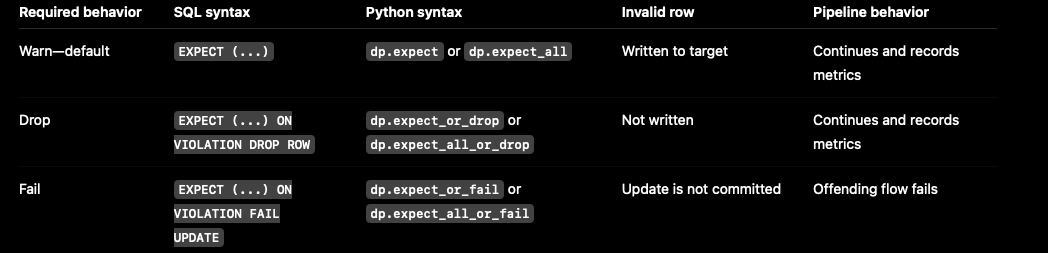
A simple memory trick is:
- Warn = Write the bad row and measure it.
- Drop = Discard the bad row and continue.
- Fail = Freeze the update and investigate.
In other words: write, discard, or freeze.
Action 1: Warn and retain invalid records
Suppose the requirement says:
Invalid records should still be written to the target, while metrics about the violations are captured by the pipeline.
The correct choice is the default expectation behavior. Do not add an ON VIOLATION clause.
SQL example
CREATE OR REFRESH STREAMING TABLE silver_sales (
  CONSTRAINT valid_id EXPECT (product_id IS NOT NULL)
)
AS
SELECT *
FROM STREAM(bronze_sales);
A row with **product_id = NULL is still inserted into silver_sales, but the expectation reports it as invalid in the pipeline metrics and event log.**
Current Python syntax using dp
from pyspark import pipelines as dp
@dp.table
@dp.expect("valid_id", "product_id IS NOT NULL")
def silver_sales():
    return spark.readStream.table("bronze_sales")
Applying multiple warn expectations
When the same dataset needs several rules, place them in a Python dictionary:
valid_products = {
    "valid_id": "product_id IS NOT NULL",
    "recent_sales": "sale_date >= '2025-01-01'",
    "quantity_within_range": "quantity BETWEEN 0 AND 1000"
}
Then apply the dictionary using expect_all:
from pyspark import pipelines as dp
@dp.table
@dp.expect_all(valid_products)
def silver_sales():
    return spark.readStream.table("bronze_sales")
dp.expect_all evaluates all three rules, retains both valid and invalid records, and captures granular metrics for every rule.
Legacy DLT syntax
Older DLT notebooks and exam-preparation material might show:
import dlt
@dlt.table
@dlt.expect_all(valid_products)
def silver_sales():
    return dlt.read_stream("bronze_sales")
The pattern is:
- Use
@dlt.table. - Apply
@dlt.expect_all(valid_products). - Define the dataset function.
- Return
dlt.read_stream("bronze_sales").
In current Lakeflow code, the equivalent pattern normally uses:
@dp.table
@dp.expect_all(valid_products)
And:
spark.readStream.table("bronze_sales")expect versus expect_all
It is common to read that expect cannot enforce all the rules together. A more precise explanation is:
**expectaccepts one named condition** at a time.- You can stack multiple individual
expectdecorators on the same dataset. **expect_allaccepts a dictionary and is a cleaner way to apply a reusable group of rules** with the same action.
For example, these approaches provide the same warn-style behavior.
Multiple individual expectations
@dp.table
@dp.expect("valid_id", "product_id IS NOT NULL")
@dp.expect("recent_sales", "sale_date >= '2025-01-01'")
@dp.expect(
    "quantity_within_range",
    "quantity BETWEEN 0 AND 1000"
)
def silver_sales_individual():
    return spark.readStream.table("bronze_sales")
Grouped expectations
@dp.table
@dp.expect_all(valid_products)
def silver_sales_grouped():
    return spark.readStream.table("bronze_sales")
For an exam scenario that explicitly says “apply all rules from this dictionary,” **expect_all** is the best answer.
Exam tip: expect_all does not merge all conditions into one unnamed metric. Each dictionary entry retains its own name and produces granular metrics.
Action 2: Drop invalid records and continue processing
Suppose the requirement changes to:
Records with a null ID must not reach the target table, but the pipeline should continue processing valid records and track the violations.
The correct SQL clause is:
ON VIOLATION DROP ROWComplete SQL example
CREATE OR REFRESH STREAMING TABLE silver_sales (
  CONSTRAINT valid_id
    EXPECT (product_id IS NOT NULL)
    ON VIOLATION DROP ROW
)
AS
SELECT *
FROM STREAM(bronze_sales);
Only the violating row is discarded. The update continues, and the dropped record is reflected in the data-quality metrics.
Python example for one rule
from pyspark import pipelines as dp
@dp.table
@dp.expect_or_drop("valid_id", "product_id IS NOT NULL")
def silver_sales():
    return spark.readStream.table("bronze_sales")
Python example for multiple rules
@dp.table
@dp.expect_all_or_drop(valid_products)
def silver_sales():
    return spark.readStream.table("bronze_sales")
The expect_or_drop name describes the complete behavior:
expectdefines the data-quality rule.or_dropdefines what happens when the rule is violated.
With **expect_all_or_drop, a row is written only when it passes every rule** in the supplied dictionary.
If it fails valid_id, recent_sales, or quantity_within_range, that row is dropped before the target write.
Exam trap: Drop does not mean fail. The bad row is removed, but the pipeline update continues.
Action 3: Fail the update when invalid data is unacceptable
Consider the following exam question:
CONSTRAINT valid_id EXPECT (id IS NOT NULL) _____________Which clause immediately stops the update when a record violates the rule?
The answer is:
ON VIOLATION FAIL UPDATEThe completed expectation is:
CONSTRAINT valid_id
EXPECT (id IS NOT NULL)
ON VIOLATION FAIL UPDATE
Complete SQL example
CREATE OR REFRESH STREAMING TABLE silver_sales (
  CONSTRAINT valid_id
    EXPECT (product_id IS NOT NULL)
    ON VIOLATION FAIL UPDATE
)
AS
SELECT *
FROM STREAM(bronze_sales);
Python example
from pyspark import pipelines as dp
@dp.table
@dp.expect_or_fail("valid_id", "product_id IS NOT NULL")
def silver_sales():
    return spark.readStream.table("bronze_sales")
What happens after a violation?
- The invalid record prevents the target update from succeeding.
- If the operation is a table update, the transaction is atomically rolled back.
- Manual investigation is required before reprocessing.
- You might need to fix the upstream data.
- You might need to modify the pipeline logic to handle the invalid condition correctly.
- Because the update fails, aggregated expectation metrics are not recorded in the same way as successful warn and drop processing.
- Failure details can help identify the violating condition or record.
The flow-level behavior Professional candidates should know
The statement “an expectation failure does not cause other flows to fail” requires additional context.
Triggered pipeline
In a triggered pipeline, FAIL UPDATE fails and rolls back the offending flow. Other independent parallel flows can continue.
Continuous pipeline
In a continuous pipeline, an expectation failure stops:
- The affected flow
- Its dependent flows
- The continuous pipeline processing associated with those dependencies
Expectations enforce data quality inside flows. They are not general workflow-orchestration mechanisms.
If one validation process must block a separate downstream process, use separate pipelines and connect them with dependent Lakeflow Job tasks.
Exam tip: When a question says “immediately stop the update,” choose **FAIL UPDATE or expect_or_fail,** not DROP ROW.
The six Python expectation functions
Lakeflow Spark Declarative Pipelines provides six expectation decorators.
Learn them as a two-by-three matrix:
- One rule versus multiple rules
- Warn versus drop versus fail
One expectation
@dp.expect("rule_name", "condition")
@dp.expect_or_drop("rule_name", "condition")
@dp.expect_or_fail("rule_name", "condition")
Multiple expectations supplied as a dictionary
@dp.expect_all(rules)
@dp.expect_all_or_drop(rules)
@dp.expect_all_or_fail(rules)
The legacy names are identical except for the module prefix:
@dlt.expect(...)
@dlt.expect_or_drop(...)
@dlt.expect_or_fail(...)
@dlt.expect_all(...)
@dlt.expect_all_or_drop(...)
@dlt.expect_all_or_fail(...)
The decorators must appear after the table, materialized-view, or temporary-view decorator and before the function definition:
@dp.table
@dp.expect_all(valid_products)
def silver_sales():
    return spark.readStream.table("bronze_sales")
One pipeline with three different policies
The following example combines all three behaviors in one streaming table.
This is useful for Professional-level questions because it shows that different rules can have different severity levels.
SQL example
CREATE OR REFRESH STREAMING TABLE silver_transactions (
  CONSTRAINT recent_status
    EXPECT (
      status = 'ACTIVE'
      AND transaction_date >= '2025-01-01'
    ),
  CONSTRAINT positive_value
    EXPECT (value > 0)
    ON VIOLATION DROP ROW,
  CONSTRAINT valid_id
    EXPECT (id IS NOT NULL)
    ON VIOLATION FAIL UPDATE
)
AS
SELECT *
FROM STREAM(bronze_transactions);
Python example
from pyspark import pipelines as dp

@dp.table
@dp.expect(
    "recent_status",
    "status = 'ACTIVE' AND transaction_date >= '2025-01-01'"
)
@dp.expect_or_drop(
    "positive_value",
    "value > 0"
)
@dp.expect_or_fail(
    "valid_id",
    "id IS NOT NULL"
)
def silver_transactions():
    return spark.readStream.table("bronze_transactions")
The result is:
- A record that violates
recent_statusis retained and counted as invalid. - A record with
value <= 0is dropped. - A record with a null
idfails the flow update.
Design tip: Use individual decorators when different rules require different actions.
A single
expect_all,expect_all_or_drop, orexpect_all_or_failapplies one shared action to every rule in its dictionary.
Walk through a realistic sales scenario
Assume bronze_sales contains these records:

The pipeline uses these rules:
valid_products = {
    "valid_id": "product_id IS NOT NULL",
    "recent_sales": "sale_date >= '2025-01-01'",
    "quantity_within_range": "quantity BETWEEN 0 AND 1000"
}
With dp.expect_all(valid_products)
All three rows are written.
- The first row passes every rule.
- The second row fails
valid_id. - The third row fails
recent_salesandquantity_within_range.
Each failure is reflected in expectation metrics.
With dp.expect_all_or_drop(valid_products)
Only the first row is written.
The other two rows are dropped because each violates at least one expectation.
With dp.expect_all_or_fail(valid_products)
The presence of any row that violates any rule causes the flow update to fail.
The table update is not committed.
Monitoring violations in the pipeline UI and event log
For warn and drop policies, expectation metrics can be inspected from the dataset’s Data quality tab in the pipeline UI.
Databricks also stores data-quality information in **flow_progress events in the pipeline event log**.
Important metrics include:
passed_records: Records that satisfied an expectation.failed_records: Records that violated an expectation.dropped_records: Records removed because they failed one or more drop expectations.
The expectation array is stored under:
details:flow_progress:data_quality:expectationsA data engineer needs to programmatically extract the data quality results of a SDP pipeline from the associated event log table. Which of the following code snippets can the data engineer use to achieve this task?
SELECT details:flow_progress.data_quality.expectations
FROM catalog.schema.event_log
WHERE event_type = 'flow_progress'
In the event log table for SDP pipelines, the data quality results are logged under events of type ‘flow_progress’ and stored inside the details column in a nested JSON structure:
- details:flow_progress: contains information about a pipeline’s execution progress
- details:flow_progress.data_quality: contains the data quality results (expectations, dropped_records, etc.)
- details:flow_progress:data_quality.expectations: specifically holds the expectation results
The following simplified query extracts per-expectation metrics. Replace the pipeline identifier with the appropriate value for your workspace.
WITH expectation_events AS (
  SELECT EXPLODE(
    FROM_JSON(
      details:flow_progress:data_quality:expectations,
      'ARRAY<STRUCT<
         name: STRING,
         dataset: STRING,
         passed_records: BIGINT,
         failed_records: BIGINT
       >>'
    )
  ) AS expectation
  FROM event_log(<pipeline_id>)
  WHERE event_type = 'flow_progress'
)
SELECT
  expectation.dataset,
  expectation.name,
  SUM(expectation.passed_records) AS passed_records,
  SUM(expectation.failed_records) AS failed_records
FROM expectation_events
GROUP BY
  expectation.dataset,
  expectation.name;
Exam trap: “Metrics are captured” does not mean that invalid records are automatically stored in a quarantine table. Warn retains them in the target, while drop discards them. Quarantine requires an explicit design.
When you need a quarantine table
A production requirement might say:
Clean rows must be written to Silver, while invalid rows must be preserved separately for investigation.
None of the three expectation actions alone provides this result:
- Warn mixes valid and invalid data in the same target.
- Drop removes invalid records.
- Fail blocks the update.
Instead, calculate a quarantine flag once and route the records into separate valid and invalid datasets.
from pyspark import pipelines as dp
from pyspark.sql.functions import expr

sales_rules = {
    "valid_id": "product_id IS NOT NULL",
    "recent_sales": "sale_date >= '2025-01-01'",
    "quantity_within_range": "quantity BETWEEN 0 AND 1000"
}
quarantine_rule = "NOT ({0})".format(
    " AND ".join(sales_rules.values())
)
@dp.view
def raw_sales():
    return spark.readStream.table("bronze_sales")
@dp.table(
    temporary=True,
    partition_cols=["is_quarantined"]
)
@dp.expect_all(sales_rules)
def sales_quarantine():
    return (
        spark.readStream.table("raw_sales")
        .withColumn(
            "is_quarantined",
            expr(quarantine_rule)
        )
    )
@dp.view
def valid_sales():
    return (
        spark.read.table("sales_quarantine")
        .filter("is_quarantined = false")
    )
@dp.view
def invalid_sales():
    return (
        spark.read.table("sales_quarantine")
        .filter("is_quarantined = true")
    )
The valid and invalid views can then feed separate published targets.
This design preserves data-quality metrics while giving downstream operations separate clean and quarantine paths.
It is a more likely Professional-level design question than a basic syntax question.
Expectations are not the same as Delta Lake table constraints
The word “constraint” appears in both features, which makes this a frequent source of confusion.
Pipeline expectations
Pipeline expectations:
- Apply while data flows through a Lakeflow pipeline dataset.
- Support warn, drop, or fail behavior.
- Produce data-quality metrics for successful warn and drop processing.
- Use
EXPECTsyntax or Python expectation decorators.
Delta Lake table constraints
Delta Lake table constraints:
- Enforce integrity on writes to a Delta table.
- Fail the transaction when an enforced constraint is violated.
- Do not provide warn-or-drop options.
- Support enforced
**NOT NULLandCHECK** constraints. - Treat primary key, foreign key, and unique constraints as informational rather than enforced.
To add a CHECK constraint to an existing table, use:
ALTER TABLE table_name
ADD CONSTRAINT constraint_name
CHECK (condition);
For example:
ALTER TABLE customers
ADD CONSTRAINT valid_adult_age
CHECK (age > 18);
Before adding the constraint, Delta Lake checks all existing rows.
If any existing row has age <= 18, or the condition does not evaluate to true, the command fails.
After the constraint is successfully added, new writes must also satisfy it.
# Create a dummy Delta table with an 'age' column
data = [
    (1, "Alice", 25),
    (2, "Bob", 19),
    (3, "Charlie", 30)
]
df = spark.createDataFrame(data, ["id", "name", "age"])
df.write.format("delta").mode("overwrite").saveAsTable("dummy_customers")

# Add a CHECK constraint to enforce age > 18
spark.sql("""
ALTER TABLE dummy_customers
ADD CONSTRAINT valid_adult_age
CHECK (age > 18)
""")
# Insert two records: one with age < 18, one with age > 18
spark.sql("""
INSERT INTO dummy_customers (id, name, age) VALUES
(4, 'David', 17),
(5, 'Eve', 22)
""")
display(spark.table("dummy_customers"))The insert statement fails for : [DELTA_VIOLATE_CONSTRAINT_WITH_VALUES] CHECK constraint valid_adult_age (age > 18) violated by row with values: — age : 17. SQLSTATE: 23001
%sql
describe extended dummy_customers
# Create a dummy Delta table with an 'age' column
data = [
(1, "Alice", 12),
(2, "Bob", 16),
(3, "Charlie", 30)
]
df = spark.createDataFrame(data, ["id", "name", "age"])
df.write.format("delta").mode("overwrite").saveAsTable("dummy_customers_fail_demo")
# Add a CHECK constraint to enforce age > 18
spark.sql("""
ALTER TABLE dummy_customers_fail_demo
ADD CONSTRAINT valid_adult_age
CHECK (age > 18)
""")The statement fails for :
[DELTA_NEW_CHECK_CONSTRAINT_VIOLATION] 2 rows in workspace.default.dummy_customers_fail_demo violate the new CHECK constraint (age > 18). SQLSTATE: 23512
Exam comparison

Scenario 1: Keep invalid rows and collect metrics
Requirement: Invalid records must remain in the target, and the pipeline must report violations.
Answer:
CONSTRAINT valid_id EXPECT (id IS NOT NULL)Or:
@dp.expect("valid_id", "id IS NOT NULL")For a dictionary of multiple rules:
@dp.expect_all(rules)Scenario 2: Drop invalid rows and continue
Answer:
ON VIOLATION DROP ROWOr:
@dp.expect_or_drop(...)For a dictionary:
@dp.expect_all_or_drop(rules)Scenario 3: Fail when a violation occurs
Answer:
ON VIOLATION FAIL UPDATEOr:
@dp.expect_or_fail(...)For a dictionary:
@dp.expect_all_or_fail(rules)Associate exam awareness
- No
ON VIOLATIONclause means warn and retain. DROP ROWdiscards the row but does not fail the update.FAIL UPDATEfails the offending update.expect_alltakes a dictionary of named conditions.- Data-manipulation code is provided in SQL when possible; otherwise, the Associate exam uses Python.
- Read the code carefully for missing quotation marks, mismatched column names, and incorrect decorator order.
Professional exam: go beyond syntax
At the Professional level, knowing the clause is only the starting point.
Expect scenarios that ask you to choose the safest and most maintainable production design.
Be prepared to reason about:
- Severity: Which rules should warn, drop, or fail?
- Observability: Where can engineers see expectation violations?
- Flow behavior: What does a failure affect in triggered versus continuous mode?
- Atomicity: What happens to the target update when
FAIL UPDATEis triggered? - Rule management: How can an organization reuse and govern rule definitions?
- Quarantine: How can invalid rows be retained separately without contaminating Silver?
- Orchestration: When should separate pipelines and job dependencies be used?
- Feature choice: Should the requirement use a pipeline expectation or a Delta table constraint?
Reusable rule repository pattern
For many datasets, storing rules separately from transformation logic makes them easier to audit and reuse.
A simplified rule table could look like this:
CREATE OR REPLACE TABLE governance.data_quality_rules AS
SELECT * FROM VALUES
  (
    'valid_id',
    'product_id IS NOT NULL',
    'sales',
    'validity'
  ),
  (
    'recent_sales',
    'sale_date >= ''2025-01-01''',
    'sales',
    'freshness'
  ),
  (
    'quantity_range',
    'quantity BETWEEN 0 AND 1000',
    'sales',
    'validity'
  )
AS rules(name, constraint, dataset, tag);
Python can load selected rules into the dictionary expected by expect_all, expect_all_or_drop, or expect_all_or_fail.
from pyspark import pipelines as dp
from pyspark.sql import functions as F

def get_rules(dataset_name, tag):
    rows = (
        spark.read.table(
            "governance.data_quality_rules"
        )
        .where(
            (F.col("dataset") == dataset_name)
            & (F.col("tag") == tag)
        )
        .select("name", "constraint")
        .collect()
    )
    return {
        row["name"]: row["constraint"]
        for row in rows
    }
@dp.table
@dp.expect_all_or_drop(
    get_rules("sales", "validity")
)
def silver_sales():
    return spark.readStream.table("bronze_sales")
Databricks recommends separating reusable expectation definitions from pipeline logic and using tags to group related rules.
One limitation to remember is that SQL does not support dynamically loading expectations from a file in the same way as Python.
A data engineering team is building a SDP pipeline to clean and validate product data streaming in from various sources. They notice that some records in the bronze_products table contain invalid price values, specifically some prices are zero or negative, which violates business rules.
To handle this issue, they implemented the following SDP code:
@dlt.table
@dlt.expect_or_drop("positive_price", "price > 0")
def silver_products():
return spark.readStream.table("bronze_products")
@dlt.table
@dlt.expect_or_drop("invalid_price", "price <= 0")
def quarantine_products():
return spark.readStream.table("bronze_products")
Records with positive prices are loaded into the silver_products table, while records with zero or negative prices are loaded into the quarantine_products table.
A data engineer is building a SDP pipeline to process product sales data. The pipeline needs to enforce the following data quality rules:
valid_products = {"valid_id": "products_id IS NOT NULL", "recent_sales": "date >= '2025-01-01", "quantity_within_range": "quantity BETWEEN 0 AND 1000"}
Any invalid records should still be written to the target, while metrics about these violations are captured by the pipeline.
@dlt.table
@dlt.expect_all(valid_products)
def silver_sales():
    return dlt.read_stream("bronze_sales")
Common certification traps and corrections
Trap 1: Invalid rows are reported, so they must be dropped
False.
Under the default warn behavior, invalid rows are written to the target and reported in the metrics.
Trap 2: DROP ROW fails the job
False.
It removes invalid rows while allowing the update to continue.
Trap 3: FAIL UPDATE produces the same metrics as warn and drop
False.
Because the update fails when the violation is detected, aggregated expectation metrics are not recorded for that failed update. Use the failure details for diagnosis.
Trap 4: expect_all is stricter than multiple expect decorators
Not automatically.
expect_all is a grouped API. Its severity comes from the function name:
expect_allmeans warn.expect_all_or_dropmeans drop.expect_all_or_failmeans fail.
Trap 5: One failing flow always stops every flow
Not in every mode.
A triggered pipeline can continue running independent parallel flows. In continuous mode, the affected flow and its dependent flows are stopped.
Trap 6: Expectations control workflow dependencies
False.
Expectations control data quality inside a flow. Use Lakeflow Jobs and task dependencies when one process must block another.
Trap 7: Metrics automatically create a quarantine table
False.
Metrics count violations. Quarantine requires explicit routing to a separate target.
Trap 8: The following dictionary is valid Python
{
    "recent_sales": "date >= '2025-01-01"
}
It is not valid because the SQL date literal is missing its closing quote.
The correct rule is:
{
    "recent_sales": "date >= '2025-01-01'"
}
Trap 9: Any Python logic can be used inside an expectation
False.
The condition must be a valid SQL Boolean expression. Custom Python functions, external service calls, and subqueries referencing other tables are not allowed.
Final exam cheat sheet
When you see the following requirements, choose these answers:
- Keep invalid rows and capture metrics
Use
EXPECT (...),dp.expect, ordp.expect_all. - Drop invalid rows, capture metrics, and continue
Use
ON VIOLATION DROP ROW,dp.expect_or_drop, ordp.expect_all_or_drop. - Immediately stop the update
Use
ON VIOLATION FAIL UPDATE,dp.expect_or_fail, ordp.expect_all_or_fail. - Apply one rule Use the corresponding single-rule decorator.
- Apply a dictionary of rules with one common action
Use an
expect_all*decorator. - Use different actions for different rules Stack individual expectation decorators.
- Keep invalid data in a separate table Build a quarantine path explicitly.
- Reject every violating write to a Delta table
Use an enforced
NOT NULLorCHECKconstraint.
If you remember only one decision sequence, use this:
- Should the invalid row remain in the target? Choose warn.
- Should only the invalid row disappear while processing continues? Choose drop.
- Should invalid data block the update? Choose fail.
That simple decision tree covers the foundation of nearly every Databricks expectations question.
For the Associate exam, memorize the mapping.
For the Professional exam, understand the operational consequences, observability model, flow behavior, reusable rule design, and production architecture behind it.
Official references
메타데이터
- post_id
- b83cd89a7151
- slug
- databricks-expectations-explained-a-complete-associate-and-professional-certification-guide-b83cd89a7151
- url
- https://medium.com/@rohit299pradhan/databricks-expectations-explained-a-complete-associate-and-professional-certification-guide-b83cd89a7151
- canonical_url
- https://medium.com/@rohit299pradhan/databricks-expectations-explained-a-complete-associate-and-professional-certification-guide-b83cd89a7151
- author_url
- https://medium.com/@rohit299pradhan
- status
- ok
- fetched_at
- 2026-08-11 04:08:35