🛡️ OWASP ZAP Deep Dive: The DevSecOps Guide to Automated Web Security Testing
Learn how OWASP ZAP works behind the scenes, how security teams use it in production pipelines, and how to run automated security scans on deployed applications using real DevOps workflows.
🛡️ OWASP ZAP Deep Dive: The DevSecOps Guide to Automated Web Security Testing
🚀 Introduction
Modern applications are deployed faster than ever. CI/CD pipelines push code to production within minutes, microservices scale automatically, and containers run across distributed clusters.
But speed often introduces a new problem — security gaps.
Even after code passes unit tests and builds successfully, vulnerabilities can still exist in the running application. Attackers don’t target your source code repository; they target the deployed application endpoints.
This is where Dynamic Application Security Testing (DAST) tools come into play. One of the most powerful and widely used open-source tools for this purpose is OWASP ZAP (Zed Attack Proxy). In this guide, we will explore:
- What OWASP ZAP is
- How it works internally
- Key features like spidering, passive scanning, active scanning
- How it integrates with DevOps pipelines
- A real-world practical workflow using Docker and cloud infrastructure
By the end of this blog, you will understand how security teams use OWASP ZAP to simulate attacks, identify vulnerabilities, and secure applications before production release.
🔍 Understanding Application Security Testing
Before diving into OWASP ZAP, we must first understand two major categories of application security tools.
1️⃣ Static Application Security Testing (SAST)
SAST tools analyze source code before deployment.
At this stage, the application is not running yet — the code simply exists in a repository like GitHub.
These tools identify issues such as:
- insecure coding patterns
- bugs
- code smells
- vulnerable libraries
Common SAST tools include:
- SonarQube
- Checkmarx
- Veracode
These tools scan the static source code, which is why they are called Static Application Security Testing tools.
2️⃣ Dynamic Application Security Testing (DAST)
DAST tools analyze the running application.
Instead of scanning code, they interact with the application exactly like a real attacker would.
This means the application must be deployed first.
DAST tools simulate attacks such as:
- SQL Injection
- Cross-Site Scripting (XSS)
- Broken Authentication
- Security misconfigurations
This is where OWASP ZAP shines.
OWASP ZAP is a dynamic security testing tool that scans deployed applications for vulnerabilities.
⚡ What is OWASP ZAP?
OWASP ZAP (Zed Attack Proxy) is an open-source web application security scanner developed by the Open Web Application Security Project (OWASP).
It helps security engineers, developers, and DevOps teams identify vulnerabilities in deployed applications. Think of OWASP ZAP as a simulated attacker. It analyzes:
- HTTP requests
- responses
- authentication tokens
- headers
- cookies
- API endpoints
Then it tries various attack techniques to see how the application behaves.
If vulnerabilities exist, ZAP reports them.
🧠 How OWASP ZAP Works Internally
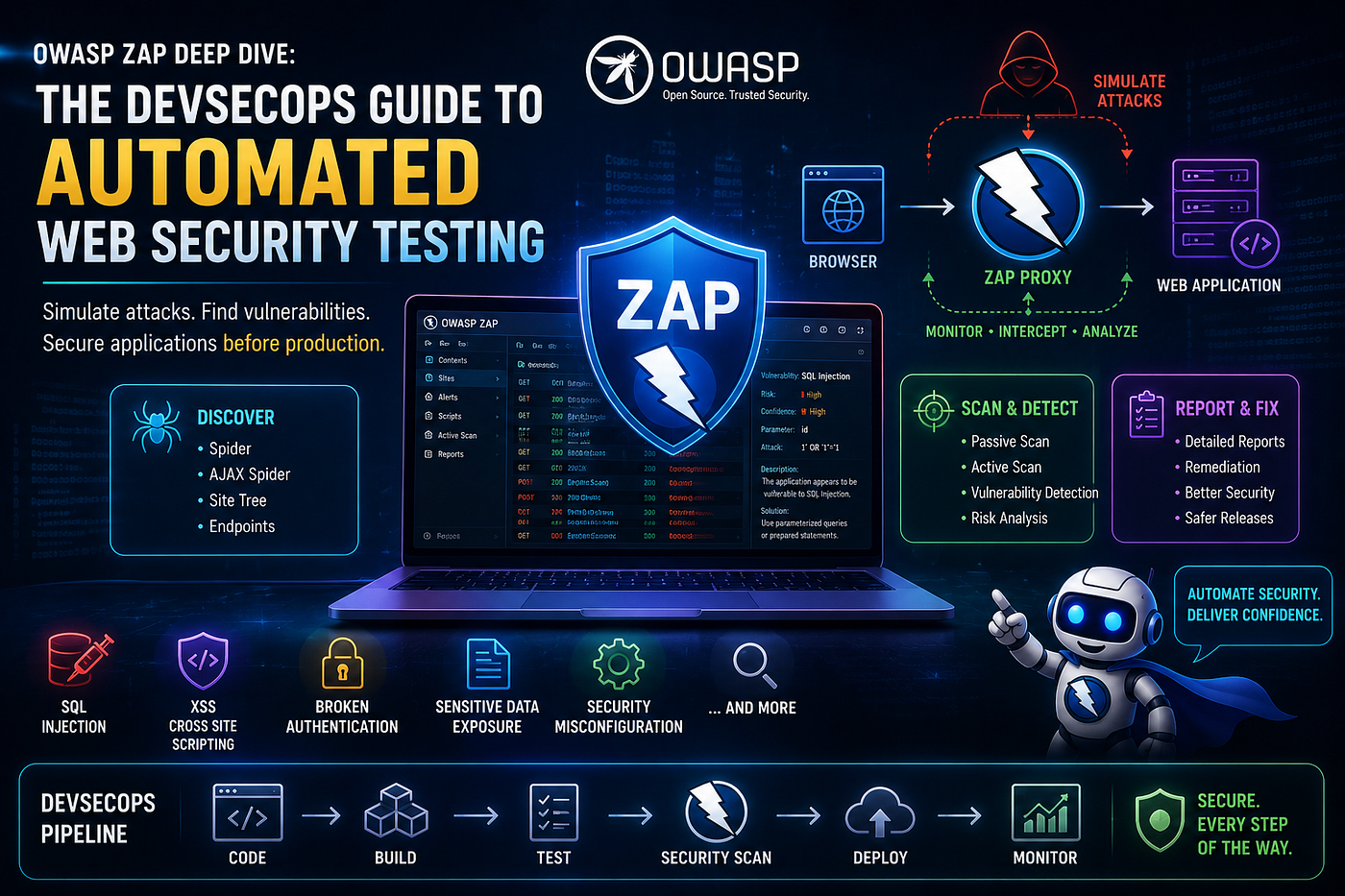
OWASP ZAP works as an intercepting proxy.
It sits between the browser and the application server, observing all network traffic.
Architecture Flow
Browser → OWASP ZAP → Application ServerSince ZAP sits in the middle, it can:
- monitor traffic
- modify requests
- replay requests
- inject malicious payloads
This technique is commonly called:
🕵️ Man-in-the-Middle (MITM)
ZAP acts like a security camera watching every request and response between the user and the application.
Because of this, ZAP can capture important data such as:
- URLs
- query parameters
- readers
- authentication cookies
- response codes
- JSON payloads
- tokens
This data becomes extremely useful for identifying vulnerabilities.
🌐 Site Tree and Traffic History
As users browse the application, ZAP automatically builds a site tree.
The site tree shows:
Website ├── Homepage ├── Login Page ├── Dashboard ├── Products └── Checkout
This allows security teams to visualize:
- all discovered endpoints
- application structure
- navigation paths
Additionally, ZAP stores request and response history.
This helps teams analyze exactly what happened during a request.
For example:
- Which API endpoint was called
- What parameters were sent
- What response the server returned
🕷️ Crawling Applications with ZAP
To test an application properly, ZAP must first discover all endpoints. This process is called crawling. OWASP ZAP provides two types of crawlers.
1.🕸️ Traditional Spider
The traditional spider scans web pages by reading:
- HTML content
- links
- forms
It discovers URLs but does not execute JavaScript or click buttons.
This method works best for:
- simple applications
- static websites
- traditional web pages
2. ⚡ AJAX Spider
Modern applications rely heavily on JavaScript frameworks like:
- React
- Angular
- Vue
These applications dynamically load content.
The AJAX spider simulates a real browser and can:
- click buttons
- execute JavaScript
- trigger dynamic requests
- discover hidden endpoints
Because of this, AJAX spider is slower but much more powerful.
🔎 Passive vs Active Scanning
OWASP ZAP performs two types of vulnerability scans.
📊 Passive Scan
Passive scanning analyzes traffic without attacking the application.
It simply observes the requests and responses.
ZAP checks for issues like:
- missing security headers
- insecure cookies
- information leakage
- improper caching policies
Passive scanning runs automatically.
📊 Passive Scan
Passive scanning analyzes traffic without attacking the application.
It simply observes the requests and responses.
ZAP checks for issues like:
- missing security headers
- insecure cookies
- information leakage
- improper caching policies
Passive scanning runs automatically.
🧪 Real DevOps Security Testing Workflow
Let’s look at how OWASP ZAP can be used in a DevOps environment.
Step 1: Deploy a Test Application
A vulnerable application like OWASP Juice Shop is often used for security testing.
It can be deployed quickly using Docker.
Example:
docker run -d -p 3000:3000 bkimminich/juice-shopThis runs the vulnerable application on port 3000.
Step 2: Create a Security Testing Environment
Security scans should never be run on live production systems.
Instead they are executed in:
- development environments
- staging environments
- pre-production environments
This ensures testing does not impact real users.
Step 3: Deploy OWASP ZAP
OWASP ZAP can also run as a container.
Example:
docker run -d -p 8090:8090 -p 8080:8080 zaproxy/zap-stableHere:
- 8090 → ZAP UI
- 8080 → proxy port
Step 4: Start an Automated Scan
Inside ZAP UI you can:
- Open Quick Start
- Select Automated Scan
- Enter the target application URL
- Start the attack
ZAP will automatically perform:
- crawling
- passive scanning
- active scanning
📊 Understanding ZAP Scan Results
After scanning, ZAP produces detailed reports.
Key sections include:
Alerts
Displays detected vulnerabilities categorized by severity.
Example levels:
- High
- Medium
- Low
- Informational
History
Shows request-response logs. Useful for debugging vulnerabilities.
Spider Results
Shows discovered application endpoints.
Active Scan Results
Displays attack results and discovered security flaws.
⚙️ Using OWASP ZAP in CI/CD Pipelines
In modern DevSecOps workflows, ZAP is integrated directly into pipelines.
Example tools:
- Jenkins
- GitHub Actions
- GitLab CI
- Azure DevOps
Typical pipeline stage:
Build → Deploy to Staging → ZAP Scan → Security Report → Production ReleaseIf vulnerabilities exceed a defined threshold, the pipeline can automatically fail the deployment.
This ensures insecure applications never reach production.
🏢 Why Companies Use OWASP ZAP
Organizations use OWASP ZAP because it provides:
✅ automated vulnerability scanning ✅ open-source flexibility ✅ CI/CD integration ✅ REST API support ✅ Docker-based deployment ✅ powerful security testing capabilities
Many DevSecOps teams run daily automated security scans using ZAP.
🛡️ Best Practices for Using OWASP ZAP
To use ZAP effectively in production environments:
✔ Always run scans in staging environments
✔ Combine ZAP with SAST tools
✔ Automate scans in CI/CD pipelines
✔ Use authenticated scans for deeper testing
✔ Monitor results and fix vulnerabilities quickly
🧾 Final Thoughts
Security cannot be treated as an afterthought in modern software development.
With applications deployed continuously and APIs exposed to the internet, security testing must be automated.
OWASP ZAP provides an extremely powerful way to simulate real cyber attacks and detect vulnerabilities early.
By integrating ZAP into DevOps pipelines, organizations can:
- identify vulnerabilities faster
- improve application security posture
- prevent costly security breaches
Ultimately, OWASP ZAP empowers teams to move towards true DevSecOps culture.

메타데이터
- post_id
- b84952a17ffc
- slug
- ️-owasp-zap-deep-dive-the-devsecops-guide-to-automated-web-security-testing-b84952a17ffc
- url
- https://cybersecuritywriteups.com/%EF%B8%8F-owasp-zap-deep-dive-the-devsecops-guide-to-automated-web-security-testing-b84952a17ffc
- canonical_url
- https://cybersecuritywriteups.com/%EF%B8%8F-owasp-zap-deep-dive-the-devsecops-guide-to-automated-web-security-testing-b84952a17ffc
- author_url
- https://medium.com/@ModelMind
- status
- ok
- fetched_at
- 2026-07-12 02:09:52