How To Implement A Theme In Next.js Using PrimeReact
To configure PrimeReact in Next.js application follow this guide https://primereact.org/installation/
How To Implement A Theme In Next.js Using PrimeReact
Themes enable users to customize the appearance of an application based on their personal preferences. This personalization can include choosing between light and dark modes, selecting color schemes, and modifying other visual elements.
To configure PrimeReact in Next.js application follow this guide https://primereact.org/installation/
Let’s Begin
Move the theme.css file you want to apply from folder node_modules/primereact/resources/themes folder to application public/themes folder.
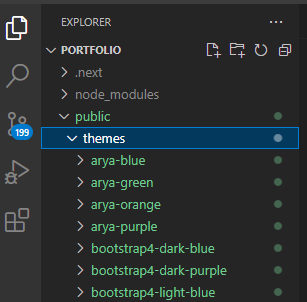
Themes folder
Open the outermost layout.tsx file and under head tag use link tag and provide theme. Do not forget to add PrimeReactProvider in the application.

Theme Implementation
If theme does not work properly after the above steps you might need to remove styles from global.css file. Remove / @tailwind base; / since it might override theme styles.
You might be interested in using primereact theme colors the way colors are used by tailwind styles. To configure primereact theme color in tailwind update the tailwind.config.ts
theme: {
    extend: {
      colors: {
        "primary-color": "var(--primary-color)",
        "secondary-color": "var(--secondary-color)"
      }
    },
  },
Now you can use color’s directly as below
<div> className="text-primary-color">Hello</div>Stackademic
Thank you for reading until the end. Before you go:
- Please consider clapping and following the writer! 👏
- Follow us **X | [LinkedIn](https://www.linkedin.com/company/stackademic) | [YouTube](https://www.youtube.com/c/stackademic) | Discord**
- Visit our other platforms: **In Plain English | CoFeed | Venture**
메타데이터
- post_id
- b874ca3268d7
- slug
- how-to-implement-atheme-in-next-js-using-primereact-b874ca3268d7
- url
- https://blog.stackademic.com/how-to-implement-atheme-in-next-js-using-primereact-b874ca3268d7
- canonical_url
- https://blog.stackademic.com/how-to-implement-atheme-in-next-js-using-primereact-b874ca3268d7
- author_url
- https://medium.com/@nitin_rajput
- status
- ok
- fetched_at
- 2026-07-24 15:01:39







