Creating tos & dos Object Stores in Embedded CPE of BAW using ACCE
To use ACCE for the embedded Content Platform Engine in a BAW environment, you need to enable the plug-in for the Administrative Console…
Creating tos & dos Object Stores in Embedded CPE of BAW using ACCE
To use ACCE for the embedded Content Platform Engine in a BAW environment, you need to enable the plug-in for the Administrative Console for Content Engine (ACCE) using the Case Configuration Tool. This allows you to access ACCE directly through IBM Content Navigator.
https://<server>:<port>/navigator/?desktop=acce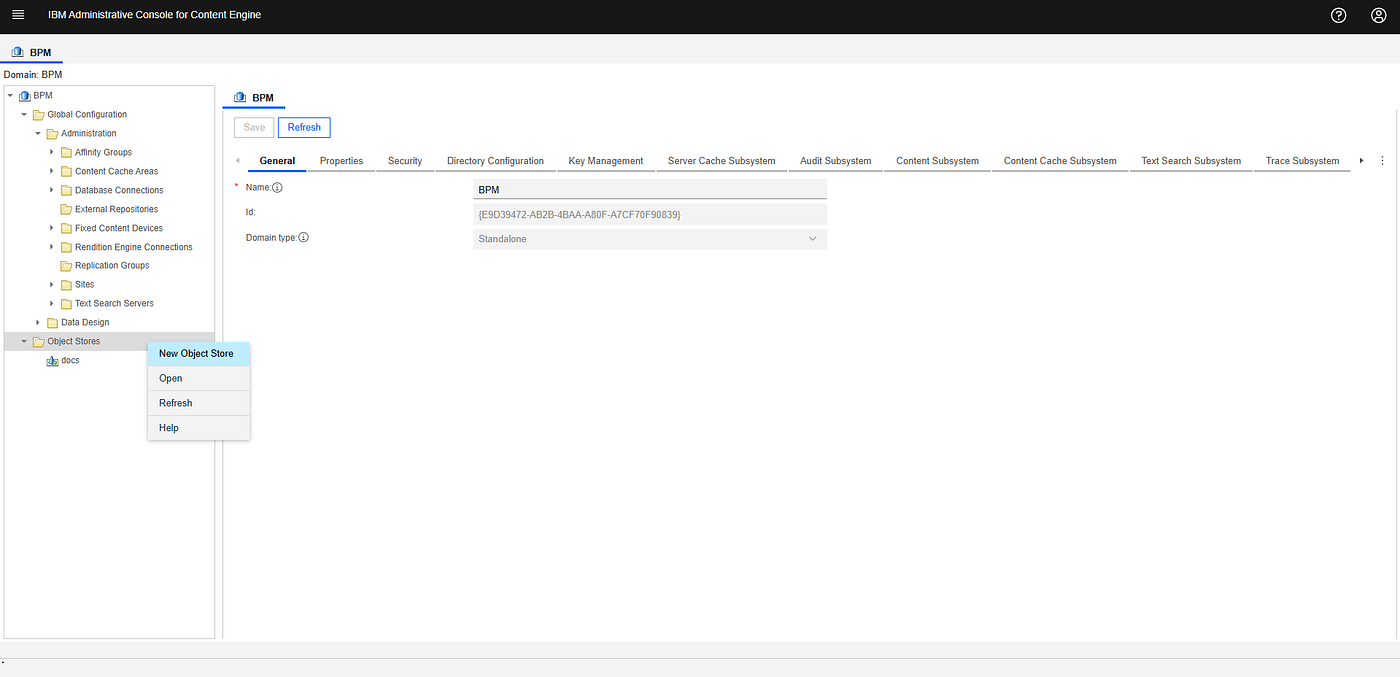
First, we will create the dos (Design Object Store).

New object store wizard

In the next step, you will be prompted to create or select an existing database connection for the object store. Select New to create a new database connection, and a new tab will open. After providing a name (dos) for the new connection, it will ask for the JNDI data sources (XA and Non-XA) for the database connection.
As we are planning to use this connection for Design Object Store (dos), I am using the existing data source **jdbc/FNDOSDS**, which was automatically created by the BAW setup.

Default data sources in the application server for dos and tos

Finish the wizard to add the connection.
After that, in the New Object Store wizard, select the newly created dos database connection. In the Schema Name field, provide a unique schema name, as both **jdbc/FNDOSDS and `jdbc/FNTOSDS` data sources use the same database, CPEDB**.

jdbc/FNDOSDS properties
Sharing a database with multiple object stores is supported in all releases of Content Engine. However, if you decide to share the database, you must use a unique schema name for each object store. This ensures that objects associated with one object store will not collide with objects from other object stores.
Therefore, I use the schema name**dos** for the Design Object Store.
In the next step select the storage area type.

Storage area types

Grant Administrative Access

Grant Basic Access

Add-ons
Complete the wizard by clicking Finish.

Creating Object Store
Follow the same steps to create a new database connection named **tos for the Target Object Store. Then, create a new object store using this database connection, and in the Schema Name field of the New Object Store wizard, enter `tos`** as schema name.
메타데이터
- post_id
- b893289e8ee7
- slug
- creating-tos-dos-object-stores-in-embedded-cpe-of-baw-using-acce-b893289e8ee7
- url
- https://medium.com/@gihanshamikeliyanage/creating-tos-dos-object-stores-in-embedded-cpe-of-baw-using-acce-b893289e8ee7
- canonical_url
- https://medium.com/@gihanshamikeliyanage/creating-tos-dos-object-stores-in-embedded-cpe-of-baw-using-acce-b893289e8ee7
- author_url
- https://medium.com/@gihanshamikeliyanage
- status
- ok
- fetched_at
- 2026-06-10 12:26:30