I Replaced My $50/Month Invoice Software With Free APIs in a Weekend
How I went from a Next.js side project to a fully deployed SaaS with AI extraction, Google OAuth, and zero AI costs
I Replaced My $50/Month Invoice Software With Free APIs in a Weekend
How I went from a Next.js side project to a fully deployed SaaS with AI extraction, Google OAuth, and zero AI costs
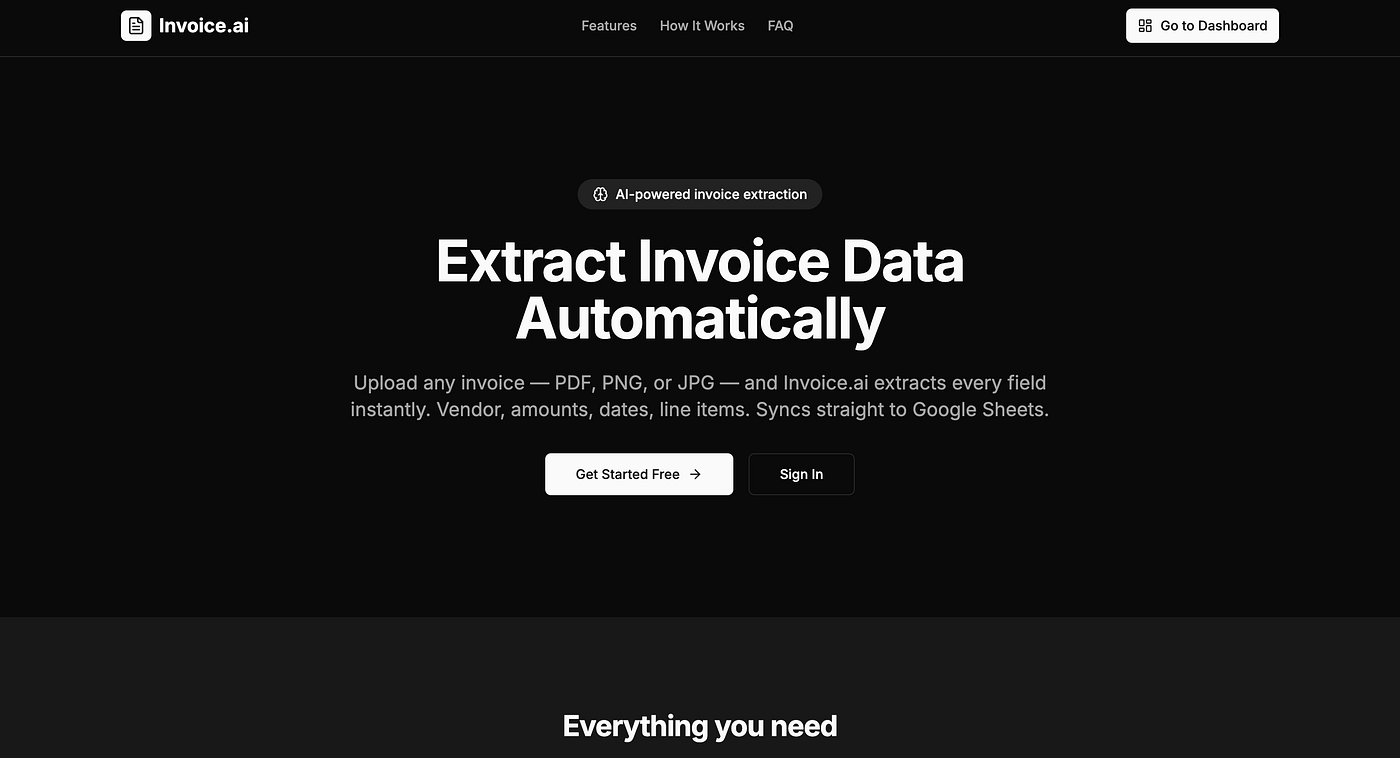
https://invoicingai.vercel.app/
When I started this project, I had a simple problem: I was drowning in invoices. PDFs in email, images on my phone, scanned documents everywhere. Every month I’d spend hours copying vendor names, amounts, and dates into a spreadsheet. There had to be a better way.
So I built Invoice.ai — an app that lets you upload any invoice (PDF, PNG, or JPG), automatically extracts every field using AI, and syncs everything to a structured Google Sheet in your own Drive. And I did it entirely with free APIs.
Here’s the complete technical story.
The Stack
- Frontend: Next.js 14, Supabase Auth, Tailwind CSS, shadcn/ui — deployed on Vercel
- Backend: FastAPI (Python) — deployed on Render
- AI: Groq (
llama-3.3-70b-versatile) + Mistral (pixtral-12b) +pdfplumber— all free tier - Storage & Database: Supabase Storage + Postgres with Row Level Security
- Integrations: Google Sheets API via user OAuth2
Why FastAPI Instead of Next.js API Routes?
The AI extraction pipeline is heavy. It involves downloading a file, running OCR, making multiple LLM API calls, parsing structured output, and writing to the database. Running this synchronously in a Next.js API route would time out.
FastAPI’s BackgroundTasks lets me return a 202 Accepted response immediately and run the extraction asynchronously. The frontend polls every 3 seconds until the status changes to saved or error. Clean, simple, no queues needed at this scale.
@router.post("/{document_id}/extract", status_code=202)
async def trigger_extraction(
    document_id: str,
    background_tasks: BackgroundTasks,
    user: dict = Depends(get_current_user),
):
    background_tasks.add_task(_run_extraction, document_id, file_url, filename, user_id)
    return {"message": "Extraction started", "document_id": document_id}
On the frontend, the polling pattern looks like this:
async function handleUpload(file: File) {
  const { id } = await uploadDocument(file)
  await triggerExtraction(id)
const result = await pollUntilDone(id, (status) => {
setCurrentStatus(status) // updates the UI in real time
})
}pollUntilDone hits /documents/{id}/status every 3 seconds with a 120-second timeout. Simple and effective — no WebSockets, no SSE.
The AI Extraction Pipeline: Two Passes, Zero Hallucinations
The most important architectural decision was making the extraction deterministic. LLMs are bad at freeform extraction — they invent fields, skip others, and format inconsistently. The fix: force JSON output against a Pydantic schema.
Pass 1 — Classify: Send the document text to Groq and ask it to identify the document type (invoice, purchase order, receipt, etc.) with a confidence score.
Pass 2 — Extract: Use the document type to select the right Pydantic schema and extract with JSON mode enabled.
GROQ_MODEL = "llama-3.3-70b-versatile"completion = groq_client.chat.completions.create(
model=GROQ_MODEL,
messages=[{"role": "user", "content": extraction_prompt}],
response_format={"type": "json_object"},
)
raw = json.loads(completion.choices[0].message.content)
validated = InvoiceData(**raw) # Pydantic validates every fieldEither you get exactly the 25 fields you need, or you get a ValidationError you can handle. No unpredictable free-text responses ever reach your database.
Handling PDFs vs Images
For digital PDFs (text-selectable), pdfplumber extracts text in pure Python — no API calls, no cost, works perfectly:
with pdfplumber.open(io.BytesIO(file_bytes)) as pdf:
    return "\n".join(p.extract_text() or "" for p in pdf.pages)
For scanned PDFs and images (PNG/JPG), I use Mistral’s pixtral-12b-2409 model via chat completions for OCR:
def _extract_text_from_image(file_bytes: bytes, filename: str) -> str:
    b64 = base64.b64encode(file_bytes).decode()
    mime = "image/png" if filename.endswith(".png") else "image/jpeg"
    response = mistral_client.chat.complete(
        model="pixtral-12b-2409",
        messages=[{
            "role": "user",
            "content": [
                {"type": "image_url", "image_url": {"url": f"data:{mime};base64,{b64}"}},
                {"type": "text", "text": "Extract all text from this document exactly as it appears."}
            ]
        }]
    )
    return response.choices[0].message.content
The extracted text then flows into the same two-pass Groq pipeline as PDFs.
Why Groq + Mistral Instead of Gemini?
My original plan was Gemini. Then I hit quota errors — Google’s free tier isn’t actually free in all regions, and the limits are frustratingly opaque.
I needed something genuinely free with no hidden limits:
- Groq gives you generous free-tier requests on
llama-3.3-70b-versatilewith JSON mode — perfect for structured extraction - Mistral gives free access to
pixtral-12bfor image understanding - pdfplumber is pure Python, completely free, zero API calls
The combination covers every document type at zero ongoing cost.
The Google Sheets Integration: Per-User Isolation by Design
This was the most architecturally interesting part. The goal: every user gets their own private spreadsheet. No mixing of data between accounts. Ever.
The OAuth Flow
- User clicks “Connect Google Sheets”
- Frontend calls
/api/integrations/google/connectwith their Supabase JWT - Backend generates an HMAC-signed state parameter containing their
user_id - User goes through Google’s consent screen
- Google redirects back with the auth code
- Backend verifies the state signature, exchanges the code for tokens
- Creates a brand-new spreadsheet in the user’s own Google Drive
- Stores their refresh token in Supabase, isolated by
user_id
The HMAC state is the clever bit — no session storage needed:
def _make_state(user_id: str) -> str:
    payload = json.dumps({"uid": user_id, "ts": int(time.time())})
    sig = hmac.new(settings.state_secret.encode(), payload.encode(), hashlib.sha256).hexdigest()
    return base64.urlsafe_b64encode(f"{payload}|{sig}".encode()).decode()
The timestamp in the payload prevents replay attacks. The HMAC ensures it can’t be forged. Pure stateless CSRF protection.
The Spreadsheet Template
Each user’s sheet gets two tabs:
Invoices — 17 columns: Synced At, Doc ID, Invoice #, Invoice Date, Due Date, Vendor Name, Vendor Tax ID, Bill To, Currency, Subtotal, Discount, Tax Rate %, Tax Amount, Total Amount, Payment Terms, Payment Status, Notes.
Formatted with dark navy headers, alternating row banding, date/number column formats, and a dropdown validation on Payment Status (Pending / Paid / Overdue / Cancelled).
Monthly Summary — and here’s the clever part.
Dynamic Date Ranges (No Hardcoding)
The naive approach is to hardcode “Jan 2025 — Dec 2026” in the summary sheet. But what if you have 2021 invoices? What about 2027? You’d need a developer to push a code change.
Instead, every sync scans the actual invoice dates and rebuilds the summary dynamically:
years = [int(rec["data"]["invoice_date"][:4]) for rec in records if rec["data"].get("invoice_date")]
year_start = min(years) if years else current_year
year_end = max(max(years) if years else current_year, current_year) + 1
summary_rows = _build_summary_rows(year_start, year_end)
If your invoices span 2021 to 2026 and it’s currently 2026, the summary covers Jan 2021 — Dec 2027. Automatically. Forever. No code changes ever.
Payment Status Preservation
Payment Status is managed by the user directly in the sheet. Overwriting on sync would delete their work. So before writing, we read the existing sheet and build a doc_id → payment_status map:
existing = service.spreadsheets().values().get(
    spreadsheetId=ss_id, range="Invoices!B:P"
).execute()
payment_map = {row[0]: row[14] for row in existing.get("values", [])[1:] if len(row) > 14}
When writing new rows, we look up the preserved status or default to “Pending”. The user’s manual edits survive every sync.
The Data Model
Five key Supabase tables:
-- Core document storage
documents (id, user_id, name, file_url, status, document_type, metadata, upload_date)
-- Extracted structured records
business_records (id, user_id, document_id, record_type, data jsonb, sync_status)-- OAuth tokens + spreadsheet reference (one row per user)
google_integrations (
user_id uuid UNIQUE,
spreadsheet_id text,
spreadsheet_url text,
access_token text,
refresh_token text NOT NULL,
token_expiry timestamptz,
last_synced_at timestamptz
)Row Level Security on every table means each user can only ever read their own data — even if you hit the database directly.
Deploying to Render + Vercel
Backend on Render:
The first gotcha: Render defaults to Python 3.14 (latest), but pydantic-core doesn't support it yet — it requires Rust to compile and fails. Fix: add a .python-version file:
3.11.9One line. Problem solved.
The second gotcha: CORS. Instead of hardcoding the allowed origin, I drive it from an environment variable:
_origins = ["http://localhost:3000"]
if settings.frontend_url and settings.frontend_url not in _origins:
    _origins.append(settings.frontend_url)
Set FRONTEND_URL=https://yourapp.vercel.app on Render and it works in both local dev and production without touching code.
Frontend on Vercel:
Set NEXT_PUBLIC_API_URL=https://your-backend.onrender.com and deploy. That's it.
The render.yaml in the repo automates the entire service configuration:
services:
  - type: web
    name: invoice-ai-backend
    runtime: python
    buildCommand: pip install -r requirements.txt
    startCommand: uvicorn app.main:app --host 0.0.0.0 --port $PORT
Bugs That Took Way Too Long
**can't compare offset-naive and offset-aware datetimes** — the google-auth library uses Python's naive datetime.utcnow() internally, but Supabase stores timestamps with timezone info. When refreshing tokens, passing a timezone-aware expiry datetime caused a crash deep in google-auth's internals.
Fix: strip tzinfo before handing the expiry to google-auth:
expiry = token_expiry.replace(tzinfo=None)**Invalid API key** — Supabase recently introduced a new sb_secret_ key format, but supabase-py v2.10.0 doesn't support it. The library expects the legacy JWT format (eyJ...). Use the legacy key from your Supabase dashboard.
**access_denied on Google OAuth** — when your OAuth app is in "Testing" mode, only explicitly whitelisted Gmail accounts can authenticate. You have to go to Google Cloud Console → OAuth consent screen → Test users and add your email.
What I Learned
Free AI is real if you pick the right tools. Groq’s free tier is genuinely generous for structured extraction. Mistral handles image OCR well. Between the two, you can process hundreds of invoices a month at zero cost.
Async background tasks beat webhooks for simple pipelines. BackgroundTasks in FastAPI is underrated. No Redis, no Celery, no infrastructure. For workloads that complete in under 2 minutes, it's all you need.
Per-user OAuth with isolated resources is the right architecture for SaaS integrations. Storing one refresh token per user and creating resources in their own accounts — not yours — means zero liability, zero data mixing, and users stay in full control of their data.
Force JSON mode on every LLM extraction call. Pydantic + JSON mode is the only reliable way to get structured data out of LLMs. Free-text responses are a maintenance nightmare at scale.
What’s Next
- Bulk upload (multiple invoices at once)
- Email integration (forward invoices to a unique address, they get auto-extracted)
- Automatic sync on extraction
- Supplier analytics (spend per vendor over time)
The production app is live at invoicingai.vercel.app.
backend https://github.com/Aaronphilip2003/saas-records-backend
frontend : https://github.com/Aaronphilip2003/SaaS-Records
If you’re building something similar or want to go deeper on any part of the architecture — the extraction pipeline, the Sheets integration, or the deployment setup — drop a comment. Happy to dig in.
Built with Next.js, FastAPI, Groq, Mistral, Supabase, pdfplumber, and Google Sheets API.
메타데이터
- post_id
- b894dcb4a7e8
- slug
- i-replaced-my-50-month-invoice-software-with-free-apis-in-a-weekend-b894dcb4a7e8
- url
- https://towardsdev.com/i-replaced-my-50-month-invoice-software-with-free-apis-in-a-weekend-b894dcb4a7e8
- canonical_url
- https://towardsdev.com/i-replaced-my-50-month-invoice-software-with-free-apis-in-a-weekend-b894dcb4a7e8
- author_url
- https://medium.com/@aaronphilip2003
- status
- ok
- fetched_at
- 2026-06-17 08:20:12