How I Built a $1,000-Sale Revenue System for a Fortune 500 Advisor in 2 Weeks Using GoHighLevel
A behind-the-scenes breakdown of a 14-day GoHighLevel build that produced its first paid sale on launch week.
How I Built a $1,000-Sale Revenue System for a Fortune 500 Advisor in 2 Weeks Using GoHighLevel
A behind-the-scenes breakdown of a 14-day GoHighLevel build that produced its first paid sale on launch week.
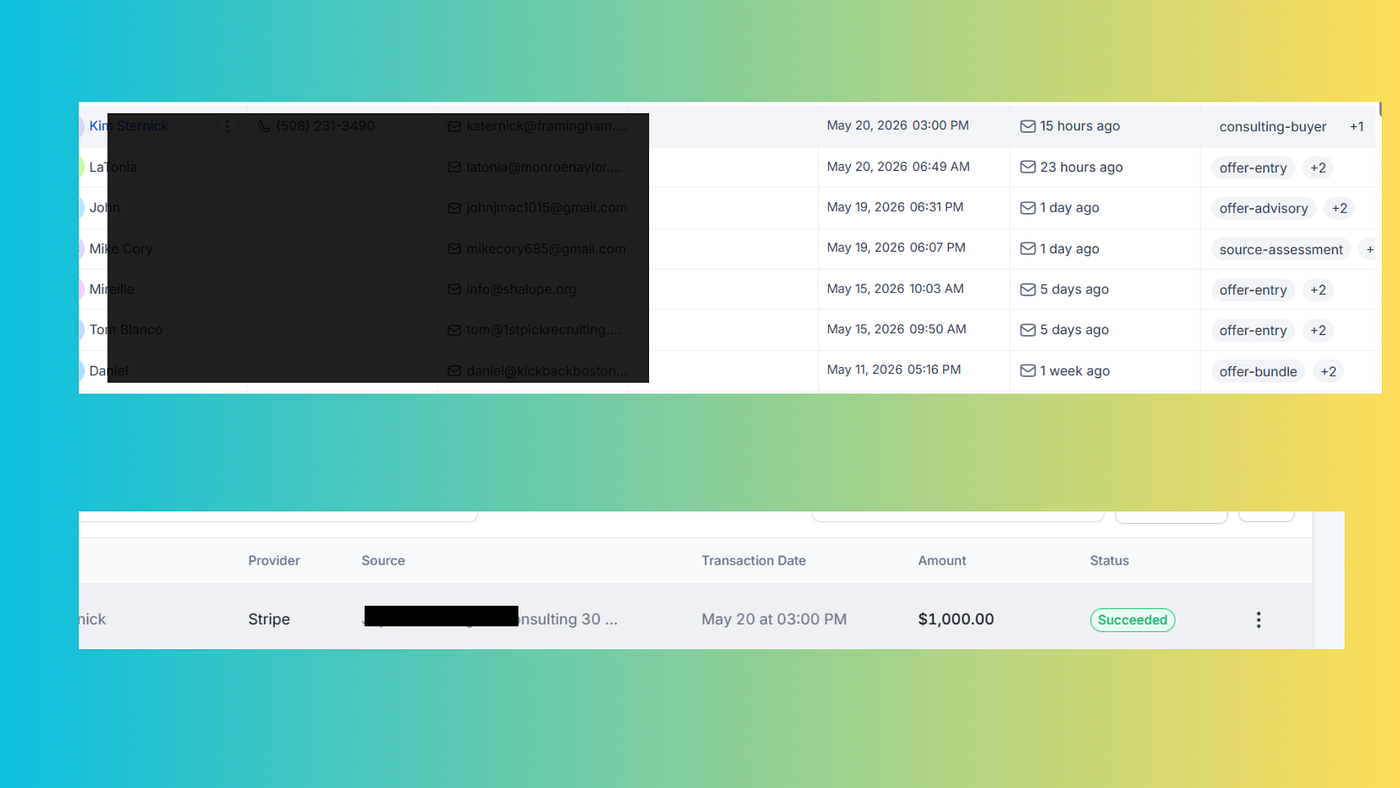
Two weeks of work. One $1,000 consulting sale. Seven segmented leads in nine days. And a system that runs itself while my client sleeps.
This is the build I shipped for a global CMO who advises Fortune 500 brands on experiential strategy — and the playbook any consultant, expert, or service business can adapt.
If you’re evaluating whether GoHighLevel is worth the learning curve, or you’re a builder looking for a real architecture to model your next project on, this article walks through exactly what I built, what broke, and what I learned.
The Client
She’s a global CMO with $776M+ in experiential budgets advised, 40 events shipped across 6 continents, and brands like Apple, Coca-Cola, and United Airlines on her client roster. The kind of credentials most consultants would mortgage their house for.
But here’s the gap most people don’t see: behind the credentials, her business ran on duct tape.
- Email marketing on ConvertKit
- Booking calls through Calendly
- Course delivery on Kajabi
- Payments through Stripe
- Manual handoffs between every tool
- A different email landing page for every offer
Her brand was bulletproof. Her back-end was held together with hope.
She had a webinar launching in 14 days. The plan was to drive cold and warm leads through a quiz funnel, segment them into 4 archetypes, route each archetype to a different paid offer, and let the system close revenue while she focused on what she’s actually paid to do — strategy.
My job: build the entire revenue infrastructure before the webinar went live.
The Brief
Five offers. Five different price points. Zero manual handoffs.
OfferPriceTarget buyerEntry playbook$297Explorer (low commitment)Experiential 5+ Bundle$997Builder (mid commitment)30-min consulting$1,000Planner (warm)45-min consulting$1,500Planner (warmer)60-min consulting$2,000Planner (hot)Retained advisory$50,000+Committed buyer
The system needed to capture leads via a quiz, score them into 1 of 4 archetypes, send each archetype to a different offer with a different email sequence, take payment, grant course access, generate Zoom links for consulting calls, and send internal alerts to her team for every event.
All running automatically. Zero manual sorting.
The Stack
After evaluating Kajabi + ClickFunnels + Zapier + multiple email tools, I chose GoHighLevel as the single platform.
Why? Because GoHighLevel is the only tool I’ve found that natively handles:
- CRM with custom fields and tag-based segmentation
- Funnels with multi-step checkout pages
- Membership sites with workflow-gated access
- Calendars with Stripe-integrated paid bookings
- Email and SMS marketing with deep merge fields
- Workflow orchestration across all of the above
- Zoom OAuth at the subaccount level
- Internal team notifications and pipeline management
What would have been 6 separate tools became one login. The migration cost real time. The payoff was infrastructure that actually talks to itself.
The 14-Day Build
Here’s the timeline as it actually ran. I’m not pretending it was clean.
Days 1–3: Architecture and product setup
Before touching any UI, I mapped the entire system on paper:
- The 4 archetypes and their characteristics
- The exact conditional logic to score quiz responses into each archetype
- Every email needed (welcome, archetype reveal, abandoned cart, post-purchase, reminder sequences for calendars)
- Every workflow trigger (form submission, purchase, calendar booking, tag application)
- Every internal notification (which event alerts which team member)
Then I built the 7 products in GoHighLevel (6 individual playbooks + 1 bundle), uploaded course content into Memberships, and configured the 3-tier paid consulting calendars with Stripe and Zoom OAuth.
Days 4–7: Workflows
This is where the real work lives.
I built 23 workflows across:
- 4 quiz archetype routing workflows (each scoring different paths)
- 7 product purchase onboarding workflows (one per product, granting access via the membership system)
- 3 consulting calendar workflows (one per tier, with reminder sequences at 24h, 1h, 10min before)
- 4 form notification workflows (apply, speaking, contact, quiz — each routing to different team members)
- 5 webinar workflows (registration, reminders, replay, no-show sweeper, click tracking)
Each workflow took 30–90 minutes to build, test, and lock down.
Days 8–11: Sales pages and funnels
The CMO needed a branded sales page that didn’t look like a stock GoHighLevel template. I built custom-coded HTML pages with her brand colors (navy + gold), her photography, and her copy.
This is where I hit the worst gotcha of the entire build — which I’ll cover in the gotchas section below.
The multi-page funnel ended up with 9 pages: lead magnet opt-in, sales page, bundle checkout (step 1: lead capture, step 2: payment), 6 individual playbook checkouts, thank-you pages with cross-sells.
Days 12–13: Email sequences and testing
I wrote 24 emails across all archetypes and product flows, set up the email signature merge field at the subaccount level (so every email she sends uses her real signature), and ran end-to-end tests on every flow.
End-to-end testing on a system like this means submitting the quiz as each of the 4 archetypes, completing the purchase of each of the 7 products, booking each of the 3 consulting tiers, and verifying:
- The right tags applied
- The right emails fired
- The right course access granted
- The right team members notified
- Stripe charged correctly in live mode
- Zoom links generated
- Calendar invites sent
I found 11 bugs across the system during testing. Fixed all of them.
Day 14: Launch
The webinar went live. The funnel was live. The Stripe was live. The system was ready.
The Result
Within 9 days of launch:
- 7 segmented leads captured through the quiz funnel
- 1 paid $1,000 consulting sale (session booked for the following week)
- 1 high-intent advisory lead (target offer: $50K+ retained)
- 1 bundle target ($997 tier)
- 3 entry-tier leads
When the consulting buyer completed her booking, the entire flow ran end-to-end in under 60 seconds:
- Stripe charged her card
- Workflow added the
consulting-buyertag - Zoom link generated automatically
- Calendar invite sent to both parties
- Assistant received an internal notification email with the full booking context
- Calendar slot blocked on the CMO’s schedule
- Reminder sequence queued: 24 hours before, 1 hour before, 10 minutes before
No human touched it. No spreadsheet. No “let me check my calendar.”
That’s the difference between automation and infrastructure.
The 5 GoHighLevel Gotchas That Cost Me Time
If you’re building a similar system, these are the 5 things I wish someone had told me on day one. Each one cost me at least an afternoon to debug.
Gotcha 1: Stripe mode lives at the funnel level
The most painful one. Stripe’s Test/Live mode in GoHighLevel is set at the funnel level, not the subaccount level. Each funnel has its own Test/Live toggle that defaults to Test.
You can pass real cards in Test mode and they’ll be declined. You can pass test cards in Live mode and they’ll be declined. The integration shows “connected” in both cases.
I lost an afternoon trying to figure out why test cards weren’t going through before discovering the Stripe mode was set to Live on a funnel I’d flipped over.
Fix: Before launch, audit every funnel’s payment settings individually. Make sure all production funnels are set to Live mode. Test with a real $1 charge before promoting the URL publicly.
Gotcha 2: Memberships modules and lessons have separate publish status
I shipped the bundle with 7 modules and 47 lessons. The first buyer paid $997, logged into the portal, and could only see 3 of the 7 modules.
The reason: Modules have their own Published/Draft status, and Lessons inside each module ALSO have their own Published/Draft status. Setting a Course to Published doesn’t propagate down. Each module AND each lesson needs to be individually set to Published.
Fix: Before launch, open every module and every lesson and verify Published status. Or build a checklist for your QA pass.
Gotcha 3: Workflow Order Form triggers need Submission Type = Sale
I built a workflow triggered by “Order Form Submission” thinking it would fire on completed purchases. It didn’t.
The reason: Order Form Submission has two filter options — Submission Type can be OptIn (for free opt-in forms) or Sale (for paid checkouts). The default is OptIn. If your checkout is paid, the workflow won’t fire unless you set Submission Type = Sale.
Fix: When building any workflow triggered by an order form, always set Submission Type = Sale unless you’re capturing leads from a free opt-in.
Gotcha 4: Mobile rendering breaks with custom CSS
The CMO’s brand is navy and gold with elegant typography. The default GoHighLevel sales page templates didn’t cut it. I custom-coded the entire sales page in HTML and CSS.
It looked beautiful on desktop. On mobile, the page broke catastrophically — content was being clipped on both sides because GoHighLevel’s parent containers override custom CSS on narrow viewports.
I went through 4 versions before figuring out the fix.
The fix: Use a “full-bleed wrapper” pattern. Set the outer container to width: 100vw and margin-left: calc(50% - 50vw) to escape GoHighLevel's max-width constraint. Then style your inner content normally.
css
.full-bleed {
  width: 100vw;
  margin-left: calc(50% - 50vw);
  position: relative;
}
This pattern works for any custom CSS inside GoHighLevel funnel pages.
Gotcha 5: Zoom OAuth must happen at the subaccount level
I connected Zoom at the agency level, expecting it to cascade to subaccounts. It didn’t. Calendar bookings appeared to work but no Zoom links were being generated.
The reason: Zoom OAuth needs to be authorized at the subaccount level, not the agency level. Connecting at agency doesn’t cascade.
Fix: Disconnect at agency level. Reconnect at subaccount level via Settings → Integrations → Zoom → OAuth flow. Test with a real booking to confirm a Zoom link is generated.
What This Means for Your Business
If you’re a consultant, expert, or service business with multiple offers and you’re still handling onboarding manually, you’re losing money on every lead.
Slow follow-up kills conversion. A study by InsideSales found that replying within 5 minutes of a lead form fill results in a 9x higher conversion rate compared to replying within 1 hour. Most service businesses average 30–60 minutes. That’s where the money leaks.
The fix isn’t more leads. The fix is infrastructure that handles existing leads without dropping the ball.
The pattern that travels to any business
The system I built for this CMO was bespoke, but the pattern is universal:
- Capture lead with a tool that segments by intent (quiz, form, calendar booking)
- Qualify automatically using conditional logic on the captured data
- Route to the right offer based on the qualification (different emails, different CTAs, different price points)
- Take payment through a Stripe-integrated checkout flow
- Grant access to the appropriate product/service via workflow
- Send internal alerts to the right team members based on the event type
- Nurture or close with automated follow-up sequences
Every step is automatable. Every step is testable. Once built, the system runs without daily intervention.
What I Charge Now (vs. What I Should Have Charged)
I’m being transparent here because I want other builders to learn from this.
I underpriced this build significantly. The actual market rate for the work delivered — full custom revenue infrastructure, custom-coded sales pages, 23 workflows, 7 products, 9 funnel pages, full integration testing — is $7,500 to $15,000 depending on scope.
I’ve corrected my pricing going forward. If you’re a builder reading this and you’re charging less than $5,000 for systems of this complexity, you’re undercharging.
If you’re a buyer reading this and you’re looking for a builder, expect quotes in the $7,500 to $15,000 range for a comparable build. Anything significantly under that, and the builder is either inexperienced or you’re not getting the full system.
Try It Yourself
GoHighLevel has a 14-day free trial. If you’re evaluating whether the platform is right for your business, the test is simple:
- Sign up for the free trial
- Build one funnel (lead magnet → opt-in → thank you)
- Connect Stripe and test a $1 charge
- Build one workflow that fires on form submission
If you complete those four steps in your trial, you’ll know whether the platform fits how you work. If you don’t, hire someone to build it for you — the ROI on a properly built GoHighLevel system pays for itself within 60–90 days for most service businesses.
About the Author
I’m Abubakar Nazir, founder of Nexiobit. I build AI automation and revenue systems for consultants, experts, and service businesses.
Recent builds include the system described in this article and a separate med spa build in Riverside, CA that produced 228 opportunities and $32,940 in revenue at 67.98% conversion in 31 days.
If you’re considering a similar build and want to talk through the architecture, find me at nexiobit.com.
메타데이터
- post_id
- b8a8c135a5b8
- slug
- how-i-built-a-1-000-sale-revenue-system-for-a-fortune-500-advisor-in-2-weeks-using-gohighlevel-b8a8c135a5b8
- url
- https://medium.com/@abubakarnazir101/how-i-built-a-1-000-sale-revenue-system-for-a-fortune-500-advisor-in-2-weeks-using-gohighlevel-b8a8c135a5b8
- canonical_url
- https://medium.com/@abubakarnazir101/how-i-built-a-1-000-sale-revenue-system-for-a-fortune-500-advisor-in-2-weeks-using-gohighlevel-b8a8c135a5b8
- author_url
- https://medium.com/@abubakarnazir101
- status
- ok
- fetched_at
- 2026-06-09 15:37:30