JavaScript Variables: var, let, and const – Complete Guide
JavaScript Variables: var, let, and const — Deep Dive
JavaScript Variables: var, let, and const – Complete Guide
JavaScript Variables: var, let, and const — Deep Dive
JavaScript provides three ways to declare variables: var, let, and const. While they may seem similar at first, they differ significantly in scope, re-declaration rules, re-assignment behavior, and how they interact with hoisting and the Temporal Dead Zone (TDZ).
1. Scope
Scope defines where a variable can be accessed.
Types of Scope
- Global Scope: Accessible everywhere
- Function Scope: Accessible only inside a function
- Block Scope: Accessible only inside
{ }(if, loops, etc.)
Example
{
  var a = 10;
  let b = 20;
  const c = 30;
}
console.log(a); // 10
console.log(b); // ReferenceError
console.log(c); // ReferenceErrorExplanation:
varignores block scope and becomes available outside the block.letandconstare restricted to the block.
2. Re-declaration
KeywordAllowedvarYesletNoconstNo
var x = 10;
var x = 20; // allowed
let y = 10;
let y = 20; // errorconst z = 5;
const z = 10; // error3. Re-assignment
KeywordAllowedvarYesletYesconstNo
var a = 5;
a = 10; // allowed
let b = 5;
b = 10; // allowedconst c = 5;
c = 10; // errorNote: const prevents reassignment, not mutation. Objects and arrays can still be modified internally.
4. Hoisting (Deep Explanation)
What is Hoisting?
Hoisting is JavaScript’s behavior of processing declarations before executing code. During the creation phase of execution, the JavaScript engine scans the code and registers variables and functions in memory.
Execution happens in two phases:
- Creation Phase (Memory Allocation)
- Execution Phase (Code Runs Line by Line)
4.1 Hoisting with var
console.log(x);
var x = 5;
How JavaScript interprets it internally:
var x;          // hoisted declaration
console.log(x); // undefined
x = 5;          // assignment happens here
Key points:
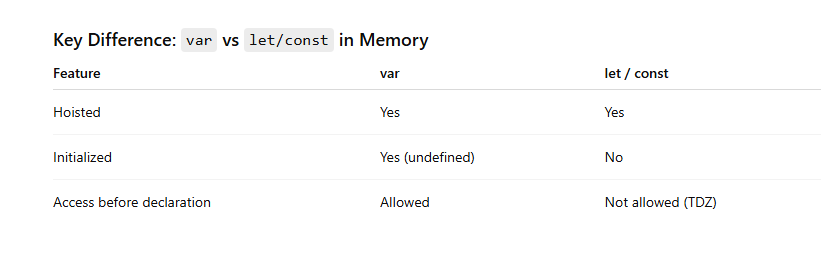
varis hoisted and initialized withundefined- Accessing it before assignment does not throw an error
4.2 Hoisting with let and const
console.log(y);
let y = 10;
This throws a ReferenceError.
Important detail:
letandconstare also hoisted- But they are not initialized
This leads to the Temporal Dead Zone.
5. Temporal Dead Zone (TDZ)
Definition
The Temporal Dead Zone is the time between:
- When a variable is hoisted (declared in memory)
- And when it is initialized (actual line of declaration)
During this period, the variable exists but cannot be accessed.
Example
{
  console.log(a); // ReferenceError
  let a = 10;
}
What actually happens internally
During creation phase:
// 'a' is registered in memory but NOT initializedDuring execution:
- From start of block → until
let a = 10 - Variable is in TDZ
- Any access → ReferenceError
Why TDZ Exists
TDZ was introduced to:
- Prevent bugs caused by using variables before declaration
- Make code more predictable
- Encourage proper variable declaration order
Another Example
let a = 5;
function test() {
  console.log(a); // ReferenceError
  let a = 10;
}test();Explanation:
- Inside the function, a new
ais created - It enters TDZ from start of function to its declaration
- So
console.log(a)fails, even though globalaexists
Key Difference: var vs let/const in Memory
6. Function Hoisting
Function Declaration
greet();
function greet() {
  console.log("Hello");
}- Fully hoisted (name + body)
- Can be called before definition
Function Expression
sayHi();
var sayHi = function() {
  console.log("Hi");
};varis hoisted asundefined- Calling it results in error
With let or const:
sayHello();
const sayHello = function() {
  console.log("Hello");
};- TDZ applies
- ReferenceError occurs
7. Final Summary

8. Key Takeaways
- Always prefer
letandconstin modern JavaScript - Use
constby default, andletwhen reassignment is needed - Avoid
vardue to its confusing behavior - Understand TDZ to avoid runtime errors
- Hoisting is not magic; it is part of JavaScript’s execution model
메타데이터
- post_id
- b8fe8d21ee34
- slug
- javascript-variables-var-let-and-const-complete-guide-b8fe8d21ee34
- url
- https://medium.com/@codewithtravel/javascript-variables-var-let-and-const-complete-guide-b8fe8d21ee34
- canonical_url
- https://medium.com/@codewithtravel/javascript-variables-var-let-and-const-complete-guide-b8fe8d21ee34
- author_url
- https://medium.com/@codewithtravel
- status
- ok
- fetched_at
- 2026-07-07 20:18:40




