Phishing Attack Investigation Lab
Phishing attacks are one of the most common cyber threats today. In this lab, we will analyze real phishing emails safely using MailCatcher…
Phishing Attack Investigation Lab
Phishing attacks are one of the most common cyber threats today. In this lab, we will analyze real phishing emails safely using MailCatcher and Thunderbird, integrating tools like VirusTotal API and PhishTool for a thorough investigation.
Step 1: Setting Up Your Environment
Install Thunderbird — We will use Thunderbird to receive, inspect, and analyze emails. You can download it from here. Once installed, set up a test email account or use a local dummy account for safe analysis.
Install MailCatcher — MailCatcher is a lightweight SMTP server and web interface that allows you to catch emails sent locally. It’s perfect for testing phishing emails without risking your real inbox.
gem install mailcatcher
mailcatcher
By default, MailCatcher listens on SMTP port 1025 and HTTP interface on 1080. Access it in a browser at [http://127.0.0.1:1080.](http://127.0.0.1:1080.)
Step 2: Download a Sample Phishing Email
For this lab, we downloaded a real phishing email saved as [phishmail.eml](https://github.com/rf-peixoto/phishing_pot/blob/main/email/sample-1064.eml). This email contains all the classic phishing traits: suspicious links, DKIM/SPF failures, and social engineering content like “KetoXplode Gummies Diet” scams.
Make sure the .eml file contains the full email headers and HTML body. This is essential for proper analysis in both Thunderbird and MailCatcher.
Step 3: Sending the Email to MailCatcher
To safely analyze the phishing email, we send it to MailCatcher instead of a real inbox:
swaks --to victim@example.com --server 127.0.0.1:1025 --data @phishmail.eml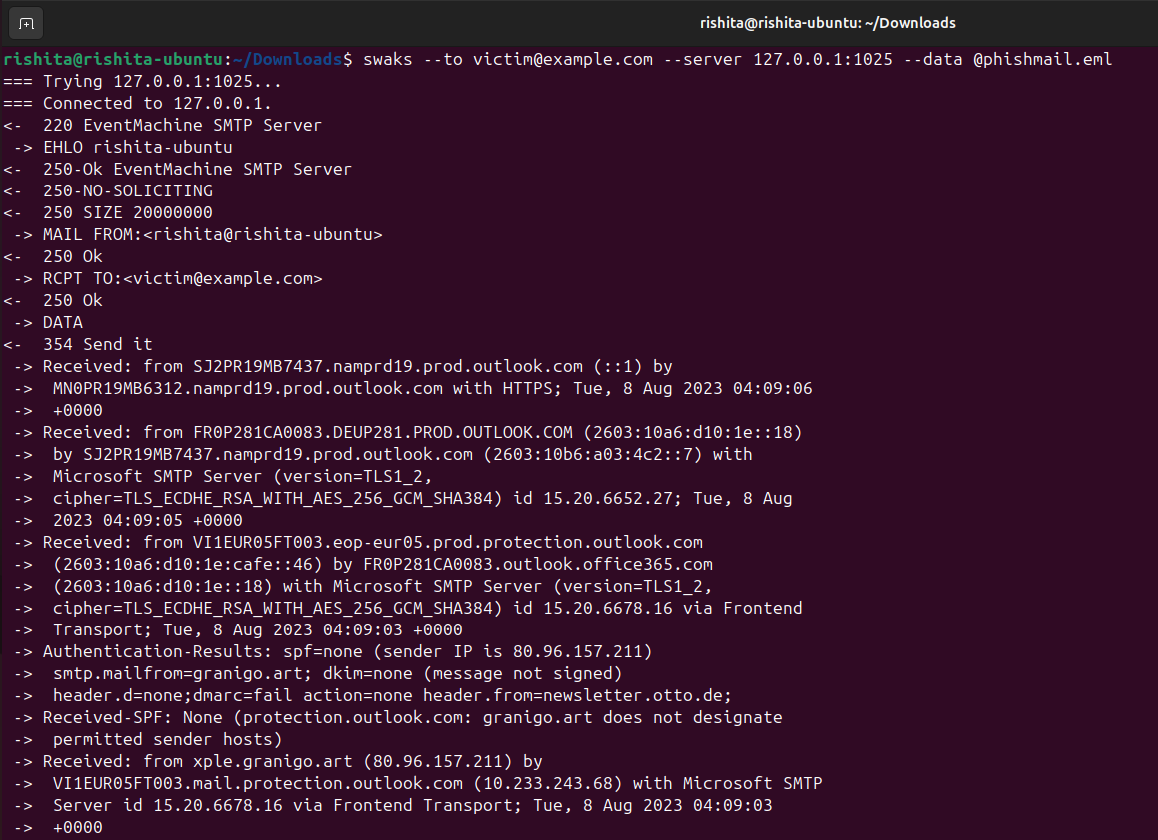
Explanation:
--to victim@example.com→ The “victim” email for testing.--server 127.0.0.1:1025→ Our local MailCatcher SMTP server.--data @phishmail.eml→ The@ensures the file is read as a complete email (headers + body).
Once sent, MailCatcher will display the email in its web interface.
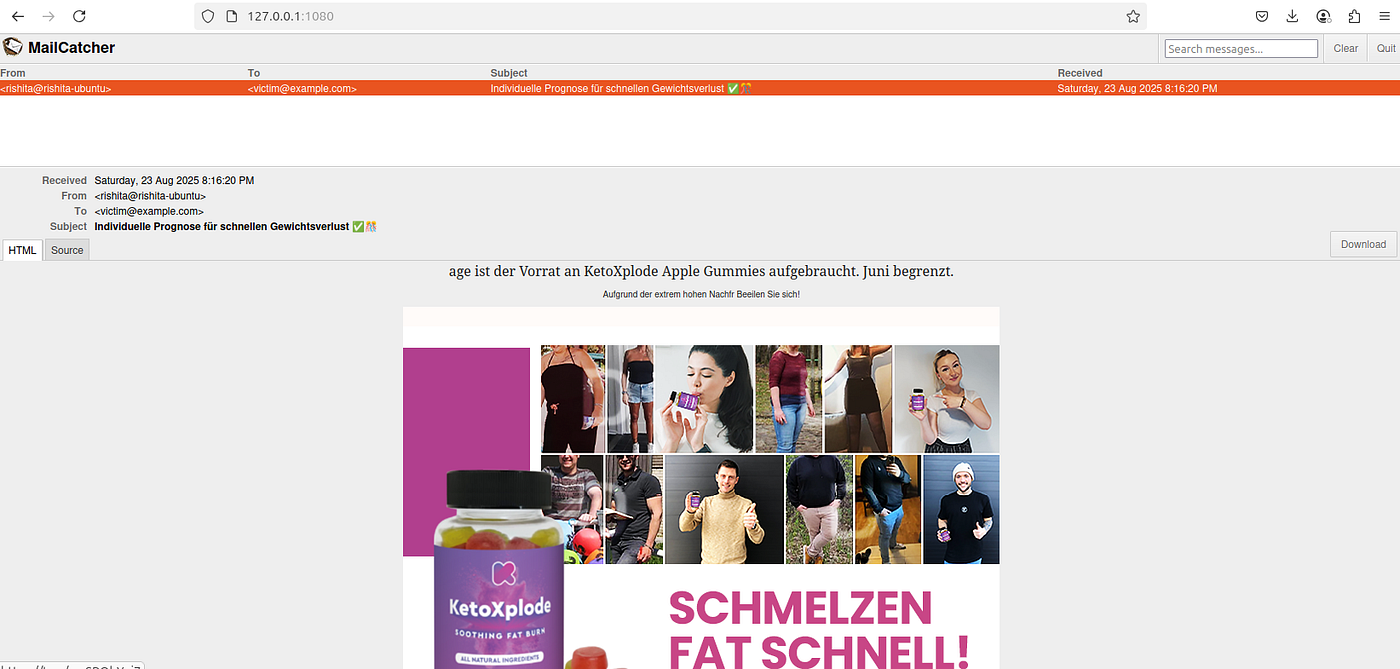
Step 4: Analyzing Email in MailCatcher
Open MailCatcher in your browser (http://127.0.0.1:1080). You will see the captured email with columns like From, To, Subject, and Received.
Clicking on the email shows the Plain Text Source and HTML Source.
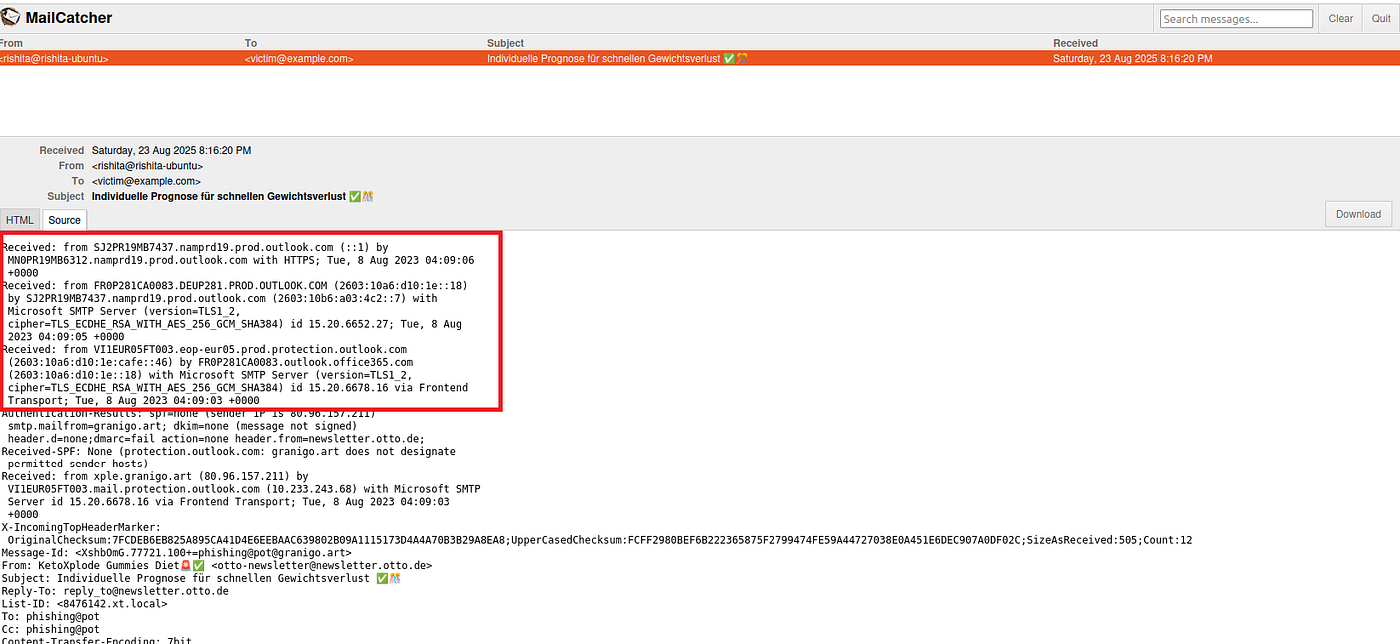
The headers showed multiple Received fields tracing the email’s path, and authentication checks revealed SPF was none, DKIM none, and DMARC fail, indicating a high likelihood of spoofing. The email source revealed a typical phishing structure: a promotional subject, suspicious links, and a sender domain that didn’t match the display name.
We examined the HTML content in detail. It contained images hosted on external domains (s3.eu-west-1.amazonaws.com) and multiple redirect links pointing to suspicious domains (firiri.shop) that could potentially lead to credential theft. The email also included hidden tracking pixels, another common phishing technique.
Step 5: Analyzing the Email in Thunderbird
While MailCatcher is great for catching emails, Thunderbird gives us a realistic user view of what a phishing email looks like in an inbox.
1.Open the same phishmail.eml file in Thunderbird by dragging and dropping it into your test inbox.
-
Observe the preview panel,notice how the subject line and sender display name are crafted to appear legitimate and eye-catching.
-
To get the full details, right-click the message and select View → Message Source (or press
Ctrl+U).
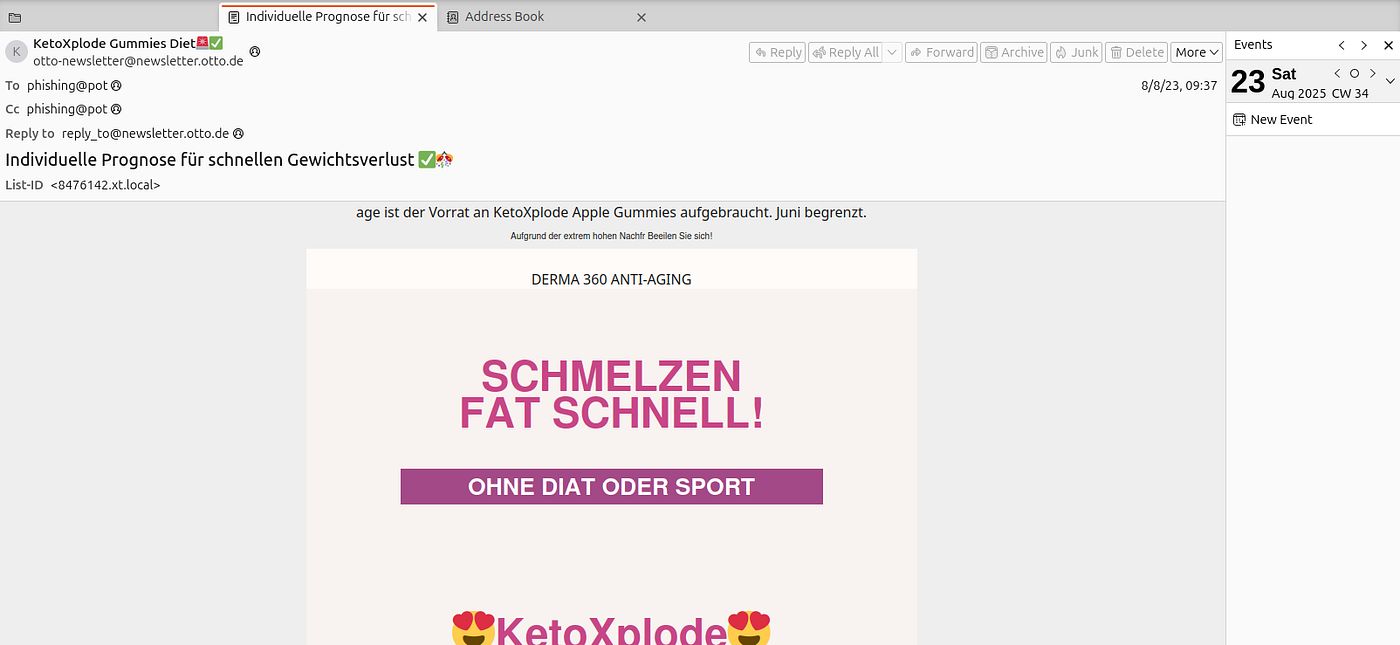
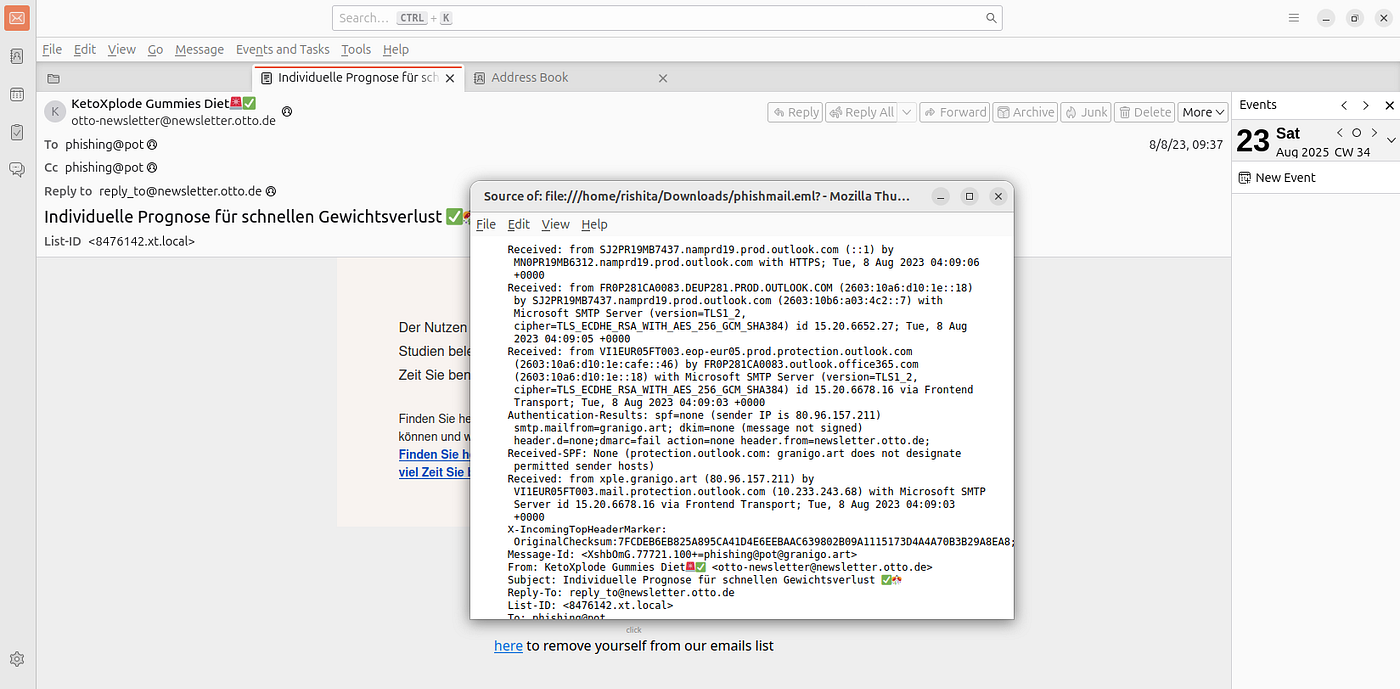
Key Findings from Thunderbird:
Sender Spoofing: Claimed sender otto-newsletter@newsletter.otto.de vs. actual return path granigo.art.
SPF/DKIM/DMARC: All failed, confirming spoofing.
Suspicious Links: Hyperlinks in the email pointed to shortened URLs (t.co) that redirected to malicious domains like firiri.shop.
Hidden Elements: Tracking pixels (1×1 images) designed to confirm that the victim opened the email.
Thunderbird’s preview made it clear how an unsuspecting user might fall victim, while the raw headers confirmed the spoofing attempt.
Step 6: Enriching the Investigation with Security Tools
To go beyond static inspection, we used external threat intelligence tools:
VirusTotal API
Extracted domains (firiri.shop, granigo.art) and IP addresses (80.96.157.211).
Queried VirusTotal: only firiri.shop was flagged as malicious.
granigo.art and the IP address were not flagged at the time of investigation, but given their role in the phishing email, they remain suspicious and should be monitored.
PhishTool
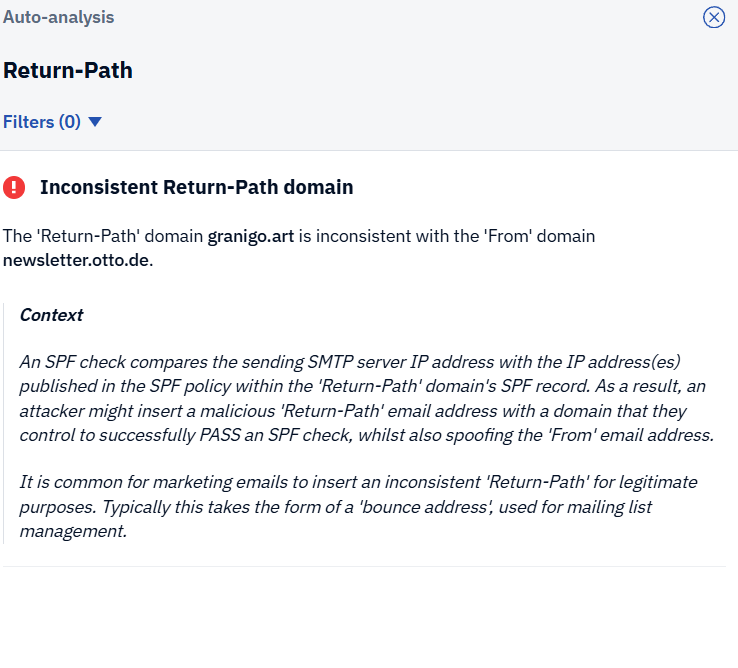
Uploaded the full .eml file to PhishTool, which automatically parsed headers and highlighted red flags.
PhishTool flagged:
Reply-To mismatch → reply_to@newsletter.otto.de inconsistent with the visible From (otto-newsletter@newsletter.otto.de).
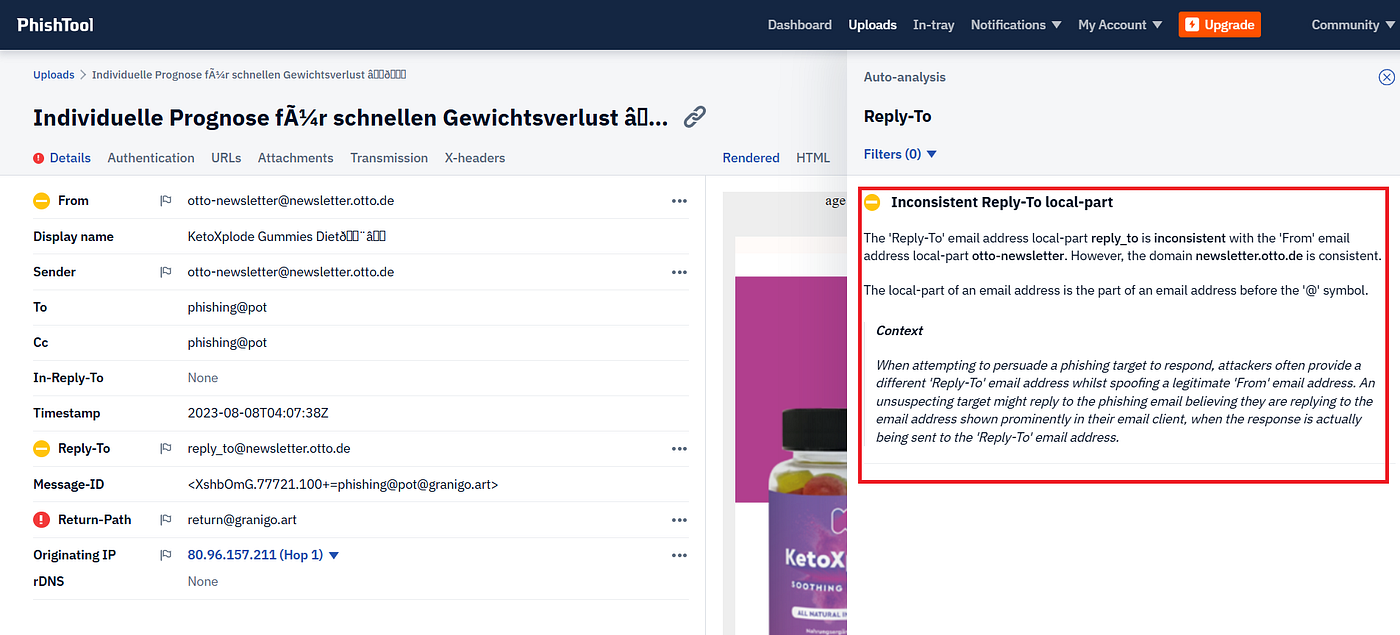
Return-Path domain mismatch → granigo.art inconsistent with the claimed sender domain newsletter.otto.de.
Display name spoofing → “KetoXplode Gummies Diet” crafted to appear trustworthy.
This reinforced that the email used common phishing techniques like spoofing and redirect links.
Step 7: Indicators of Compromise (IOCs)
From the analysis, we documented the following IOCs:
Indicators of Compromise (IOCs):
- Domain:
firiri.shop/Flagged by VirusTotal as phishing site (redirect + tracking) - Domain:
granigo.artSpoofed return-path domain - IP Address:
80.96.157.211Originating mail server - URL:
[https://t.co/mvSRObYnj7](https://t.co/mvSRObYnj7)Shortened link masking phishing site - Email:
otto-newsletter@newsletter.otto.deDisplay name spoofed sender
These IOCs should be added to blocklists and monitored in SIEM systems for proactive defense.
Conclusion
This lab showed how phishing emails can be safely analyzed using tools like MailCatcher, Thunderbird, VirusTotal, and PhishTool. We found clear signs of phishing, such as spoofed senders, mismatched domains, and malicious links. By checking the email from a victim’s view in Thunderbird and combining it with technical inspection using other tools, we were able to complete the phishing investigation process.
Even if threat tools don’t flag all IOCs, checking email headers, looking at the HTML, and adding extra threat checks together give clear proof an email is phishing. This layered method helps detect, report, and stop future phishing attacks better.
메타데이터
- post_id
- b969ccc8ea79
- slug
- phishing-attack-investigation-lab-b969ccc8ea79
- url
- https://medium.com/@rishitaa/phishing-attack-investigation-lab-b969ccc8ea79
- canonical_url
- https://medium.com/@rishitaa/phishing-attack-investigation-lab-b969ccc8ea79
- author_url
- https://medium.com/@rishitaa
- status
- ok
- fetched_at
- 2026-06-26 21:52:29