Building an AI IT Support Copilot: What LangGraph Taught Me About Real AI Workflows
A few weeks ago, I started building a project that came directly from my experience working in IT support. Not from a tutorial, not from a…
Building an AI IT Support Copilot: What LangGraph Taught Me About Real AI Workflows
A few weeks ago, I started building a project that came directly from my experience working in IT support. Not from a tutorial, not from a course, but from watching how real support sessions actually work and noticing the gap between that and what most AI demos show.
Most AI support demos follow the same pattern: a user asks a question, the AI generates an answer, and the interaction ends. Clean, simple, and not particularly useful for actual IT support work.
When someone says, “My VPN isn’t connecting,” that’s rarely enough information to do anything with. Before you can help, you need to know what error they’re seeing, what they’ve already tried, whether the issue is local or affecting others, and what environment they’re working in. The answer rarely comes from the first message. It comes from the conversation that follows.
That’s what I wanted to build around.
The Problem with Generic AI Support Tools
Real support work has a structure to it. A user reports an issue. You gather context. You work through troubleshooting steps, track the issue as it progresses, document the outcome, and decide whether to escalate or close. That cycle matters is not just for resolving the current ticket, but for building knowledge that makes the next similar ticket faster to resolve.
Most AI implementations skip that cycle entirely. They’re stateless: each message is treated independently, with no memory of what came before and no mechanism for tracking an issue through to resolution. That’s fine for answering questions. It’s not enough to support users through a real incident.
The difference between those two things is what the AI IT Support Copilot is trying to address.
What the System Does

The current version handles the full support workflow:
- Issue classification: Categorising the incoming problem before attempting to troubleshoot it
- Context-aware follow-up questions: Asking for the specific information needed based on the issue type, not generic clarifying questions
- Knowledge base retrieval: Pulling relevant troubleshooting guidance rather than generating responses from scratch
- Ticket generation and lifecycle management: Creating a ticket, tracking its status from open through in-progress to resolved
- Escalation logic: Recognising when an issue exceeds first-level scope and flagging it accordingly
- Root cause analysis: When a ticket closes, automatically generate a structured summary: issue type, likely cause, actions taken, final outcome
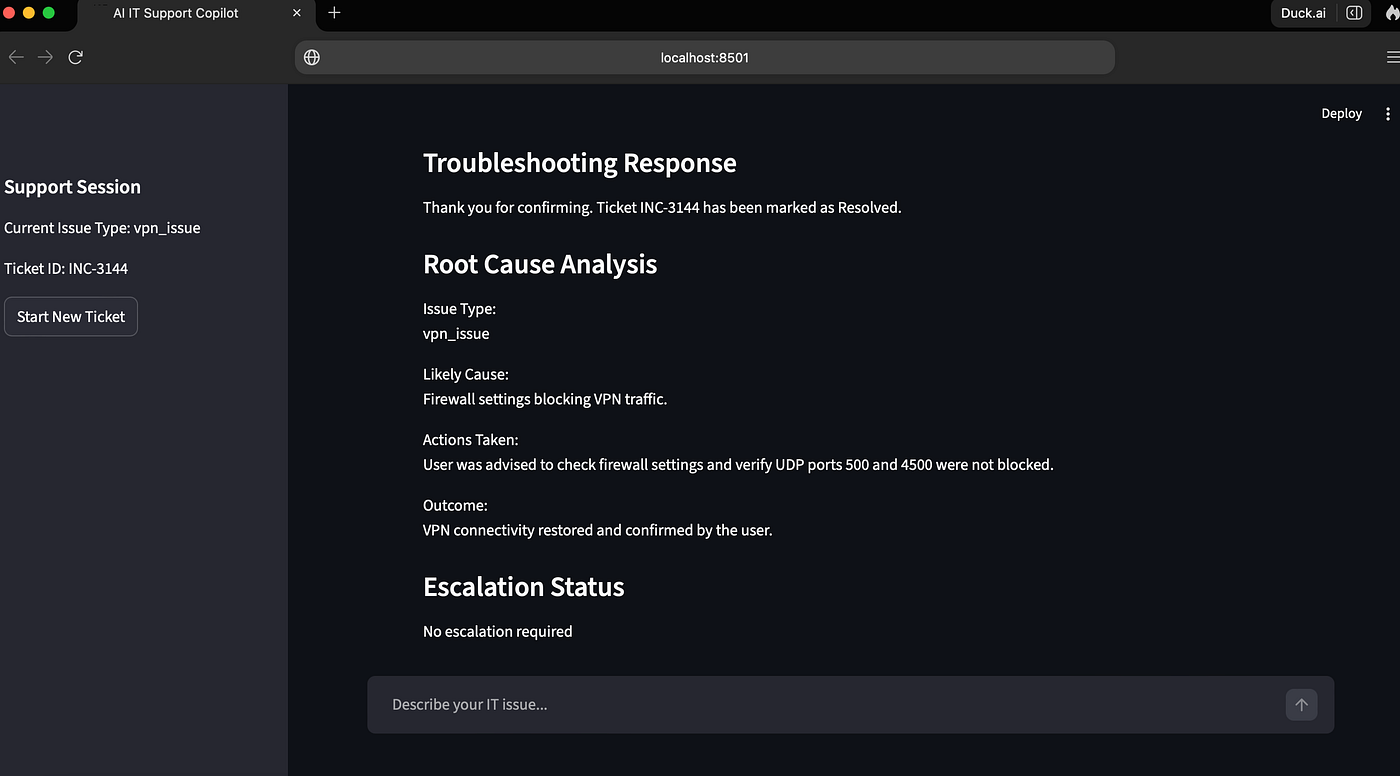
That last feature was the most recent addition. It matters because resolving an incident is only half the job. The other half is understanding why it happened, which is what reduces repeat tickets over time.
Why LangGraph
Before this project, I mostly thought about AI interactions as a straightforward request-response cycle. LangGraph changed that.
The core idea in LangGraph is building AI systems as graph nodes that each handle a specific responsibility, connected by edges that define how state flows between them. Instead of one model trying to do everything, you have a structured workflow:
User Issue → Classification → Knowledge Retrieval → Follow-Up Questions
→ Troubleshooting Guidance → Ticket Management → Resolution → Root Cause Analysis
Each node has a clear job. The system maintains context across the entire conversation because that context lives in a shared state object that every node can read from and write to. It’s a fundamentally different way of thinking about AI application design, closer to how you’d design a backend workflow than how you’d prompt a language model.
That mental shift was probably the biggest thing I took from the project.
The Problems That Actually Taught Me Something
The AI responses themselves were not the hard part. Modern language models are good at generating coherent, contextually appropriate text. Getting OpenAI to produce a reasonable troubleshooting response for a VPN issue took maybe an hour of work.
The harder problems were about the state:
Conversation memory: How does the system know, three messages into the conversation, what issue type was classified at the start? How does it carry that context without re-classifying on every message?
Ticket consistency: When a user says “that fixed it,” how does the system recognise that as a resolution signal, update the ticket status correctly, and trigger the root cause analysis without that logic breaking when the user phrases it differently?
Incomplete input: Real users don’t give you clean, structured problem descriptions. They say “it’s not working” or “something’s broken with my email.” The workflow has to handle that gracefully rather than failing or producing nonsense.
These are the kinds of problems that rarely appear in AI demos, because demos are designed to show the happy path. They’re also the problems that make the difference between something that works in a demo and something that works with real users.
The Stack
- Python: Application logic and workflow orchestration
- LangGraph: Stateful multi-step AI workflow
- Streamlit: Interface
- OpenAI: Language model layer
What’s Next
The knowledge retrieval layer is the current focus. Right now, it’s relatively simple, keyword matching against a structured knowledge base. What I want to move toward is semantic retrieval: embeddings, vector search, and proper RAG so the system can find relevant guidance even when the user’s description doesn’t use the exact terminology the knowledge base was written with.
After that: expanding support domains and improving the escalation workflow logic.
The GitHub repository is linked below for anyone who wants to follow along or dig into the code. I’m building this in public partly because having to explain what I built forces me to understand it better, and partly because the feedback from people who’ve hit similar problems has been genuinely useful.
If you’re working on something similar, especially around state management in multi-step AI workflows, I’d like to hear how you approached it.
GitHub Repository: https://github.com/akinselureabiola/AI-IT-Support-Copilot
Abiola Desmond Akinselure is an IT Support Engineer building at the intersection of IT operations and AI engineering. Currently working on the AI IT Support Copilot using Python, LangGraph, Streamlit, and OpenAI.
메타데이터
- post_id
- b9d2bd8d9c4d
- slug
- building-an-ai-it-support-copilot-what-langgraph-taught-me-about-real-ai-workflows-b9d2bd8d9c4d
- url
- https://medium.com/@abioladesmond/building-an-ai-it-support-copilot-what-langgraph-taught-me-about-real-ai-workflows-b9d2bd8d9c4d
- canonical_url
- https://medium.com/@abioladesmond/building-an-ai-it-support-copilot-what-langgraph-taught-me-about-real-ai-workflows-b9d2bd8d9c4d
- author_url
- https://medium.com/@abioladesmond
- status
- ok
- fetched_at
- 2026-06-09 15:37:30



