Free PostgreSQL MCP for Antigravity
The only setup that worked for me as of January 2026
Free PostgreSQL MCP for Antigravity
The only setup that worked for me as of January 2026
I decided to give a try to use agentic coding with Antigravity by Google. So, I sold my soul to Google by paying an yearly subscription when they offered a big discount. They really don’t have many MCPs right now. Sometimes, that’s good because there are so many horrible MCPs on the internet. Maybe it’s better they keep things simple, at least for now.
The method described here works with Postgres, but it may also work with other popular database.
There are very few MCP servers on Antigravity at this time
When you search for MCP servers on Antigravity, you can search for database related products. However, a lot of them are for paid databases online on their server. I maintain some of my databases for free with unlimited transactions and very large disk spaces on incredibly affordable servers that very few people in the world know. (I’m an expert in saving computing costs with an experience of three decades. Software compression is my expertise. Ring me up if you want to cut down your server cost dramatically or compress your system. My fee will be recuperated in several months if not weeks.)
At any rate, I needed an MCP server that doesn’t require an API Key which requires registration!!!
I found it. But, it was incredibly cumbersome to make it work! Even the state of the art LLMs didn’t know how to do it. This included GPT-5, Gemini-3, and Grok-4.1. It’s because the pubilc references for Antigravity is still rare. So, I thought I shared the knowledge with my fellow paid subscribers of Medium. Maybe this post will be scraped by bots soon and help the poor LLMs to guide people with the most current information.
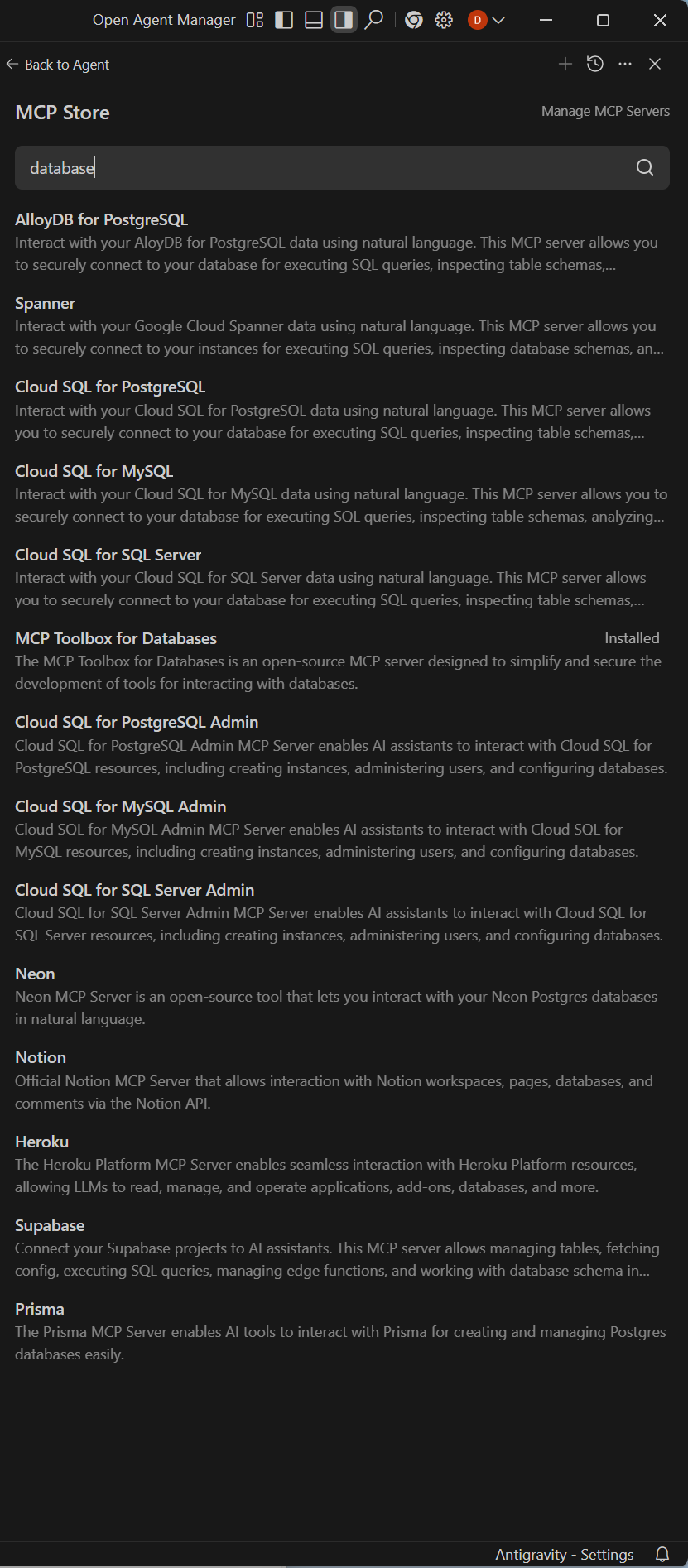
You just saw what I installed.
1. Install MCP Toolbox for Databases

This tool doesn’t work out of the box yet. You may see a screen similar to this. Before you enter the configuration file’s path, you need to create a yaml file which is the configuration file that contains information about database commands.
2. Create a file called tools.yaml
It doesn’t have to be called tools, but it keeps things simple.
sources:
  my-pg-source:
    kind: postgres
    host: 127.0.0.1
    port: 5432
    database: image_search_db
    user: db_user_name
    password: db_password

tools:
  execute_sql:
    kind: postgres-execute-sql
    source: my-pg-source
    description: Execute an arbitrary SQL query on the database (SELECT/EXPLAIN recommended for safety)

  analyze_query:
    kind: postgres-execute-sql
    source: my-pg-source
    description: Run EXPLAIN on a SQL query for performance analysis

  list_tables:
    kind: postgres-sql
    source: my-pg-source
    description: List all tables in the public schema
    statement: "SELECT table_name FROM information_schema.tables WHERE table_schema='public';"

  get_table_info:
    kind: postgres-sql
    source: my-pg-source
    description: Show column names and types for a given table
    parameters:
      - name: table
        type: string
        description: The table name
    statement: "SELECT column_name, data_type FROM information_schema.columns WHERE table_name=$1;"
Replace ‘db_user_name’ and ‘db_password’ with your own. You can actually change this with environment variables if you are familiar with using environment variables. I just decided to keep it simple. In my case, I put this configuration file in the root of the D drive.
The key here is ‘kind: postgres-execute-sql’. For listing tables and getting table information ‘kind: postgres-sql’ works, but not for executing SQL statements. It took me a long time to figure this out because none of the best LLMs didn’t know. I found it by getting the usage information buy invoking a command from the terminal. The helpful information was hidden inside the program. This is one of those occasions when vibe coding doesn’t work. A new program or new hardware with little mentioning on the internet yet will be very difficult to work with if you rely solely on vibe coding.
3. Enter the path for tools.yaml
When you enter the path for tools.yaml, it will set up your MCP server configuration automatically and show you the following screen.

Contact me if you have trouble. I’ll be glad to help.
Like, subscribe, or share if you want to support content like this!
메타데이터
- post_id
- b9ec9c5cf932
- slug
- free-postgresql-mcp-for-antigravity-b9ec9c5cf932
- url
- https://medium.com/@don-lim/free-postgresql-mcp-for-antigravity-b9ec9c5cf932
- canonical_url
- https://medium.com/@don-lim/free-postgresql-mcp-for-antigravity-b9ec9c5cf932
- author_url
- https://medium.com/@don-lim
- status
- ok
- fetched_at
- 2026-06-13 09:11:36