Multithreading in .NET — Part 2: The Synchronization Primitives Every .NET Developer Should Know
A practical guide to Mutex, Semaphore, ReaderWriterLockSlim and signaling constructs for real world concurrency in .NET
Multithreading in .NET — Part 2: The Synchronization Primitives Every .NET Developer Should Know
A practical guide to Mutex, Semaphore, ReaderWriterLockSlim and signaling constructs for real world concurrency in .NET
In this article, we are going to pick up exactly where we left off.
In *Part 1*, we explored the fundamentals of multithreading and understood how race conditions arise when multiple threads access shared data. We also saw how constructs like lock, Monitorand Interlocked help ensure correctness by enforcing synchronization within a single process.
👉 If you are a non member — Access this story for free.
But real-world applications rarely operate under such simple constraints. As systems grow in complexity, new questions start to emerge:
- What if multiple applications need to access the same shared resource?
- What if allowing only one thread at a time becomes a performance bottleneck?
- What if threads need to actively signal and coordinate with each other rather than just blocking?
These scenarios demand more than the basics and .NET has exactly the tools to handle them.
In this article we’ll explore .NET’s advanced synchronization mechanisms and thread signaling constructs, building on what you already know to help you tackle real-world concurrency challenges with confidence.
Mutex: When a Lock Isn’t Enough
You already know that lock prevents multiple threads within the same application from accessing a shared resource simultaneously.
But what happens when the competing threads aren't in the same application at all?
This is exactly the problem Mutex solves.
A Mutex (short for Mutual Exclusion) works similarly to lock , only one thread can hold it at a time. But unlike lock, a Mutex can operate across process boundaries making it the right tool when multiple running instances of an application or entirely different applications, need to coordinate access to the same shared resource.
Consider a shared counter stored in a text file and two helper methods handle reading and writing, Go ahead and run this code in 2 separate console application:
For the complete code refer to this github LINK
using System;
using System.Threading;
using System.IO;
using System.Diagnostics;

class Program
{
    // Shared resource is this file
    static string filePath = Path.Combine(Path.GetTempPath(), "counter.txt");
    static Mutex mutex = new Mutex(false, "GlobalCounterMutex");

    static void Main()
    {
        // Current process ID to distinguish between the two running apps
        int processId = Environment.ProcessId;
        Console.WriteLine($"Counter file location: {filePath}");

        Console.WriteLine($"Process {processId} started");
        Console.WriteLine($"Process {processId} waiting to acquire Mutex...\n");

        for (int i = 0; i < 5; i++)
        {
            // Critical section
            UpdateCounter(processId, i + 1);
        }

        Console.WriteLine($"\nProcess {processId} completed.");
        Console.WriteLine($"Final Counter Value: {ReadCounter()}");

        Console.ReadLine();
    }

    static void UpdateCounter(int processId, int iteration)
    {
        mutex.WaitOne(); // Blocks until this process owns the Mutex
        Console.WriteLine($"Process {processId} — Iteration {iteration} — Mutex acquired");

        try
        {
            int value = ReadCounter();
            value++;
            WriteCounter(value);
            Console.WriteLine($"Process {processId} — Iteration {iteration} — Counter updated to {value}");
            Thread.Sleep(1000);

        }
        finally
        {
            Console.WriteLine($"Process {processId} — Iteration {iteration} — Mutex released\n");
            mutex.ReleaseMutex();
        }
    }

    static int ReadCounter()
    {
        if (!File.Exists(filePath))
            return 0;
        string content = File.ReadAllText(filePath);
        return string.IsNullOrEmpty(content) ? 0 : int.Parse(content);
    }

    static void WriteCounter(int value)
    {
        // We might encounter some problem here that I will cover later in this article.
        File.WriteAllText(filePath, value.ToString());
    }
}
Let’s break down what’s happening here:
new Mutex(false, "GlobalCounterMutex")— Creates or opens a named Mutex. The first argumentfalsemeans we are not requesting immediate ownership. The second argument is the name that makes this Mutex globally identifiable across processes- The thread requests ownership of the Mutex through this line
mutex.WaitOne(). If another thread or process already holds it, this call blocks and waits until it is released try/finallyensures the Mutex is always released even if an exception is thrown inside the critical section. This is critical as a Mutex that is never released will block every other process indefinitelymutex.ReleaseMutex()explicitly releases ownership so the next waiting thread or process can proceed
The output of the following code can be seen as follows:
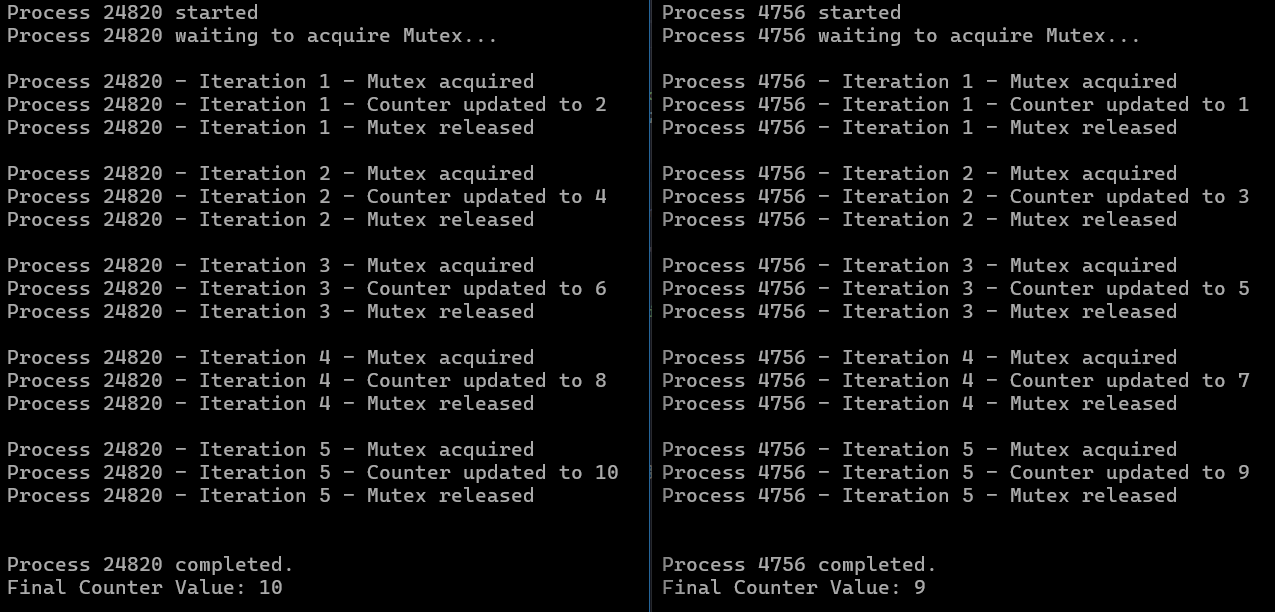
Both the process are now waiting to access the critical section
This is quite similar to what we had covered in the locks except over there we had threads waiting to access shared resource but here we have processes waiting to access them.
If you do this operation without the mutex you will face some serious errors regarding failure in updation of counter or even failure in accessing the file as multiple processes are trying to access it.
But is this enough? Or we need to add something to make this code errorproof?
Even though the Mutex is protecting the counter increment logic, the file itself can still throw an access error because:
File.WriteAllTextandFile.ReadAllTextopen and close the file at the OS level- Sometimes one process hasn’t fully released the file handle before the other process tries to access it
- The Mutex controls thread/process entry into the critical section but it doesn’t control the underlying file system lock.
To prevent this we must add retry logic as well for accessing the file.
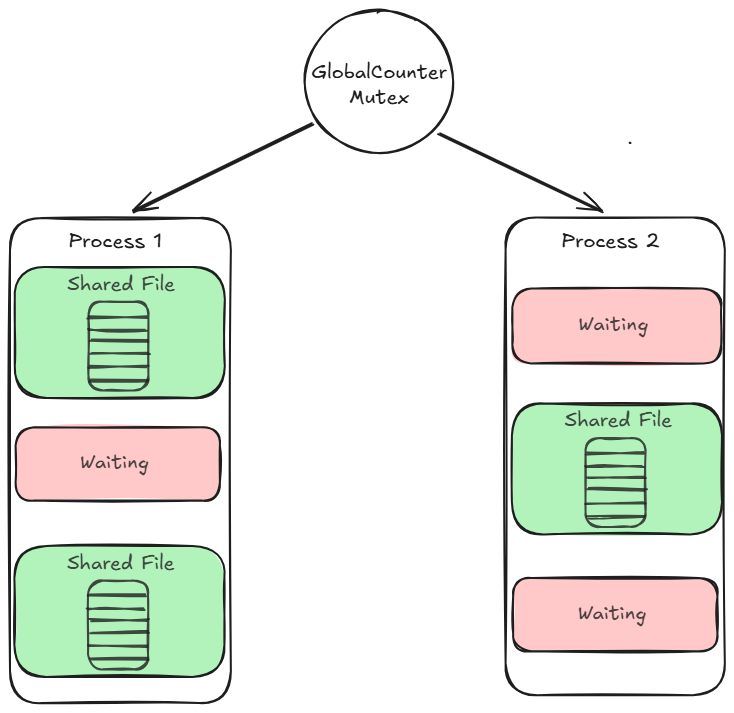
Working of How Mutex Shares Resources
The Mutex solved our cross process problem elegantly but it enforces a strict rule: only one thread at a time. What if that’s too restrictive?
Imagine a database connection pool that can handle 5 concurrent connections. Using a Mutex would limit it to one connection at a time, leaving 4 slots completely unused. What we need is a way to say “allow up to N threads in at a time” and that’s exactly what Semaphore and SemaphoreSlim give us.
Semaphore & SemaphoreSlim: Controlling How Many Get In
A Mutex is essentially a Semaphore with a maximum count of one, only one thread gets in at a time. A Semaphore generalizes this idea by allowing you to define exactly how many threads can enter a critical section simultaneously.
.NET gives you two flavors:
- Semaphore: Used to work across processes
- SemaphoreSlim: Used to work with threads within the same process along with async support.
How SemaphoreSlim Works
Think of a SemaphoreSlim as a bouncer at a club with a fixed capacity. The club allows a maximum of N people inside at any time. When someone wants to enter they check with the bouncer, if there’s room they walk straight in, if the club is full they wait outside until someone leaves.
In code terms:
- N is the maximum number of threads allowed in simultaneously
WaitAsync()is the thread asking the bouncer for entryRelease()is the thread leaving and freeing up a slot
Lets look how does it look in practice:
For the complete code refer to the github link at the end of the article
static SemaphoreSlim semaphore = new SemaphoreSlim(3, 3);

static async Task SimulateApiCall(int requestId)
{
    await semaphore.WaitAsync(); // Waiting untill slot is available

    try
    {
        // Simulating response time for an API call
        await Task.Delay(new Random().Next(1000, 3000));
    }
    finally
    {
        semaphore.Release(); // Release even when failed
    }
}
SemaphoreSlim vs Mutex , Which one to reach out for
If there are N threads at a time in a single process go for SemaphoreSlim, whereas N threads at a time which are cross process, then Semaphore.
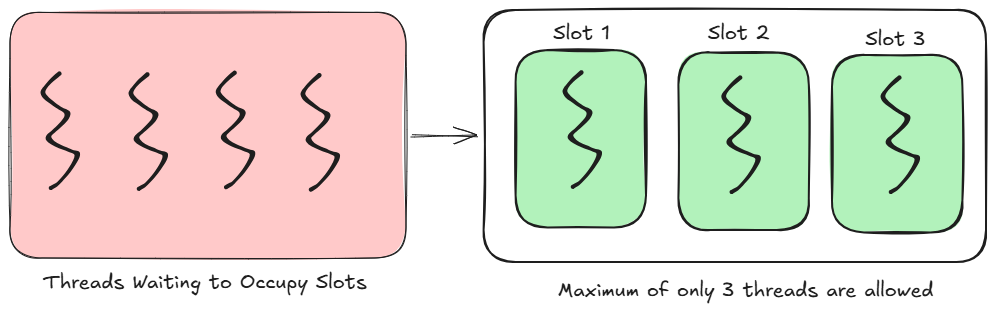
Semaphore Regulates the Number of Threads
But, Most systems are read-heavy and our current approach treats reads and writes the same. That’s inefficient!
While SemaphoreSlim allows us to limit the number of threads accessing a resource, it does not distinguish between different types of operations. In scenarios where the majority of operations are reads, restricting access using a semaphore can become inefficient. This is where we use ReaderWriterLockSlim .
ReaderWriterLock & ReaderWriterLockSlim: Smarter Access Control
.NET originally shipped ReaderWriterLock but it had well documented performance problems and could cause thread starvation in write heavy scenarios. This was addressed with ReaderWriterLockSlim a faster, leaner replacement that should always be preferred in modern .NET applications.
The core idea is simple:
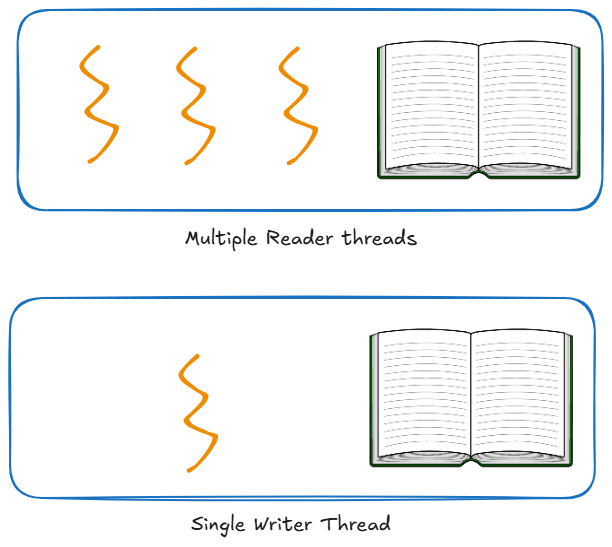
- Multiple threads can read simultaneously so reads don’t conflict with each other
- Only one thread can write at a time and while writing, no reads are allowed either
Looking at the code below we understand how can we utilize this:
For the complete code refer to this github LINK
static Dictionary<string, string> _store = new Dictionary<string, string>
{
    { "config:timeout", "30s" },
    { "config:retries", "3" },
    { "config:environment", "production" }
};

// The slim lock controlling access to the store
static ReaderWriterLockSlim _lock = new ReaderWriterLockSlim();

static void ReadFromStore(int readerId, string key)
{
    _lock.EnterReadLock(); // Multiple readers can hold this
    try
    {
        Console.WriteLine($"Reader {readerId} — acquired read lock");

        Thread.Sleep(500);

        string value = _store.ContainsKey(key) ? _store[key] : "not found";
        Console.WriteLine($"'{key}' = '{value}'");
    }
    finally
    {
        _lock.ExitReadLock();
        Console.WriteLine($"Reader {readerId} — released read lock\n");
    }
}

static void WriteToStore(int writerId, string key, string value)
{
    _lock.EnterWriteLock();// Only 1 writer allowed along with no readers
    try
    {
        Thread.Sleep(1000);

        // Store updation happends here, now no thread can access it except the write one
        _store[key] = value;
        Console.WriteLine($"Updated '{key}' to '{value}'");
    }
    finally
    {
        _lock.ExitWriteLock();
    }
}
The key parts in this code are that the _lock.EnterReadLock() allows multiple threads to enter whereas the _lock.EnterWriteLock() permits only a single thread for updation. This scenario is particularly useful when updating the cached items for an application.
The Upgradeable Read Lock — A Hidden Gem
ReaderWriterLockSlim has one feature that ReaderWriterLock completely lacks, the upgradeable read lock. This solves a very specific but common scenario:
“I want to read first and only upgrade to a write lock if I actually need to make a change.”
Without this you would have to release the read lock and then acquire a write lock creating a window where another thread could sneak in and modify the data between your two lock acquisitions. The upgradeable lock eliminates that window entirely:
static void ConditionalUpdate(string key, string newValue)
{
    // Acquire upgradeable read lock first
    _lock.EnterUpgradeableReadLock();
    try
    {
        string current = _store.ContainsKey(key) ? _store[key] : null;
        if (current != newValue) // Only upgrade if value needs changing
        {
            _lock.EnterWriteLock();
            try
            {
                _store[key] = newValue;
            }
            finally
            {
                _lock.ExitWriteLock();
            }
        }
        else
        {
            Console.WriteLine($"No update needed — '{key}' is already '{newValue}'");
        }
    }
    finally
    {
        _lock.ExitUpgradeableReadLock();
    }
}
This helps us in conditional as well as maintaining direct read/write protection.
⚠️ One important rule always call
Dispose()on yourReaderWriterLockSliminstance when you are done with it as it holds unmanaged resources:
_lock.Dispose();
We optimized access to shared data here but everytime we can’t perform restriction on threads as the problem that we want to solve might be different.
Instead of us restricting them they communicate with each other and co-ordinate accordingly. This is where we explore communication
Thread Signaling: Making Threads Talk to Each Other
This is where AutoResetEvent and ManualResetEvent come in. Both are signaling mechanisms, they allow one thread to notify one or more waiting threads that something has happened. Think of them as a traffic light for your threads.
AutoResetEvent — The Turnstile
An AutoResetEvent behaves like a turnstile at a subway/metro station, it lets exactly one person through and then immediately locks itself again. Every thread that wants to pass needs its own dedicated signal.
Set():opens the gate for one waiting thread, then automatically closes againWaitOne():waits at the gate until it is opened- Once one thread passes through, the gate resets automatically and the next thread has to wait for another
Set().
Let us look how that would look:
For the complete code refer to this github LINK
static void Producer()
{
    string[] workItems = { "Order #1", "Order #2", "Order #3", "Order #4", "Order #5" };

    foreach (var item in workItems)
    {
        Thread.Sleep(500);
        _workQueue.Enqueue(item);//The queue helps maintain the list so that no item is skipped

        // Signal the consumer that one item is ready
        _signal.Set();
    }

    _producerDone = true;
    _signal.Set(); // Final signal to unblock consumer so it can exit
}

static void Consumer()
{
    while (true)
    {
        // Wait for producer to signal that an item is ready
        _signal.WaitOne();

        if (_workQueue.Count == 0 && _producerDone)
        {
            break;
        }

        while (_workQueue.Count > 0)
        {
            string item = _workQueue.Dequeue();
            Thread.Sleep(300);

            Console.WriteLine($"processed '{item}'");
        }
    }
The Consumer here processes only one single item per signal, it never races ahead of the producer. Each Set() opens the gate for exactly one WaitOne() and then the gate closes again automatically.
ManualResetEvent — The Stadium Gate
ManualResetEvent behaves like a stadium gate at a concert. Once it opens, everyone rushes through simultaneously. It stays open until someone manually closes it again.
Set(): opens the gate and it stays open while all waiting threads and any future threads pass through immediatelyReset(): manually closes the gate againWaitOne(): waits at the gate until it is opened
We can imagine this in real world scenario where we need all threads to wait until some resource is loaded or initialized. Something like this:
For the complete code refer to this github LINK
    static ManualResetEvent _startGate = new ManualResetEvent(false);

    static async Task Manual()
    {
        int numberOfWorkers = 5;
        Task[] workers = new Task[numberOfWorkers];

        for (int i = 1; i <= numberOfWorkers; i++)
        {
            int workerId = i;
            // Spinning up all workers
            workers[i - 1] = Task.Run(() => Worker(workerId));
        }

        // Set() opens the gate permanently, now all spinned threads can work
        _startGate.Set();

        await Task.WhenAll(workers);

        // Control returns when all threads complete work
        Console.WriteLine("\nAll workers completed.");
        Console.ReadLine();
    }

    static void Worker(int workerId)
    {
        Console.WriteLine($"Worker {workerId} — ready and waiting at the gate");

        _startGate.WaitOne(); //No thread crosses ahead untill Set() is called

        // Some task that the thread needs to perform .....

         // This line will be all at once for every thread
        Console.WriteLine($"Worker {workerId} — work completed");
}
Here all 5 workers are released at the exact same moment , completely unlike AutoResetEvent which releases exactly one thread per signal. The gate stays open permanently until Reset() is called.
TL;DR
- Mutex extends the concept of
lockbeyond a single process — use it when multiple applications/processes need to coordinate access to the same resource - A SemaphoreSlim generalizes mutual exclusion by allowing N threads in simultaneously instead of just one. It also supports
async/await. - ReaderWriterLockSlim optimizes read heavy scenarios by allowing multiple threads to read simultaneously while ensuring writes are always exclusive.
- AutoResetEvent is a one to one signaling mechanism, it releases exactly one waiting thread per
Set()and resets automatically. - ManualResetEvent is a one to many broadcasting mechanism, once
Set()is called the gate stays open and all waiting threads are released simultaneously. - Across all these primitives one rule never changes, always release locks and signals in a
finallyblock. A lock that is never released will starve every thread waiting for it
The Github link to the complete codes used in this article is here — 🔗LINK!
Coming Up Next
We now have a solid toolkit of synchronization primitives at our disposal. We know how to protect shared resources, control how many threads get in simultaneously, optimize for read heavy workloads and make threads signal each other with precision.
But we’ve only been thinking about threads in terms of controlling and restricting them. In Article 3 we shift gears entirely.
We’ll explore how .NET’s Barrier and CountdownEvent let threads coordinate and we’ll dive into the ThreadPool and the Task Parallel Library, the modern foundation of concurrent .NET applications, how ConcurrentCollections will give thread safe data structures right out of the box without a single lock in sight.
By the end of Article 3 you’ll have everything you need to design and build production ready concurrent .NET applications with confidence.
Follow along so you don’t miss it and feel free to drop your questions or thoughts in the comments below.
메타데이터
- post_id
- ba4c508d958b
- slug
- multithreading-in-net-part-2-the-synchronization-primitives-every-net-developer-should-know-ba4c508d958b
- url
- https://medium.com/c-sharp-programming/multithreading-in-net-part-2-the-synchronization-primitives-every-net-developer-should-know-ba4c508d958b
- canonical_url
- https://medium.com/c-sharp-programming/multithreading-in-net-part-2-the-synchronization-primitives-every-net-developer-should-know-ba4c508d958b
- author_url
- https://medium.com/@kroshpan
- status
- ok
- fetched_at
- 2026-06-22 12:55:45