QA Learning Journal #3: Understanding Data Types & Operators
While learning Playwright, I quickly realized that writing automation scripts is about much more than interacting with web elements. Every…
QA Learning Journal #3: Understanding Data Types & Operators
While learning Playwright, I quickly realized that writing automation scripts is about much more than interacting with web elements. Every script is built on JavaScript fundamentals.
In my previous article, I explored how JavaScript stores values using variables. This week, I wanted to understand something equally important: What kind of values are those, and how does JavaScript work with them?
That’s where Data Types and Operators come in.
What is a Data Type?
A data type simply tells JavaScript what kind of value it is dealing with.
For example,
let browserName = "Chrome";JavaScript knows this is a String.
let totalProducts = 8;This is a Number.
Different data types allow JavaScript to perform different operations correctly.
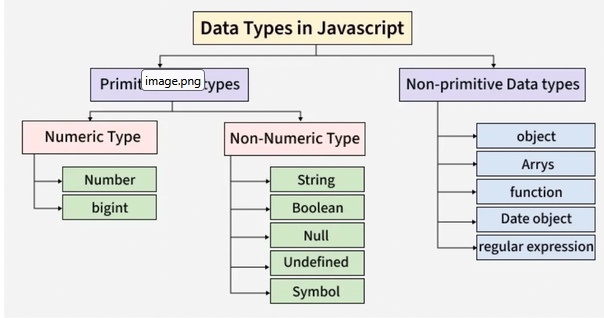
Primitive Data Types
The primitive data types I learned are:
- String
- Number
- Boolean
- Undefined
- Null
- BigInt
- Symbol
Example:
let isLoggedIn = true;                      // boolean type
let totalProducts = 8;                      // number
const baseURL = "https://example.com";      // string
How do we check a data type?
Until I started learning JavaScript, I had never paid much attention to data types. But experimenting with the typeof operator made me realize how useful it is when debugging or simply understanding what kind of value I'm working with.
It was quite amusing to see that difference between undefined, null and [] from typeof. Give it a try :)
typeof "Chrome"      // string
typeof 20           // number
typeof true         // boolean
A simple but very useful operator while debugging.
Operators
Operators help us perform actions on values. Some common categories include:
Arithmetic Operators
+
-
*
/
%
Comparison Operators
==      // Compares "values only" after type conversion (loose equality)
===     // Compares "both value AND datatype". No conversion (strict equality)
>
<
>=
<=
Used to compare values.
Assignment Operators
=
+=    // s += 5 implies s = s+5
-=    // s -= 5 implies s = s-5
Used to assign or update values.
Logical Operators
true && false   // false (AND - both must be true)
true || false   // true  (OR - at least one true)
!true           // false (NOT - flips the value)
Commonly used in conditions.
Why are Operators Important?
Almost every JavaScript program uses operators.
Whether you’re:
- checking login credentials,
- calculating totals,
- validating forms,
- or writing Playwright assertions,
operators are everywhere.
Apart from primitive types, JavaScript also has non-primitive (reference) types such as Objects, Arrays, and Functions. I’ll explore these in more detail in a future article.
My Key Takeaways
- Variables store values, but data types describe those values.
- JavaScript supports both primitive and non-primitive data types.
- The
typeofoperator helps identify the type of a value. - Operators allow JavaScript to perform calculations, comparisons, assignments, and logical decisions.
What’s Next?
With variables, data types, and operators covered, I’m gradually building a stronger JavaScript foundation. In the next article, I’ll continue exploring more core JavaScript concepts that will eventually help me write cleaner, more reliable Playwright automation scripts.
If you’re also learning JavaScript or Playwright, I’d love to hear what concepts you’re exploring. Feel free to share your though ts or connect with me — documenting this journey one concept at a time.
메타데이터
- post_id
- ba56739363c9
- slug
- qa-learning-journal-3-understanding-data-types-operators-ba56739363c9
- url
- https://medium.com/@priti.jain84/qa-learning-journal-3-understanding-data-types-operators-ba56739363c9
- canonical_url
- https://medium.com/@priti.jain84/qa-learning-journal-3-understanding-data-types-operators-ba56739363c9
- author_url
- https://medium.com/@priti.jain84
- status
- ok
- fetched_at
- 2026-07-24 19:13:54




