Monolithic vs Microservices in Expo Apps: What Mobile Developers Should Actually Understand
When developers hear the words monolithic and microservices, they usually think about backend architecture.
Monolithic vs Microservices in Expo Apps: What Mobile Developers Should Actually Understand
When developers hear the words monolithic and microservices, they usually think about backend architecture.
Databases. APIs. Servers. Deployment pipelines.
But if you are building mobile apps with Expo and React Native, this topic still matters a lot.
Because your app may be a single Expo project, but the way your features, APIs, business logic, and release process are structured can decide whether your product becomes easy to scale or painful to maintain.
The real question is not:
“Should I use monolithic or microservices?”
The better question is:
“At this stage of my product, which architecture gives me speed without creating future problems?”
Let’s break it down with a practical Expo example.
What Is a Monolithic Architecture?
A monolithic architecture means most parts of the system are built and managed as one unit.
In a simple Expo app, this may look like:
expo-app/
 ├── app/
 ├── components/
 ├── services/
 ├── store/
 ├── utils/
 ├── api/
 └── package.json
Everything lives inside one codebase:
- Authentication
- Course listing
- Payments
- Notifications
- User profile
- Admin-related screens
- API calls
- State management
- Business logic
For many early-stage products, this is not bad.
In fact, this is usually the best starting point.
Example: Monolithic Expo Learning App
Imagine you are building a learning app using Expo.
The app has:
- Login
- Course list
- Video player
- Payment screen
- My notes
- Live classes
- Push notifications
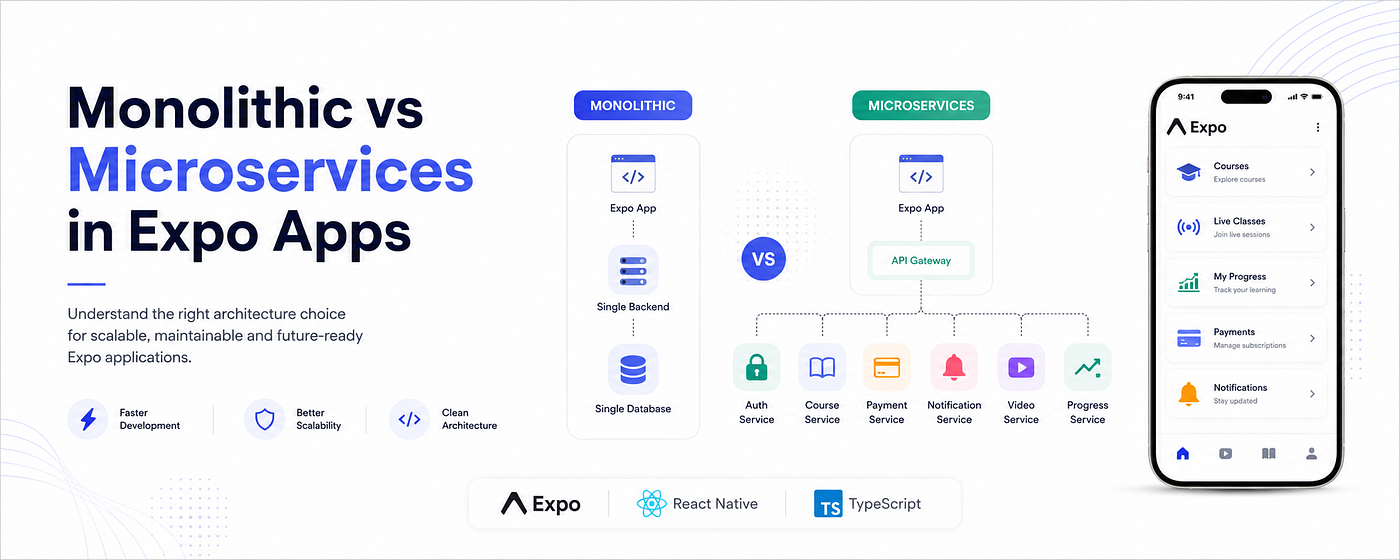
In a monolithic setup, you may have one backend API and one Expo app consuming it.
Expo App
   ↓
Single Backend API
   ↓
Single Database
The flow is simple.
The mobile app calls APIs like:
GET /courses
GET /courses/:id/videos
POST /auth/login
POST /payments/create-order
GET /user/profile
This is easy to build, easy to debug, and easy to deploy.
For a small team, this gives speed.
And speed matters when you are still validating the product.
Why Monolithic Works Well in the Beginning
A monolithic setup is useful because it keeps complexity low.
You do not need to manage multiple services, multiple deployment pipelines, complex monitoring, or inter-service communication.
For an Expo project, this means:
- Faster development
- Easier debugging
- Fewer moving parts
- Simple API integration
- Easier onboarding for new developers
- Lower infrastructure cost
If your team is small, your product is still evolving, or your feature set is not too complex, monolithic architecture is often the practical choice.
Many developers try to use microservices too early because it sounds modern.
But modern does not always mean better.
Sometimes, simple architecture is the most professional decision.
The Problem With Monolithic Apps
The problem starts when the product grows.
Your Expo app may still look fine from the outside, but internally things can become messy.
You may start seeing problems like:
- One API change breaks multiple screens
- Payment logic is mixed with user logic
- Notification logic is tightly coupled with course logic
- Testing becomes harder
- Releases become risky
- One backend issue affects the entire app
- Developers are afraid to touch old code
For example, your course API may also return payment status, user progress, subscription details, and video access rules.
At first, it feels convenient.
Later, it becomes technical debt.
const course = {
  id: "course_001",
  title: "React Native Masterclass",
  videos: [],
  paymentStatus: "paid",
  subscriptionDaysLeft: 42,
  userProgress: 68,
  notificationEnabled: true,
};
This kind of data mixing makes the system harder to maintain.
The app becomes dependent on one large backend response.
A small backend change can create unexpected mobile bugs.
What Is Microservices Architecture?
Microservices architecture means splitting the system into smaller independent services.
Each service handles one business responsibility.
For the same learning app, the backend may look like this:
Expo App
   ↓
API Gateway
   ↓
Auth Service
Course Service
Payment Service
Notification Service
Video Service
User Progress Service
Each service has a clear responsibility.
For example:
- Auth Service handles login, signup, token refresh
- Course Service handles courses, chapters, lessons
- Payment Service handles subscriptions and transactions
- Video Service handles video access and playback metadata
- Notification Service handles push notifications
- Progress Service handles watch history and completion status
The Expo app still looks like one app to the user.
But behind the scenes, the backend is split into focused services.
How Expo Works With Microservices
Expo itself does not force monolithic or microservices architecture.
Expo is your mobile client.
The architecture usually depends on how your backend and app modules are designed.
In a microservices-based Expo app, your API layer may look like this:
src/
 ├── features/
 │   ├── auth/
 │   ├── courses/
 │   ├── payments/
 │   ├── notifications/
 │   └── profile/
 ├── services/
 │   ├── authApi.ts
 │   ├── courseApi.ts
 │   ├── paymentApi.ts
 │   └── notificationApi.ts
 └── lib/
     └── apiClient.ts
Each feature talks to its related service.
Example:
// services/courseApi.tsimport { apiClient } from "../lib/apiClient";export const getCourses = async () => {
const response = await apiClient.get("/course-service/courses");
  return response.data;
};export const getCourseDetails = async (courseId: string) => {
const response = await apiClient.get(`/course-service/courses/${courseId}`);
return response.data;
};Payment APIs can stay separate:
// services/paymentApi.tsimport { apiClient } from "../lib/apiClient";export const createPaymentOrder = async (courseId: string) => {
const response = await apiClient.post("/payment-service/orders", {
courseId,
}); return response.data;
};This keeps your mobile app cleaner.
Even though the user sees one product, your app internally respects service boundaries.
Monolithic Frontend vs Modular Expo App
One important point:
A microservices backend does not automatically make your Expo app clean.
You can have microservices in the backend and still have a messy mobile codebase.
That is why Expo apps should also follow modular structure.
Instead of putting everything into random folders, organize by feature:
src/
 ├── features/
 │   ├── auth/
 │   │   ├── screens/
 │   │   ├── components/
 │   │   ├── api/
 │   │   └── hooks/
 │   ├── courses/
 │   │   ├── screens/
 │   │   ├── components/
 │   │   ├── api/
 │   │   └── hooks/
 │   └── payments/
 │       ├── screens/
 │       ├── components/
 │       ├── api/
 │       └── hooks/
 ├── shared/
 │   ├── components/
 │   ├── utils/
 │   └── constants/
 └── app/
This is still one Expo app.
But it is not a messy monolith.
This approach is often the best middle ground for modern mobile teams.
When Should You Use Monolithic Architecture?
Use monolithic architecture when:
- You are building an MVP
- The team is small
- The product is not validated yet
- Features are changing frequently
- You want faster delivery
- Infrastructure cost should stay low
- You do not have many backend engineers
For most early Expo apps, this is the correct choice.
A clean monolith is better than a badly designed microservices system.
When Should You Move Toward Microservices?
Microservices make sense when:
- Different teams own different modules
- Payments, courses, notifications, and users need separate scaling
- One module changes frequently without affecting others
- The backend is becoming too large
- Deployment is risky
- Testing is becoming difficult
- You need better fault isolation
For example, if your payment system fails, your course browsing should still work.
If your notification service has an issue, video playback should not break.
That is the value of microservices.
Not hype.
Practical separation.
The Hidden Cost of Microservices
Microservices sound clean, but they introduce real complexity.
You now need to manage:
- Multiple deployments
- API versioning
- Service communication
- Authentication between services
- Logging and monitoring
- Error tracking
- Network failures
- Data consistency
- DevOps complexity
For mobile apps, this also means your Expo app needs better API handling.
You need proper loading states, retry logic, fallback UI, and graceful error messages.
Example:
try {
  const course = await getCourseDetails(courseId);
  const progress = await getUserProgress(courseId);
return {
course,
progress,
};
} catch (error) {
// Show useful fallback instead of breaking the screen
}In microservices, partial failure is common.
Your app should be designed for that.
A Practical Recommendation for Expo Developers
For most Expo apps, I recommend this path:
Start with a clean monolith.
Do not over-engineer the backend on day one.
But structure your Expo app in a way that allows future separation.
That means:
- Keep feature folders independent
- Avoid mixing business logic across modules
- Use a clean API layer
- Keep shared components truly shared
- Avoid direct API calls inside UI components
- Use proper types for API responses
- Keep payment, auth, course, and notification logic separated
This gives you speed today and flexibility tomorrow.
Final Thoughts
Monolithic architecture is not outdated.
Microservices are not automatically superior.
Both are tools.
The mistake is choosing architecture based on trend instead of product stage.
For Expo developers, the best approach is usually simple:
Build fast, but structure cleanly.
Start with a monolith if your product is young.
Move toward microservices when your scale, team, and business complexity actually demand it.
A good mobile app is not just about beautiful screens.
It is about building a system that can survive real users, real changes, real bugs, and real growth.
That is where architecture matters.
메타데이터
- post_id
- ba6fea5f7c36
- slug
- monolithic-vs-microservices-in-expo-apps-what-mobile-developers-should-actually-understand-ba6fea5f7c36
- url
- https://medium.com/@adsalihac/monolithic-vs-microservices-in-expo-apps-what-mobile-developers-should-actually-understand-ba6fea5f7c36
- canonical_url
- https://medium.com/@adsalihac/monolithic-vs-microservices-in-expo-apps-what-mobile-developers-should-actually-understand-ba6fea5f7c36
- author_url
- https://medium.com/@adsalihac
- status
- ok
- fetched_at
- 2026-07-14 13:28:58