Treedix USB Cable Tester Review
How to Solve USB Cable Confusion
Treedix USB Cable Tester Review
How to Solve USB Cable Confusion
I once called USB the “Least Standard Standard”. How do you solve the lottery of whether you have the right USB cable for your task? I have found a solution in the form of the Treedix USB Cable Tester.
[embed]The Confusing World of USB-C Cables The Least Standard Standard?medium.com
I had been keeping my eye out for a suitable testing device, but many looked a bit too much like a science project to me. The Treedix looked to have a user interface that was a bit more user-friendly.
It consists of a small, rectangular plastic box with a screen and various ports around the outside. On the underside are the labels for the ports and a battery slot for a single AAA.
On the left side of the unit is a mode selector, a battery switch, and a USB-C port. This allows you to power the tester using a power bank, PC, or hub. The battery switch toggles between using this port and the battery.
On the right side are two output ports. One is USB Type A, the other USB-C.
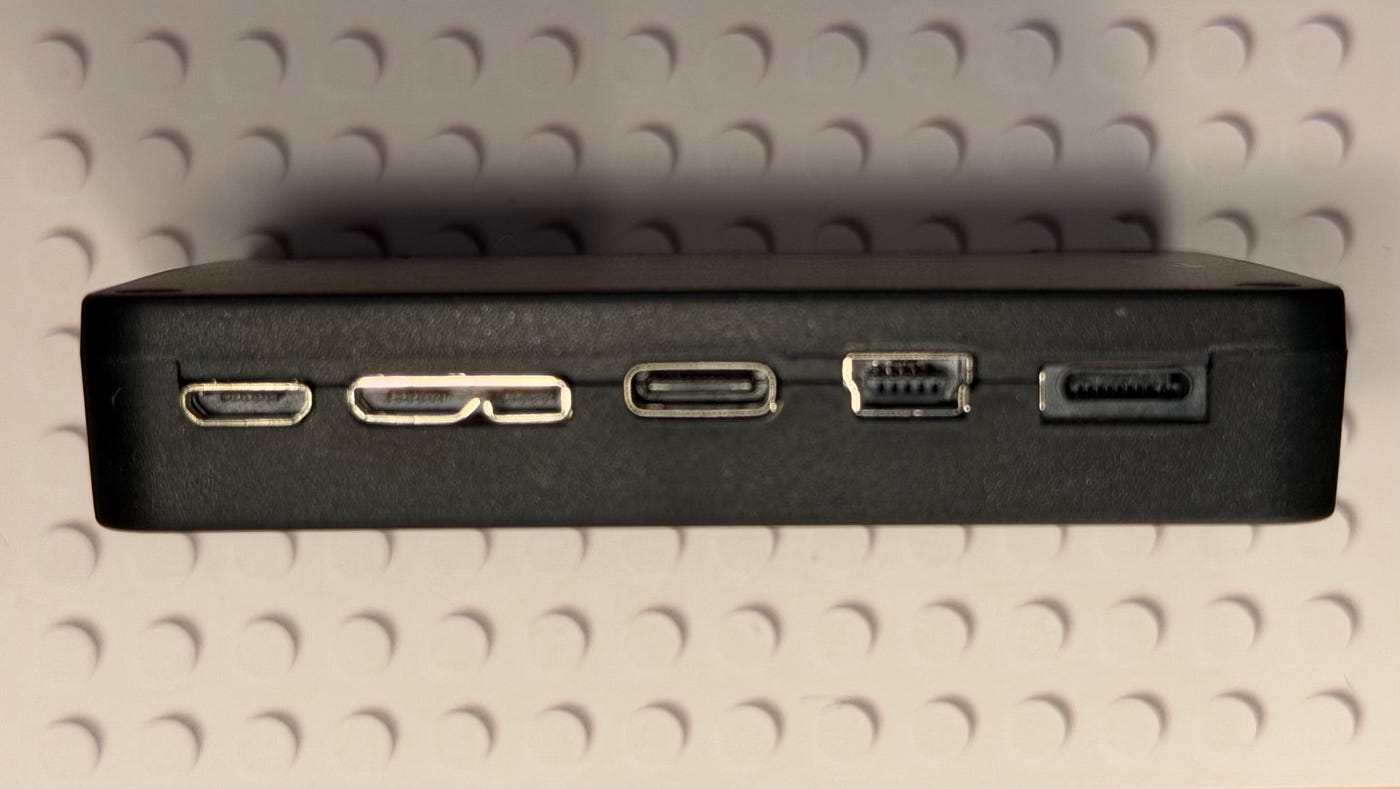
On the bottom edge are the input ports. From left to right, you have:
- Micro B 2.0 was commonly used for things like Mice and Android phones before USB-C came along
- Micro C 3.0 is most commonly seen on external USB hard drives
- Type C is the new standard for most modern devices
- Mini B is an older USB2 standard that largely got replaced by Micro B
- Lightning was Apple’s proprietary connector before they switched to USB-C
This selection will cover most of the common combinations you will find in your USB cable collection. My primary interest is in cables that have USB-C at both ends, or are USB-A to USB-C.
Please note that the model I have can test Thunderbolt cables with a Type C connector. It is marked “USB Cable Tester III” on the box. I don’t see any reference to testing Thunderbolt on the website anymore. This is why my Basic Functions screen differs from the product images.
The testing process is very simple. You press the mode button to wake the unit up and check that you are in the mode you want. If it doesn’t wake up, make sure the battery selector is set to the correct option for how you are powering the tester. Pressing the mode button again will toggle through the modes.

©Treedix
You must first plug in your cable into the output port on the right, and the unit will wake up if it isn’t on already. Then you plug the other end of the cable into the input port on the lower edge.

This fancy braded cable supplied by Apple with a new iPhone only supports USB2.0 and <65W power
The default starting screen is called “Basic Functions”. This quickly tells you what USB standard and what power delivery standard the cable supports. Many of the cables that arrive with your devices will deliver data or power, but not both. Once they are separated from that device, there is usually no clue about the cables' capabilities. The Treedix will solve that mystery.
The other modes are a bit more technical — back in the realms of an electronics project. I don’t pretend to know what the resistance should be or the significance of every pin in the connector. I do understand that a green tick is good and a red cross is bad.
The final screen is more interesting. Some USB-C cables have a chip that identifies their capabilities to other devices. A bit like the handshake HDMI devices do with each other. This eMarker information is displayed for you by the Treedix.

©Treedix
I plan to use the tester to go through my cable stock and check each one. Any “minimum effort” cables that manufacturers have bundled with their devices will go into recycling. I will keep the ones that excel at data, power delivery, or both. These I will label so I know their capabilities going forward. If I am getting too much duplication, then the cables that are only good at one thing will be next for recycling.
If, like me, you tend to hoard on a “just-in-case” basis, then this little device is a very useful way to help you sort the wheat from the cable chaff.
Live View features authors from a variety of backgrounds who share their passion for photography. You can meet them all, read their stories, and follow them by visiting the Live View About page.
메타데이터
- post_id
- ba8a5e5137f2
- slug
- treedix-usb-cable-tester-review-ba8a5e5137f2
- url
- https://medium.com/live-view/treedix-usb-cable-tester-review-ba8a5e5137f2
- canonical_url
- https://medium.com/live-view/treedix-usb-cable-tester-review-ba8a5e5137f2
- author_url
- https://medium.com/@amckinlayh
- status
- ok
- fetched_at
- 2026-06-09 15:37:30