Accessibility beyond the tools
Every human being, at some point in life, will experience a limitation that affects how they interact with the world. Some are born with…
Accessibility beyond the tools

Every human being, at some point in life, will experience a limitation that affects how they interact with the world. Some are born with disabilities. Others acquire them through injury, illness, or age. Many face barriers in specific moments; holding a child, recovering from surgery, using a phone in bright sunlight, or working in a noisy environment. These are not exceptions. They are ordinary parts of being human.
Yet much of the digital world is designed as if these conditions do not exist. Interfaces assume perfect vision, steady hands, fast connections, and complete focus. This disconnect creates friction, confusion, and in many cases, exclusion.
Do we truly understand what accessibility means? Not as a technical requirement, but as a design principle that reflects the full range of human experience. Do we recognise that accessibility is not just for others, but for all of us?
Do we know when to begin? At what point in our process do we consider accessibility, and who do we involve? Is it something we address only after everything else is in place?
And perhaps most importantly, are we willing to accept that people are currently unable to use what we create? Are we comfortable with that reality, or do we believe we can do better?
These are questions not of technology, but of intention. If we aim to build products for people (all people) then accessibility must become a natural part of how we work. Not as an afterthought, but as a foundation. Not as a feature, but as a principle.
What Accessibility Means in Web Development
Accessibility, in the context of digital products, refers to the inclusive practice of removing barriers that prevent people from using websites and applications. It is not limited to addressing the needs of users with permanent disabilities. Rather, it is about ensuring that everyone, whether older, injured, affected by environmental constraints, or living with a disability, can perceive, understand, navigate, and interact with digital content.
In web development, accessibility is often reduced to technical compliance tasks such as adjusting colour contrast, enabling keyboard navigation, or applying ARIA attributes. These aspects are important but do not capture the full scope. Accessibility is not only a matter of code. It reflects a broader design philosophy that places human diversity at the centre of the process.

Its relevance is wide-ranging. A user with reduced motor control may rely entirely on a keyboard. A commuter using a phone with a cracked screen may struggle to complete a simple task. An elderly person may encounter challenges with modern interface patterns. In all these situations, accessible design helps preserve usability. This is both a moral imperative and a practical advantage. Accessible products tend to reach more users, perform more consistently across contexts, and offer better long-term maintainability.
The Many Dimensions of Accessibility
Accessibility is often misunderstood as a concern limited to users with permanent physical impairments. It encompasses a much wider spectrum of human conditions and contexts. Addressing accessibility properly requires acknowledging the varied circumstances in which users engage with digital products. By understanding these dimensions, development teams can design with greater empathy and effectiveness.
Age plays a significant role in how users experience digital interfaces. Older users may experience reduced vision, hearing, or dexterity. Cognitive processing may be slower, and modern interaction patterns may not be familiar or intuitive. Interfaces that rely heavily on gestures, small touch targets, or hidden interactions often exclude this group. Accessibility in this context means designing for clarity, simplicity, and adaptability.

Physical disabilities, such as limited mobility, visual or auditory impairments, and chronic conditions, directly impact a person’s ability to interact with a digital interface. Someone with limited hand movement may depend entirely on keyboard navigation or assistive devices such as eye-tracking tools. For users with visual impairments, screen reader compatibility and semantic structure are essential. These needs must be considered from the outset, not addressed reactively.
Situational disabilities refer to constraints caused by the user’s environment. A person carrying a child in one arm can only operate a phone with the other. Someone in a noisy environment may not be able to listen to audio content. Bright sunlight may reduce screen visibility. These limitations are temporary but common. Designing with these contexts in mind results in more resilient and user-friendly products.
Temporary disabilities include injuries such as a broken arm, eye strain, or post-operative limitations. Although these are not permanent, they affect the user experience just as strongly during the period in which they occur. Accessibility practices, such as flexible input methods or reduced motion settings, ensure that users in these conditions can still operate and benefit from digital systems.
Restrictions on bandwidth and speed are often overlooked but form a critical part of accessibility. Not all users have access to high-speed internet or modern devices. Heavy websites with large images, auto-playing videos, or bloated scripts can become unusable under constrained conditions. Prioritising performance, progressive enhancement, and graceful degradation allows services to remain accessible regardless of connectivity or hardware limitations.
Accessibility is not a single concern aimed at a narrow audience. It is a multi-faceted design principle that improves usability for everyone. By recognising these diverse needs and constraints, developers and designers can create digital experiences that are more inclusive, resilient, and ultimately more effective.
Why Accessibility Fails When Treated as an Afterthought
In many organisations, accessibility is not considered at the start of a project. It is often introduced later, usually in response to legal requirements or external pressure. This approach makes accessibility more difficult, more expensive, and less effective than it needs to be.

The root of this issue lies in several common misconceptions. One of the most frequently heard is, “People with disabilities do not use our product.” This assumption is misleading. People who encounter barriers simply leave before they can be counted. If someone cannot complete a task, they will not appear in your analytics. The absence of feedback is not a sign that everything is working. It may be a sign that people have already given up.
Another misconception is that accessibility is less important for internal systems. Since these tools are only used by staff, there is often a belief that they can be less inclusive. This ignores a simple truth: internal users are still people. We do not control their physical condition, cognitive abilities, or work environment. Accessibility is just as essential in internal tools as it is in public-facing applications.
A third objection is often based on resource constraints. Teams say, “We already have enough trouble getting ordinary users to succeed.” This way of thinking sets up a false divide between so-called normal users and everyone else. Users exist across a wide spectrum. Some have temporary injuries. Some face situational limitations. Some are older or less familiar with current technology. When we focus only on one group, we ignore many others. The group that is left out is large, and when excluded, cannot contribute to the product’s success.
These perspectives are not just incorrect; they are also limiting. Accessibility should not be added on top of a completed product. It must be built into the foundation. When considered early, it becomes a natural part of the design process. It improves clarity, consistency, and usability for everyone. It reduces the need for costly adjustments later and ensures that more people can use the product as intended.
The objective is not to do more work for a small group. It is to design in a way that reflects the real diversity of people who use digital systems. This approach is not only more effective, but also simply the right thing to do.
The Illusion of Accessibility Overlays
In recent years, accessibility overlays have gained popularity as a supposed quick fix for inaccessible websites. These overlays are third-party tools that claim to enhance accessibility without requiring changes to the underlying codebase. The idea sounds promising. With just a single snippet of JavaScript, a website gains features such as text-to-speech, adjustable font sizes, higher contrast modes, automatic fixes for accessibility issues, and even machine-generated alternative text for images.

At first glance, this seems like a convenient solution. However, beneath the surface, overlays often introduce more problems than they solve. For users, the presence of an overlay requires them to first understand what it is and then discover how to activate it. This presumes a level of familiarity and confidence that many users do not have, especially those with cognitive or visual impairments. An accessibility feature that must be manually discovered and configured already places a burden on the user.
More critically, overlays do not address the root cause of inaccessibility. They do not fix semantic structure, poor navigation, unclear focus states, or misleading interaction patterns. Instead, they attempt to patch over these problems after the fact. As such, overlays are just another form of afterthought; and accessibility delivered too late is rarely effective.
The benefits claimed by overlay vendors largely derive from practices that are already available through proper use of web standards and good development techniques. If a site is already built with accessibility in mind, many of these tools become redundant. If it is not, the overlay cannot repair it meaningfully. In practice, overlays tend to perform best on sites that are already accessible, which makes their added value highly questionable.
So why do these tools exist? The answer lies in who benefits. Overlays are marketed as fast, low-effort solutions that relieve organisations from doing the harder work of accessible design. They promise compliance without needing to understand accessibility. This appeals to businesses under pressure to meet legal requirements. However, the value of overlays primarily serves the vendors who build and sell them. The users they claim to support often experience limited or even reduced usability.
Accessibility is not a layer that can be applied externally. It is a discipline that must be integrated from the beginning. Overlays may create the appearance of action, but they do not substitute for thoughtful, inclusive design. The true path to accessibility remains what it has always been: build with care, follow established standards, and put people at the centre of the process.
Changing the Mindset: From Obligation to Opportunity
Improving accessibility within digital products begins with a shift in mindset. It should not be seen as a burden or a checklist item, but rather as a shared responsibility that enhances the overall quality of what we build. While the ethical case for accessibility is widely accepted, there are also legal, financial, and practical reasons to make it a central part of the development process.
One of the most significant legal drivers is the European Accessibility Act (EAA). This directive aims to harmonise accessibility requirements across the European Union and applies to a wide range of products and services. From 2025, the EAA will require compliance from providers of digital financial services, e-commerce platforms, operating systems, computers, smartphones, streaming services, e-books, and equipment such as ATMs, ticketing and check-in machines. Online and offline transport services are also included. These requirements are no longer optional. Failing to meet them will carry legal and commercial consequences.
Financially, the argument for accessibility is just as clear. Fixing issues after a product has launched is far more expensive than addressing them early. According to Deque Systems, resolving accessibility problems during the design phase can be up to one hundred times cheaper than fixing them in production. The International Association of Accessibility Professionals (IAAP) found that organisations who educate their teams early reduce post-release accessibility defects by more than sixty percent. By building accessibility into the process, not onto the product, teams can deliver better results more efficiently.
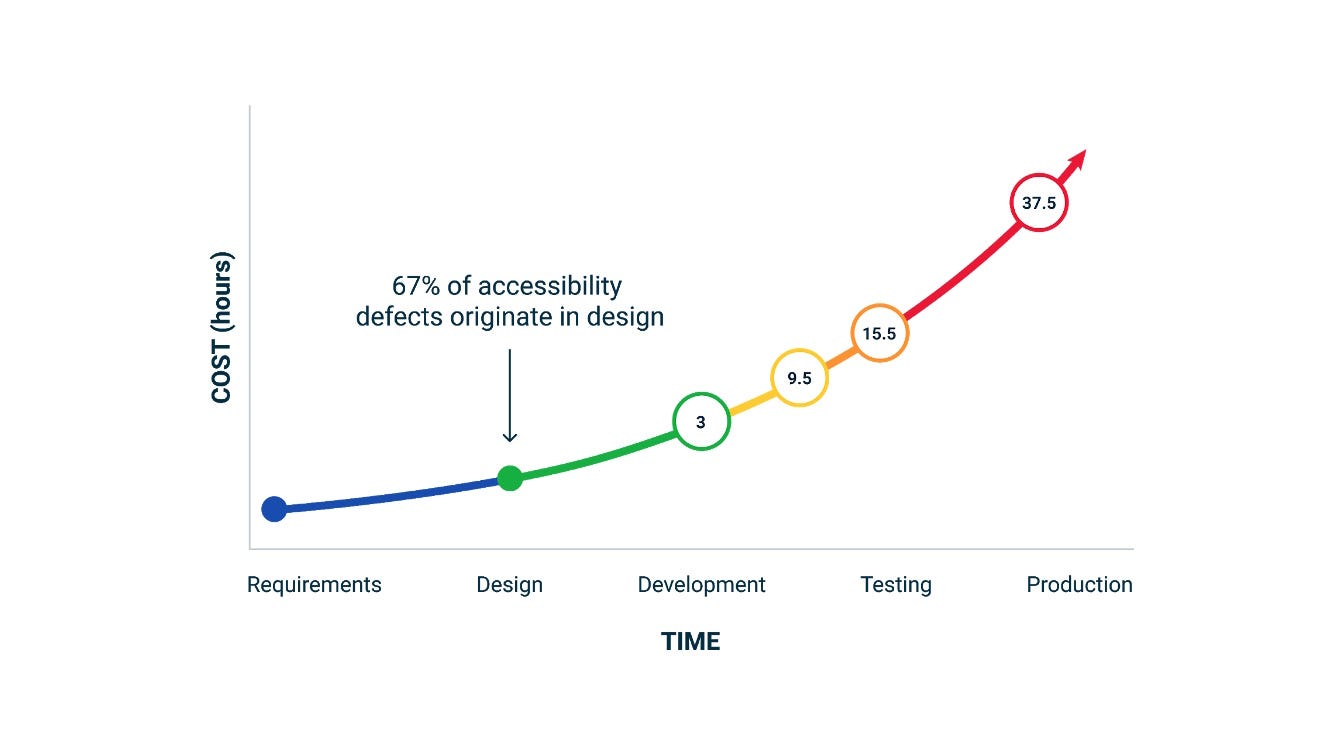
This improvement does not rely solely on accessibility specialists. It is the result of including everyone involved in the development process. Product owners, UX designers, developers, testers, and stakeholders each have a role to play. When accessibility is considered during planning, design, development, and testing, it becomes a natural part of the workflow rather than an extra task.
Importantly, the benefits of accessibility extend far beyond those with permanent disabilities. Most people will experience some form of limitation at some point in their lives. These include temporary conditions such as recovering from surgery or managing fatigue, as well as situational constraints like working in bright sunlight, being interrupted by a child, or using a laptop with a broken trackpad. Even those without any disability benefit from clearer layouts, better contrast, consistent navigation, and simplified language.

Making products accessible creates better experiences for everyone. It increases reach, improves performance, and reduces long-term cost. But just as importantly, it gives teams a sense of purpose. Knowing that the work you do makes life easier for others (and ensures no one is needlessly excluded) fosters pride, motivation, and a stronger culture of care.
Accessibility beyond the tools
Accessibility in digital products is not about checklists, compliance boxes, or retrofitted tools. It is a fundamental principle of good design. When we remove barriers, we make space for more people to participate fully, regardless of age, ability, circumstance, or technology.
Throughout this article, we have explored what accessibility means in practice. It goes beyond permanent disabilities to include temporary injuries, situational challenges, and even the constraints of ageing or limited bandwidth. It is not about designing for a small group, but about recognising the full range of human experience.
We have also seen why accessibility becomes difficult when it is left too late. Assumptions such as “people with disabilities do not use our product” or “this is only for internal use” do not reflect reality. People who are excluded do not leave feedback. They leave entirely. And internal users remain individuals with diverse needs. Focusing solely on a narrow definition of the average user results in missed opportunities and weaker products.
The growing use of accessibility overlays has offered the illusion of progress, but not real improvement. These tools place the burden on the user to fix what the creators failed to consider. They offer limited value and work best only when the underlying site is already accessible. They do not replace the need for thoughtful, standards-based development.
Real change requires a shift in how we think and work. Legislation such as the European Accessibility Act makes accessibility a legal obligation across industries. But compliance should not be the only driver. Accessibility is also more efficient when built in early. Studies show that addressing issues during design is vastly more cost-effective than fixing them in production. Educating everyone involved reduces overhead and creates better outcomes.
And perhaps most importantly, accessibility benefits us all. Whether it is navigating an interface with one hand while holding a child, using a screen in bright sunlight, or managing a temporary injury, most people will encounter moments where inclusive design makes a meaningful difference.
Choosing to prioritise accessibility is not just about reaching more users or reducing risk. It is about doing the right thing. It strengthens our products, our teams, and the experiences we create. By embedding accessibility into our thinking, our processes, and our culture, we do more than meet expectations. We build a digital world that welcomes everyone.
What Will You Do Differently Next Week?
Awareness alone does not lead to change. What truly matters is how we act on what we know. Accessibility is not a separate discipline, reserved for specialists or delayed until the end of a project. It is a shared responsibility that starts with the choices we make every day, in meetings, in design tools, in code, and in conversation.
So, how do we begin? Start small, start practical, but most importantly, start now.
Could you ask a non-developer colleague to test your component and describe their experience? You might be surprised at what they struggle with, and even more surprised at how easy it is to fix.
Could you zoom your interface to 200 percent and try to use it as if you were showing it to a parent or grandparent? If the design breaks or the text becomes unreadable, that is a clear sign of an opportunity to improve.
Could you challenge yourself to go mouse-free for a day and rely entirely on your keyboard? This exercise reveals navigation flaws that are invisible to those who never leave the mouse.

These small shifts in habit bring accessibility out of theory and into practice. They help uncover barriers early, when they are easiest to address. They also build empathy, not as a vague ideal, but as a concrete part of the design and development process.
Most importantly, these actions make accessibility part of your culture. Not just a requirement, but a value. Not just something we do for others, but something we do as professionals committed to quality, inclusion, and human-centred design.
So, ask yourself: what will you do differently next week? And how can you make it easier for more people to participate, to contribute, and to succeed?
The answer does not lie in waiting for perfect conditions or complete knowledge. It begins with one decision, one habit, one conversation. And it continues from there.
메타데이터
- post_id
- baa7bbcf9abd
- slug
- accessibility-beyond-the-tools-baa7bbcf9abd
- url
- https://medium.com/team-rockstars-it/accessibility-beyond-the-tools-baa7bbcf9abd
- canonical_url
- https://medium.com/team-rockstars-it/accessibility-beyond-the-tools-baa7bbcf9abd
- author_url
- https://medium.com/@lucien.immink
- status
- ok
- fetched_at
- 2026-06-14 11:28:49