How to estimate your model’s Inference mode memory requirements
Deploying an LLM model in the inference mode is easy, at least that’s what vLLM says and try to achieve. But the real challenge is not the…
How to estimate your model’s Inference mode memory requirements
Photo by Igor Omilaev on Unsplash
Deploying an LLM model in the inference mode is easy, at least that’s what **vLLM** says and try to achieve. But the real challenge is not the one-click deployment, rather its the estimation of the model, the traffic and the target use case. So after running into a lot of OOM (out-of-memory) issues myself while deploying LLMs, I finally decided to take a deep dive in to the VRAM requirements, to ensure that your models fit on your hardware.
The Holy Grail of VRAM estimation
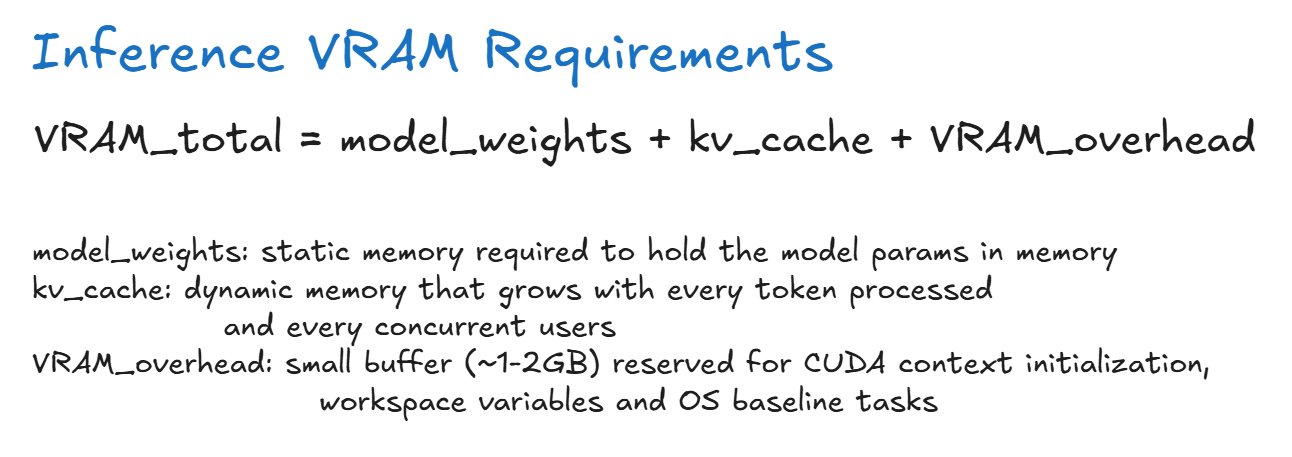
Inference VRAM Requirement Estimation Formula
During the inference, the overall VRAM requirements depend on these 3 things: Model Weights, KV Cache and the CUDA operational overheads.
Model Weights is largely static, and represents the actual model memory requirements. During inference, these weights must already be loaded onto the VRAM, in order to perform the self-attention calculation.

Model Weight Estimation
Note that the model weight is static, but an estimate. The actual size of the model can be found on the HuggingFace’s model listing page. Hence, even though the estimated weight for Llama-8B model is approximately 16GB, its an optimistic estimate, and actual size may be slightly higher than 16GB, hence always consider a buffer.
Next part is the KV cache. KV cache, as the name suggests is the cache the model can use for faster calculations. Since the model operates auto-regressively, the KV cache helps us store intermediate results. Except the catch is, KV cache can really bloat your memory requirements.

KV Cache Memory Estimation
You can clearly see how the KV Cache for the full context can be roughly the same size as the model weights itself. And this is estimation for just one in-flight request. In reality, you may have thousands of users, so you can clearly visualize the scale of the KV Cache.
Finally, plugging all the numbers into the overall memory estimation.

Total VRAM Memory Estimation
We learn that for serving a single user with 128K context window, the system needs 34GB of VRAM. For realistic purposes, it may be slightly higher than 34GB…
But then what is the problem? 34GB is a piece of cake. right? RIGHT?
Nope, the problem is, there are not many Hardware options, especially cheap ones that allow you to have so much VRAM.

GPU Pricing Table
So what can we do about the high prices? You pay by the hour, not based on the number of requests served. These two are opposite goals, hence we must optimize our serving strategy.
The Holy Grail of Cost Optimization
From the above calculations, it is clear that we will have to pay a lot for our GPUs when serving for inference. We cannot cut down on the CUDA operational VRAM costs, but we can cut down on the Model Weights and the KV Cache size.
1. Optimizing the Model Weights
This will directly impact our fixed costs. Instead of serving our models in FP32/FP16 precision, we can quantize our model down to INT4.

Model Weight Optimization
Watchout for framework and hardware specific limitations for the Quantization process. VLLM uses Marlin or AWQ kernels to unpack the 4Bit weights back to 16-bit on the fly. The model weights remain in 4Bit form, where as the Activations during the forward pass remains in 16Bit form.
- When the weights are 4Bit, the time required to fetch the weights from the slow serving global VRAM (HBM — High Bandwidth Memory, GDDR) to the local cache is cut down, hence speed up is observed.
- When the batch size increases, the on-the-fly dequantization overhead catches up to us, at this point unpacking becomes a drag, thus making quantized models slightly slower than a full native model.
If the underlying hardware can support 4-bit quantization using dedicated 4-bit tensor cores eg: A100, and both the model weights and activations are 4-bit quantized, then on-the-fly dequantization is not needed. But if the operation is mixed-precision where Weights are 4-bit quantized, where as Activations are full precision FP16/FP32, then the 4-bit tensor cores will not be able to perform the operations.
2. Optimizing the KV Cache
During text generation KV Cache grows dynamically with context length and user count. We can change the storage format from 16-bit to FP8 which is widely supported in (A100 & H100 GPUs) or even NVFP4 (natively accelerated on Blackwell architecture)

KV Cache Optimization
So lets look at some numbers.

Some estimates after Model and KV Cache Quantization for 24GB VRAM
but we have some more tricks up our sleeves!
3. Capping the Context
This is the simplest trick you can pull off. The KV cache grows linearly with sequence length. Hence, if we reduce the sequence length, the KV Cache size will also drop. This is trick can be used when the use-case does not require a 128K context window.

Context Capping and Concurrency Trend
Notice how context capping yeilds perfectly linear inverse scaling for concurrency. For production the best approach is to set the
— max-model-lento 95th percentile of your actual request length. Never leave it at maximum default 128K unless your users are routinely uploading full text books, otherwise VLLM will reserve vast pools of virtual memory pages that sit completely empty, starving your system of throughput.
4. Automatic Prefix Caching (APC)
If you are running multi-turn agent chats or multi-document RAG pipelines, or using heavy system prompts, different users consistently send the exact same context blocks over and over again.
Normally vLLM would recalculate the KV Cache for that identical 5000 token system prompt every time a new user makes a query. By turning on prefix caching, vLLM hashes your input blocks. If a new request shares the same starting tokens a.k.a prefix, vLLM completely skips the compute-heavy prefill phase and instantly mounts the existing KV cache from memory. Use --enable-prefix-caching in vLLM.
5. Chunked Prefill & Iteration Balancing
By default vLLM prioritizes new incoming requests. If a user drops a massive 30,000 Tokens document into the queue, the engine stops generating text for all other active users to process the new prompt. This resource hogging can create massive variance in the latency metrics.
Chunked prefill slices the giant incoming prompt into smaller uniform chunks eg: 2048 tokens each, which can be interleved with the execution batch, thus providing fair share usage to all users and reduced variance in the user latencies.
Enable --enable-chunked-prefill --max-num-batched-tokens 2048 for this behavior.
Conclusion
In this article we studied how to estimate the VRAM requirements of your model in the inference mode, and a few tricks to optimize the model serving and the user experience.
메타데이터
- post_id
- baedd7f1e9a2
- slug
- how-to-estimate-your-models-inference-mode-memory-requirements-baedd7f1e9a2
- url
- https://medium.com/@aditya-dawadikar/how-to-estimate-your-models-inference-mode-memory-requirements-baedd7f1e9a2
- canonical_url
- https://medium.com/@aditya-dawadikar/how-to-estimate-your-models-inference-mode-memory-requirements-baedd7f1e9a2
- author_url
- https://medium.com/@aditya-dawadikar
- status
- ok
- fetched_at
- 2026-07-17 22:40:55






