Kafka is Just a Log. Once That Clicked, Everything Else Made Sense
The first time someone explained Kafka to me, they said “it’s a distributed messaging system with high throughput and fault tolerance.” I…
Kafka is Just a Log. Once That Clicked, Everything Else Made Sense
The first time someone explained Kafka to me, they said “it’s a distributed messaging system with high throughput and fault tolerance.” I just nodded, as if i have just discovered the unifying theory of the universe. I understood every individual word but i had absolutely no idea what they meant.
The second explanation involved a diagram with boxes, arrows, producers, consumers, brokers, topics, partitions, offsets, consumer groups, and a ZooKeeper that apparently nobody likes but everyone uses. I nodded again and yet understood even less.
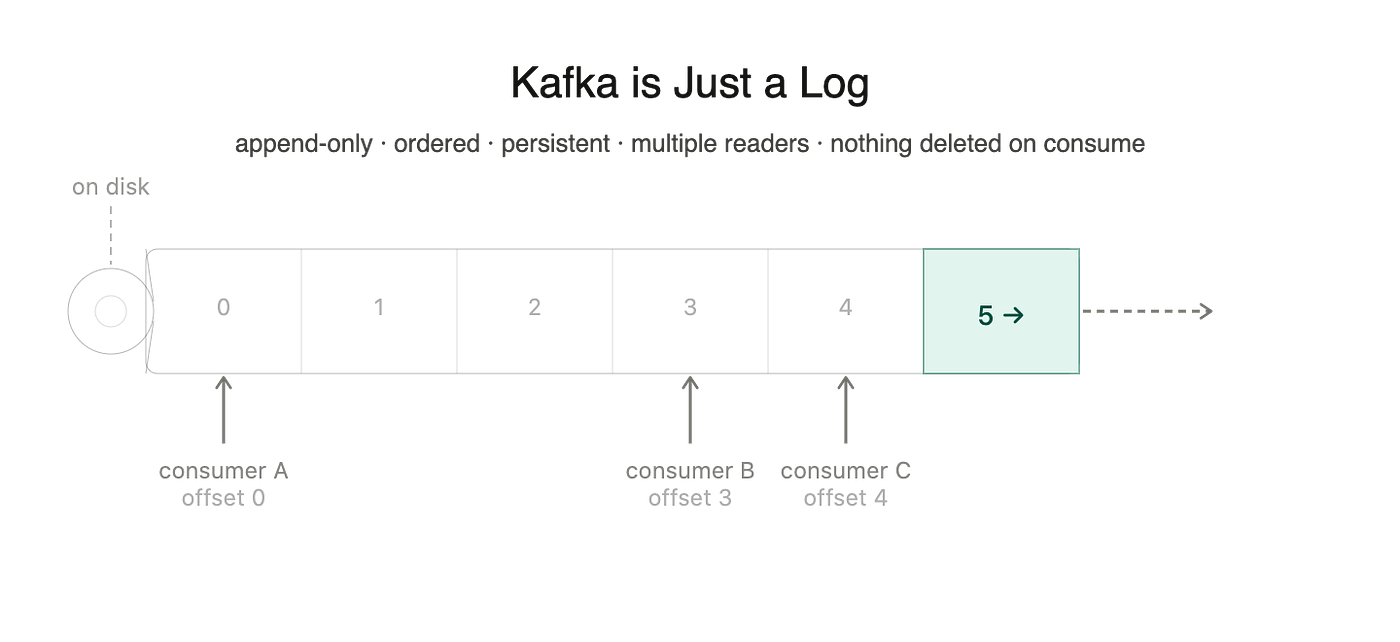
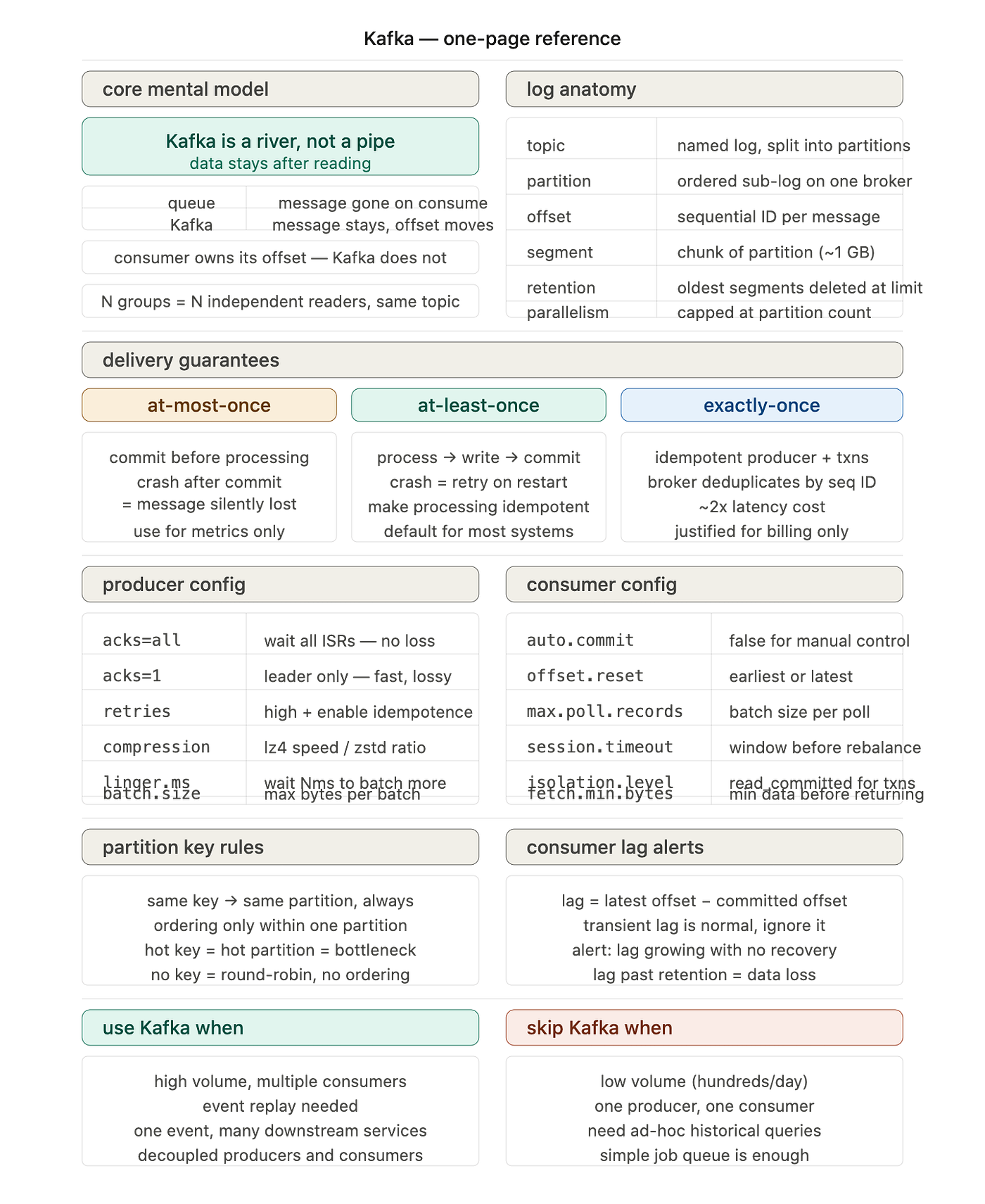
Here is the explanation i probably needed to hear at the start: Kafka is a log. An append-only, ordered, persistent log stored on disk. That is the whole thing. Everything else is just details about how that log is distributed and who gets to read it.
A log, not a queue
This is the part that trips people coming from RabbitMQ or any traditional message queue. In RabbitMQ, a message gets consumed and disappears. The broker hands it to a consumer, the consumer acknowledges it, gone. The queue is the temporary holding area between producer and consumer, and its job is to eventually empty itself.
Kafka does not work like that. When a message lands in Kafka, it stays there. The consumer reads it but does not delete it. Another consumer can read the same message. A third consumer that did not exist when the message was written can show up six hours later and read it from the beginning, and Kafka will serve it without complaint because the log is still there.
This sounds like a small distinction but it is not. It means Kafka is not a pipe between two services, it is a permanent record of events that happened, and any service can read that record whenever it wants.
The reason this does not cause every disk in the world to fill up is retention policy. You configure each topic with a retention period (keep messages for 7 days) or a retention size (keep the last 100GB). When messages age out, Kafka deletes the oldest log segments. The consumer’s one job is to stay close enough to the head of the log that it never falls behind the retention window. If it does, Kafka has deleted the messages it hasn’t read yet, and you have a data loss incident on your hands and a very bad afternoon ahead of you.
How Kafka actually stores data
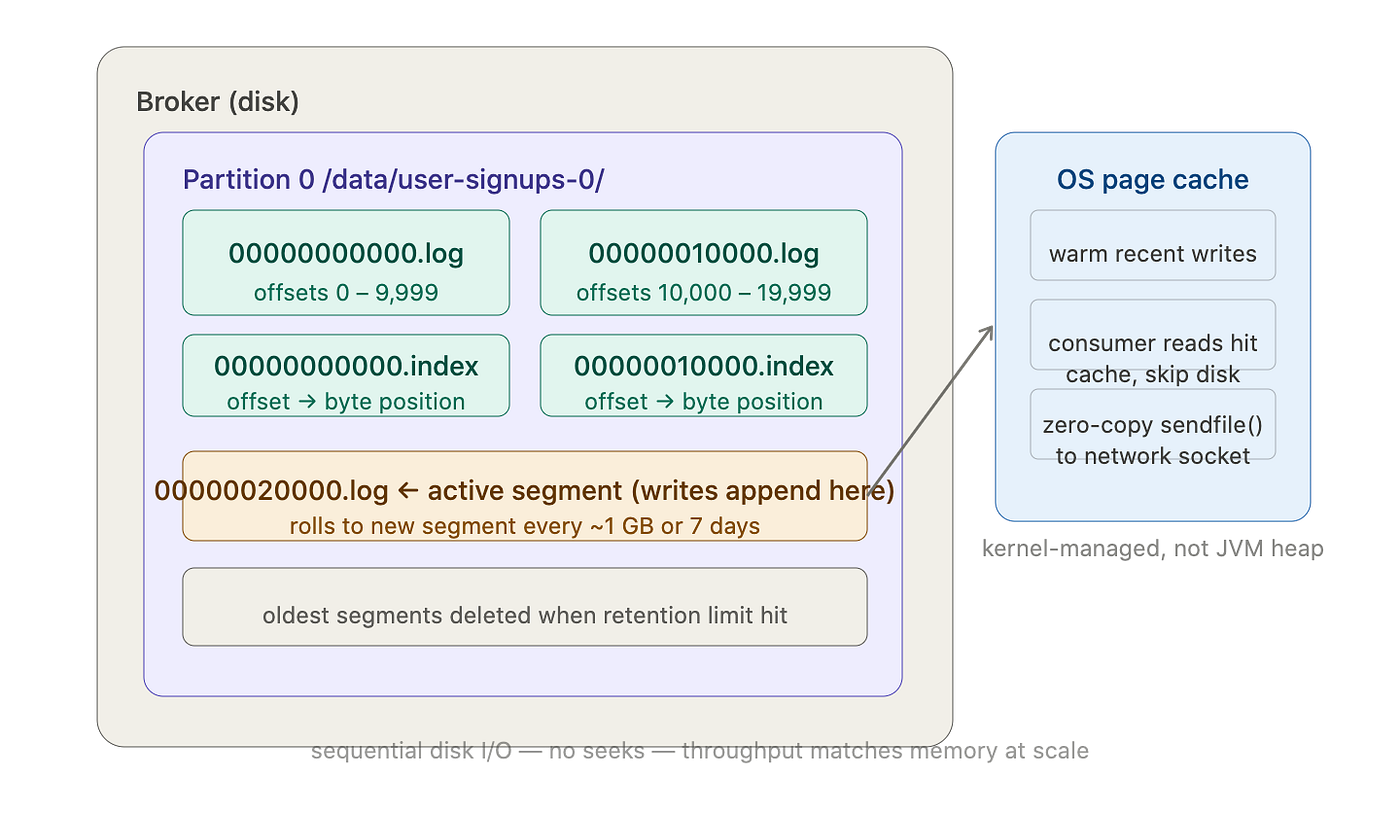
Under the hood, each partition is a directory on disk containing a sequence of segment files. A segment is a chunk of the log; Kafka rolls to a new segment file every gigabyte or so. Each segment has an accompanying index file that maps offsets to byte positions, so Kafka can jump to any offset without scanning the whole file.
Kafka writes to disk sequentially and relies heavily on the OS page cache. Sequential disk writes are fast, often comparable to memory writes, because the disk head never needs to seek. Random writes, which is what most databases do, are slow. Kafka’s design deliberately avoids them. When a consumer reads, it is usually reading from the page cache rather than actual disk, because recently written data is still warm in memory. This is why Kafka throughput stays high even at large volumes: it is doing fast sequential I/O and letting the kernel handle caching. The JVM heap barely enters the picture, which is a pleasant change from most Java software.
Replication works by assigning each partition a leader broker and a configurable number of follower brokers. Producers write to the leader. Followers pull from the leader and replicate. If the leader dies, one of the in-sync replicas gets elected as the new leader. A message is only considered committed when all in-sync replicas have acknowledged it, controlled by the acks setting on the producer. acks=all means the producer waits for full ISR confirmation before moving on. acks=1 means only the leader needs to confirm, which is faster but means you can lose messages if the leader dies before followers catch up. Choose accordingly, and then choose again after your first production outage.
Topics, partitions, and the ordering problem
A topic is a named log. You write events to a topic called user-signups and they accumulate there in order. As Simple is that really.
Kafka splits each topic into partitions, and this is where people start glazing over. A partition is a piece of the log. With three partitions, Kafka distributes incoming messages across them, and different consumers can read different partitions simultaneously. More partitions means more parallelism, which is why partition count is one of the first decisions you make when designing a topic and one of the hardest to change later, because repartitioning a live topic is painful in ways that make engineers visibly age.
Ordering is guaranteed within a partition, not across the whole topic. If you write messages A, B, C to a three-partition topic, A might land in partition 0, B in partition 2, C in partition 1. A consumer reading all three partitions will not necessarily see them in the order they were written.
When ordering matters, and in payments it absolutely does, you use a partition key. Kafka hashes the key and routes all messages with the same key to the same partition, so all events for a given account ID always land in order within that partition. The tradeoff is partition skew: if one account generates vastly more events than others, that partition fills up while the rest sit idle, and the consumer assigned to it becomes the bottleneck for the entire system. Distributed systems find a way to make you pay for everything eventually.
Producers, consumers, and the mechanics of delivery guarantees
A producer writes to a topic. A consumer reads from it. The interesting part is the offset: every message in a partition has a sequential number starting from zero, and the consumer tracks which offset it has read up to.
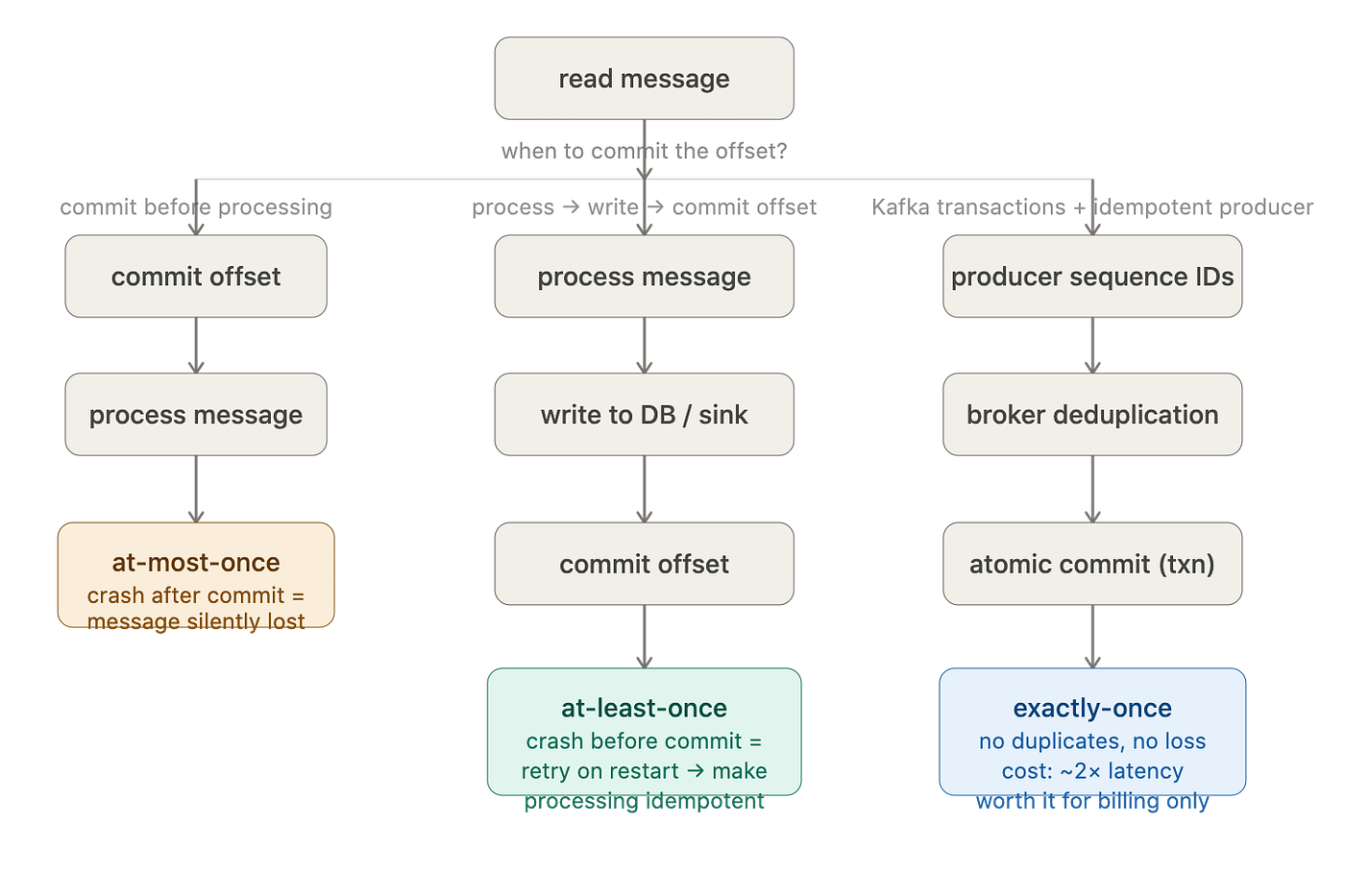
Kafka does not track this for consumers by default. The consumer commits its own offset, either automatically on a schedule or manually after processing. Manual offset commits exist for a concrete reason. If your consumer reads a message, processes it, and crashes before committing the offset, Kafka does not know the message was processed. On restart, the consumer reads from the last committed offset and processes it again. With manual commits, you read the message, write the result to your database, and only then commit the offset, so if the database write fails, the offset never advances and you retry cleanly. This is at-least-once delivery.
At-least-once means the same message might be processed twice. Exactly-once is possible in Kafka through producer idempotency and transactional APIs. The producer idempotency feature assigns each message a sequence number and deduplicates retries at the broker level, so network errors that cause a producer to retry do not result in duplicate messages. Kafka transactions extend this to span multiple partitions and even multiple topics, letting you atomically write to two different topics as a single transaction. The tradeoff is roughly double the latency. Most systems choose at-least-once delivery and make their processing idempotent instead, because idempotent operations are simpler to reason about than distributed transactions, and simpler is almost always the right choice until it isn’t.
Consumer groups and the ceiling on parallelism
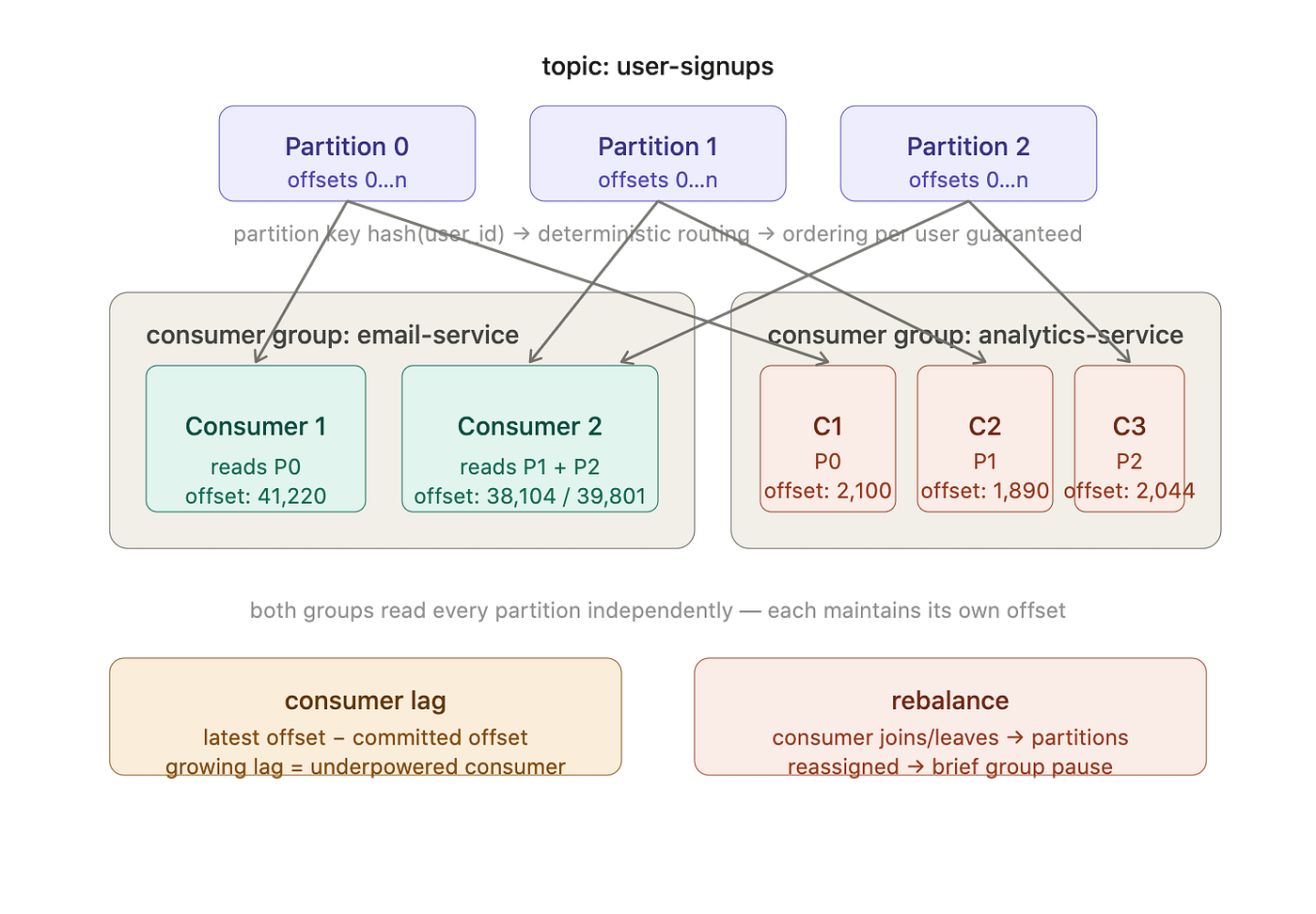
A single consumer reading a topic works fine at low volume. For real throughput, you use a consumer group: multiple consumers sharing the work, each assigned to different partitions. Each partition is assigned to exactly one consumer in the group at a time. Three partitions, three consumers: each gets one partition, full parallelism. Three partitions, five consumers: two consumers sit idle because there are not enough partitions to go around. The ceiling on parallelism is partition count, which is why that initial design decision matters and why increasing partitions on an existing live topic requires rebalancing all the consumers, which everyone discovers at the worst possible time.
When a consumer joins or leaves a group, Kafka triggers a rebalance: it reassigns partitions across the current members. During a rebalance, all consumers in the group pause. For a large consumer group on a busy topic, a rebalance can cause a visible latency spike. Kafka’s cooperative incremental rebalancing reduces this by only reassigning the partitions that actually need to move, rather than revoking all assignments and starting from scratch. A small mercy at least.
Different consumer groups are entirely independent. A group called email-service and a group called analytics-service can both read the same topic simultaneously, each maintaining its own offset. The email service being six hours behind does not affect the analytics service in any way. This is what makes Kafka genuinely useful for event-driven architectures: publish an event once, and every downstream service that cares about it reads it independently at its own pace, with no coupling between them.
Where Kafka breaks down
Kafka is not a database. You can retain messages for a long time with the right configuration, but querying Kafka for “give me all events where user ID is 12345” is painful and slow. You would need to scan the entire topic or maintain a separate index. Kafka moves events forward; it is not built for questions that go sideways or backwards through the data.
Small message sizes hurt throughput disproportionately. Kafka batches messages for efficiency, and if each message is a few bytes, the per-message overhead dominates. Very large messages create memory pressure on brokers and slow replication. The sweet spot is the kilobytes range. If you are sending large payloads, compress them at the producer level. Kafka supports lz4, snappy, gzip, and zstd, and compression at the batch level tends to be very effective because similar messages compress well together.
Consumer lag is the main operational hazard. Lag is the difference between the latest offset on a partition and the offset the consumer has committed. If a consumer is processing slowly, whether from a slow downstream database, expensive computation, or external API calls with opinions about rate limits, lag accumulates. If lag grows faster than the consumer can catch up and the retention period is short, you eventually lose messages the consumer never got to read. Monitoring lag per consumer group is non-negotiable in production. The alert is not “lag exists,” because lag always exists transiently. The alert is “lag is growing over time with no sign of recovery.”
Running Kafka at small scale is buying a freight train to commute to work. The operational overhead of managing brokers, tuning retention and replication, monitoring lag, and handling rebalances makes sense when you have high volume, multiple independent consumers, or a genuine need for event replay. For a service processing a few hundred events per day, a database-backed queue will do the job with a fraction of the complexity and none of the 3am alerts.
In short
Think of Kafka as a river, not a pipe which only carries water from A to B and the water is gone. A river flows continuously, you can sample it at any point, multiple people can stand at different places along the bank reading from it simultaneously, and the record of what passed earlier is preserved in the sediment downstream. Your services are standing at that bank, each reading at its own pace, tracking where they left off, and new services can join at any time and start reading from any point the retention policy covers.
With that picture in mind, topics are obvious, partitions are obvious, consumer groups are obvious, and offset commits make complete sense. The replication model, the retention tradeoff, the consumer lag problem: they all follow naturally from the same underlying idea.
A log nothing more but a distributed, replicated, retention-bounded, offset-tracked log. The rest is configuration.
If distributed systems and backend architecture are your thing, I am building this into a structured series. The Rust field guide is already out, 23 chapters from ownership to a full Redis clone.
$7 — Zero to Rust: A Systems Programmer’s Field Guide You can read the free sample here — Free 20-page sample
메타데이터
- post_id
- bb0bd67220fe
- slug
- kafka-is-just-a-log-once-that-clicked-everything-else-made-sense-bb0bd67220fe
- url
- https://medium.com/zero-to-rust-go-from-beginner-to-rust-expert/kafka-is-just-a-log-once-that-clicked-everything-else-made-sense-bb0bd67220fe
- canonical_url
- https://medium.com/zero-to-rust-go-from-beginner-to-rust-expert/kafka-is-just-a-log-once-that-clicked-everything-else-made-sense-bb0bd67220fe
- author_url
- https://medium.com/@zeeshankhan0094
- status
- ok
- fetched_at
- 2026-06-24 23:31:39