The Bridge to Bulletproof: Connecting Alloy, Synthetics, and IRM for ShopFast
Series: The Grand Finale | Connecting Series A & B You’ve built the infrastructure (Series A) and deployed the global watchdogs (Series B)…
The Bridge to Bulletproof: Connecting Alloy, Synthetics, and IRM for ShopFast
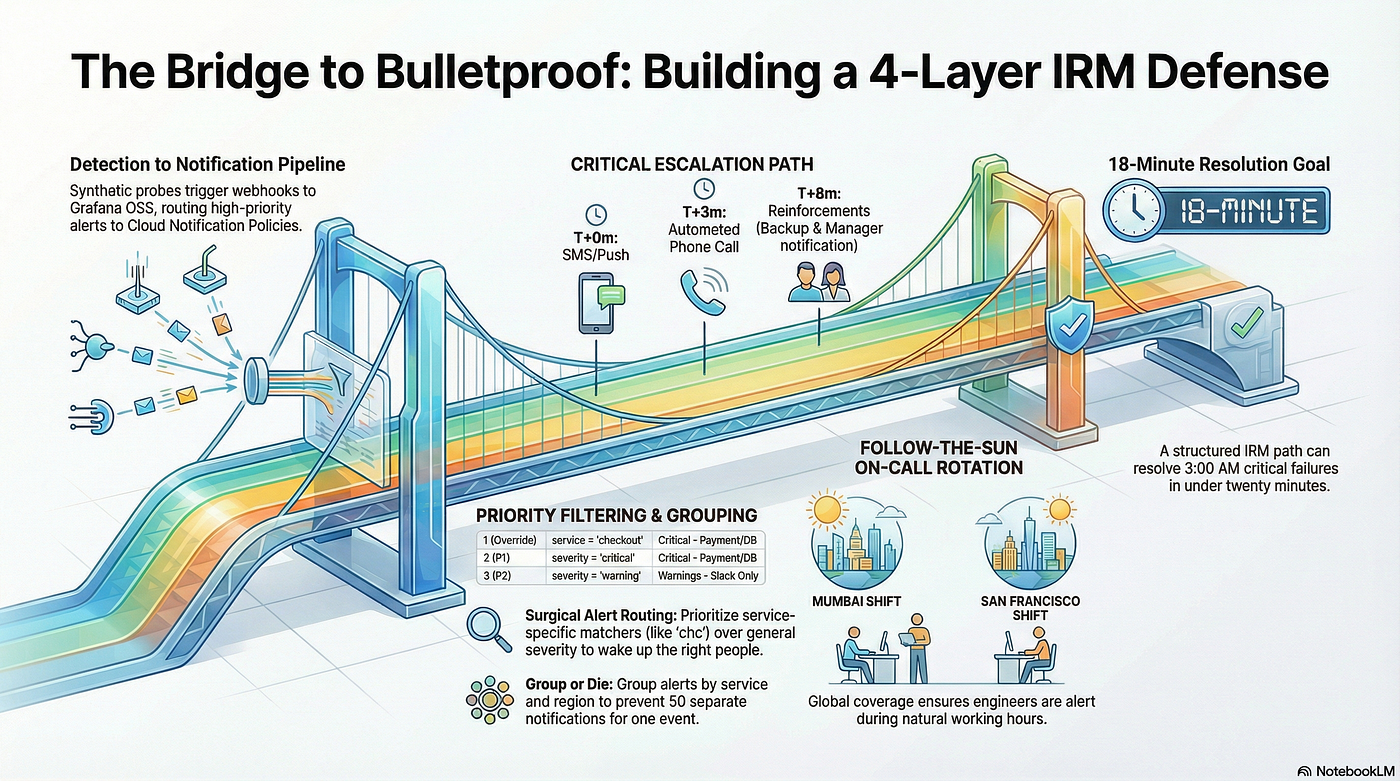
Series: The Grand Finale | Connecting Series A & B You’ve built the infrastructure (Series A) and deployed the global watchdogs (Series B). Now, it’s time for the “Masterclass”: weaving it all into a bulletproof, 24/7 on-call system that protects your revenue without burning out your team.
Enjoy free access via this friend link — no membership required.
The Production Scenario: “ShopFast” E-Commerce
[!NOTE] ShopFast is a fictional (imaginary) e-commerce platform we’ve created for this Masterclass. While the company is imaginary, the monitoring techniques, configurations, and the “3 AM panic” are very much based on real-world production experience.
Imagine you’re the DevOps lead for ShopFast, a multi-region e-commerce platform. Your stack is exactly what we’ve built so far:
- Infrastructure (Series A): VMs running Nginx and critical backends, monitored by Grafana Alloy.
- Global Watchdogs (Series B): Synthetic Monitoring probes in Mumbai, Hydrabad, and Singapore checking your checkout API every 60 seconds.
- The Engine: A local **Grafana OSS** instance handling the logic and routing alerts to the Cloud.
The Stakes
On a typical Tuesday at 3:00 AM, a silent network failure in a regional ISP could cut off 30% of your checkout traffic.
- The Metric:
probe_successdrops to 0. - The Impact: Significant revenue loss for every minute the site is down.
- The Human Cost: If you wake up the wrong person (or everyone), you aren’t just losing money — you’re losing your team’s trust.
In this Masterclass, we will configure the 4-Layer IRM Defense to handle this exact scenario with surgical precision.
The Masterclass Strategy: The 4-Layer Defense
We aren’t just sending emails. We’re building a tiered defense system:


Let’s build this layer by layer.
Phase 1: The Human Foundation (Teams & Contact Points)
Before we can route a single alert, we need to define who is responding and how they want to be reached.

Step 1.1 — Create the Master Team
In Grafana Cloud:
- Navigate to Alerts & IRM → IRM → Teams.
- Click + Create Team.
- Name:
ShopFast Core DevOps. - Add your Mumbai, Singapore, and SF engineers.
Step 1.2 — Configure Contact Points (Hardware)
While IRM has its own logic, it relies on Alerting Contact Points to send messages to Slack or Email.
In Grafana Cloud:
- Navigate to Alerting (Bell Icon) → Contact points.
- Click + Add contact point.
- Name:
Slack - Critical Incidents(Channel:#alerts-critical). - Name:
Slack - Warnings(Channel:#alerts-warning). - Name:
Email - Team(team@shopfast.com).
[!TIP] Important Notifications: SMS and Phone calls are configured per-user. Ensure your team has verified their numbers under User Settings → Phone Verification.
Phase 2: On-Call Schedules — The Follow-the-Sun Time Machine
Now that we have a team, we need to define when they are responsible. A 24/7 shop doesn’t mean engineers work 24/7. We use a Follow-the-Sun rotation to ensure someone is always awake and alert during their natural working hours.

The ShopFast Rotation Scheme

| Shift              | Coverage (Local Time) | Role                                  |
|--------------------|-----------------------|---------------------------------------|
| **Asia Weekday**   | 09:00 - 21:00 IST     | DevOps (Mumbai) + Backend (Singapore) |
| **US Weekday**     | 09:00 - 01:00 PST     | DevOps (SF) + Backend (SF)            |
| **Global Weekend** | 24 Hours (Rotating)   | The Whole Team (Round Robin)          |
Step 2.1 — Create Asia Weekday Schedule
In Grafana Cloud:
- Navigate to Alerts & IRM → IRM → Schedules.
- Click + New Schedule.
- Fill in:
- Name:
Asia Weekday On-Call. - Time Zone:
Asia/Kolkata (IST). - Team: Select
Shopfast Core DevOps.
- Click Create Schedule.
Now add shifts:
- Click + Add Layer
- Configure the layer:
- Name:
Primary Asia Shift - Rotation: Weekly
- Users in rotation: Select your Mumbai DevOps engineer
- Start time: Monday, 9:00 AM
- End time: Monday, 9:00 PM
- Handoff time: Every Monday at 9:00 AM
- Days of week: Monday, Tuesday, Wednesday, Thursday, Friday
- Save
Repeat for the Singapore engineer as a backup layer if needed.
Step 2.2 — Create US Shift Schedule
- Click + New Schedule
- Fill in:
- Name:
US Evening On-Call(covers Asia night hours) - Time Zone:
America/Los_Angeles (PST)
- Add layer:
- Rotation: Weekly
- Users in rotation: Select your SF DevOps engineer
- Start time: Monday, 9:00 AM
- End time: Tuesday, 1:00 AM (extends into next day to cover overlap)
- Days of week: All weekdays
- Save
Step 2.3 — Create Weekend Rotation Schedule
- Click + New Schedule
- Fill in:
- Name:
Weekend On-Call - Time Zone:
UTC(fair for all zones)
- Add layer:
- Rotation: Weekly (switches every weekend)
- Users in rotation: Add all 6 engineers in round-robin
- Start time: Saturday, 12:00 AM
- End time: Monday, 12:00 AM
- Days of week: Saturday, Sunday
- Save
Step 2.4 — View the Combined Schedule
IRM has a calendar view that shows who’s on-call at any given time:
- Go to Schedules tab
- Select Calendar View
- You’ll see all three schedules overlaid
Example coverage for a Tuesday at 3 PM IST:
- Primary: Mumbai DevOps Engineer (Asia Weekday schedule)
- Backup: SF DevOps Engineer (US Evening schedule also active for overlap)
Phase 3: Escalation Chains — The Automatic Pager
This is where the magic happens. Escalation chains define the urgency logic. If the primary engineer doesn’t hit “Acknowledge” within 3 minutes, the system shouldn’t just sit there — it should escalate.

ShopFast’s Critical Path Logic
- T+0m: SMS and Mobile Push (The “Nudge”).
- T+3m: Automated Phone Call (The “Wakeup”).
- T+10m: Notify Backup Engineer + DevOps Manager (The “Reinforcements”).
Step 1: Immediate notification
- Click + Add Step.
- Select Notify Users from Schedule.
- Fill in:
- Schedule:
Asia Weekday On-Call. - Notification importance: Important (this triggers high-priority channels like SMS and Phone).
-
Save.
-
Click + Add Step again.
-
Select Notify Users from Schedule.
-
Fill in:
- Schedule:
US Evening On-Call. - Notification importance: Important.
- Save.
This sends to both schedules simultaneously (good for handoff overlap periods).
Step 2: Wait before phone escalation
- Click + Add Step.
- Select Wait.
- Set duration: 3 minutes.
- Save.
Step 3: Phone call escalation
- Click + Add Step.
- Select Trigger Phone Call.
- Select the schedules again:
Asia Weekday On-Call,US Evening On-Call. - Save.
Step 4: Wait before backup escalation
- Click + Add Step → Wait → 5 minutes.
Step 5: Notify backup + manager
- Click + Add Step → Notify Specific Users.
- Add your manager’s email and the backup engineer.
- Save the escalation chain.
Step 3.2 — Create Warning Escalation Chain
- Click + New Escalation Chain
- Name:
Warnings - Slack Only - Add steps:
- Step 1: Notify Slack channel (no personal notification)
- Step 2: Wait 30 minutes
- Step 3: Notify backup engineer (only if still firing after 30m)
Phase 4: The Integration Bridge & Routing
Finally, we connect the “hardware” (Contact Points) and the “brain” (Escalation Chains) to the actual data flow.

Step 4.1 — The Front Door (Integration)
In Grafana Cloud:
- Navigate to Alerts & IRM → IRM → Integrations.
- Click + Add Integration → Grafana Alerting.
- Name:
ShopFast OSS Bridge. - Copy the Webhook URL: Paste this into your local Grafana OSS as the contact point.
Step 4.2 — The ShopFast Routing Tree
Instead of one big bucket, we want to route alerts with surgical precision.
In the “Routes” tab of your ShopFast OSS Bridge:
| Priority         | Matcher                 | Escalation Chain                  | Logic                                                                  |
|------------------|-------------------------|-----------------------------------|------------------------------------------------------------------------|
| **1 (Override)** | `service` = `checkout`  | **Critical - Payment & Database** | Even if it's a "Warning," if checkout is broken, we wake up the world. |
| **2 (P1)**       | `severity` = `critical` | **Critical - Payment & Database** | Standard critical infrastructure or VM failures.                       |
| **3 (P2)**       | `severity` = `warning`  | **Warnings - Slack Only**         | High CPU, low disk, or minor latency.                                  |
| **4 (P3)**       | `severity` = `info`     | **Passive Email Digest**          | Deployment logs and heartbeat checks.                                  |
[!IMPORTANT] Priority Matters: IRM evaluates routes from top to bottom. The first match wins. Always place your “Overriding” rules (like
checkout) at the top.
Step 4.3 — Policy Tuning (Grouping & Silence)
How many times should your phone ring?
- Grouping: In the route settings, set Group by to
service, region. This ensures that if 5 Mumbai servers fail at once, you get one incident alert, not five calls. - Group Wait: Set to
30s. This allows the bridge to gather multiple related alerts into a single notification. - Repeat Interval: Set to
12h. If the site is still down after a shift, the new shift will be re-notified.
Phase 5: The 3:00 AM Drill — An End-to-End Incident
Let’s see the entire series in action.
Tuesday, 3:47 AM IST
- Detection (Series B): A Synthetic Monitoring probe in Mumbai fails to hit the
checkoutendpoint. Theprobe_successmetric drops to 0. - Firing (OSS): Your local Grafana OSS evaluates the alert rule. It sees the failure and fires an alert with
severity=criticalandservice=checkout. - Routing (Series B / Bridge): The alert hits Grafana Cloud IRM via the
ShopFast OSS Bridgeintegration we configured. - Notification (Phase 1 & 4):
- T+0s: Slack #alerts-critical lights up. An SMS hits the Mumbai DevOps engineer’s phone (via their personal notification preferences).
- T+3m: No acknowledgment. IRM triggers an Automated Phone Call as per the
Critical - Payment & Databaseescalation chain.
5. Human Response: The engineer wakes up, acknowledges the alert on their mobile app, and checks the Alloy Dashboards (Series A).
- Resolution: The engineer identifies an ISP-level routing issue, updates the IRM incident notes, and once the ISP recovers, the alert auto-resolves.
Total Downtime: 18 minutes. Total Revenue Saved: Critical checkout transactions saved.
Phase 6: Production Best Practices
To keep this system healthy, follow these “DevOps Gold Rules”:
- The Monthly Drill: Once a month, trigger a test P1 alert. If the phone doesn’t ring, the system is broken.
- Mute the Noise: Use Mute Timings for P2/Warning alerts during nights. Your team’s sleep is a finite resource — don’t waste it on “Disk at 80%.”
- Group or Die: Always group alerts by
serviceandregion. Ten pods failing should be one alert, not ten. - MTTA as a North Star: Track your Mean Time to Acknowledge. It’s the best indicator of whether your escalation chains are actually working.
References
- Grafana IRM Docs: Contact Points
- Grafana IRM Docs: Notification Policies
- Grafana IRM Docs: On-Call Schedules
- Grafana IRM Docs: Escalation Chains

👋 If you find this helpful, please click the clap 👏 button below a few times to show your support for the author 👇
🚀Join FAUN.dev() & get similar stories in your inbox each week for free!
메타데이터
- post_id
- bb0d98a42420
- slug
- the-bridge-to-bulletproof-connecting-alloy-synthetics-and-irm-for-shopfast-bb0d98a42420
- url
- https://faun.pub/the-bridge-to-bulletproof-connecting-alloy-synthetics-and-irm-for-shopfast-bb0d98a42420
- canonical_url
- https://faun.pub/the-bridge-to-bulletproof-connecting-alloy-synthetics-and-irm-for-shopfast-bb0d98a42420
- author_url
- https://medium.com/@pranav-dhopey
- status
- ok
- fetched_at
- 2026-06-24 11:06:28