File System caching in Db2 LUW
File system caching in Db2 LUW is one of those knobs everyone has heard about, but few have actually benchmarked properly. Let’s walk…
File System caching in Db2 LUW
File system caching in Db2 LUW is one of those knobs everyone has heard about, but few have actually benchmarked properly. Let’s walk through what it really does, when to turn it off, and when leaving it on is actually the better choice.
What “file system caching” really is
At the OS level, every read or write to a file usually goes through the operating system’s page cache. The kernel reads from disk into RAM, keeps those pages around, and hopes someone will read them again soon. Db2 has its own bufferpools doing almost exactly the same thing. Thanks to the file system caching data reads are faster (because access to memory is much quicker than access to disk).
So the Db2 data files can be cached:
- in Db2 bufferpools;
- in the OS page cache (like any other data on the server).
This brings a risk of “double caching”. The same data page might live in RAM twice and be touched by the CPU twice, for no functional benefit.
Where Db2 bypasses caching
Fortunately, on many platforms Db2 will deliberately invalidate or bypass the file system cache for most data pages and keep caching only for specific cases like:
- temporary table space files;
- LOB / long field data in certain SMS tablespaces.
The idea is: for regular table data, Db2 wants control. It would rather use bufferpools, page cleaners, and its own replacement algorithms than depend on the OS to guess what the workload looks like.
That’s why you see options like:
- direct I/O (DIO) or concurrent I/O (CIO) on some Unix/Linux file systems;
- Db2 clauses like
NO FILE SYSTEM CACHINGon table spaces; - registry variables for specific operations (e.g.
DB2_DIRECT_IOorDB2_BACKUP_USE_DIO) .
All of these are just different ways of saying: “Dear OS, don’t waste memory caching these bytes; Db2 knows better.”
(NO) FILE SYSTEM CACHING
The easiest way to disable file system caching on the OS level is to alter the DDL of specific tablespaces with the following simple SQL:
ALTER TABLESPACE KACPERS_TBSP
  NO FILE SYSTEM CACHING;
What this means in practice:
- Db2 will use non‑buffered I/O for containers in this table space;
- the OS page cache is bypassed for these containers (exact mechanism is platform‑dependent: DIO, CIO, flags on
open()andread()/write()calls); - all caching responsibility shifts to Db2 bufferpools.
This is great when:
- you have large bufferpools sized to hold your hot data;
- you want to avoid wasting RAM on double caching;
- you’re tight on memory and prefer to give it to Db2 instead of the OS.
This is risky when:
- bufferpools are small or poorly tuned;
- the OS cache previously “saved you” from a too‑small bufferpool;
- you have a weird workload where the OS cache patterns are better than Db2’s (rare, but it happens).
A good mental model: NO FILE SYSTEM CACHING converts that table space into a “Db2-only cache” object. If Db2 can’t keep the hot pages in memory, you will feel it directly as physical I/O.
Enabling FILE SYSTEM CACHING is as easy as turning it off:
ALTER TABLESPACE KACPERS_TBSP
  FILE SYSTEM CACHING;
When file system caching actually helps
It’s easy to say “turn off FS caching everywhere,” but reality is more subtle.
Situations where enabling file system caching can be beneficial:
- small bufferpools, lots of RAM free on the OS — if you have tens of GB free RAM and only a couple of GB bufferpools, the OS page cache can act as a crude “second-level bufferpool”;
- mixed workloads where the OS sees patterns Db2 doesn’t — sequential scans, repeated reads of backup images, or non‑Db2 processes accessing the same files can sometimes benefit from the OS cache;
- environments where you cannot safely grow Db2 memory — maybe the same host runs application servers, other databases, or services you don’t fully control. In that case you can let the OS do the balancing and keep caching enabled.
In practice, you often see:
- FS caching ON + decently sized bufferpools → good enough, easy to operate;
- FS caching OFF + carefully tuned bufferpools → best performance when done right;
- FS caching OFF + small bufferpools → disaster.
So the key is measurements.
Backups, loads, and bypassing cache
One very concrete place where file system caching is wasteful is backup and load images.
Imagine:
- you take a large online backup to a file;
- the OS happily caches gigabytes of backup data in RAM;
- nobody is going to read that backup image again in the next hours.
You just blew a chunk of memory on bytes that won’t be touched again soon, and potentially evicted useful data from OS cache or Db2 bufferpools.
Db2 addresses this with a registry variable such as:
db2set DB2_BACKUP_USE_DIO=ONWhen enabled:
- backup and load copy images are written using direct I/O;
- the OS does not fill the page cache with them;
- memory is preserved for actual database workload.
If your system is tight on RAM or you do frequent large backups, this setting is often an easy, low‑risk win.
Practical tuning approach
A pragmatic way to handle file system caching in Db2 LUW:
1. Baseline first
Measure your current workload: bufferpool hit ratios, physical reads/writes, CPU usage, and OS page cache usage.
2. Identify critical tablespaces
Separate out:
- high‑traffic OLTP tablespaces;
- large, mostly sequential scan tablespaces (data warehouses);
- temporary and LOB‑heavy tablespaces.
3. Apply NO FILE SYSTEM CACHING gradually
Start with one or two tablespaces that:
- have clear, predictable access patterns;
- are backed by fast storage;
- have bufferpools you can grow.
4. Resize bufferpools to match
If you steal cache from the OS, give it to Db2. Growing bufferpools without adjusting DB_MEM_THRESHOLDS or other heaps can cause swapping, which is worse than any double caching.
5. Benchmark, don’t guess
Run repeatable tests:
- same queries, same data volume;
- measure elapsed time, I/O, CPU, and memory;
- compare FS caching ON vs OFF, and different bufferpool sizes.
6. Treat backups separately
For backup and load images, consider bypassing OS cache by using the relevant registry variable or options. That decision is mostly independent from tablespace FS caching.
Typical configurations that work well
Here are some patterns I’ve seen succeed repeatedly:
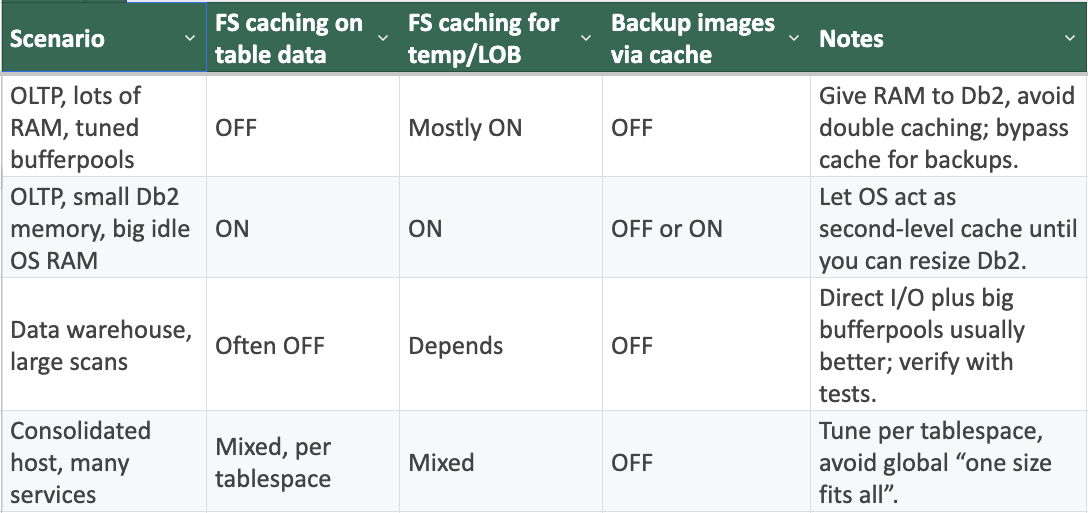
How to configure file system caching
(If you need an editable version of the table, here is the LINK)
Closing thoughts
File system caching in Db2 LUW is not a moral question; it is a resource‑allocation question. You’re deciding whether your scarce RAM should be owned by Db2 or by the OS. The only wrong configuration is the one you never measured.
메타데이터
- post_id
- bb0f0c61709d
- slug
- file-system-caching-in-db2-luw-bb0f0c61709d
- url
- https://medium.com/@kubicakacper/file-system-caching-in-db2-luw-bb0f0c61709d
- canonical_url
- https://medium.com/@kubicakacper/file-system-caching-in-db2-luw-bb0f0c61709d
- author_url
- https://medium.com/@kubicakacper
- status
- ok
- fetched_at
- 2026-06-23 03:48:11