Building Scalable Data Pipelines: Processing, Transformation, and Warehousing
Introduction to Data Processing and Transformation
Building Scalable Data Pipelines: Processing, Transformation, and Warehousing
Introduction to Data Processing and Transformation
- Session Overview: Focuses on data processing and transformation, particularly how these processes are essential for modern data usage, much like refining crude oil into petrol.
- Key Concept: Data is the “new oil,” but requires processing and transformation before it can be used for analytics or machine learning purposes.
Agenda for the Session
- What is Data Processing?
- Different Types of Data Processing.
- What is Data Transformation?
- Understanding ETL (Extract, Transform, Load) vs. ELT (Extract, Load, Transform).
- AWS Services for Data Transformation.
- Challenges in Data Transformation.
- Key Takeaways on Data Processing and Transformation Techniques.
What is Data Processing?
Data processing refers to collecting and manipulating data into a desirable format for end-use, such as for machine learning models, business analysis, or data visualization. This ensures that raw data can be used to derive meaningful insights.
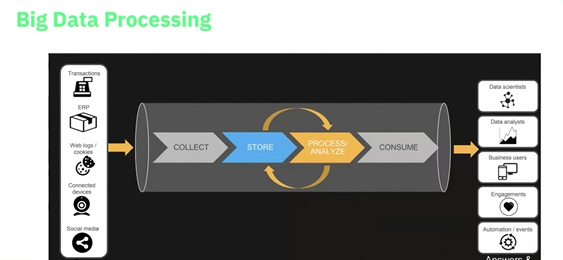
Key Stages of Data Processing
- Data Collection: Gathering data from multiple sources, including:
- Web logs
- Application logs
- Social media
- Third-party databases
- Marketplaces
2. Data Storage: Once collected, data needs to be stored securely. Examples include:
- AWS S3 for Amazon Web Services.
- Azure Blob Storage for Microsoft Azure.
- GCS for Google Cloud.
Other storage methods can include databases, data lakes, and data warehouses.
3. Data Sorting: The process of selecting only the relevant datasets from the collected data. Sorting focuses on which data files (e.g., 6 out of 10 files) are needed for the final analysis.
- Sorted data is used in machine learning models or business intelligence (BI) tools like Tableau, Power BI, etc.
4. Data Analysis: This is where the sorted and processed data is used to:
- Answer business-related questions.
- Perform trend analysis (e.g., e-commerce trends, sales figures).
- Support decision-making with reports and visualizations.
5. Data Presentation: Presenting analyzed data to stakeholders, usually in the form of visualizations or dashboards for business users.
Why Do We Need Data Processing?
Without proper data processing, raw data can’t provide meaningful insights. Data that is not transformed properly might lead to incorrect analysis or decisions. Accurate data processing allows businesses to:
- Identify trends.
- Predict future patterns.
- Optimize operations.
Types of Data Processing
- Batch Processing:
- Data is collected over time (e.g., daily) and processed in batches.
- Ideal for applications where real-time data isn’t required.
2. Real-time Processing:
- Data is processed almost immediately after it’s generated. This includes stock market data, fraud detection, and other time-sensitive data streams.
- Real-time can be near real-time (data arrives every few minutes) or true real-time (data is processed as it arrives).
3. Online Processing:
- Data is processed in the context of e-commerce or other interactive services where users expect immediate responses.
4. Multiprocessing:
- Involves processing multiple datasets simultaneously.
- Can combine with batch or real-time processing to handle larger data volumes.
5. Time-sharing:
- Data is shared and processed by multiple users connected to a single machine (e.g., CPU-sharing environments).
ETL vs. ELT
ETL (Extract, Transform, Load):
- Traditional approach where data is extracted from source systems, transformed into a suitable format, and loaded into a target system.
ELT (Extract, Load, Transform):
- Modern approach, especially in big data ecosystems. Data is first extracted and loaded into a storage system (e.g., data lake) and then transformed based on use cases.
ETL Process Overview
ETL (Extract, Transform, Load) is a data pipeline process used to gather data from various sources, process it, and load it into a destination, such as a data warehouse. Let’s dive into each step:
1. Extraction
- Data can be extracted from various sources:
- Relational Databases
- Raw files
- Semi-structured (e.g., JSON, XML)
- Unstructured data
- Extraction occurs at the loading point known as the destination.
2. Transformation
Transformation involves converting raw data into a desirable format. This step includes:
- File Format Conversion: Data can be transformed from formats like CSV, JSON, or text into columnar formats like Parquet or ORC.
- File Compression: Reduces file size, which improves storage efficiency and query performance.
- Partitioning:
- Data is partitioned to organize it by date or other criteria.
- Partitioning allows queries to retrieve specific data quickly, reducing overall processing time.
Partitioning and Its Importance
What is Partitioning?
- Dividing data into smaller segments based on key attributes, like date.
Why is Partitioning Important?
- Helps with efficient querying. For instance, if data is partitioned by date, a query targeting a specific date will only extract the relevant partition.
- This improves query speed and reduces computational time.
3. Loading
- Data is loaded into the destination, often after transformation.
- Loading can target:
- Data visualization tools (e.g., Tableau, Power BI)
- Machine Learning models (using processed data)
- Other teams or systems (for further use)
Basic Data Transformations
Several common data transformations help cleanse and prepare the data for analysis:
- Cleaning:Replace null values (e.g., replace null with 0 for integer columns).
- Deduplication:Remove duplicate records to ensure clean data.
- Datetime Conversion:Convert epoch time or other formats into human-readable formats (e.g.,
YYYY-MM-DD). - Key Restructuring:Add foreign keys or modify keys to create dependencies between different datasets.
Advanced Data Transformations
These are transformations applied in more complex scenarios:
- Business Logic:
- Derive new values from existing data based on specific business logic.
- Example: Calculate BMI based on height and weight.
2. Filtering:Filter out unnecessary rows or columns.
Example: Keep only transactions greater than 1 million.
3. Joining:Combine data from multiple sources using joins (e.g., SQL INNER JOIN, LEFT JOIN).
4. Splitting Columns:Split a string column (e.g., names or comma-separated values) into multiple columns.
5. Data Validation:Ensure that key fields are not null or contain invalid values. For example, in a loan dataset, ensure loan status is either “disbursed” or “rejected” but not any other value.
6. Aggregation & Summarization:
- Aggregation: Combine data from multiple sources into summary statistics or tables.
- Summarization: Example, summarizing data by count with respect to gender, city, or other demographic categories.
ETL with AWS Services
AWS provides several services to implement the ETL process effectively. Here’s how:
Extraction Using AWS Services
- Amazon RDS: Relational Database Service for relational databases like MySQL, PostgreSQL.
- AWS Redshift: A cloud-based data warehouse.
- AWS Glue Data Catalog: A fully managed catalog that keeps track of all the data in your AWS environment.
- Amazon S3: Simple Storage Service used for storing raw and processed data. This is often the first destination for extracted data.
Transformation with AWS Services
- AWS Glue: A managed ETL service that helps transform data.
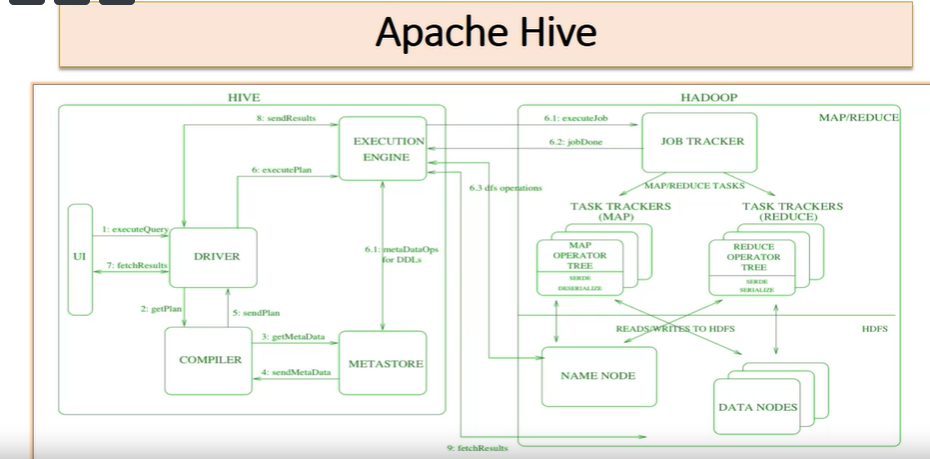
- Amazon EMR (Elastic MapReduce):Used for big data processing, enabling tools like Apache Spark, Hadoop, and Hive.
- AWS Redshift:Supports ELT (Extract, Load, Transform) operations.
- Amazon Athena:A service that allows querying data stored in S3 using SQL.
Loading Data
Once data is transformed, it’s ready for loading into one or more of the following:
- S3: Store processed data.
- SageMaker: AWS service for machine learning models.
- NoSQL Databases: Like DynamoDB for unstructured data.
- Relational Databases: Like MySQL, PostgreSQL via RDS.
S3 and Its Importance in ETL
Amazon S3 is essential for storage in ETL processes. Key features include:
- Durability: 99.99% durability, with data replicated across regions.
- Versioning: Maintain multiple versions of data and keep the most recent one for easy access.
- Low cost: Highly economical storage option.
S3 Storage Types
- Standard: Default, highly durable storage for frequently accessed data.
- 1 Zone-IA (Infrequent Access): Storage for data that’s less frequently accessed but still needs to be quickly retrieved.
- Glacier and Deep Archive: Used for long-term data archiving, providing cost-effective solutions for storing data that does not require frequent access.
Lifecycle Policies in S3
- Automatically transition data from one storage class to another based on predefined rules (e.g., move from Standard to Glacier after 1 year).
Real-time Processing with AWS
Real-time data processing in AWS is made easy with services such as:
- Amazon Kinesis:Used for real-time streaming data.
- You can process and analyze real-time data streams using Kinesis.
2. Kinesis Firehose:A fully managed service for delivering real-time streaming data to destinations like S3, Redshift, or other analytics tools.
3. Kinesis Analytics:Allows users to analyze streaming data using SQL.
AWS Tools for Real-time and Batch Processing
For batch and real-time processing in AWS, the following services are commonly used:
- Amazon Glue: A managed service that provides the foundation for building batch processing jobs.
- Amazon EMR: Supports big data processing frameworks like Apache Spark and Hadoop.
- Amazon Kinesis: Supports real-time streaming of data.
In summary, the ETL process is crucial for transforming raw data into actionable insights. Partitioning, compression, and transformation are key techniques that help optimize the data for querying and analysis. AWS offers a range of services to facilitate each step in the ETL process, from extraction to transformation and loading.

Challenges in Data Transformation
- Handling large data volumes: As data grows in size, processing and transforming it becomes increasingly complex.
- Complex transformation logic: Ensuring that the “T” (Transformation) in ETL is correctly handled is crucial, as any errors can lead to inaccurate results.
AWS Services for Data Transformation
- AWS Glue: For ETL tasks.
- AWS Lambda: For serverless data processing.
- Amazon Redshift: For data warehousing and large-scale data queries.
- Amazon S3: For data storage.
- Amazon Kinesis: For real-time data streaming and processing.
Real-world Example: E-commerce Data Analysis
- Scenario: Stakeholders from an e-commerce platform (e.g., Flipkart) might ask for insights into mobile phone sales over the last six months.
- Solution: Use collected data (sales, product views, etc.) to create reports that answer key questions, such as:
- How many phones were launched?
- What price categories performed best?
- How many users bought phones in different categories?
- This analysis is achieved through data collection, storage, sorting, and processing, followed by visualization using BI tools.
Automation in Data Processing
Data processing pipelines can be automated to handle large-scale tasks, such as:
- Log analysis for fraud detection.
- Example: Analyzing web logs for unusual user behavior (e.g., checking 10 products simultaneously in an e-commerce platform), which might indicate a DDoS attack or other malicious activity.
- Steps include collecting the web logs, storing them (e.g., in S3), processing the logs, and raising alerts if abnormal patterns are detected.
Types of Data Sources
- Social Media: Collecting and analyzing data from platforms like Twitter, Facebook, etc.
- Connected Devices: Internet of Things (IoT) devices, cameras, sensors, etc., used for image recognition or live stream analysis.
- Web Logs: Logs from websites and web applications. Used for understanding user behavior, click patterns, and fraud detection.
- ERP Data: Enterprise Resource Planning systems, which manage business processes.
- Transaction Data: Bank transactions, UPI data, etc.

AWS ETL and Data Processing Services
Overview of AWS Analytics Services:
- Kinesis Analytics:Used for real-time analytics.
- QuickSight:A tool for visualization and dashboarding.
- Redshift:Primarily used for data warehousing.
- Amazon Elasticsearch:Supports operational analytics.
- EMR (Elastic MapReduce):For big data processing.
- Amazon Athena:Used for interactive analytics.
- Can perform SQL queries directly on data stored in Amazon S3.
AWS Glue:
AWS Glue is a managed ETL (Extract, Transform, Load) service designed to help you easily prepare and load data.
Glue Data Catalog:
- Stores metadata information.
- Can catalog data from various sources like S3, RDS, or Redshift.
AWS Glue Subservices and Functionalities:
Glue Crawler:Automatically detects schemas and updates the Data Catalog.
Glue Jobs:Used for data processing and data transformation.
- You write your ETL code in Spark, Scala, or Python within the Glue jobs UI.
Glue Architecture & Processing:
- Glue is based on Apache Spark.
- It uses Data Processing Units (DPU) to allocate resources for processing. DPU determines how many workers and how much computing power is used.
Data Transformation in Glue:
- RDD (Resilient Distributed Dataset):
- The core of Spark-based data processing.
- Transforms data using lazy evaluation. Changes only take effect when an action is called.
2. Dynamic Frames:
- Similar to DataFrames, but more flexible for semi-structured or unstructured data.
- Do not require schema definitions upfront.
- Supports transformations specific to AWS Glue.
3. DataFrames vs. Dynamic Frames:
- DataFrames: Better for structured data.
- Dynamic Frames: Ideal for semi-structured or unstructured data.
- Conversion between the two is easy using commands like:
dynamicFrame.toDF()(Converts DynamicFrame to DataFrame)dataFrame.toDynamicFrame()(Converts DataFrame to DynamicFrame)
AWS Glue ETL Workflow:
- Extract:Load data into a Dynamic Frame using createDynamicFrame.
- Transform:
- Modify or cast data types using built-in functions like resolveChoice.
- Example: Cast a column to long data type.
3. Load:Write data back to your target (e.g., S3 bucket, Redshift, or RDS) using writeDynamicFrame.
Dynamic Frame Advantages:
- No need to define schema upfront.
- Suitable for semi-structured and unstructured data (e.g., JSON, IoT data).
- Easier error handling and transformations for unstructured or streaming data.
Example AWS Glue Script Basics:
- Initialize Glue Context:
- Example:
getGlueContext() - This is the entry point for running Glue jobs.
2. Reading Data:
- Example:
createDynamicFrame.fromCatalog() - Reads data from the Data Catalog.
3. Transformation:
- Example:
resolveChoice()function. - Cast or modify data columns and handle data types.
4. Writing Data:
- Example:
writeDynamicFrame.fromOptions() - Store the processed data in your target location (e.g., S3 bucket).
Major Use Cases for ETL in AWS:
- Collection: Data is collected from various sources like web applications, IoT devices, logs, and data centers.
- IoT and streaming data is real-time and can be processed using services like Kinesis.
- Logs can be collected using CloudWatch or CloudTrail.
- Processing and Transformation:AWS Glue is widely used for transforming and processing this data before it’s analyzed and consumed.
- Data Sources:S3, RDS, Redshift, and third-party applications.
- Data Processing Flow:
- Collection →
- Storage (e.g., S3) →
- ETL (using Glue) →
- Processing (e.g., Kinesis) →
- Consumption (BI tools, reporting).
This detailed breakdown covers various AWS services that can be used for ETL and analytics workflows, focusing on the role of AWS Glue and its dynamic frames for data transformation.
Summary:
- A clear understanding of data processing and data transformation.
- Knowledge of various AWS services for handling data transformation.
- Practical insights into the types of data processing and their real-world applications.
Data Processing, Transformation, Storage, and Warehousing Using Google Cloud Platform
Overview:
In this session, we will cover essential topics related to data processing, data transformation, storage, and warehousing. We will explore the services offered by Google Cloud Platform (GCP) and map the relevant services to our use cases.
Key Concepts:
- Data Processing: Refers to how raw data is managed and processed using cloud services.
- Data Transformation: Involves refining the raw data by cleansing, enriching, and transforming it.
- Storage: Discusses storing raw, refined, and integrated data using services like Google Cloud Storage (GCS).
- Warehousing: Involves structuring and querying the data, typically using BigQuery for storing and managing structured datasets.
Google Cloud Services Mapped:
- Google Cloud Dataproc: For managing data processing and transformation tasks.
- Google Cloud Storage (GCS): To store raw and refined data.
- BigQuery: To store and manage the data warehouse with capabilities for querying and analytics.
Data Processing with Dataproc:
1. Dataproc Overview:
- Dataproc provides compute and storage resources, where you can specify configurations (e.g., worker nodes, cores, and RAM) for processing data.
- Challenges arise when large amounts of data come unexpectedly, leading to resource constraints in a cluster.
2. Dataproc Serverless:
- Dataproc Serverless helps solve the problem of resource allocation by automatically scaling based on job requirements. It eliminates the need for manual provisioning.
- Use Spark or PySpark jobs, and let Dataproc handle infrastructure scaling, autoscaling, and resource management.
3. Batch and Interactive Workloads:
- You can use Dataproc Serverless for both batch workloads (to process jobs and return outputs) and interactive workloads (e.g., Jupyter notebooks for analytical purposes).
4. Comparison: Dataproc Serverless vs. Dataproc on Compute Engine:
- Dataproc Serverless is optimized for Spark workloads, with no control over infrastructure but faster startup times (~60 seconds).
- Dataproc on Compute Engine provides control over cluster configurations and supports other frameworks (e.g., Hive, Kafka). It uses YARN-based resource management.
- Dataproc Serverless supports Spark-based resource management, but GPU support is currently unavailable.
5. Custom Containers and Java Versions:
- Dataproc Serverless supports interactive sessions and custom containers.
- Only Java 17 and 11 are supported on Dataproc Serverless, while previous Java versions are available on the Compute Engine.
Data Warehousing with BigQuery:
1. BigQuery Overview:
- BigQuery is Google’s fully managed cloud data warehouse designed for efficient querying and analytics. It requires no infrastructure management and offers on-demand and flat-rate pricing models.
2. Storing Data in Google Cloud Storage (GCS):
- Raw data from sources is typically stored in GCS buckets, where it is stored in its original form. Data lakes can also be implemented using GCS.
- Parquet format is often used to store refined and integrated data for optimization.
Dataset Overview:
1. Movie Dataset:
- Stored in a CSV format within a GCS bucket, the movie dataset contains:
- Movie ID
- Title
- Genre (e.g., Toy Story, which includes genres like adventure, animation, comedy, etc.)
2. Ratings Dataset:
- The ratings dataset contains:
- User ID
- Movie ID
- Rating out of 5
- Timestamp of the rating
BigQuery and GCS Integration:
1. Creating Tables from GCS:
- BigQuery allows creating tables directly from GCS buckets. These tables can be external or native.
- External Table: Data resides in GCS, and BigQuery uses this external data for queries.
- Native Table: BigQuery manages the data internally, storing it in its own format.
2. Table Creation Example:
- For the movie dataset, a table is created in BigQuery from the GCS bucket storing the raw movie data. The format used is CSV, and BigQuery automatically handles the schema.
- Queries can be executed directly on the table to fetch movie data (e.g., Movie ID, Title, Genre).
Data Transformation and Refined Datasets:
1. Refined Data:
- After processing raw data, refined data is created by performing operations like:
- Removing unnecessary columns
- Adding new columns
- Data cleansing and enrichment
2. Storage of Refined Data:
- Refined datasets are stored separately from raw data. The structure of refined datasets can differ from the raw datasets (e.g., dropping the “Genre” column for movies).
3. Managing Multiple Datasets:
- Different datasets can be managed separately for specific purposes:
- Raw Data: Contains the original data as it was received.
- Refined Data: Processed and cleaned data for specific use cases.
4. BigQuery Queries on Refined Data:
- After creating the refined dataset tables, queries can be run similarly to those on raw data to fetch the processed information.
Key Services Mentioned
- Dataproc Serverless (Data Processing and Transformation):
- Used for processing and transforming data in Google Cloud.
- Tasks include:
- Cleaning datasets (e.g., removing null values).
- Aggregating data.
- Filtering records.
- Uses Apache Spark as the processing engine, which is widely regarded as a highly efficient tool for data processing and transformation.
- Dataproc provides a Hadoop cluster on Google Cloud to run Spark jobs.
- Traditionally, cluster management involved manual creation and deletion, which was time-consuming and tedious.
- Dataproc Serverless automates cluster management, eliminating the need to create and manage clusters for each Spark job.
2. Google Cloud Storage (GCS) Buckets (Raw Storage):
- GCS buckets serve as raw data storage.
- Raw datasets, typically in formats like CSV or Parquet, are stored in GCS before any processing.
- Used for the initial phase of storing unprocessed or minimally processed datasets.
3. BigQuery (Storage and Warehousing):
- Used for storing refined and integrated datasets.
- Datasets are processed in Dataproc and stored in BigQuery for further analysis and querying.
- External tables can be created on raw datasets stored in GCS, and these can be transformed to refined datasets in BigQuery.
Data Layers and Transformation Phases
- Raw Layer:
- Stores the initial data in GCS buckets.
- Datasets are typically in their unprocessed form.
- Operations may include simple tasks such as cleaning null values or standardizing formats.
2. Refined Layer:
- Represents a more structured and cleaned version of raw datasets.
- Data is cleaned, filtered, and aggregated based on specific business logic.
- Example: Movies with a genre of Adventure are filtered from the raw dataset, and unnecessary columns are removed to only include Movie ID and Title.
- Data from GCS buckets is processed in Dataproc and loaded into BigQuery as a refined dataset.
3. Integrated Layer:
- Involves combining multiple datasets (e.g., movies and their ratings) to create a cohesive dataset.
- Joins data from various sources to provide meaningful insights.
- Example: The Movie ID, Title, and Rating (e.g., user-given rating as a float) are combined in this layer.
- Results are stored in BigQuery in a table that combines movies and their associated user ratings for analytical purposes.
Processing Pipelines Using Dataproc and BigQuery
- Python Script for Data Processing (Using PySpark)
- A script is written to automate the transformation and loading of data between layers.
- It supports two types of workloads:
- Raw to Refined: Processing raw data from GCS and storing it in BigQuery.
- Refined to Integrated: Taking the refined data and combining it with other datasets to create integrated datasets in BigQuery.
Key Components:
- Argument Parser (argpass):
- Used to pass arguments like the application name (
app_name) and the layer on which the job will run (layer). - Example:
raw_to_refinedorrefined_to_integrated.
Main Function:
- Creates a Spark session.
- Calls a transformation function that reads data from GCS or BigQuery, processes it, and outputs the results to BigQuery.
- Supports arguments for defining input/output paths, storage types (GCS or BigQuery), and formats (CSV or Parquet).
ETL Pipeline Functions:
- Extract: Retrieves data from GCS or BigQuery.
- Transform: Applies business logic, including filtering, aggregating, or joining datasets.
- Example: Filtering movies with a rating above 3.0.
- Load: Saves the processed data to the target location in BigQuery.
Key Configurations
- Raw to Refined Pipeline:
- Input: Data is read from GCS buckets (CSV format).
- Output: Data is written to BigQuery in the refined layer.
- Example: Movies dataset is filtered to only include “Adventure” genre movies, and the result is stored in BigQuery.
2. Refined to Integrated Pipeline:
- Input: Data is read from BigQuery (movies and ratings datasets).
- Output: Data is written to BigQuery in the integrated layer.
- Example: Movies and ratings are joined to create an integrated dataset with user IDs, movie titles, and ratings.
Data Formats and Storage Types
- GCS (Google Cloud Storage):
- Data in CSV or Parquet format can be stored in GCS and used as input for Spark jobs.
- Example: Raw movie data in CSV format.
2. BigQuery:
- Datasets are stored in BigQuery as tables, and transformations can be performed directly within BigQuery.
- Example: Ratings data stored in a BigQuery table.
Error Handling
- Data Format Compatibility:
- Currently, the script only supports CSV and Parquet formats.
- If an unsupported format (e.g., JSON) is encountered, the script raises an exception.
2. Storage Type Compatibility:
- The script can handle datasets stored in GCS and BigQuery.
- Unsupported storage types trigger an exception, ensuring the pipeline remains robust.
Dataproc ETL Process
1. Data Extraction, Transformation, and Load Process (ETL)
- The ETL flow begins with extracting data, transforming it based on requirements, and loading it into the target storage.
- Overwrite Configuration: By default, data overwrites the previous data in the destination unless explicitly configured for another mode like append. The current setting is overwrite to ensure data is updated rather than accumulated.
- Transformation Steps:
- Data is read from various sources (like movies and ratings datasets) and transformed according to the specific layer (e.g., raw-to-refined, refined-to-integrated).
- For the raw-to-refined flow, the process involves extracting raw data, applying transformations, and loading the refined data back into the target.
2. Refined to Integrated Transformation
- This phase transforms data from the refined layer to the integrated layer.
- Transformation Logic:
- Data from the movies and ratings datasets is joined on
movie_id. An inner join is used to merge both datasets. - The final output includes
user,movie_id,title, andratingcolumns. - Output Data Structure: The output of this phase is returned as a dictionary of DataFrames to maintain consistency across ETL jobs.
3. Execution and Loading Data to BigQuery
- The transformed data (from both raw-to-refined and refined-to-integrated phases) is loaded into a BigQuery table.
- The load function handles the actual loading process, ensuring the data is written to the appropriate table in BigQuery.
- For each phase, the corresponding function (raw-to-refined or refined-to-integrated) triggers the ETL process, transforming the input data and loading it into BigQuery.
4. Triggering Dataproc Jobs using REST API
- Instead of manually triggering jobs from Dataproc, you can use a REST API to execute Dataproc serverless jobs.
Configuration:
- A POST request is sent to the Dataproc API with the necessary configuration.
- The configuration includes job details such as the script location (
main.pystored in a Google Cloud Storage bucket) and the BigQuery Spark connector for data loading. - Two distinct configurations are used for raw-to-refined and refined-to-integrated jobs:
- For raw-to-refined,
raw2-refined-request.jsonis used. - For refined-to-integrated,
r2i.jsonis used.
5. Automation with Cloud Scheduler
- To avoid manual triggers, automation can be achieved using Google Cloud Scheduler.
- A Cloud Scheduler can be configured to run Dataproc jobs at specific intervals (e.g., daily at 7 AM). The scheduler executes a POST request that triggers the Dataproc job.
- Cloud Function Integration: Alternatively, a Cloud Function can be set up to trigger the Dataproc job whenever invoked, offering a flexible and event-driven trigger mechanism.
6. Execution Time and Job Monitoring
- When a job is triggered, it takes about 1 minute to provision infrastructure (like Dataproc serverless instances) and additional time (30–40 seconds) to execute the job.
- The job’s progress can be monitored through the Dataproc UI, which shows the number of executors used, job configuration details, and logs.
- Log Monitoring: Custom logs and job execution details can be reviewed in Dataproc, making it easy to troubleshoot or verify job outcomes.
7. Verifying Data in BigQuery
- After a job is executed, the data is loaded into BigQuery tables.
- The results can be queried to confirm successful completion:
- For the movies dataset, columns like
movie_idandtitlecan be queried. - For the ratings dataset, columns like
ratingandts(timestamp) can be queried.
8. Job Execution (Refined to Integrated)
- Similar to raw-to-refined, a second job for refined-to-integrated can be triggered.
- After the job completes, the job status and execution details (time taken, parameters passed, etc.) are available in Dataproc.
- The integrated data is then queried in BigQuery to verify the successful transformation and load into the final destination.
Key Takeaways
- Dataproc Serverless: Simplifies the management of infrastructure, scaling executors based on job requirements.
- Automation: Cloud Scheduler and Cloud Functions help automate ETL workflows, reducing manual intervention.
- Flexibility: REST API triggers and configuration files enable flexible job execution tailored to different layers (raw-to-refined, refined-to-integrated).
Conclusion
This system provides a highly structured ETL pipeline leveraging Google Cloud services such as Dataproc (for Spark jobs), GCS (for raw data storage), and BigQuery (for refined and integrated data storage). The use of Python, PySpark, and configurable scripts makes it flexible for various workloads, ensuring that both data processing and transformation can be efficiently managed across different data layers.
In this session, we discussed the key concepts of data processing, transformation, storage, and warehousing using GCP services like Dataproc, GCS, and BigQuery. Key takeaways include the benefits of Dataproc Serverless for resource management and BigQuery for its flexible and scalable data warehousing capabilities.
메타데이터
- post_id
- bb15ad80ee5e
- slug
- building-scalable-data-pipelines-processing-transformation-and-warehousing-bb15ad80ee5e
- url
- https://medium.com/@lolithasherley7/building-scalable-data-pipelines-processing-transformation-and-warehousing-bb15ad80ee5e
- canonical_url
- https://medium.com/@lolithasherley7/building-scalable-data-pipelines-processing-transformation-and-warehousing-bb15ad80ee5e
- author_url
- https://medium.com/@lolithasherley7
- status
- ok
- fetched_at
- 2026-09-02 20:16:31