Effortlessly Create a Public Internet WHIP Service for OBS: A Guide for Sub-Second Streaming
Discover our easy guide to create a WHIP service with Oryx in just one click! Revolutionize your streaming & OBS-RTC experience now!
Effortlessly Create a Public Internet WHIP Service for OBS: A Comprehensive Guide to Sub-Second Streaming

Photo by Himmel S on Unsplash
Introduction
Are you tired of struggling with complicated setups and technical jargon when trying to create a public internet WHIP service for OBS? Look no further! In this comprehensive guide, we will walk you through the process of effortlessly building your own WHIP service using the Oryx, all with just a single click. Say goodbye to the complexities of security, authentication, and WebRTC, and embrace the future of sub-second live streaming and seamless OBS-RTC room connections.
Join us as we break down the barriers of online streaming and help you unlock the full potential of OBS’s WHIP support. Our easy-to-understand, step-by-step tutorial will empower you to create a secure and efficient WHIP service, revolutionizing your online meeting and live streaming experience. Don’t let technical challenges hold you back any longer — dive into our guide and start streaming like a pro today!
Step 1: Create Oryx by One Click
Creating an Oryx is simple and can be done with just one click if you use AWS Lightsail or Digital Ocean droplet. Please see How to Setup a Video Streaming Service by 1-Click for detail.
You can also use Docker to create an Oryx with a single command line:
docker run --restart always -d -it --name oryx -v $HOME/data:/data \
  -p 80:2022 -p 443:2443 -p 1935:1935 -p 8000:8000/udp -p 10080:10080/udp \
  ossrs/oryx:5
After creating the Oryx, you can access it through http://your-server-ip/mgmt via a browser.
Step 2: Get the WHIP URL from Oryx
Please download OBS version 30 or higher from this link and proceed with the installation.
Open the Oryx, select Scenarios > Streaming > WebRTC: WHIP OBS, and follow the instructions to get a WHIP URL for OBS.
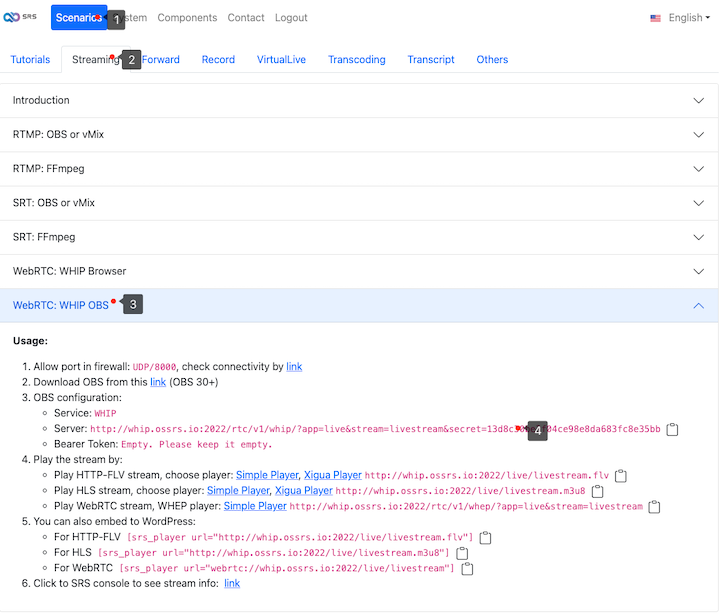
Please copy the WHIP URL as we will use it in OBS. Be aware that the WHIP stream can be played using the WHEP player or embedded into your WordPress website.
Step 3: Publish WHIP via OBS to Oryx
Next, launch OBS and select Settings > Stream. Choose WHIP from the Service drop-down menu, and set the WHIP URL into the Server field.
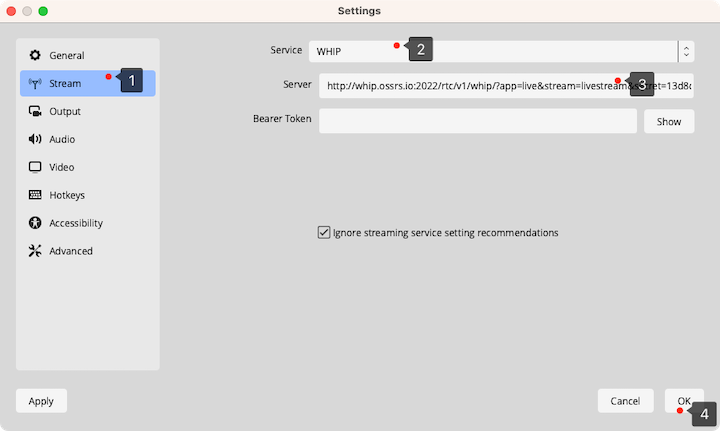
Note: If the latency is large, setup the OBS Output by: For OBS encoder, select the x264 encoder and in the advanced settings, set the GOP (Keyframe interval) to 1 s. Choose Preset as fast, Profile as baseline, and Tune as zerolatency.
Now you can click the Start Streaming button to publish the WHIP stream to the Oryx.
Step 4: Use WHEP to View the Stream
After publishing the stream, you can view it with a WebRTC HTML5 player. Access the WHEP player from the Oryx dashboard.
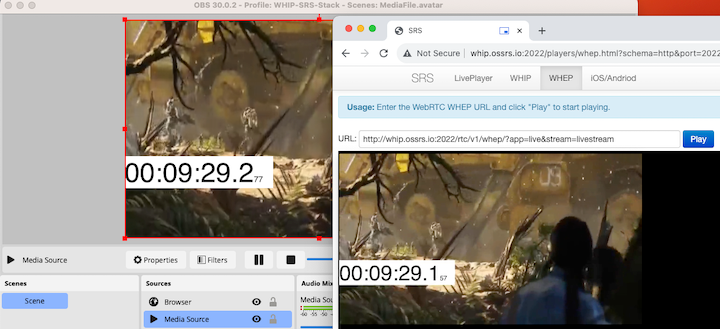
Additionally, integrate the WHEP player within your WordPress website. Kindly adhere to the guidelines provided on the Oryx dashboard.
Conclusion
In conclusion, our comprehensive guide has provided you with a simple and efficient method to create a public internet WHIP service for OBS using the Oryx. By following our easy-to-understand, step-by-step tutorial, you can now effortlessly build your own WHIP service with just a single click, eliminating the need to grapple with complex security, authentication, and WebRTC issues. With this newfound knowledge, you can revolutionize your online meeting and live streaming experience, fully harnessing the power of OBS’s WHIP support for sub-second streaming and seamless OBS-RTC room connections.
Contact
Join us for further conversation on Discord. If you’d like to help, please feel free to support us through donations on OpenCollective.
메타데이터
- post_id
- bb19c2a3bb7a
- slug
- effortlessly-create-a-public-internet-whip-service-for-obs-a-guide-for-sub-second-streaming-bb19c2a3bb7a
- url
- https://blog.ossrs.io/effortlessly-create-a-public-internet-whip-service-for-obs-a-guide-for-sub-second-streaming-bb19c2a3bb7a
- canonical_url
- https://blog.ossrs.io/effortlessly-create-a-public-internet-whip-service-for-obs-a-guide-for-sub-second-streaming-bb19c2a3bb7a
- author_url
- https://medium.com/@ossrs
- status
- ok
- fetched_at
- 2026-07-24 18:52:03




