SSH 2.0 Explained Visually: The Complete Handshake, Authentication & Encryption Flow
Topics:
SSH 2.0 Explained Visually: The Complete Handshake, Authentication & Encryption Flow
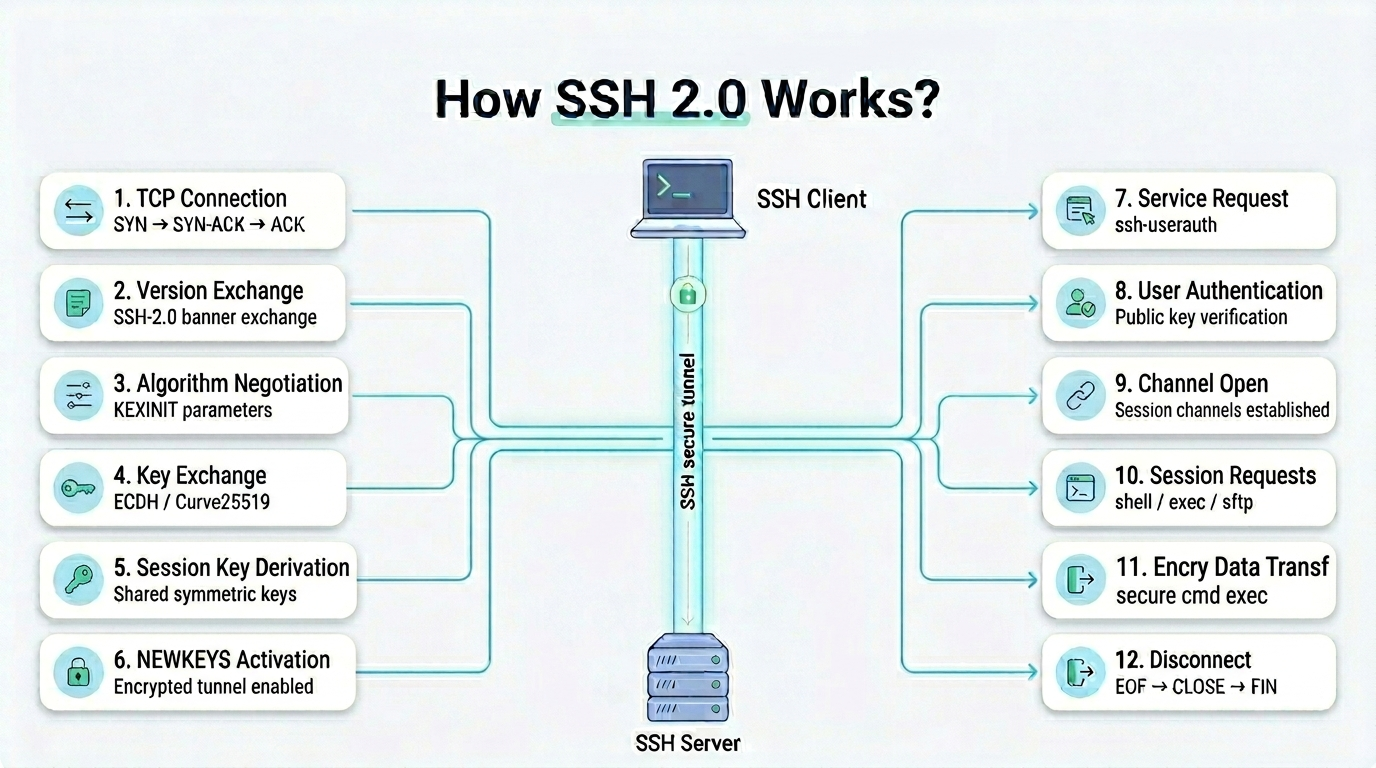
How SSH 2.0 Works ?
Topics:
- The Big Picture
- Keys That Exist Before The Connection Even Starts
- Phase 1 - TCP Connection
- Phase 2 - Version Banner Exchange
- Phase 3 - Algorithm Negotiation / KEXINIT
- Phase 4 - Key Exchange (ECDH / Curve25519)
- Phase 5 - Session Key Derivation
- Phase 6 - New Keys / Switch to Encrypted Mode
- Phase 7 - Service Request
- Phase 8 - User Authentication
- Phase 9 - Channel Open
- Phase 10 - Session Requests: PTY and Shell
- Phase 11 - Data Transfer
- Phase 12 - Disconnect
- The 9-Key RAM Inventory At Full Session
- Common Misconceptions Cleared
1. The Big Picture
SSH 2.0 is not a single protocol - it is three logical layers stacked on top of each other, each with a distinct responsibility.
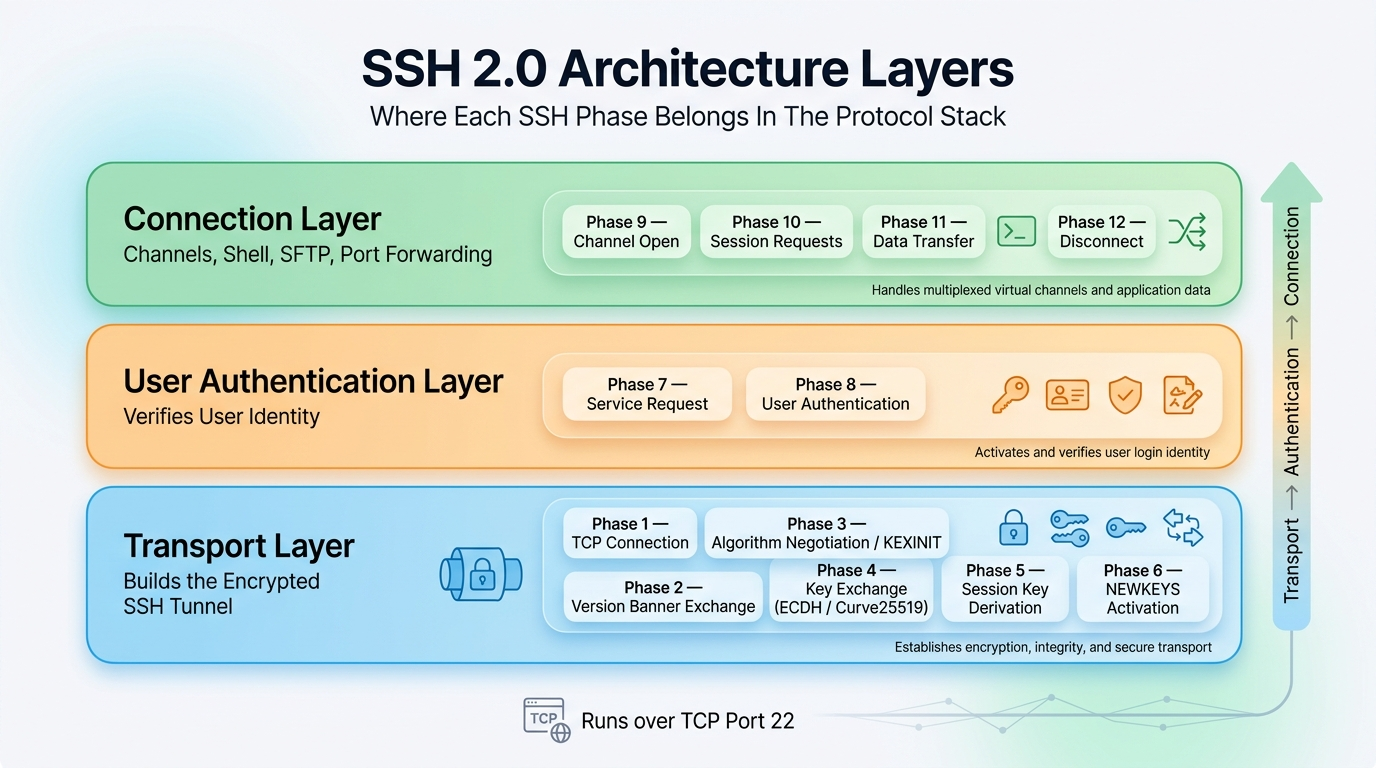
SSH 2.0 Architecture Layers (3 Layers)
The Transport Layer runs first and builds the encrypted tunnel before anything else happens. The User Auth Layer runs inside that tunnel to prove your identity. The Connection Layer runs last and manages the actual shell, file transfers, and port forwards - all multiplexed over a single TCP connection.
Every phase of the SSH handshake maps to exactly one of these three layers. Nothing happens out of order - you cannot authenticate before the tunnel is built, and you cannot open a shell before you are authenticated.
2. Keys That Exist Before The Connection Even Starts
This is one of the most important things to understand about SSH - the keys involved in the handshake are not created during the connection. They already exist on disk before the first TCP packet is sent.
ON THE CLIENT MACHINE (pre-existing, on disk):
  ~/.ssh/id_ed25519           → User Long-term Private Key
  ~/.ssh/id_ed25519.pub       → User Long-term Public Key
  ~/.ssh/known_hosts          → fingerprints of previously trusted servers
ON THE SERVER MACHINE (pre-existing, on disk):
/etc/ssh/ssh_host_ed25519_key → Server Host Private Key
/etc/ssh/ssh_host_ed25519_key.pub → Server Host Public Key
~/.ssh/authorized_keys → user public keys allowed to loginThe server host keys are generated once when SSH is first installed on the machine using:
sudo ssh-keygen -AThese keys are stored in:
/etc/ssh/and represent the server’s permanent identity. They do not change unless an administrator explicitly regenerates them.
The user keys are generated once by the user using:
ssh-keygen -t ed25519These keys are stored in:
~/.ssh/and represent that user’s identity across all servers they connect to.
Both sets of keys sit completely idle at connection start. They are not involved in building the encrypted tunnel. Each key pair has a specific phase where it is used and a specific job it performs - the server host key proves server identity in Phase 4, and the user key proves user identity in Phase 8.
Neither is involved in the actual encryption of data flowing through the session. That job belongs to a completely separate set of keys that are derived fresh during the handshake using ECDH/Curve25519 and exist only in RAM for the duration of the connection.
Phase 1 - TCP Connection
What happens: Before SSH communication can begin, the client and server first establish a basic TCP connection using the standard three-way handshake on port 22.
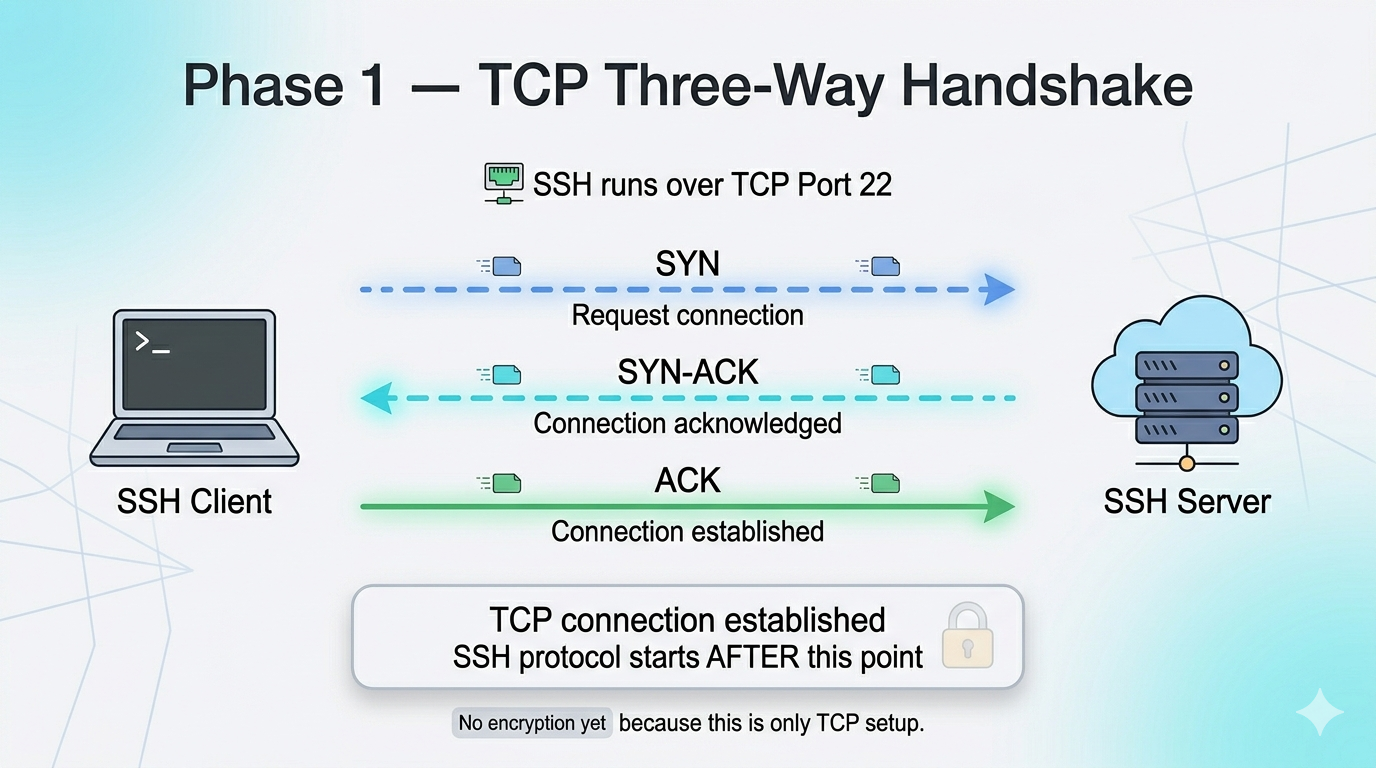
Three-Way Handshake
At this stage, SSH itself has not started yet. No encryption, authentication, or cryptography is involved. The goal is simply to create a reliable network communication channel between the two machines over which the SSH protocol can later operate.
Phase 2 - Version Banner Exchange (Plaintext)
What happens: Once the TCP connection is established, both the client and server exchange their SSH software version banners, such as SSH-2.0-OpenSSH_9.6
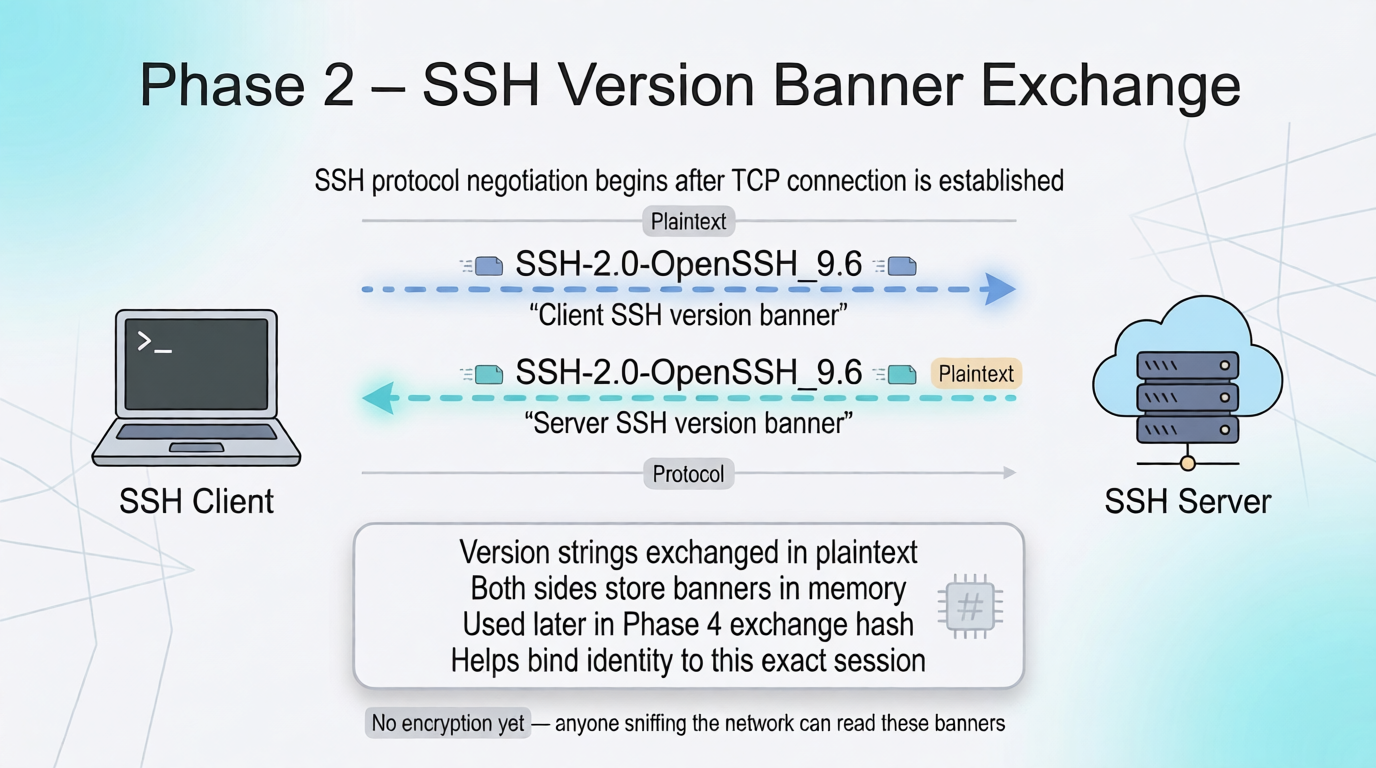
Version Banner Exchange
This is the first actual SSH protocol message exchanged between both systems. The banners are transmitted completely in plaintext, meaning anyone monitoring the network can read them.
Important: Both version strings are saved in memory. They will be hashed together in Phase 4 to bind identity proof to this exact session.
Phase 3 - Algorithm Negotiation / KEXINIT (Plaintext)
What happens: Both the client and server exchange SSH_MSG_KEXINIT packets containing the cryptographic algorithms they support for key exchange, server identity verification, encryption, integrity protection, and compression.
Client sends SSH_MSG_KEXINIT containing:
  - 16-byte random cookie
  - KEX algorithms list        (e.g. curve25519-sha256, ecdh-sha2-nistp256)
  - Host key types it accepts  (e.g. ssh-ed25519, ecdsa-sha2-nistp256, rsa-sha2-512)
  - Encryption ciphers C→S     (e.g. chacha20-poly1305, aes256-gcm)
  - Encryption ciphers S→C
  - MAC algorithms C→S         (e.g. hmac-sha2-256-etm)
  - MAC algorithms S→C
  - Compression C→S            (usually none)
  - Compression S→C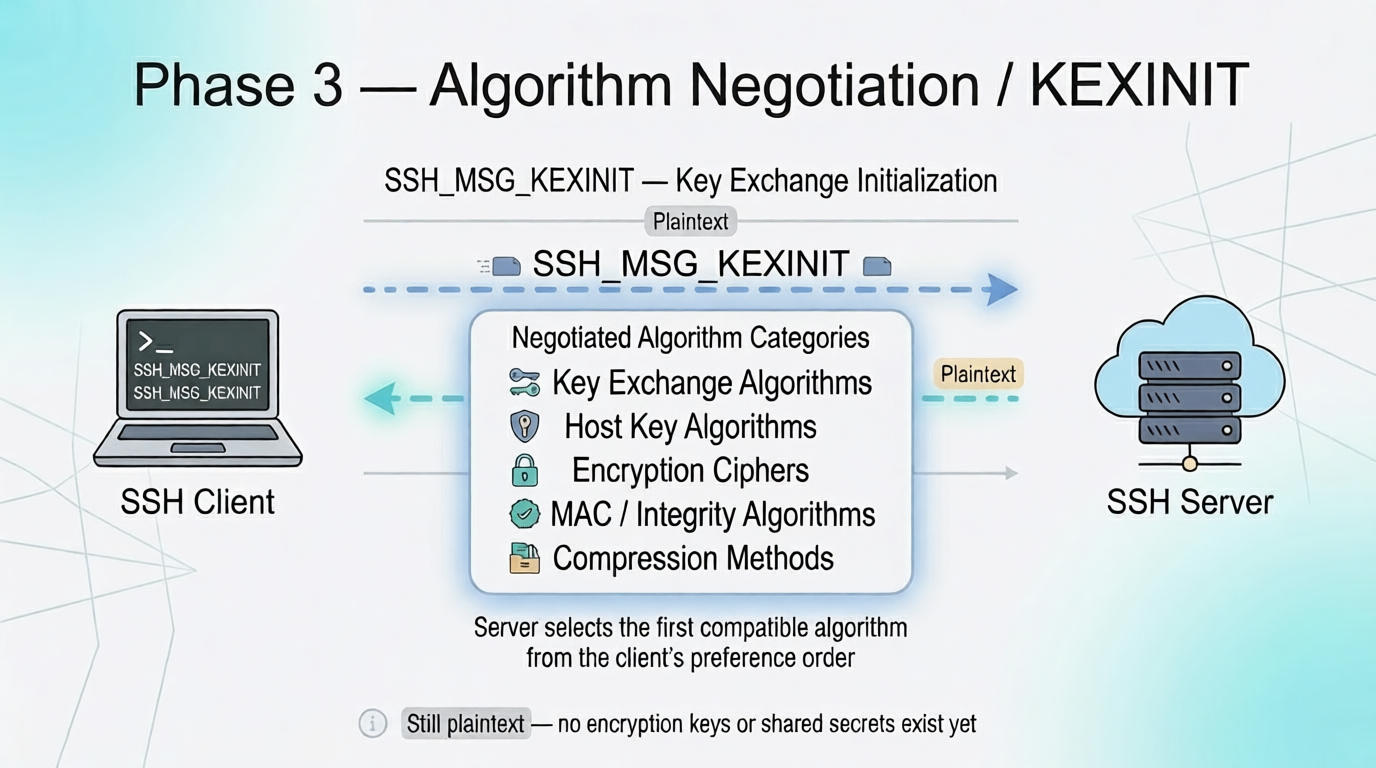
Server sends same structure with its own supported lists. Winner = first algorithm in client’s list that also appears in server’s list
The negotiation is still completely plaintext, meaning anyone monitoring the network can see which algorithms are being chosen for key exchange, encryption, and integrity protection. However, no secret keys or shared encryption material have been created or exchanged yet.
Phase 4 - Key Exchange (ECDH / Curve25519)
This is the most important phase of the SSH handshake. Three critical things happen here simultaneously:
- A shared secret is established between the client and server using ECDH/Curve25519.
- The server proves its identity using its host key and digital signature.
- The entire handshake so far is cryptographically tied together using the exchange hash
H, preventing tampering or man-in-the-middle modification.
Step 4a - Client Generates Ephemeral Keypair and Sends Public Half
The client generates a brand new keypair specifically for this connection. These keys are not stored anywhere and will be discarded after Phase 5.
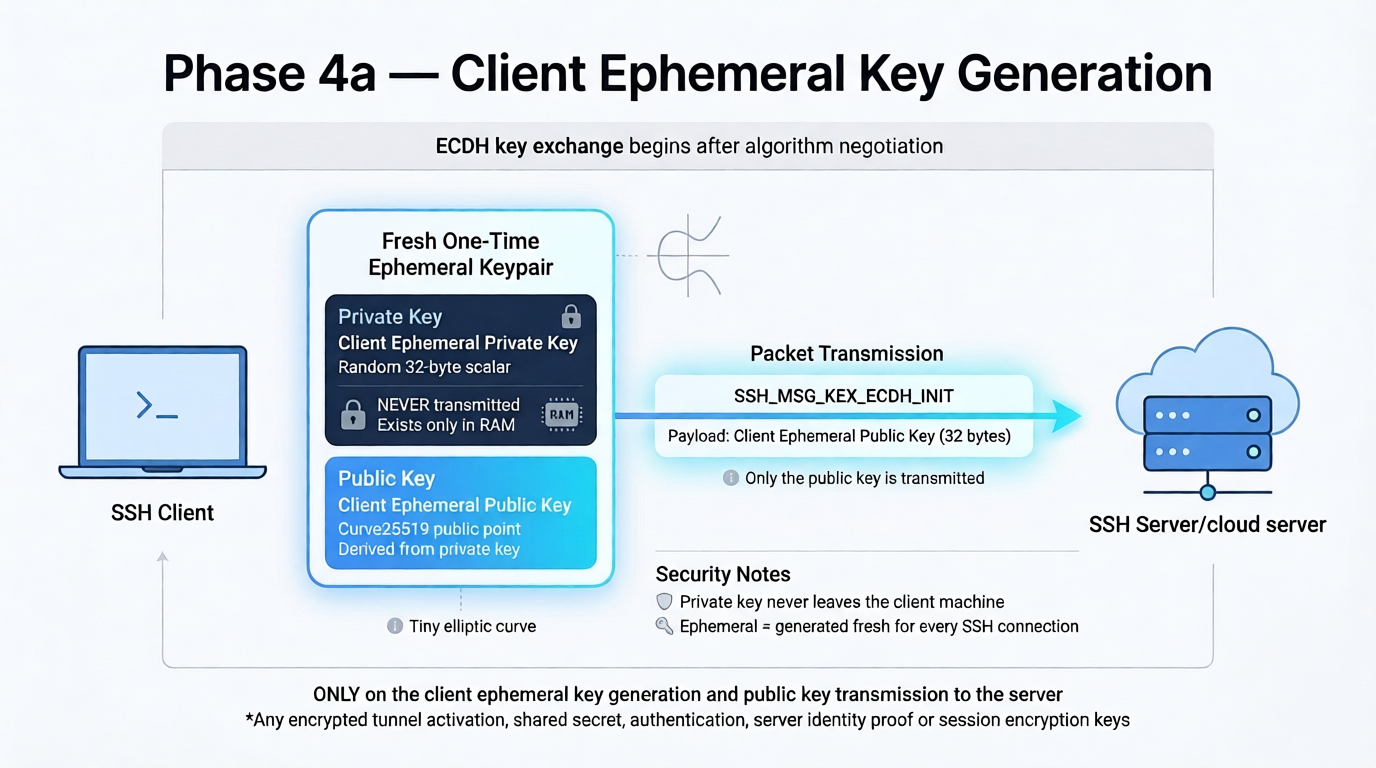
Client Ephemeral Key
Client generates (fresh, one-time use, exists only in RAM):
   1,Client Ephemeral Private Key  →  random 32-byte scalar, NEVER transmitted
   2,Client Ephemeral Public Key   →  Curve25519 point derived from private key, SENT to server
Only the public half crosses the wire. The private key stays on the client and is used locally in Step 4c to compute the shared secret.
Step 4b - Server Computes Shared Secret, Exchange Hash, and Signs It
When the server receives the client’s ephemeral public key, it performs four critical operations in sequence:
- It generates its own fresh ephemeral keypair.
- It computes the shared secret using ECDH/Curve25519.
- It computes the Exchange Hash
H, which cryptographically binds the entire handshake so far. - It signs the Exchange Hash using the server’s long-term host private key to prove server identity.
Server generates (fresh, one-time use, exists only in RAM):
  Server Ephemeral Private Key  →  random 32-byte scalar, NEVER transmitted
  Server Ephemeral Public Key   →  Curve25519 point, SENT to client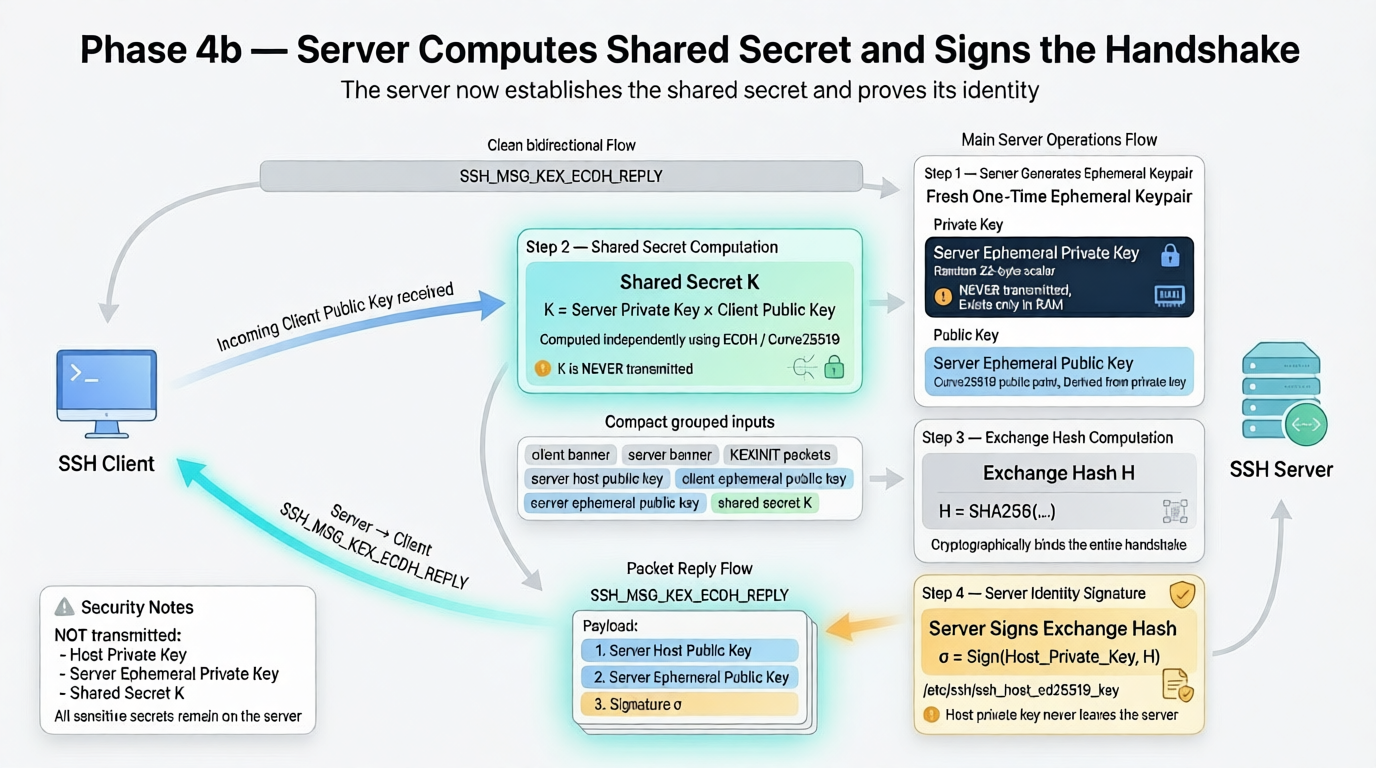
Shared Key(K) and Exchange Hash(H) → Signature(σ) = Sign(Host_Private_Key, H)
What is NOT sent: the Host Private Key, the Server Ephemeral Private Key, and the Shared Secret K. All three remain on the server.
The Two Steps of Diffie-Hellman:
- The Keys: Each side uses Diffie-Hellman math to generate its own temporary Private/Public Keypair.
- The Secret: Both sides then cross-combine their local private keys with the received public keys to arrive at the exact same Shared Secret.
Step 4c - Client Independently Verifies Server Identity
The client does not blindly accept the reply. It independently recomputes H from scratch using everything it witnessed across Phases 2, 3, and 4, then verifies the signature against it.
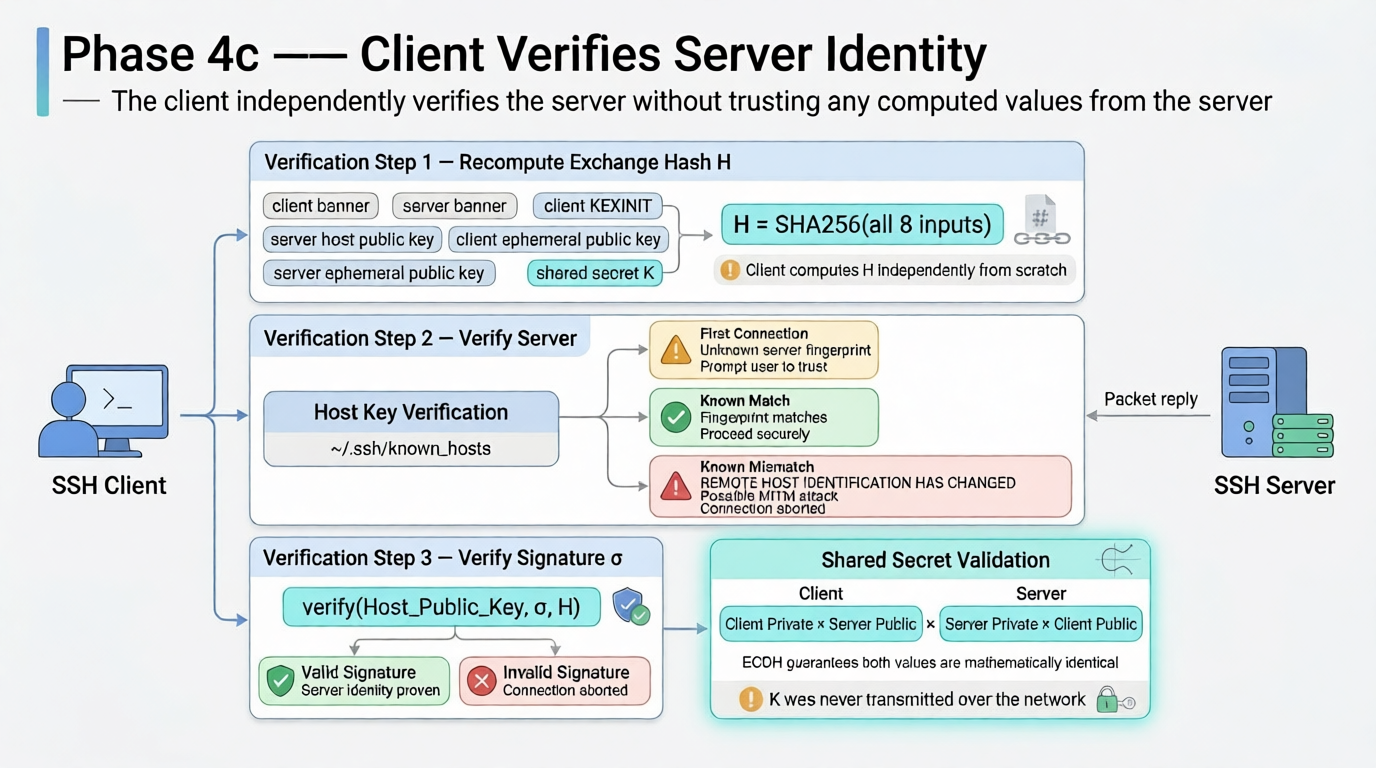
Client Verifies Server Identity
Why The Client Can Verify Without Ever Receiving H
The client never receives H and never needs to. It recomputes H itself from the raw data it directly witnessed during Phases 2, 3, and 4. Since both sides feed identical inputs into identical SHA256, they always produce the same H independently.
Server: H = SHA256(A+B+C+D+E+F+G+K)  →  signs it  →  σ
Client: H = SHA256(A+B+C+D+E+F+G+K)  →  same H (computed independently)
Client: verify(Host_Public_Key, σ, own_H)
Was σ produced by signing this exact H with the private key matching Host_Public_Key?
Yes → passes ✅
No → fails ❌
If an attacker tampered with anything during Phases 2, 3, or 4 - swapped a cipher, modified a banner, changed a public key - the client’s H would differ from the server’s H and the signature would fail immediately. The signature σ is the only thing the server sends that the client cannot compute itself, because producing σ requires the Host Private Key which only the real server possesses.
What The Exchange Hash H Proves
A single valid signature over H simultaneously proves three things:
① Server Identity
   Only the real server holding /etc/ssh/ssh_host_ed25519_key
   can produce a σ that verifies against the Host Public Key.
   An impostor cannot forge σ without that private key.

② Handshake Integrity
   H includes both KEXINIT packets and both version banners.
   If an attacker swapped any algorithm during Phases 2 or 3,
   H would differ, σ would not verify, connection aborts.

③ Shared Secret Agreement
   H includes K itself.
   If client and server arrived at different K values,
   H would differ, σ fails — mismatch is detected immediately.
Server authentication does not need to be a separate phase because the signature over H, verified against a known host key, proves identity, handshake integrity, and shared secret agreement in a single cryptographic operation.
IMPORTANT:
At the end of Phase 4, both the client and server independently compute the Exchange Hash (H). The SSH protocol explicitly defines that this first Exchange Hash (H) is frozen and renamed as the “Session ID”. It never changes for the rest of the connection.
Phase 5 - Session Key Derivation (Local, Nothing Transmitted)
What happens: Both sides independently derive 6 symmetric keys from K and H. Zero bytes sent.
Inputs:
  K          → Shared Secret from ECDH
  H          → Exchange Hash (Session ID) from Phase 4
  Session ID → equals H from the very first key exchange of this connection
  Hash algo  → e.g. SHA256 (negotiated in Phase 3)
Output:
6 Keys derived (using a letter constant A–F to separate them):(session keys)
IV(Initialization Vector) for Client→Server encryption
IV(Initialization Vector) for Server→Client encryption
Encryption Key for Client→Server (e.g. 32 bytes for AES-256)
Encryption Key for Server→Client
Integrity/MAC Key for Client→Server
Integrity/MAC Key for Server→ClientBoth sides run the same derivation function with the same inputs and arrive at identical keys.
The Shared Secret K is deleted from RAM after this - it is no longer needed. Perfect Forward Secrecy: even if the server’s long-term host key is compromised later, past sessions cannot be decrypted because K is gone.
Phase 6 - New Keys (Switch to Encrypted Mode)
What happens: Both sides signal they are activating the derived keys.
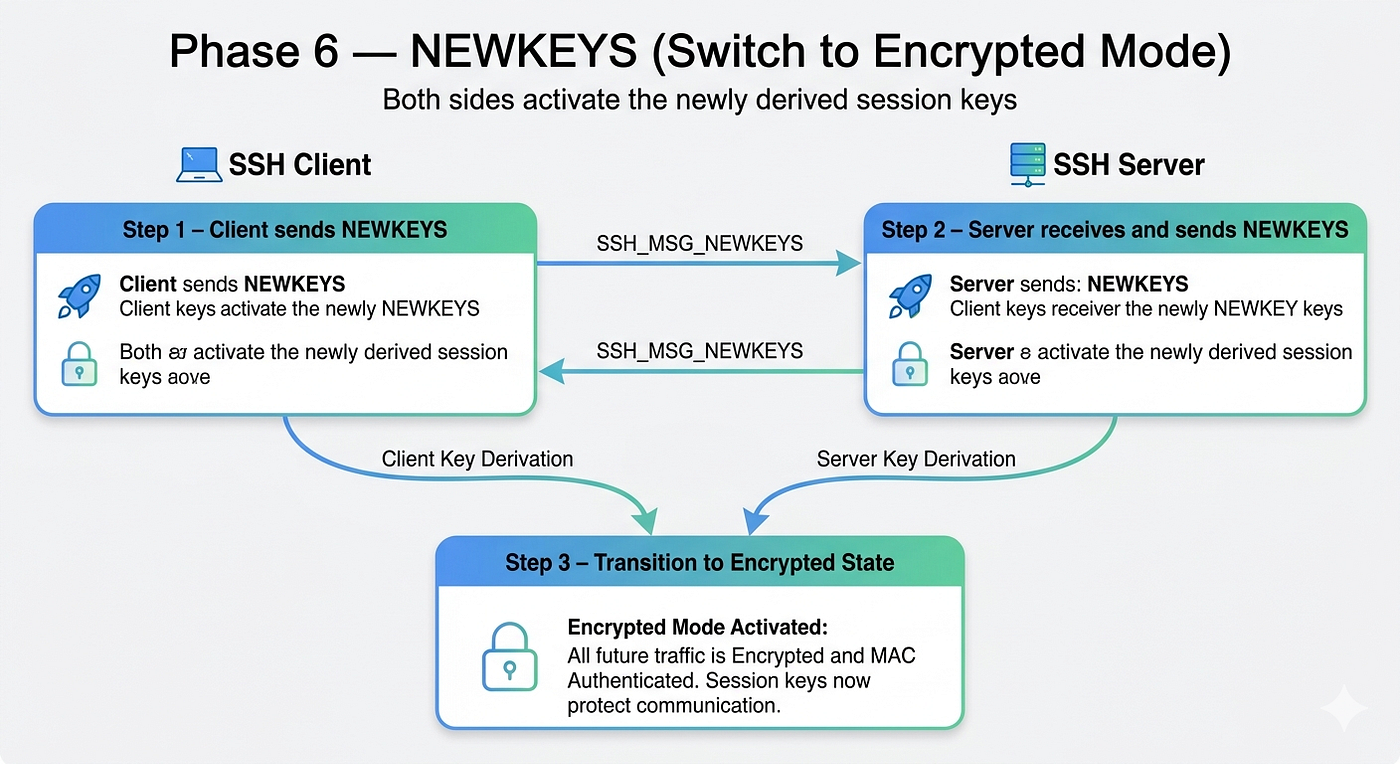
Switch to Encryted Mode
After this every packet is encrypted + MAC authenticated using the 6 keys from Phase 5. Wireshark shows only ciphertext from this point. This is the last plaintext boundary.
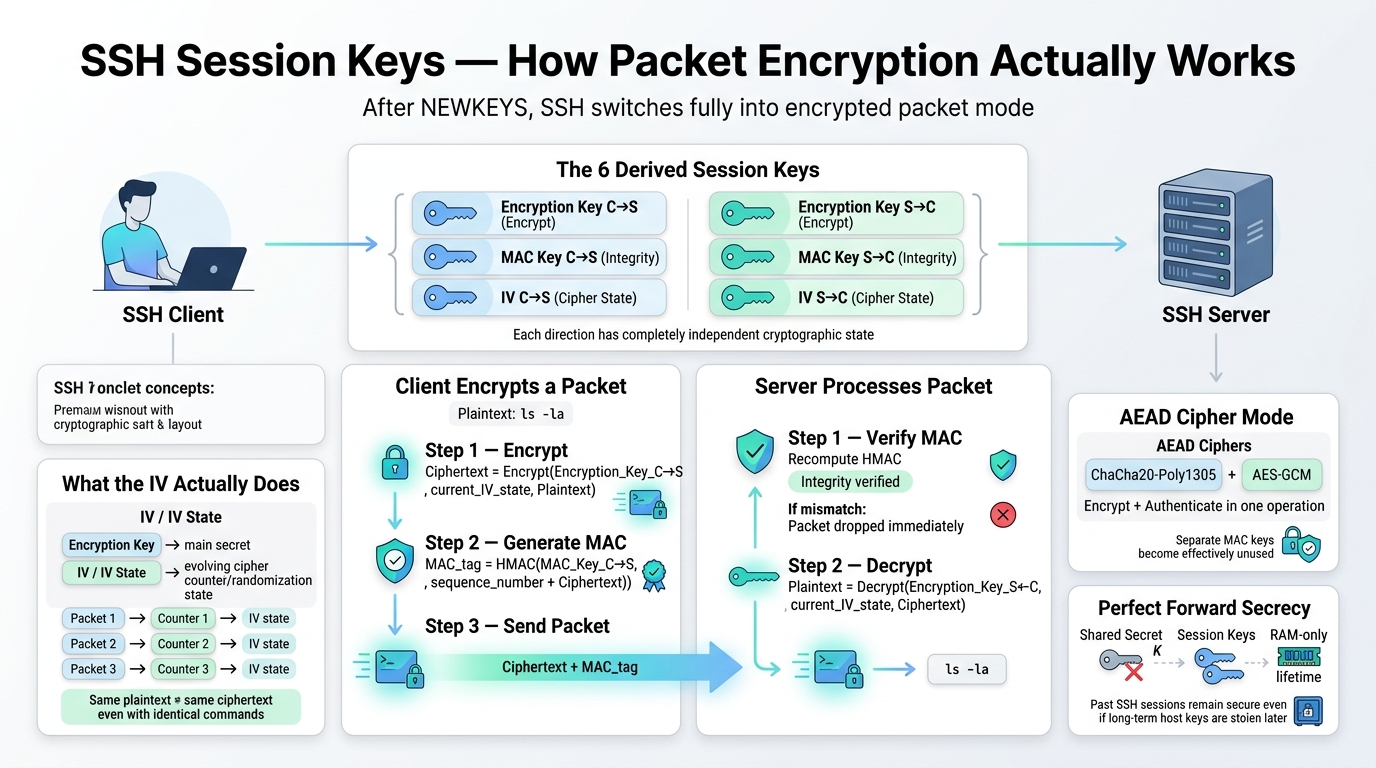
How 6 keys are used ?
Phase 7 - Service Request (Encrypted)
What happens: Client activates the authentication subsystem.
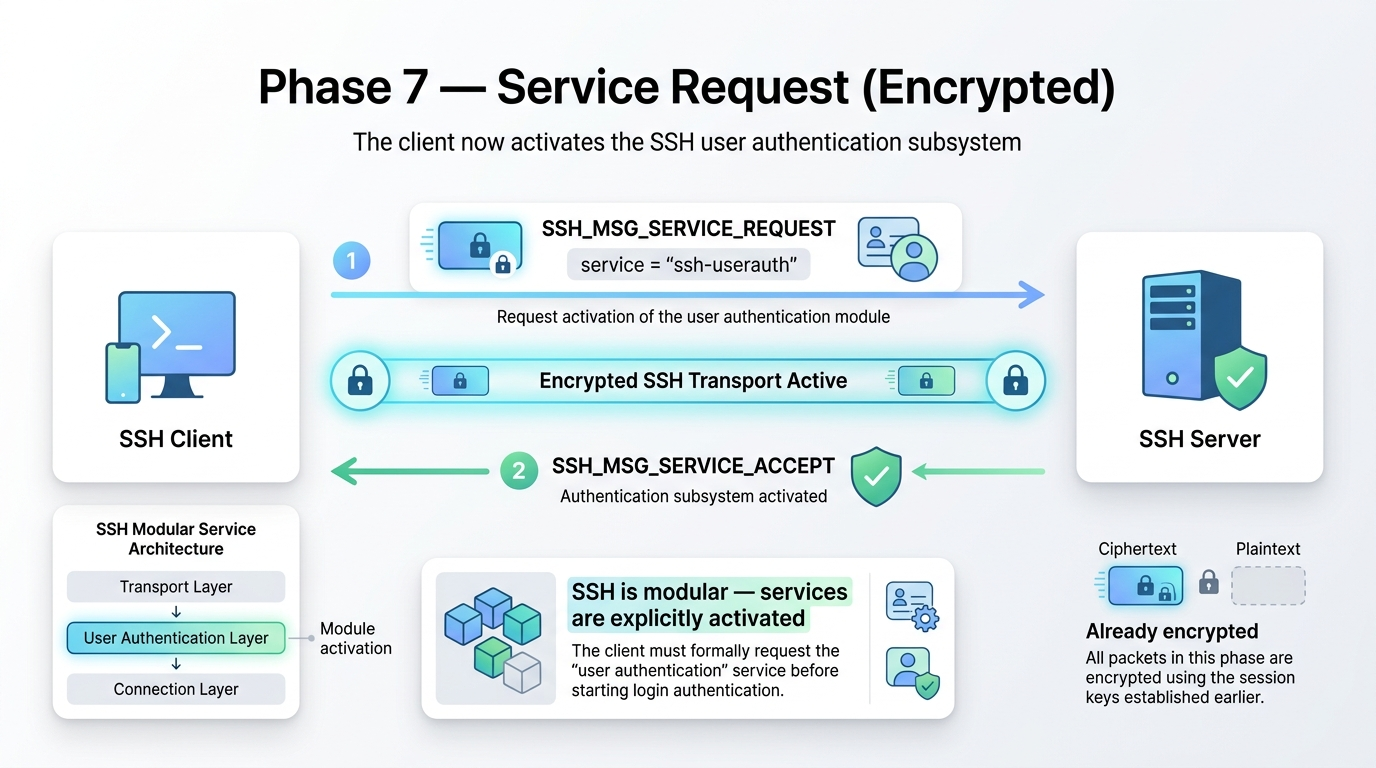
Service Request before User Auth
SSH is modular - services are explicitly activated. This formally requests the user authentication module before using it.
Phase 8 - User Authentication (Encrypted)
Now that the tunnel is safe, the server needs to know WHO is connecting. Three methods exist:
Method A - Public Key (recommended)
Client holds:
  User Private Key (~/.ssh/id_ed25519)   → NEVER transmitted
  User Public Key (~/.ssh/id_ed25519.pub) → sent to server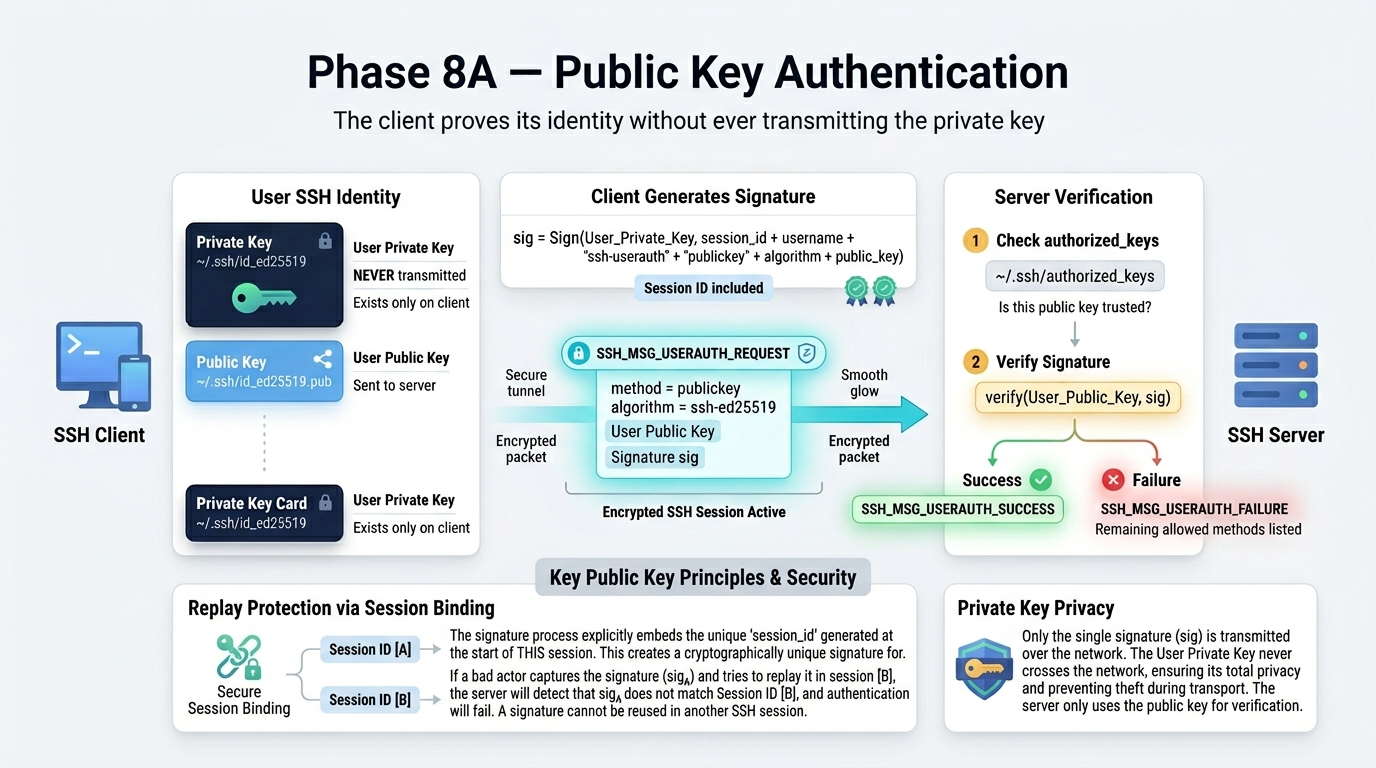
User Auth using public key (Defauilt)
The User Private Key never leaves the client. Instead, the client generates a digital signature and sends only that signature across the wire to prove ownership. This signature mathematically binds the proof to the unique Session ID generated during the Diffie-Hellman exchange. Because it is tied to this specific connection, the signature is completely useless for replay attacks on any other session.
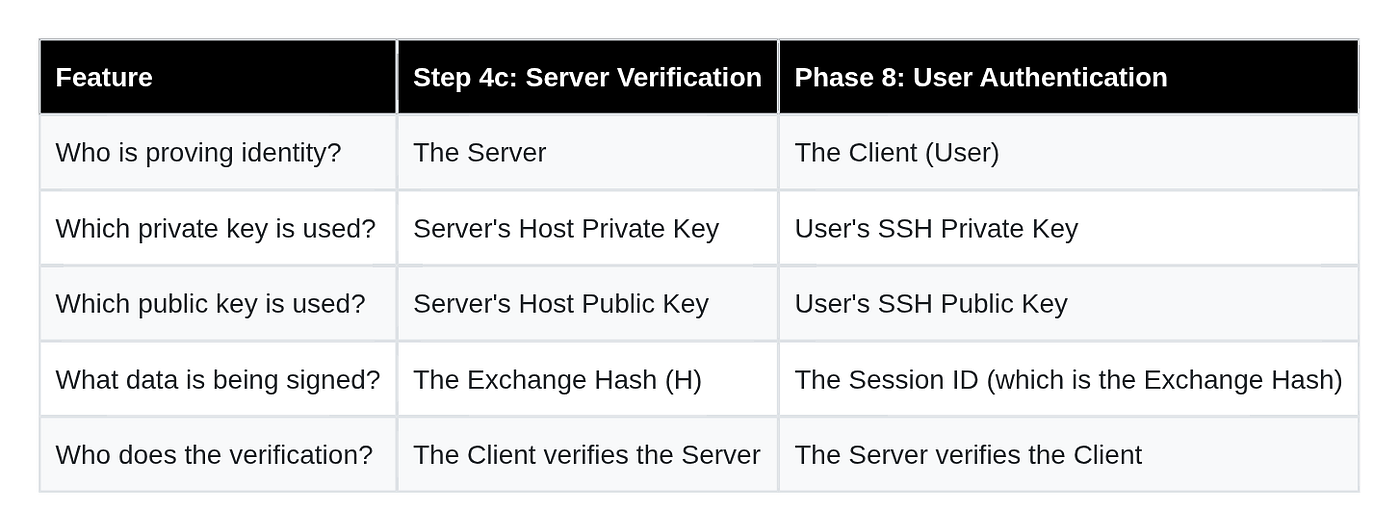
Same process as Server
Method B - Password
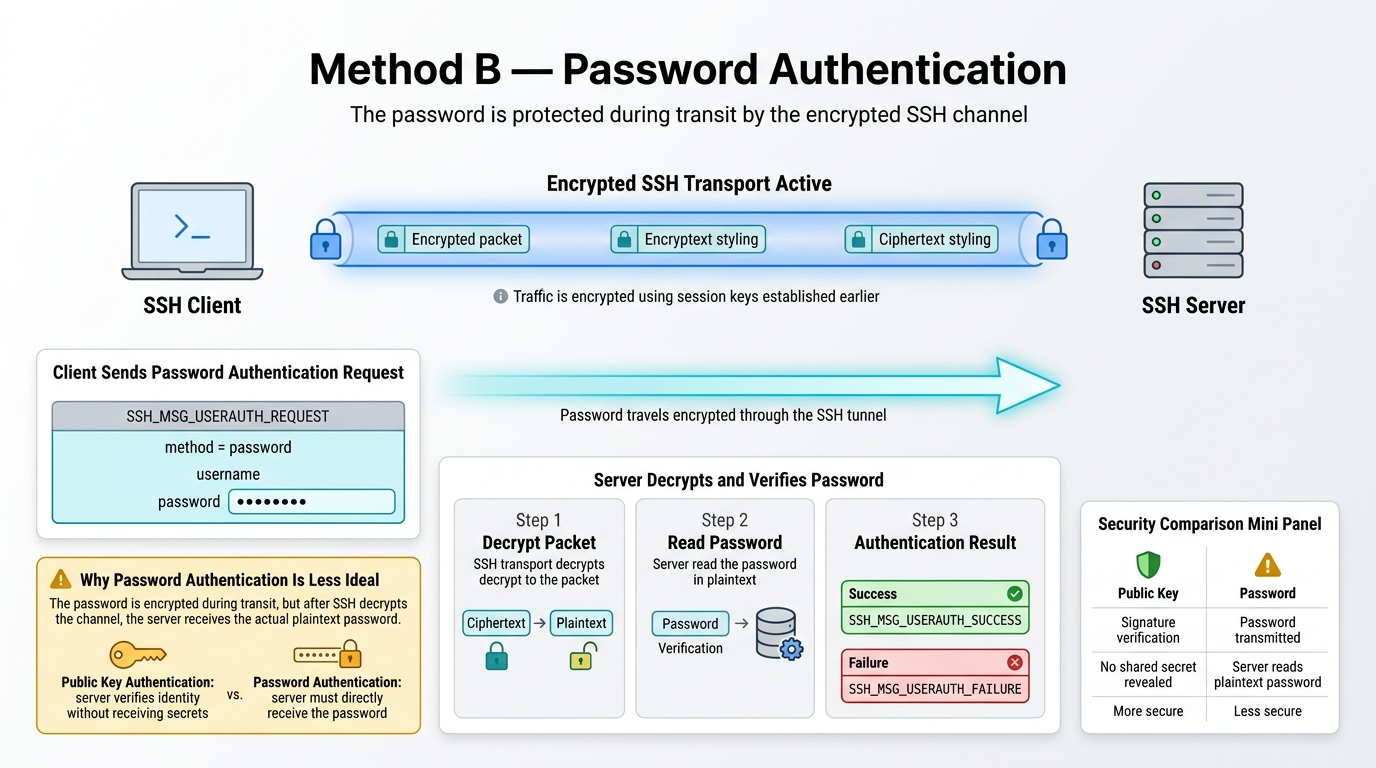
Password Auth
Less ideal than publickey - password reaches the server in cleartext after channel decryption.
Method C - Keyboard-Interactive
Multi-round challenge/response. Used for OTP, PAM, 2FA.
Phase 9 - Channel Open (Encrypted)
SSH does not open a new TCP connection for every task. Instead it multiplexes multiple virtual streams over the single existing TCP connection. Each virtual stream is called a channel.
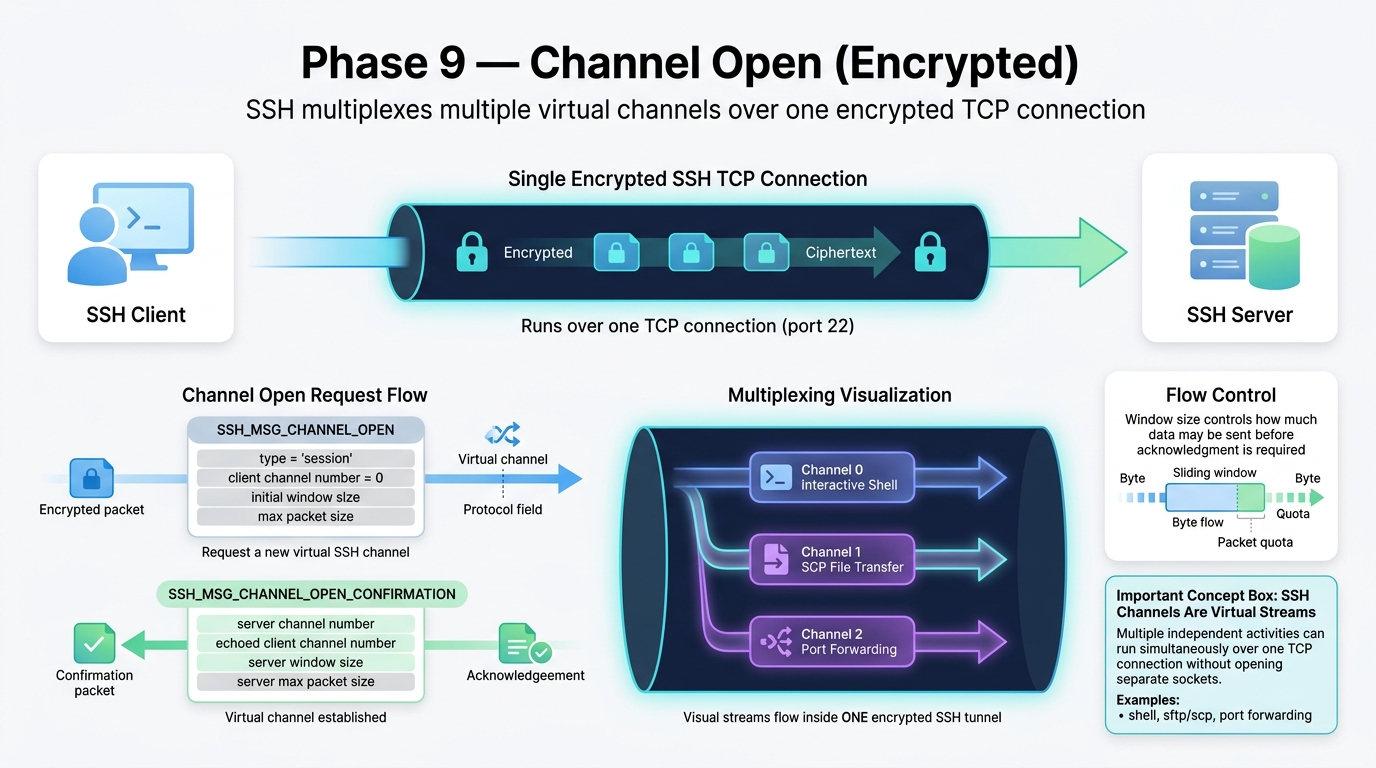
Channel Open
You can open multiple channels simultaneously.
Flow Control (Window size):
The window size is the data capacity limit - it tells the other side exactly how many bytes it is permitted to send before it must stop and wait for permission to send more.
Client advertises window size = 2MB
  → server may send up to 2MB of data before client says "you can send more"

Server advertises window size = 2MB
  → client may send up to 2MB of data before server says "you can send more"
As data is consumed and buffer space frees up, the receiving side sends SSH_MSG_CHANNEL_WINDOW_ADJUST to grant more send quota to the other side. If the window hits zero, the sender must stop completely and wait.
This is what prevents a fast sender from crashing a slow receiver — neither side can flood the other beyond what was advertised.
Eg: shell on channel 0, SCP on channel 1, port forward on channel 2 - all over one TCP connection.
Phase 10 - Session Requests: PTY and Shell (Encrypted)
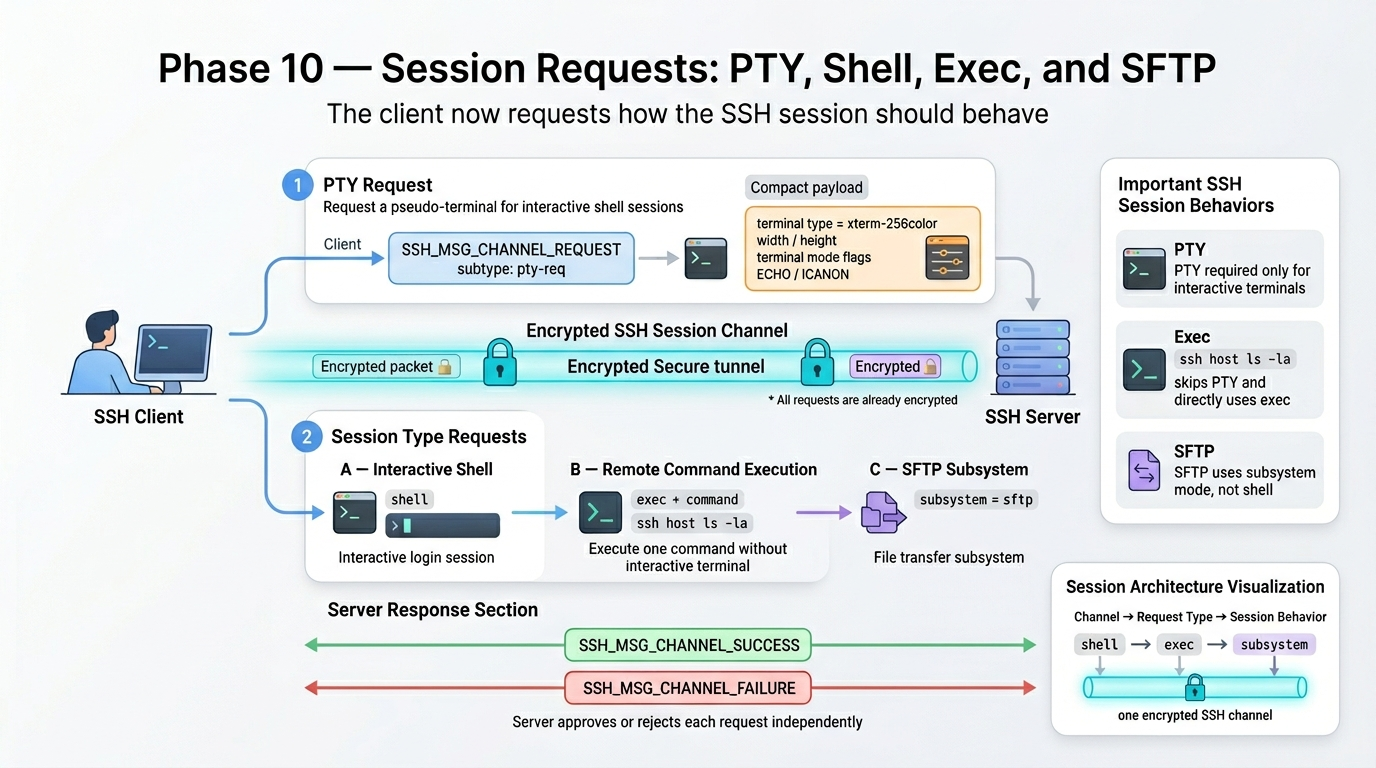
Session Requests
PTY is only needed for interactive sessions. Running ssh host ls -la skips pty-req and goes straight to exec. SFTP uses subsystem, not shell.
Phase 11 - Data Transfer (Encrypted, Windowed)
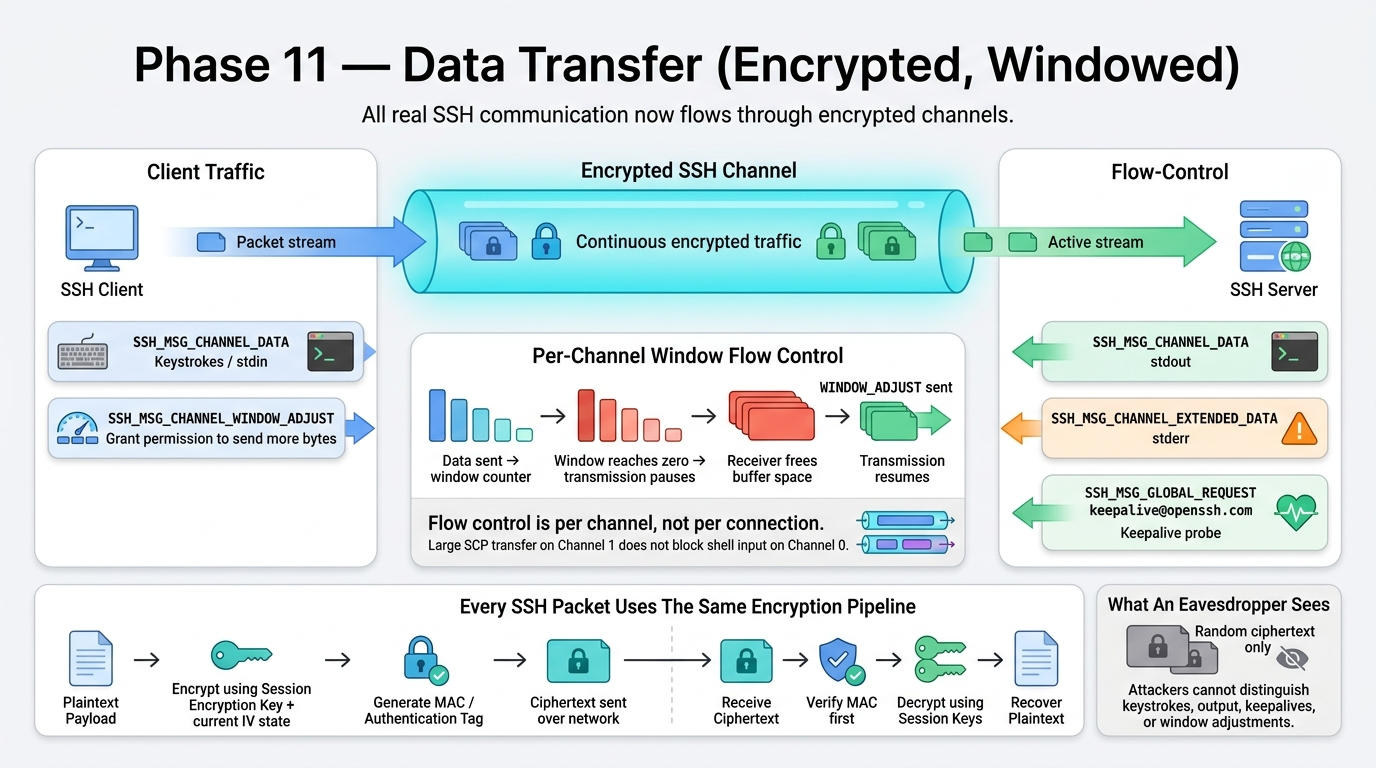
Data Transfer( WIndow Adjust and Global Request)
In the SSH protocol, Global Requests run in parallel with specific Channel Requests. While a channel request (like a shell or file transfer) only affects one specific stream, a global request affects the entire encrypted pipe.
1. The Parallel Nature of Global Requests
Because SSH uses multiplexing, multiple streams of data are packed into one TCP connection. A Global Request effectively “cuts in line” or rides alongside these channels to communicate state changes that the whole connection needs to know about.
- TCP Layer: One single connection (Port 22).
- Encrypted Tunnel: All data is bundled here.
- Parallel Activity: Inside that tunnel, you can have a massive file download (Channel 1) and a terminal session (Channel 0) running. If the client sends a
SSH_MSG_GLOBAL_REQUEST(like a keepalive), it is processed by the server's main SSH process, independent of whether the file transfer in Channel 1 is currently stalled or busy.
2. Common Global Requests Used in Parallel
- Tcpip-forward: When you set up a remote port forward (
-R), the client sends a global request to the server to ask it to start listening on a new port. - Cancel-tcpip-forward: If a program or the SSH client needs to shut down that specific tunnel without closing the entire SSH connection, it sends the
cancel-tcpip-forwardrequest.
Keepalive: As mentioned previously, these act as an encrypted heartbeat that ensures the “container” for all these parallel channels hasn’t timed out.
- Hostkeys-00@openssh.com: A modern global request where the server sends the client a list of all its available public host keys so the client can update its
known_hostsfile.
3. Execution Flow
When a global request is sent, it includes a “Want Reply” boolean.
- If True, the receiver must send a
SSH_MSG_REQUEST_SUCCESSorSSH_MSG_REQUEST_FAILUREback immediately. - This exchange happens inside the same encrypted tunnel as your active data, ensuring that the control signals are just as secure as your actual terminal input.
Flow control: both sides track the other’s window size. If window drops to zero you must stop sending and wait for WINDOW_ADJUST. This prevents a fast sender from overwhelming a slow receiver. Every byte is encrypted and MAC authenticated using the 6 keys from Phase 5.
Phase 12 - Disconnect (Encrypted) → connection closed
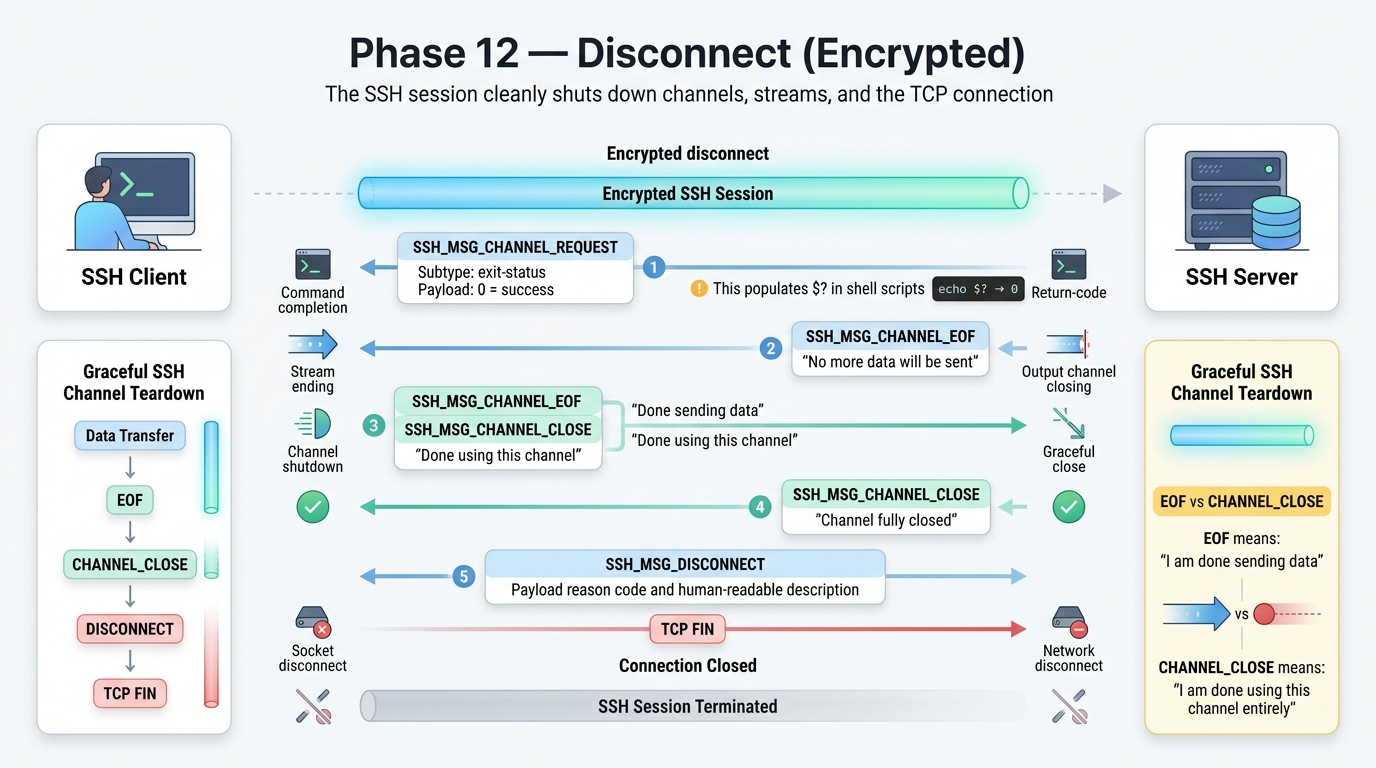
Deisconnect from client →server (server responce with “NO MORE DATA WILL BE SEND) after all response
When the remote command or shell session finishes, the server first sends SSH_MSG_CHANNEL_REQUEST with exit-status, which contains the command’s return code (0 = success). This is the value that later appears in $? inside shell scripts. After sending the final output, the server sends SSH_MSG_CHANNEL_EOF, meaning
“I am done sending data on this channel”
The channel itself is still alive at this point - only the outgoing data stream has ended.
The client finishes reading any remaining buffered output, processes the exit status, and then sends its own SSH_MSG_CHANNEL_EOF to indicate that it is also done sending data. Once the client no longer needs the channel at all, it sends SSH_MSG_CHANNEL_CLOSE, meaning
“I am completely done using this SSH channel”
The server responds with its own SSH_MSG_CHANNEL_CLOSE as an acknowledgment, and the channel is destroyed on both sides.
If no more SSH channels remain active, either side may then send
SSH_MSG_DISCONNECTcontaining a reason code and human-readable description, followed by the normal TCPFINpacket which fully closes the underlying network connection.
The 9-Key RAM Inventory At Full Session
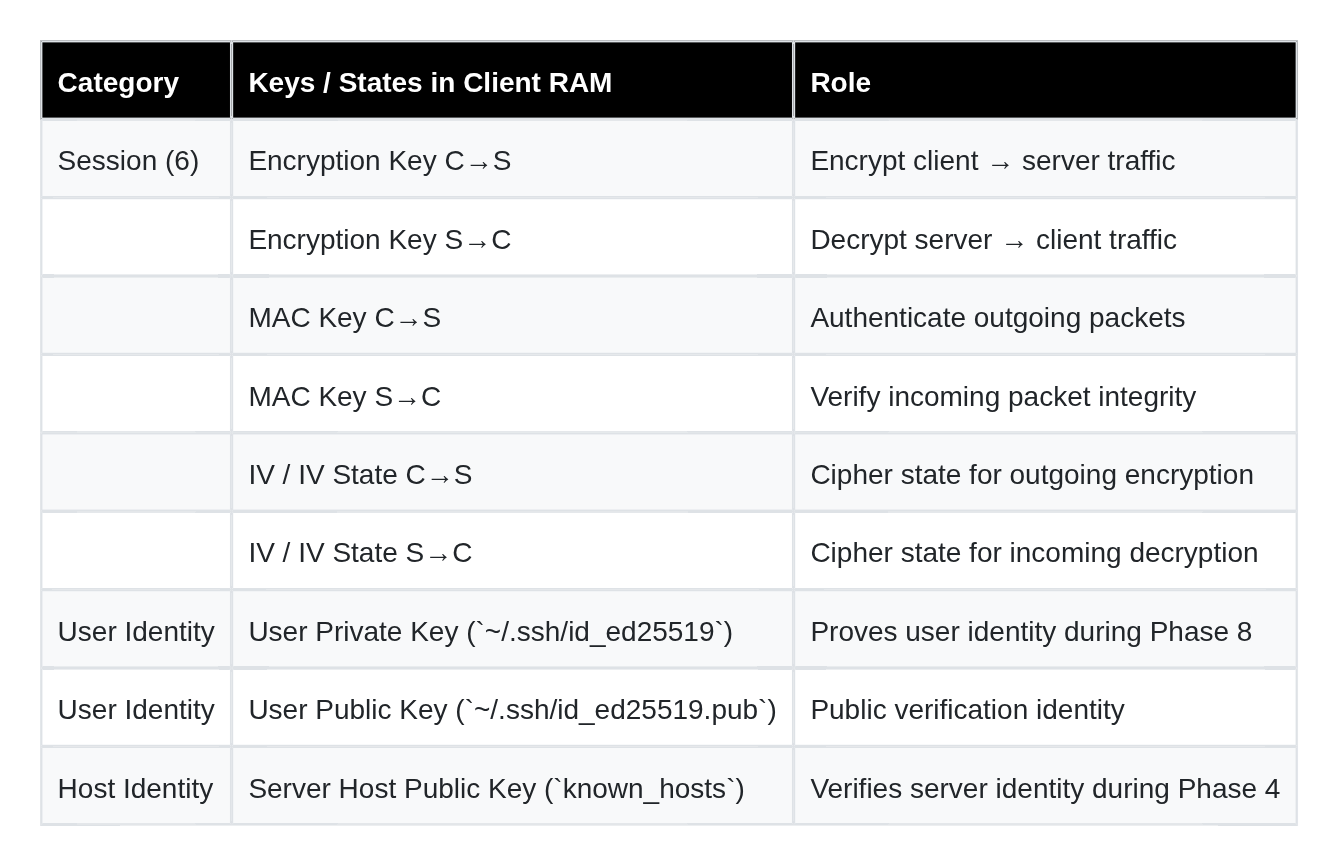
Client side keys before disconnect (9 keys) same for server too
Total active keys in RAM during session: 9
Shared Secret K: DELETED after Phase 5 (Perfect Forward Secrecy)
Ephemeral keypairs: DELETED after Phase 5 (used once, discarded)
Common Misconceptions Cleared
- The server’s host key encrypts the session - Wrong. The host key only signs the Exchange Hash to prove server identity. Actual encryption uses the 6 derived symmetric session keys.
- The client’s private key is sent to the server - Wrong. Only the signature is sent. The private key never leaves the client machine.
- The shared secret K is transmitted - Wrong. K is computed independently on both sides via ECDH math and never put on the wire.
- The client receives H from the server and trusts it - Wrong. The client recomputes H itself from raw data it witnessed across Phases 2, 3, and 4. It trusts only what it computed.
- Ephemeral keys are the same as long-term keys - Wrong. Ephemeral keys are generated fresh for every single connection and discarded after Phase 5. Long-term keys (host keys, user keys) persist on disk across all sessions.
- Password auth sends the password in plaintext - Wrong on the wire. The channel is encrypted by Phase 6 before Phase 8 starts. The password is encrypted in transit. However the server does decrypt and read it in cleartext - which is why publickey auth is preferred.
- SSH authentication and SSH encryption are the same thing - Wrong. Encryption (Transport Layer, Phases 1–6) is set up before authentication (Phase 8) even begins. You are inside an encrypted tunnel before you ever prove who you are.
메타데이터
- post_id
- bb1a7c5f078a
- slug
- ssh-2-0-explained-visually-the-complete-handshake-authentication-encryption-flow-bb1a7c5f078a
- url
- https://medium.com/@rocroshanga/ssh-2-0-explained-visually-the-complete-handshake-authentication-encryption-flow-bb1a7c5f078a
- canonical_url
- https://medium.com/@rocroshanga/ssh-2-0-explained-visually-the-complete-handshake-authentication-encryption-flow-bb1a7c5f078a
- author_url
- https://medium.com/@rocroshanga
- status
- ok
- fetched_at
- 2026-07-24 12:01:37