Windows on RunPod: What We Tried & Why It Fails
A candid engineering post-mortem on every approach we explored — and the hard kernel-level truth that stops them all.
Windows on RunPod:
What We Tried & Why It Fails
A candid engineering post-mortem on every approach we explored — and the hard kernel-level truth that stops them all.
Every 3D artist and creative technologist who discovers RunPod’s cheap GPU pods asks the same question within the first hour: “Can I just run Windows on this?” The answer is a firm — and frustrating — no. Here’s why, and every approach we tried to get around it.
The Platform Reality
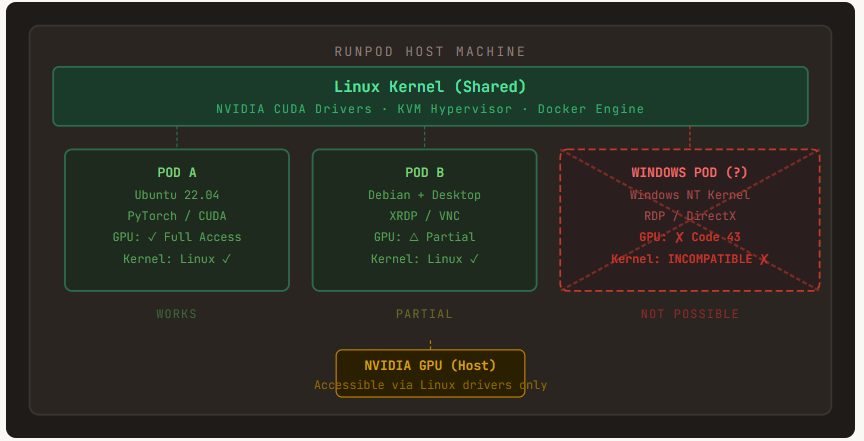
RunPod pods are Linux containers — full stop. They are not virtual machines with dedicated hardware. Every pod shares the host machine’s Linux kernel, which makes running a Windows OS or official Windows VM images structurally impossible at the container level.
⛔ Core Constraint
Windows requires the Windows NT kernel. RunPod’s infrastructure uses a shared Linux kernel across all pods. These two facts alone close the door on every “just boot Windows” approach before you even start.
Fig 1 — RunPod Architecture vs Windows Requirements
Every Approach We Tried
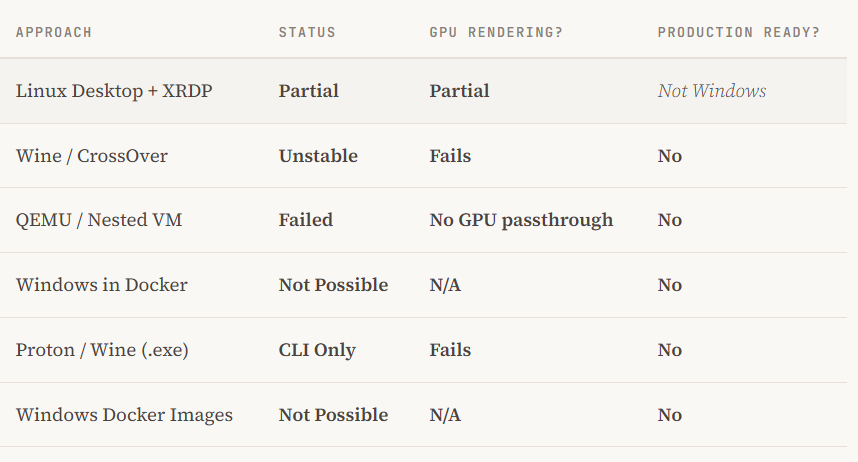
We systematically worked through every avenue that looked remotely promising. Here is the full list — warts and all.
PartialLinux Desktop + XRDP (Remote Desktop)
We spun up Ubuntu Desktop with XRDP and connected via Windows Remote Desktop. It feels convincingly Windows-like until you open Task Manager and see Linux. This gives you a remote Linux GUI — not Windows. Useful for some workflows, but Maya, Cinema 4D, Redshift, Octane, and Unreal Engine all expect Windows-specific subsystems that simply aren’t there.
Partial / UnstableWine / CodeWeavers CrossOver
Wine and CrossOver translate Windows API calls to Linux syscalls. For simple headless CLI tools, this works surprisingly well. For production 3D apps — Maya, C4D, Redshift, Octane — it falls apart immediately. Plugins fail to load, GPU drivers speak Linux-only, and performance degrades badly under translation overhead. Not viable for any serious rendering pipeline.
FailedQEMU / Nested Virtualization
We explored running a Windows VM inside a Linux pod using QEMU with KVM. Nested virtualization is theoretically possible, but RunPod’s containerized environment exposes no /dev/kvm. Without hardware-accelerated virtualization, any Windows VM falls back to pure software emulation — far too slow for GPU rendering and essentially useless for 3D workloads.
Not Possible”Windows in Docker”
Docker containers share the host OS kernel. Docker on Linux cannot run a Windows NT kernel — period. Windows Docker containers (which exist on actual Windows hosts) require a Windows kernel underneath. Since RunPod runs Linux hosts, there is no pathway to a Windows container image that boots meaningfully.
Partial (CLI only)Wine / Proton for .exe Files
We tried Proton (Valve’s gaming-focused Wine fork) on default Linux templates. Headless command-line Windows executables often work. But anything with a complex GUI, hardware GPU hooks, or plugin architectures (like DCC applications) fails consistently. Production 3D rendering tools are in the “fails” category.
Failed Windows-Based Docker Images
We looked into using official Windows Server Core or Nano Server images from Docker Hub. RunPod’s infrastructure is built on Linux KVM/Docker stacks which do not natively support Windows container images — these images are designed for Windows Container hosts only. The pull succeeds; the boot fails.
Fig 2 — Summary: Approaches vs. Outcomes
The Key Limitations, Explained
🔴Kernel IncompatibilityRunPod pods share a Linux kernel. Windows requires the Windows NT kernel. There is no mechanism within a Linux container to “boot” a different kernel — this is a fundamental OS design constraint, not a RunPod policy choice.
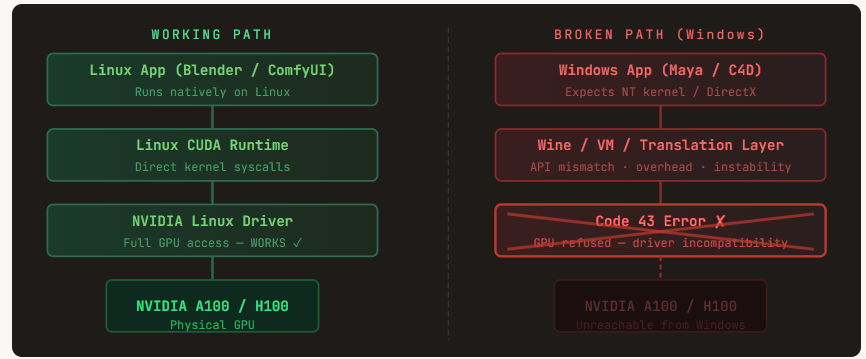
🔴No Practical GPU Passthrough to a Windows VM Even if a nested VM were possible, passing the NVIDIA GPU through to it requires hardware-level IOMMU control and bare-metal hypervisor permissions. As documented in recent 2026 user reports, RunPod pods have insufficient permissions to modify hardware-level settings — “Insufficient Permissions” errors are the consistent result.
🟠NVIDIA Driver Code 43 NVIDIA’s data center drivers on RunPod are optimized for Linux CUDA workloads. When Windows sees these drivers through any translation or VM layer, it typically throws Error Code 43, disabling GPU acceleration entirely — the exact thing you need for rendering.
🟠No Native Display Output RunPod is designed for headless AI/ML workloads. There is no physical display output. Any Windows GUI must be streamed over the network via VNC or RDP — adding significant latency on top of an already-emulated environment.
🟡Storage Overhead A minimal Windows installation starts at 20 GB+. RunPod’s default container storage is often 5–20 GB. Expanding storage is possible but significantly raises cost — and still doesn’t solve any of the above problems.
🟡Wine / Emulation Too Slow for Production 3D Even in the cases where Wine partially launches a Windows application, API translation adds enough overhead that GPU rendering benchmarks fall far below usable thresholds. Professional DCC tools like Maya and Redshift are particularly sensitive to these translation gaps.
Fig 3 — Why GPU Passthrough Fails in This Stack
“RunPod is an extraordinarily powerful Linux GPU cloud. The moment you try to run Windows on it, you are fighting every layer of its architecture simultaneously.”
⚠ Licensing & Compliance
Even if a workaround were found, there is a deeper issue: RunPod does not provide Windows licenses. Microsoft’s licensing terms for Windows Server and Windows 11 include specific restrictions around multi-tenant cloud hardware — the kind of shared infrastructure RunPod operates on. Running an unlicensed Windows environment on someone else’s hardware falls into a grey area at best, and an explicit violation at worst. This is not a technicality to hand-wave; audit exposure is real.
The Bottom Line
RunPod is a phenomenal platform for Linux-native AI, ML, and GPU workloads — ComfyUI, Blender (Cycles/EEVEE), Stable Diffusion, PyTorch training, and countless other workflows run exceptionally well. But it was never designed to be a Windows cloud, and its architecture makes Windows a structural impossibility rather than a missing feature.
If your pipeline must have Windows — for licensing-locked DCC applications, Windows-only plugins, or DirectX rendering — you need a platform that provides genuine Windows VMs with GPU passthrough: Azure NV-series, AWS G5, or a dedicated Parsec / Shadow-style cloud PC service.
✓ What Actually Works on RunPod
Blender + Cycles (Linux), ComfyUI / Stable Diffusion, PyTorch / CUDA workloads, Jupyter notebooks, headless render farm agents, and any Linux-native GPU pipeline. These are where RunPod genuinely shines.
RunPod #GPU Cloud #Windows #Linux #3DRendering #DevOps #CUDA
This note reflects research and testing conducted through early 2026. RunPod’s platform continues to evolve — check current documentation for the latest capabilities.
메타데이터
- post_id
- bb1d045b03d4
- slug
- windows-on-runpod-what-we-tried-why-it-fails-bb1d045b03d4
- url
- https://medium.com/@airrender/windows-on-runpod-what-we-tried-why-it-fails-bb1d045b03d4
- canonical_url
- https://medium.com/@airrender/windows-on-runpod-what-we-tried-why-it-fails-bb1d045b03d4
- author_url
- https://medium.com/@airrender
- status
- ok
- fetched_at
- 2026-07-13 16:52:42