Github Advanced Security — A one stop article to understand most of what GHAS is…
Github Advanced security is a build on module and an additional paid feature as part of the enterprise license, It is based on the number…
Github Advanced Security — A one stop article to understand most of what GHAS is…
Github Advanced security is a build on module and an additional paid feature as part of the enterprise license, It is based on the number of user license. This addtioanl bolt on is available for both the enterprise cloud version and the server version(self hosted), there are some features that you get as part of the public github platform as well, which is the dependecny graph and the dependabot alerts(github version of software composition analysis).
Lets look at the major offerings under the Github Advanced security:
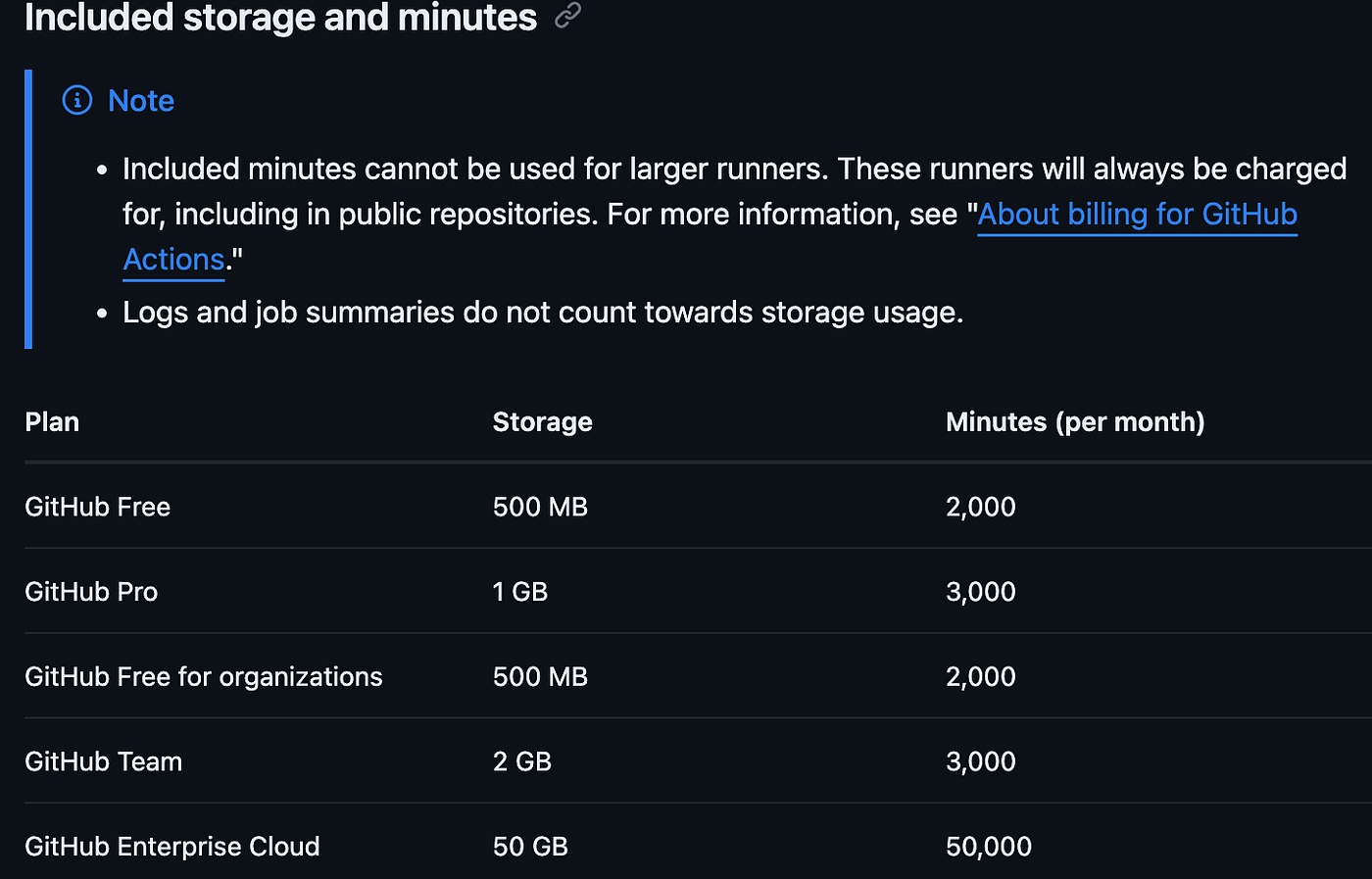
- Code Scanning — we are all familiar with this term probably a larger term which encompasses code scanning that we have all heard of is the Static Application Security Testing of which the code scanning is a part off. Code scanning is made possible using the CodeQL engine that is native to github and is also kind of an open source project which is maintained by the github team, although contributions can be made by anyone in the internet. One other feature that github provides is the ability to monitor the code scanning alert (https://docs.github.com/en/code-security/code-scanning/managing-code-scanning-alerts/about-code-scanning-alerts) However there is a catch when it comes to code scanning in terms of the resources that it uses from a licensed user standpoint. The code scanning uses the github actions and hence every code scan that runs uses the time(in minutes) that is allotted for your licenses for the github actions which goes as seen below. Enterprise cloud gets 50k minutes which should be good enough for a mid size organization. — https://docs.github.com/en/code-security/code-scanning/introduction-to-code-scanning/about-code-scanning#about-billing-for-code-scannin
There are 2 types of code scanning options available under the code scanning: a. Default code scan configuration: The easier way quick configuration built and you can start using it from day one where a set of queries are run against your repositories and detections/alerts are triggered based on the language that are supported by Code QL. b. Advanced setup for code scanning: As the name suggests is more advanced than the default configuration where you can customise your code scanning. By creating and editing a workflow file, you can define how to build compiled languages, choose which queries to run, select the languages to scan, use a matrix build, and more. You also have access to all the options for controlling workflows, for example: changing the scan schedule, defining workflow triggers, specifying specialist runners to use. All this needs to be configured in the workflow file which is a yaml/yml file.
How to customise based on the frequency of scanning. https://docs.github.com/en/code-security/code-scanning/creating-an-advanced-setup-for-code-scanning/customizing-your-advanced-setup-for-code-scanning#configuring-frequency
How do you trigger a workflow — https://docs.github.com/en/actions/writing-workflows/choosing-when-your-workflow-runs/triggering-a-workflow
To monitor the code scanning results across all your repos across your org you can use web-hooks and code scanning API
2. Code QL CLI: More of a CLI offering of the code QL engine. Where you can run the CLI on your local repositories, probably that couldn’t get integrated with your enterprise GitHub or a one-off scan you wanted to run from your local system. Code QL where the QL stands for Query language is language which is used to analyse the code(https://codeql.github.com/docs/ql-language-reference/), this was basically developed by the security lab team in Github and is open source and free for public repos, however it is a part of the advanced security license if you use it for org with private repos. Code QL supports the below languages:
- C/C++
- C#
- Go
- Java/Kotlin
- JavaScript/TypeScript
- Python
- Ruby
- Swift
3. Secret Scanning: As the name suggests, it is used for scanning any secrets that might be hardcoded in your code, could be API tokens or Vault secrets, Any secret value pair, any sensitive information that should have been there in the first place. I feel this one piece is a pretty good offering from Github becuase of its ability to detect true positive secrets and also due to the dtabase that they maintain which improves the ability to detect secrets exponentially, also note this is a free offering and is available for the public github as well.
4. Dependabot: The Software composition analysis and alerting tool for Github, It gives out alerts of any vulnerabilities and any insecure code that you might have pulled from the ton of open source libraries out in the internet. With supply chain attacks in the rise this one crucial and hence is invaluable and cannot be replaced in any of the application security program within your organisation.
5. Dependency Review: This is similar to the Dependabot but think of this as a proactive approach where you don’t have to wait till your code is pushed/merged with the branch or synced with your github repo to get an alert saying there is a vulnerability in one of the open source library you have used, Instead the review gives you the information right before/at the time of the pull request and also help you compare using the diff in git.

Code QL commands — https://docs.github.com/en/code-security/codeql-cli/codeql-cli-manual
메타데이터
- post_id
- bb21cbdac4f1
- slug
- github-advanced-security-a-one-stop-article-to-understand-most-of-what-ghas-is-bb21cbdac4f1
- url
- https://medium.com/@arjun_zs/github-advanced-security-a-one-stop-article-to-understand-most-of-what-ghas-is-bb21cbdac4f1
- canonical_url
- https://medium.com/@arjun_zs/github-advanced-security-a-one-stop-article-to-understand-most-of-what-ghas-is-bb21cbdac4f1
- author_url
- https://medium.com/@arjun_zs
- status
- ok
- fetched_at
- 2026-06-27 10:07:59



