Why rsyslog and logrotate Are More Important Than Most Linux Admins Realize 🚀
Log rotate will save from outage
Why rsyslog and logrotate Are More Important Than Most Linux Admins Realize 🚀
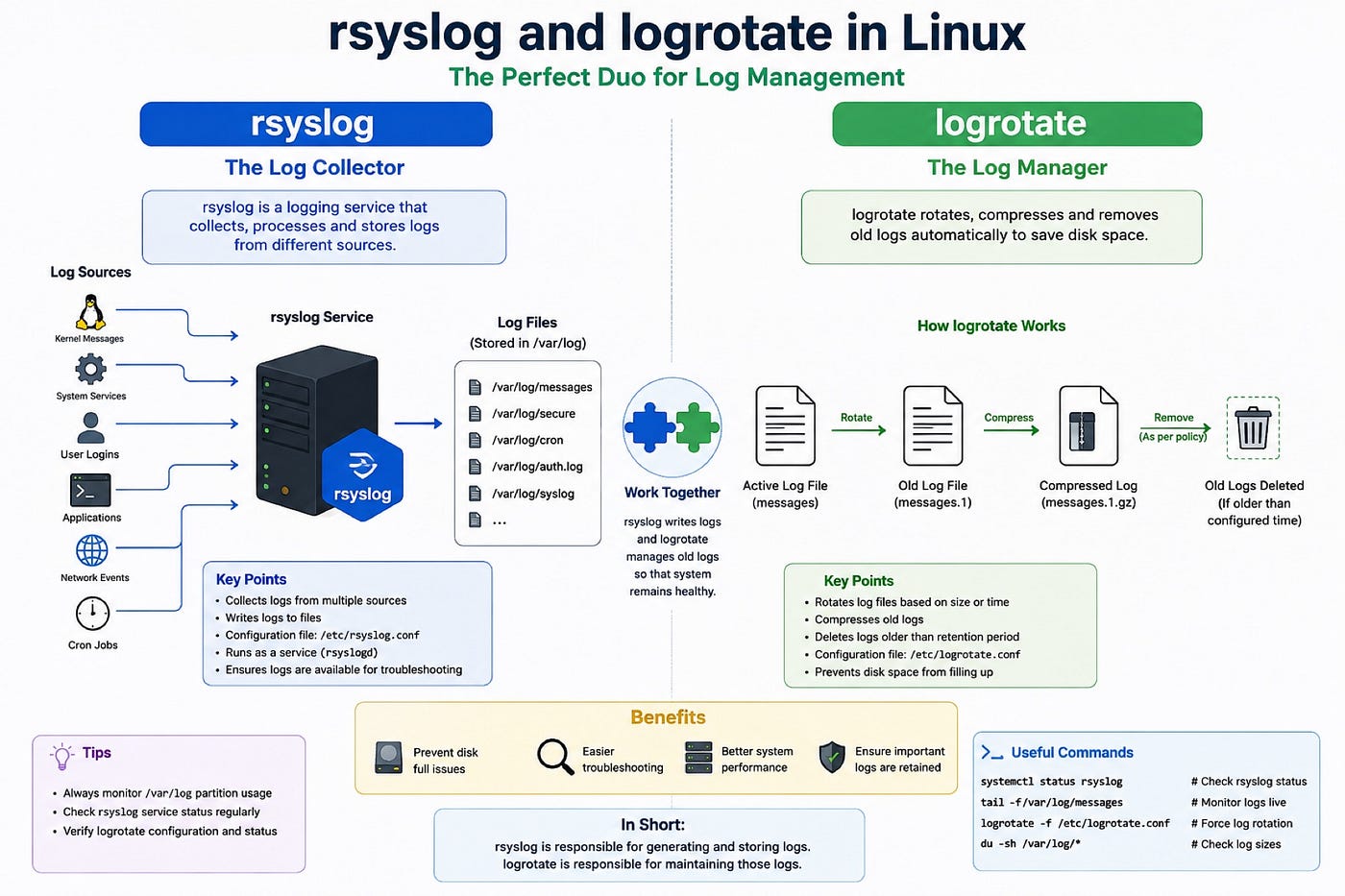
When people start learning Linux administration, they usually focus on:
- CPU
-
- Memory
-
- Networking
-
- Storage
-
- Patching
But one thing many admins ignore initially is log management.
Ironically, during real production issues, logs become the most important thing on the server.
Two services quietly doing their job in the background on almost every Linux server are:
- rsyslog
-
- logrotate
Most people know their names, but not everyone understands how important they actually are.
⸻
rsyslog – The Silent Log Collector
Whenever something happens in Linux:
- User login
-
- SSH failure
-
- Service crash
-
- Kernel issue
-
- Cron execution
somewhere, a log gets generated.
That’s where rsyslog comes into the picture.
Its job is simple:
👉 Collect logs and write them into log files.
Usually under:
/var/log/
Example:
/var/log/messages
/var/log/secure
During incidents, this is the first place most admins check.
I still remember troubleshooting a random application failure where nobody knew what happened. CPU looked fine, memory looked fine, services were running…
But checking /var/log/messages immediately showed filesystem errors.
That’s when you realize logs never lie.
⸻
logrotate – The Service That Saves Your Filesystem
Now imagine logs continuously growing forever.
One week passes.
One month passes.
Suddenly /var becomes 100% full.
Then:
- Applications stop working
-
- Monitoring floods with alerts
-
- Servers become unstable
This is where logrotate quietly saves the day.
Its job is to:
- Rotate old logs
-
- Compress them
-
- Remove very old logs
-
- Prevent disk space issues
Without log rotation, many production servers would eventually break because of massive log growth.
⸻
The Difference Most Beginners Confuse
The easiest way to understand it:
- rsyslog writes logs ✍️
-
- logrotate manages old logs 📦
Both work together.
One creates the information.
The other prevents that information from consuming the entire filesystem.
⸻
Commands Every Linux Admin Should Know
Check rsyslog service:
systemctl status rsyslog
Monitor logs live:
tail -f /var/log/messages
Check logrotate config:
cat /etc/logrotate.conf
Force log rotation manually:
logrotate -f /etc/logrotate.conf
Very useful during troubleshooting and testing.
⸻
Real Production Learning
One thing I’ve learned working on Linux servers is:
Many outages are not caused by complex issues.
Sometimes the root cause is simply:
- Logs not getting generated
-
- Logs filling the filesystem
-
- Rotation not working properly
Simple services… huge impact.
⸻
Final Thoughts
Good Linux administration is not only about fixing servers after issues happen.
It’s also about understanding the small background services preventing disasters silently every day.
rsyslog and logrotate may not look exciting, but they are among the most important components in a Linux system.
And the day you face a critical production issue, logs become your best friend. 🔥
메타데이터
- post_id
- bb27c06b5f44
- slug
- why-rsyslog-and-logrotate-are-more-important-than-most-linux-admins-realize-bb27c06b5f44
- url
- https://medium.com/@linux.anish26/why-rsyslog-and-logrotate-are-more-important-than-most-linux-admins-realize-bb27c06b5f44
- canonical_url
- https://medium.com/@linux.anish26/why-rsyslog-and-logrotate-are-more-important-than-most-linux-admins-realize-bb27c06b5f44
- author_url
- https://medium.com/@linux.anish26
- status
- ok
- fetched_at
- 2026-06-09 15:37:30



